
If I had to sum this up in one line: Cosmos DB works for event sourcing when I keep writes append-only, partition by stream ID, and treat projections as disposable read views.
Most of the risk comes from a few design choices made early:
- Partition by aggregate or stream ID so replay and atomic writes stay in one logical partition
- Split storage by job: events, projections, and lease data should live in separate containers
- Keep event indexing light to control RU spend, and put query-heavy indexes on projections
- Build idempotent projection handlers because Change Feed is at-least-once
- Use direct stream reads for command checks when I need stricter consistency than projections can give
- Plan for long streams with snapshots, versioned event schemas, and archive rules
Here’s the plain-English takeaway: events tell me how state changed, not just what state looks like now. In Cosmos DB, that model lines up with low-latency writes, partition-based scale, JSON event storage, and Change Feed processing. But it only holds up if I control hot partitions, replay cost, and duplicate event handling.
A few numbers and facts stand out:
- Cosmos DB Change Feed provides an ordered record of changes within partitions
- Azure Cosmos DB includes a 99.999% availability SLA
- The All Versions and Deletes feed mode is generally available, but replay depth depends on the Continuous Backup retention window
For me, the article’s core message is simple: use Cosmos DB as the event log, not as a shortcut around event-store design rules. That means being strict about boundaries, concurrency, read-model lag, and schema drift from day one.
Azure Cosmos DB Design Patterns | Event Sourcing
sbb-itb-79ce429
How to model event streams and containers in Cosmos DB
Your modeling choices shape three things right away: replay speed, write cost, and partition balance. And those three things decide whether replay, projections, and retention stay under control as the system grows.
Choose partition keys around stream or aggregate identity
Use the Stream ID or Aggregate ID as the partition key. That keeps each stream inside one logical partition, which makes ordered replay and atomic writes much easier to handle.[2][3]
The main tradeoff is hot partitions. If one aggregate gets far more writes than the rest, that partition can turn into a choke point. So the goal isn't just “pick an ID.” It's to set aggregate boundaries in a way that spreads traffic across many IDs instead of piling it onto one.[5]
Separate events, projections, and leases into distinct containers
A solid Cosmos DB event store will usually have at least three containers, and each one should do one job well:
| Container | Purpose | Partition Key |
|---|---|---|
| Events | Append-only system of record | Aggregate ID / Stream ID |
| Projections | Query-optimized read models | Query-specific keys such as UserID or Region |
| Leases | Change Feed processor checkpoints | id (default) |
The split matters. Events hold the source of truth. Projections support reads shaped around how the app needs to query data. Leases keep track of Change Feed checkpoints. Once those roles are separated, the next thing to think through is RU cost, indexing, and retention.
Plan RU, indexing, and retention from day one
Every append uses RUs, and indexing is part of that bill. For the events container, keep indexing lean and limit it to the fields needed for replay, such as streamId and version.[1] Then put heavier indexing on projections, where different query patterns actually need it.
A simple rule of thumb: keep the event stream forever, and rebuild projections when needed. If PII is involved, store sensitive fields in a separate place and reference them from the immutable event stream instead of placing them directly inside the events.[5] That setup leads naturally into the Change Feed projection pipeline in the next section.
How change feed and Azure Functions turn events into read models
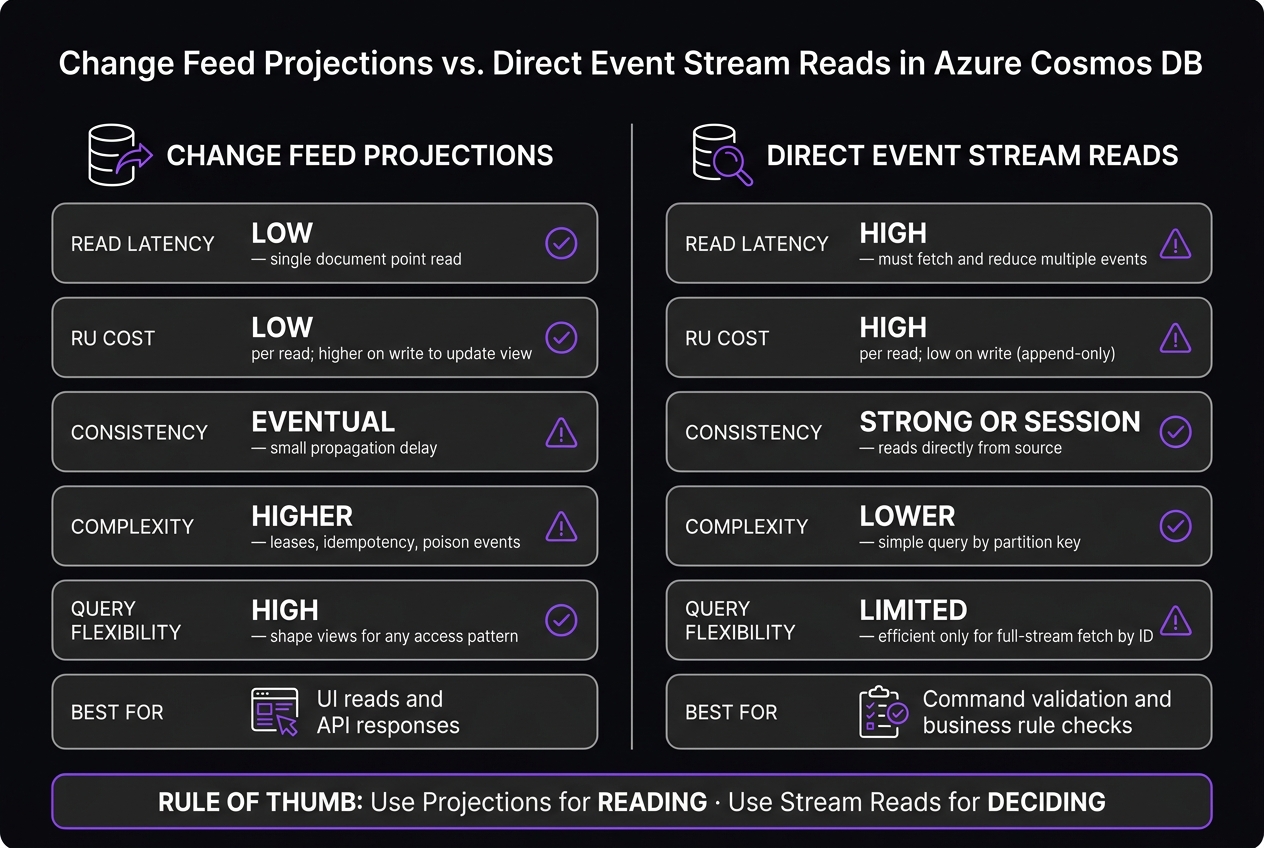
Change Feed Projections vs. Direct Event Stream Reads in Cosmos DB
Once the event store is in place, the next step is turning immutable writes into reads your app can use. After events land in the events container, Cosmos DB Change Feed exposes them to Azure Functions in partition order.[3][1] From there, you can build a materialized view: a single document in the projections container that stores the current state, like a customer's balance. That's the handoff point between immutable events and fast reads.
Build projections with idempotent handlers
The change feed uses at-least-once delivery. That means a handler can see the same event more than once. If you don't plan for that, your projection can drift out of sync.
To keep things correct, use aggregate versions or idempotency keys so updates are safe to replay.[4][2] A common pattern is simple: compare the incoming AggregateVersion to the version stored in the projection, and only apply the next expected event.[2]
Use leases, retries, and poison-event handling
The lease container lets multiple Azure Functions instances process different feed partitions in parallel.[3] That's how you scale without having every function fight over the same work.
Retries are built in, but poison events are not.[4] And this is where teams can get tripped up. One malformed event can stall a partition if you don't catch it. The fix is straightforward: catch failures and send bad events to a dead-letter path.[4]
Change feed projections vs. direct-query read models
For UI reads and API responses, pre-built projections are usually the better pick.[3][1] They're fast, cheap to read, and shaped for the screen or endpoint that needs them.
For commands, it's often better to query the event stream directly. When you read the stream in the same partition, you can check business rules with stronger consistency and without projection lag.[2][1] Put plainly: projections are great for reading, while direct stream reads are often the safer path for decision-making.
| Feature | Change Feed Projections | Direct-Query (Event Stream Rehydration) |
|---|---|---|
| Read Latency | Low - single document point read | High - must fetch and reduce multiple events |
| RU Cost | Low per read; higher on write to update view | High per read; low on write (append-only) |
| Consistency | Eventual - small propagation delay | Strong or Session - reads directly from source |
| Complexity | Higher - leases, idempotency, poison events | Lower - simple query by partition key |
| Query Flexibility | High - shape views for any access pattern | Limited - efficient only for full-stream fetch by ID |
The "All Versions and Deletes" feed mode is generally available.[6] It records intermediate updates and deletes, which makes it a better match for event sourcing when the stream is the system of record.[6] There's one catch: this mode is tied to the Continuous Backup (PITR) retention window, so it can't replay events older than that setting allows.[6] That directly shapes how far back you can replay and how long the event store stays useful in day-to-day operations.
Where CQRS, DDD, and consistency decisions matter most
Change Feed handles reads. This section is about how writes stay correct.
The hard part is that aggregate boundaries, partitioning, and consistency rules are painful to change later. Get them wrong, and the problems show up fast: cross-partition reads get expensive, concurrency checks start failing, and read models can drift in ways that are tough to trace.
Design aggregates to minimize cross-partition work
When an aggregate lives in a single partition, CreateTransactionalBatch can commit related events atomically[2]. That matters for more than write safety. It also keeps command-side rehydration and version checks inside the same partition.
If one aggregate is spread across partitions, replay becomes slower and much harder to reason about. The same partitioning decision also decides whether command validation stays atomic or has to jump across partitions.
Choose consistency and concurrency rules deliberately
For command validation, optimistic concurrency is the standard move: read the current stream version before appending, then reject the write if it doesn't match the expected version[2].
Single-region writes make command validation easier because Strong or Bounded Staleness consistency gives you more predictable validation reads. Multi-region writes can push more throughput, but they also bring conflict-handling work with them. That setup makes more sense when global scale is an actual need, not just a nice idea.
Architecture tradeoffs table for common design choices
| Design Choice | Consistency / Safety | Throughput Impact | Operational Complexity |
|---|---|---|---|
| Single-region write | Strong / Bounded Staleness | Moderate | Low |
| Multi-region write | Eventual / Session | High (global scale) | High - conflict handling required |
| Aggregate-ID partitioning | Atomic writes within one logical partition[2] | High (horizontal scale) | Low - enables TransactionalBatch |
| Cross-partition queries | No transactional boundary | Low - RU-intensive | High - avoid for command validation |
| CQRS with projections | Eventual | Low RU per read | High - leases and syncing |
| Stream read for command validation | Strong | High RU per read | Low |
These tradeoffs get more expensive as streams grow, schemas shift, and retention rules get tighter.
Operational lessons: growth, schema changes, snapshots, and AI workflows
Manage long-lived event stores without losing auditability
Use snapshots to limit replay cost as event streams get bigger, and keep those snapshots up to date with Change Feed.
After replay cost is in check, the next issue is simpler but easy to mishandle: making sure both old and new event shapes still work. Cosmos DB is schemaless, so old and new event formats can sit next to each other in the same container. That sounds convenient, but the hard part moves into your application code.
A common pattern is to add type and version fields, then deserialize based on the version [1][2]. Old events should stay untouched. Instead of rewriting history, deal with shape changes in readers [1]. And when streams get long, archive older history so replay cost doesn't keep creeping up [3].
Pros and cons of event sourcing on Cosmos DB
These tradeoffs shape day-to-day cost and maintenance.
| Advantage | Disadvantage | |
|---|---|---|
| Auditability | Complete, immutable history of every state change | Rehydration is expensive for reads. |
| Flexibility | Schemaless payloads evolve without migrations | Versioning and consistency rules must live in application code |
| Debugging | Replay events to reproduce past system states | Replays fail without strict ordering and idempotent handlers. |
| Scalability | Partition-based horizontal scaling supports large event stores | Storage grows indefinitely; archive old streams. |
| Read performance | Materialized views keep reads fast and cheap | Loading raw event streams without snapshots is expensive |
Conclusion: Practical guidance for teams building on the Microsoft stack
Keep events append-only, keep snapshots current, and make projections idempotent so replay stays cheap and auditability stays intact.
FAQs
When should I use snapshots?
Use snapshots when replaying an aggregate’s full event history gets too expensive or too slow.
A snapshot saves the aggregate’s state at a given point in time. That lets your application load that saved state first, instead of replaying the entire event stream from the very beginning.
How do I prevent duplicate projection updates?
Use idempotency by assigning each event a unique ID, such as a MessageId or a hash of the event payload. Before you process the event, check a persistent store or cache to make sure it hasn’t already been handled.
Another smart move is to put the final state in the event payload. For example, send the updated account balance instead of a step-by-step balance change. If you’re using Azure Service Bus, built-in duplicate detection can help by checking the MessageId property.
What happens when a stream gets too large?
When a stream grows too large in an event sourcing setup on Azure Cosmos DB, replaying every past event to rebuild aggregates can slow things down.
A simple way to cut that cost is to use materialized views.
Here’s the idea: Azure Functions updates a separate document with the aggregate’s current state each time a new event arrives. That means you don’t have to recalculate current values from the full event stream every time you need them.


