
The cache-aside pattern is a widely used approach in .NET applications for managing cached data effectively. Here's how it works: when your app requests data, it first checks the cache. If the data is there (cache hit), it’s returned immediately. If not (cache miss), the app fetches the data from the database, stores it in the cache, and then serves it to the user.
Key Takeaways:
- Performance Boost: Reduces database load by serving frequent reads directly from the cache.
- Control: Developers decide what to cache, set expiration times, and handle invalidation.
- Best Use Cases: Ideal for data that's read more often than updated, like user profiles or product catalogs.
- Tools in .NET: Use
IMemoryCachefor single-instance apps orIDistributedCache(e.g., Redis) for multi-instance/cloud environments..NET 9introducesHybridCache, combining memory and distributed caching.
Quick Tips:
- Choose the Right Cache: For cloud apps,
IDistributedCacheensures consistency across instances. - Design Cache Keys Well: Use predictable, namespaced formats like
user:{id}:profileto avoid collisions. - Prevent Stampedes: Use techniques like distributed locks or
HybridCache.GetOrCreateAsyncto manage concurrent requests. - Set TTLs Wisely: Start with 15 minutes for most data, adjusting for volatility.
- Monitor Metrics: Aim for a cache hit ratio above 80% and P99 latency under 5ms for Redis.
By following these practices, you can improve your app's performance, scalability, and reliability. Let’s dive into the details of implementation, tools, and strategies.
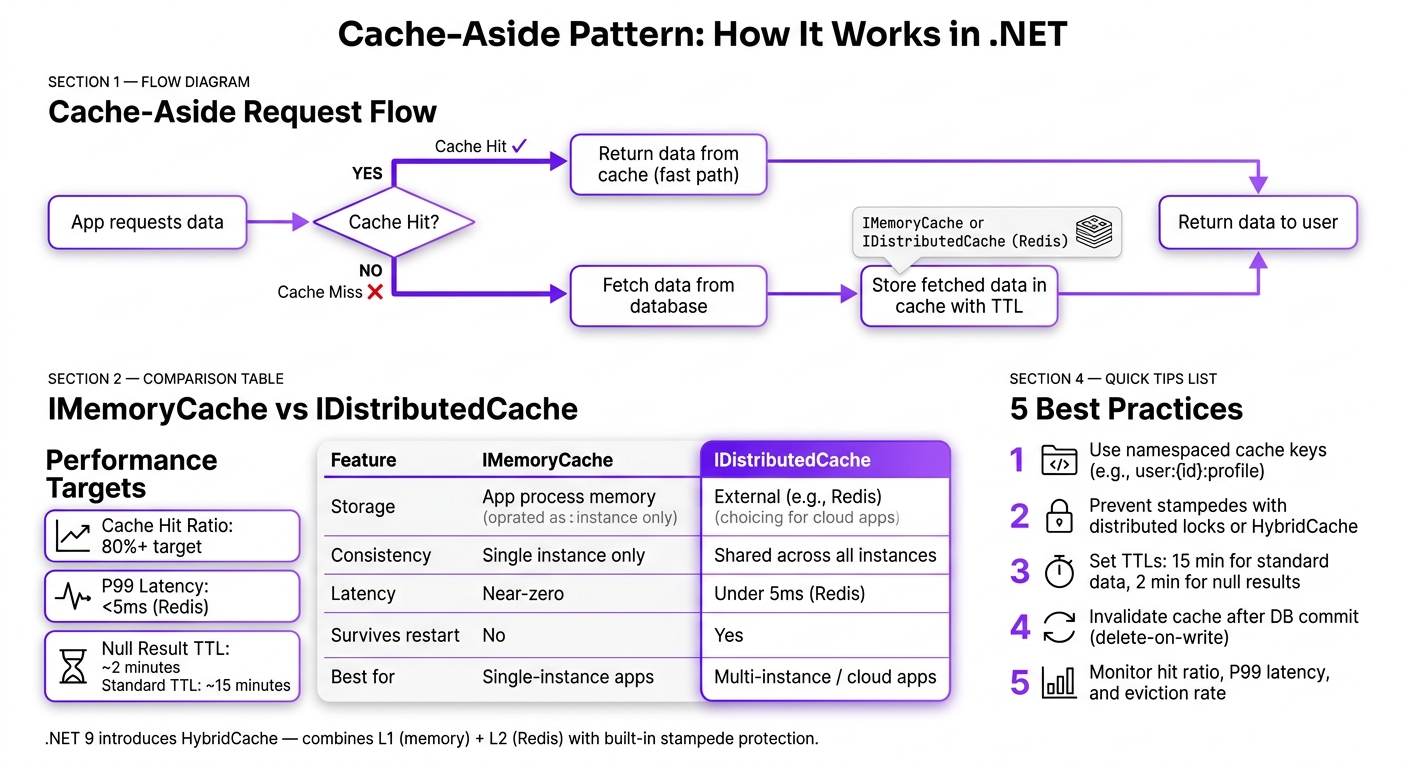
Cache-Aside Pattern: How It Works in .NET
Design Decisions for Cache-Aside in .NET
IMemoryCache vs. IDistributedCache: Which to Use
Before diving into implementation, you need to decide where your cache will live.
IMemoryCache keeps data in the application’s process memory. This setup offers lightning-fast access but is tied to a single app instance. If your app runs on multiple servers (a common scenario in cloud environments), each server maintains its own cache, which can lead to inconsistencies. On the other hand, IDistributedCache relies on an external storage system, like Redis, which all app instances share. This ensures consistent data across instances but introduces a slight network delay. However, with proper configuration, P99 latency can stay under 5ms [5].
| Feature | IMemoryCache | IDistributedCache |
|---|---|---|
| Storage | Application process memory | External service (e.g., Redis) |
| Consistency | Local to one instance | Shared across all instances |
| Serialization | Not required | Required (e.g., JSON or byte[]) |
| Latency | Near-zero latency | Under 5ms (with Redis) [5] |
| Survives app restart | No | Yes |
| Best for | Single-instance apps or small static data | Multi-instance, cloud-based apps |
For most .NET apps deployed in the cloud, IDistributedCache is often the better choice. If you’re working with .NET 9, you might want to explore HybridCache. It combines the best of both worlds by keeping frequently accessed data in memory while relying on Redis for everything else [2].
"The interface IMemoryCache is not abstract enough. It suggests that the data is kept in application memory but the client code should not care where it is stored." - Kamil Grzybek, Software Architect [1]
To keep your architecture flexible, avoid hardcoding dependencies on a specific cache type. Wrapping your caching logic in a custom abstraction, like ICacheStore, allows you to switch providers later without disrupting your business logic [1].
These choices are crucial because they directly influence your app’s performance and how it handles data consistency - key factors when implementing the cache-aside pattern in .NET.
Once you’ve decided on the storage type, the next step is selecting the right cache provider.
Picking a Cache Provider
After settling on your cache storage type, it’s time to choose a provider that aligns with your deployment setup.
For distributed caching in .NET, Azure Cache for Redis is a solid option, especially if you’re already using Microsoft’s ecosystem. It integrates seamlessly with IDistributedCache, supports connection pooling, and is fully managed. When running in production, aim for P99 latency under 5ms, particularly for read-heavy operations [5].
That said, your application should never rely entirely on the cache to function. If the cache goes offline, your app should still work - albeit at a slower pace.
"Cache-aside is ideal when... you want the cache to be a performance optimization, not a critical dependency. If Redis goes down, your app should still work (just slower)." - Nawaz Dhandala, OneUptime [5]
Designing Cache Key Strategies
Once your provider is in place, focus on designing a solid key strategy to avoid issues like collisions or stale data.
The golden rule? Make your cache keys predictable, namespaced, and consistent.
Adopt a structured format such as product:{id} or user:{userId}:profile. In multi-tenant systems, include a tenant identifier to isolate data, e.g., tenant:{tenantId}:product:{id}. If you’re sharing a Redis instance across environments like staging and production, prepend an environment-specific prefix [5].
Normalize any variable components to prevent duplicates. For instance, always apply .ToLower() to category names to avoid treating Electronics and electronics as separate entries [5]. Keep key-building logic centralized to reduce errors.
"Client code should not be responsible for logic of the naming cache key. It is Single Responsibility Principle violation. It should only provide data to create this key name." - Kamil Grzybek, Architect & Design Lead [1]
sbb-itb-79ce429
Implementing the Cache-Aside Pattern
How to Implement Cache Reads
To effectively implement cache reads, follow a straightforward three-step process: check, fetch, and store. First, check if the data exists in the cache. If it’s not found (a cache miss), fetch the data from the database. Finally, store the fetched data in the cache with an appropriate expiration time.
For .NET 9, you can streamline this process by using HybridCache.GetOrCreateAsync, which allows a single, thread-safe operation. If you're using IDistributedCache, you'll need to handle the process manually: deserialize the cached data on a hit, retrieve it from the database on a miss, and serialize the result before storing it back in the cache.
As a general rule, a Time-to-Live (TTL) of 15 minutes is a solid starting point for most data. However, for highly dynamic information like pricing or inventory, shorter durations are better to ensure accuracy.
Serialization and Error Handling
When working with IDistributedCache solutions like Redis, keep in mind that these systems store data as bytes, not objects. Therefore, serialization is necessary. For most cases, System.Text.Json is a good choice. But if you're dealing with large payloads, tools like MessagePack or protobuf can help minimize payload size and reduce CPU usage.
"Use MessagePack or protobuf for large objects. Compress only if your payloads are big enough to justify CPU cost." - Kanaiya Katarmal, .NET Weekly Newsletter
To ensure reliability, wrap cache operations in try/catch blocks. This way, if the cache fails for any reason, your application can safely fall back to the database. If you're using HybridCache, it simplifies the process by automatically managing serialization between the in-memory (L1) cache and the distributed (L2) store.
The next challenge is preventing cache stampedes.
Preventing Cache Stampedes
A cache stampede happens when a popular cache key expires, causing multiple requests to miss the cache and hit the database simultaneously. This can overwhelm the database and lead to performance issues.
One effective way to prevent this is by using a distributed lock. This ensures that only the first request fetches data from the database, while other requests wait and re-check the cache after the lock is released. Always re-read the cache after acquiring the lock to avoid unnecessary database queries.
Other techniques include null caching, where "not found" results are temporarily stored with a short TTL (e.g., 2 minutes). This reduces repeated database queries for missing data. If you're using .NET 9, HybridCache offers built-in protection against stampedes through its GetOrCreateAsync method, which is thread-safe and often eliminates the need for manual locks.
| Strategy | Purpose | Mechanism |
|---|---|---|
| Distributed Lock | Prevent stampedes | Ensures only one request queries the database while others wait and retry |
| Double-Check | Avoid redundant DB calls | Re-checks the cache after acquiring the lock |
| Null Caching | Reduce database load | Temporarily caches "not found" results with a short TTL |
| HybridCache | Built-in stampede protection | Thread-safe GetOrCreateAsync handles concurrency automatically |
The Only .NET Caching Library You’ll Ever Need?
Keeping Cache Data Consistent and Reliable
After addressing effective cache reads and stampede prevention, the next step is to ensure cached data remains both consistent and dependable.
Cache Update and Invalidation Strategies
To maintain cache consistency, you can choose between two key approaches: delete-on-write and update-on-write.
- Delete-on-write: This is often the safer option. Once a database update is successful, the corresponding cache key is removed. The next read operation will repopulate the cache with fresh data, avoiding race conditions.
- Update-on-write: This approach updates the cache directly after a database update, which helps maintain a higher cache hit rate. However, it comes with added complexity and risks, such as race conditions if multiple writes occur in quick succession.
When invalidating the cache, make sure this happens only after the database transaction has been committed. In .NET, you can achieve this by tying cache removal to a post-commit callback within repository patterns. If the transaction rolls back after clearing the cache, stale or incorrect data could be reintroduced during subsequent reads.
"Caching only feels hard when you skip the simple rules. Do these and 90% of the pain vanishes: name keys well, scope them right, choose a small set of invalidation strategies, and automate the boring parts." - Michael Maurice [7]
When updates affect related records (like a product list), use a pattern-based invalidation strategy. For instance, clearing all keys matching Product:* ensures all affected data is refreshed without needing to track dependencies manually [4].
Setting TTLs and Handling Bulk Updates
The right TTL (time-to-live) depends on how volatile the data is. Static reference data can have TTLs lasting hours, while dynamic data might need expiration times measured in seconds. Adjust TTLs to balance freshness with performance.
For bulk updates that impact a large number of records, namespace versioning is a powerful tool. Here’s how it works:
- Store a version number in a single Redis key (e.g.,
products:version). - Include this version number in every related cache key.
- When data changes, increment the version number. This instantly invalidates all dependent keys in O(1) time without requiring iteration through thousands of entries [7].
| Strategy | Best For | Key Trade-off |
|---|---|---|
| TTL-only | Tolerates minor staleness | Simple setup, but data remains stale until it expires |
| Delete-on-Write | Standard cache-aside writes | High consistency; next read results in a cache miss |
| Namespace Versioning | Bulk invalidation of related keys | Fast and efficient; requires versioned key logic |
| Event-Driven | Distributed systems, microservices | Near real-time updates; needs a message broker or Outbox |
For scenarios where low latency is more critical than absolute freshness, combine TTL with a stale-while-revalidate approach. This serves cached data immediately while refreshing it in the background [7].
Scaling these strategies introduces new challenges, particularly in multi-instance and multi-region environments.
Caching in Multi-Region and Multi-Instance Environments
In single-instance applications, IMemoryCache works just fine. However, when scaling out to multiple pods or regions, each instance maintains its own in-memory cache, leading to inconsistencies. At this point, switching to IDistributedCache - backed by a solution like Azure Cache for Redis - becomes essential.
For a distributed cache, aim for at least an 80% cache hit ratio in read-heavy workloads. Keep P99 latency under 5ms for Azure Cache for Redis [5]. If your hit ratio drops below this threshold, it could indicate TTLs that are too short or overly granular key designs.
In multi-region setups, event-driven invalidation is the go-to method for maintaining consistency. This involves using domain events or the Outbox pattern, ensuring cache invalidation happens only after the database confirms a transaction. These events then propagate across all regions that need updates [7]. This approach balances performance and accuracy in .NET applications, even at scale.
Monitoring and Tuning Cache Performance
To keep your cache running smoothly and reliably, monitoring and fine-tuning are essential steps - especially in multi-instance setups. Keeping an eye on performance metrics helps you spot and address issues before they affect users.
Cache Metrics to Track
Certain metrics are key indicators of your cache's health. For instance, the cache hit ratio and P99 latency are critical for assessing performance. As mentioned earlier, factors like TTL settings and cache key design directly impact metrics such as hit ratio and eviction rates. For read-heavy workloads, a hit ratio below 80% signals potential problems. It could mean your TTLs are too short, your keys are overly specific, or the data being cached changes too frequently [5]. For Azure Cache for Redis, aim to keep P99 latency under 5ms [5].
Another important metric is the database query rate. A properly functioning cache-aside pattern should significantly reduce database queries compared to a non-cached baseline. If your load tests don't show this reduction, it's time to revisit your TTLs or key strategy [5].
Here’s a quick snapshot of key metrics and their targets:
| Metric | Target | What It Tells You |
|---|---|---|
| Cache Hit Ratio | 80%+ | Whether TTLs and key design are effective |
| P99 Latency | < 5ms (Redis) | Whether the cache layer is causing delays |
| DB Query Rate | Significant drop | Whether the cache is reducing database workload |
| Eviction Rate | Low and stable | Whether the cache size matches the working set |
Export these metrics to tools like Application Insights or Prometheus for better visualization. Tracking trends over time, such as a gradual decline in hit ratios, can help you identify and address issues early [3].
Load Testing and Failure Simulation
Testing under load and simulating failures ensure your cache can handle stress and degrade gracefully. Load testing helps uncover issues unique to cache-aside patterns, such as what happens when hot keys expire during high traffic [6].
Failure simulation is just as important. For example, taking Redis offline during a load test helps you verify if your application can continue functioning - albeit slower. If your app crashes or becomes unusable, it’s a sign that your cache dependency is too rigid and needs a fallback mechanism.
Tuning Expiration and Eviction Policies
Once you have data from production, use it to fine-tune your TTLs. For static reference data, longer expiration times - sometimes hours - are usually fine. On the other hand, frequently updated data needs shorter TTLs. A good rule of thumb for product-style data is 15 minutes, while "null" results should have a much shorter TTL, around 2 minutes, to avoid repeated database queries for missing data [5].
To make adjustments easier, configure expiration values in appsettings.json, allowing you to tweak settings without redeploying [1]. On the Redis side, choose an eviction policy that fits your needs. For example:
volatile-lru: Evicts keys with TTLs set, prioritizing the least recently used.allkeys-lru: Evicts the least recently used keys, regardless of expiration.
If you notice a high or increasing eviction rate, it’s often a sign that your cache is too small for your working set - not necessarily that your TTLs are incorrect [3].
Conclusion
Wrapping up our discussion on implementing the cache-aside pattern, here are the key points to keep in mind.
The cache-aside pattern stands as one of the most practical and commonly used caching strategies in production .NET systems. As Nawaz Dhandala aptly puts it:
"The cache-aside pattern is the most common caching strategy in production systems... It is simple, predictable, and gives your application full control over what gets cached and when." [5]
This level of control makes implementation crucial. To do it effectively, abstract your caching logic using an ICacheStore interface to separate it from business logic [1]. Cache null results with short TTLs to avoid repeated database hits for missing records [5]. Additionally, when updating an entity, invalidate related aggregate entries - not just the single item - to maintain consistency [5].
Monitoring is equally important. Keep an eye on metrics like hit ratio, P99 latency, eviction rate, and database query rate to ensure they stay within acceptable thresholds [5]. If these metrics deviate, the issue often lies in TTL settings or key granularity rather than the caching infrastructure itself.
When implemented thoughtfully, the cache-aside pattern enhances performance, improves resilience, and simplifies scaling in .NET applications - without making the cache a critical dependency. By following these practices, .NET developers can fine-tune caching strategies to deliver faster, more reliable applications.
FAQs
How do I pick the right TTL for each cache entry?
Choosing the right TTL is all about finding a balance between keeping your data fresh and making your cache as efficient as possible. Here’s what to think about:
- How often the data changes: If your data updates frequently, you’ll need shorter TTLs to avoid serving outdated information.
- What your application needs: For critical data, shorter TTLs might be non-negotiable. On the other hand, less important data can stick around longer without causing issues.
- Performance trade-offs: Longer TTLs can boost performance by reducing the load on your backend, but there’s always the risk of delivering stale data.
Keep an eye on your cache’s hit and miss ratios. Use that information to tweak your TTL settings and strike the perfect balance.
What’s the simplest way to prevent a cache stampede in .NET?
The easiest method to avoid a cache stampede in .NET is by implementing the cache-aside pattern alongside strategies like locking or a single-flight approach. These techniques ensure that only one request retrieves data from the database at a time, while others pause and wait. This minimizes duplicate calls and enhances system dependability.
How do I invalidate cache keys after database writes?
When using the cache-aside pattern, it's crucial to ensure that cache keys are invalidated after database updates. The simplest way to do this is by deleting the cache entry as soon as the database is modified. This approach guarantees that future reads will pull the latest data from the database and then repopulate the cache. While some methods involve updating the cache directly, removing the cache key is often a more straightforward and dependable way to maintain consistency.


