
Managing RAG pipeline costs is all about understanding where your money goes. Retrieval-Augmented Generation (RAG) pipelines rely on multiple processes - embedding, vector storage, retrieval, reranking, and LLM inference - all of which contribute to expenses. The largest cost driver? LLM inference, accounting for 50–70% of total costs. Scaling a system from prototype to production can increase costs 10–50x, making cost control essential for businesses.
Key takeaways:
- LLM inference dominates costs: Budget-friendly models cost ~$30/month for 60,000 queries, while premium models like Claude Sonnet 4.6 can exceed $1,500/month.
- Storage costs add up: High-dimensional embeddings and unnecessary chunking inflate vector storage expenses.
- Inefficient queries waste resources: Repeated LLM calls and excessive vector lookups can multiply costs by 4x–20x.
- Cloud egress fees: Moving data across regions or services creates hidden charges.
To reduce costs:
- Use smaller embeddings (e.g., 1,536 dimensions instead of 3,072).
- Optimize retrieval by caching frequent queries and limiting token use.
- Consolidate multi-tenant data with logical isolation to avoid duplication.
- Monitor metrics like token usage and query patterns to prevent inefficiencies.
Key Cost Drivers in RAG Pipelines
Storage Costs from Vectors and Embeddings
One of the most overlooked expenses in a RAG system is vector storage. For example, storing 10 million vectors at 1,536 dimensions requires about 60 GB of storage - this doesn’t even include the additional space needed for index structures [3]. Most vector databases, like those using HNSW indexes, add around 1.5× overhead on top of the raw vector size [4].
Dimensionality plays a big role in costs. A 3,072-dimensional embedding can require two to three times the storage of a 1,536-dimensional one, without necessarily improving accuracy [4]. Additionally, your chunking strategy affects the total number of vectors. Overlapping chunks can result in 20–40% more vectors than needed [2][4]. For engineering leaders, understanding these nuances is critical to keeping RAG costs under control.
"If you only budget for embedding cost, you are not budgeting for RAG. You are budgeting for the cheapest part." [1]
On platforms like Azure, vector storage is handled by services such as Azure Database for PostgreSQL (via pgvector) or Azure Cosmos DB. However, costs scale directly with the number of vectors and their dimensionality [3][6]. Managed vector services typically charge between $0.10 and $0.40 per million vectors per month [3].
Compute Costs from Querying and Indexing
Compute costs in RAG pipelines go beyond simple retrieval. While retrieval itself is relatively cheap, other operations in the pipeline can significantly drive up costs. For instance, conversational interfaces and AI agents often trigger 3 to 10 vector queries for a single user interaction [2][3]. If you add hybrid search - where vector search is combined with traditional keyword search methods like BM25 in Azure AI Search - you effectively double the query workload.
Re-ranking is another major contributor. Cross-encoder re-ranking requires an additional model inference step for every retrieval, which scales with both query volume and the number of retrieved candidates [2]. Background tasks like reindexing, updating metadata, and managing namespaces add further compute overhead, often overlooked during initial budgeting [2].
The table below highlights how query approaches impact token usage and costs:
| Approach | Tokens per Query | Typical Cost | Accuracy |
|---|---|---|---|
| Full-document prompt | 15,000–20,000 | Very high | Medium |
| Fixed-size RAG chunks | 5,000–8,000 | Moderate | Medium-high |
| Context-aware RAG | 2,000–3,000 | Low | High |
These compute-related expenses emphasize the importance of optimizing query pipelines and closely monitoring resource usage. For multi-agent systems, costs can quickly add up, with each query often requiring 5–15 LLM calls and 5–20 vector lookups [3]. What seems like a small per-query cost can balloon into substantial monthly expenses.
Data Movement and Egress Costs
Egress fees are often called the "hidden tax" of cloud-based RAG pipelines [6]. These costs arise whenever data moves between or outside cloud regions. In typical RAG setups, fees accumulate during document ingestion, retrieval calls, re-ranking, and LLM inference - especially when services are spread across multiple Azure regions.
"Smaller chunks give you more precise search results but increase costs since you'll have more vectors to store and search." - Balasaravanan Venugopal, Technology Professional [6]
Fragmented tenant data across namespaces or indexes can lead to additional cross-service calls, increasing both latency and egress fees [2]. These charges, combined with storage and compute costs, highlight the need for a comprehensive cost management strategy. Keeping a close eye on egress fees can help avoid unexpected charges [6]. Understanding these cost factors is essential for effectively managing RAG pipeline expenses on Azure.
sbb-itb-79ce429
Common Pitfalls That Inflate RAG Database Costs
Bloated Indexes and Storage Waste
Using higher-dimensional embeddings, like 3,072 instead of 1,536, can inflate storage costs by 2–3 times without delivering proportional accuracy benefits[4]. It's often better to start with smaller dimensions and only scale up if benchmarks prove a significant improvement in recall performance.
Overly granular chunking is another culprit. It can generate 3–5 times more vectors, which drives up both storage and indexing costs[4]. Ignas Vaitukaitis, an AI Agent Engineer, highlights this issue perfectly:
"Chunking isn't just an information retrieval decision - it's an economic one." [4]
The problem doesn’t stop there. HNSW index overhead adds another layer of inefficiency, and poor data cleaning can bloat indexes even further. In fact, data cleaning alone can account for 30–50% of total project costs[4]. Beyond storage, inefficient query patterns exacerbate these rising expenses.
Inefficient Query Patterns
Re-embedding identical queries is one example of wasted compute power and LLM tokens. This inefficiency becomes even more pronounced in multi-agent systems, where a single user interaction might trigger 5–15 LLM calls and 5–20 vector lookups[3]. Clara Vo from GreenNode explains:
"Cost is no longer proportional to request volume alone. It depends on how the agent behaves during execution, including how often it loops, retries, or selects expensive tools." [7]
Without setting strict execution budgets - such as limits on tokens, steps, or tool calls - a single runaway agent session can cost more than thousands of regular queries combined[7]. These inefficiencies can spiral out of control, especially in multi-tenant environments, where fragmented data further compounds the problem.
Multi-Tenant Architectures with Fragmented Data
Dedicated tenant databases often come with high fixed fees. Consolidating tenant data with metadata isolation can help reduce these costs. Many managed vector databases charge minimum monthly fees, typically ranging from $25 to $50 per instance, which can quickly add up when managing over 100 tenants[4].
By consolidating tenant data into a shared index and using metadata isolation (like tenant_id filters), you can maximize compute efficiency and eliminate idle resource waste[3][4]. For tenants with unpredictable or low-frequency traffic, serverless billing models - where costs are based on actual storage and read/write usage instead of fixed uptime - can be much more economical[4].
To put this into perspective, a system handling 1,000 queries per day might cost around $500 per month. However, scaling up to 100,000 queries daily without rethinking the retrieval layer could push costs as high as $50,000 per month[4].
Your RAG Pipeline Is Wasting 60% of Your Money. Here's How to Fix It.
How to Reduce RAG Pipeline Costs on Azure
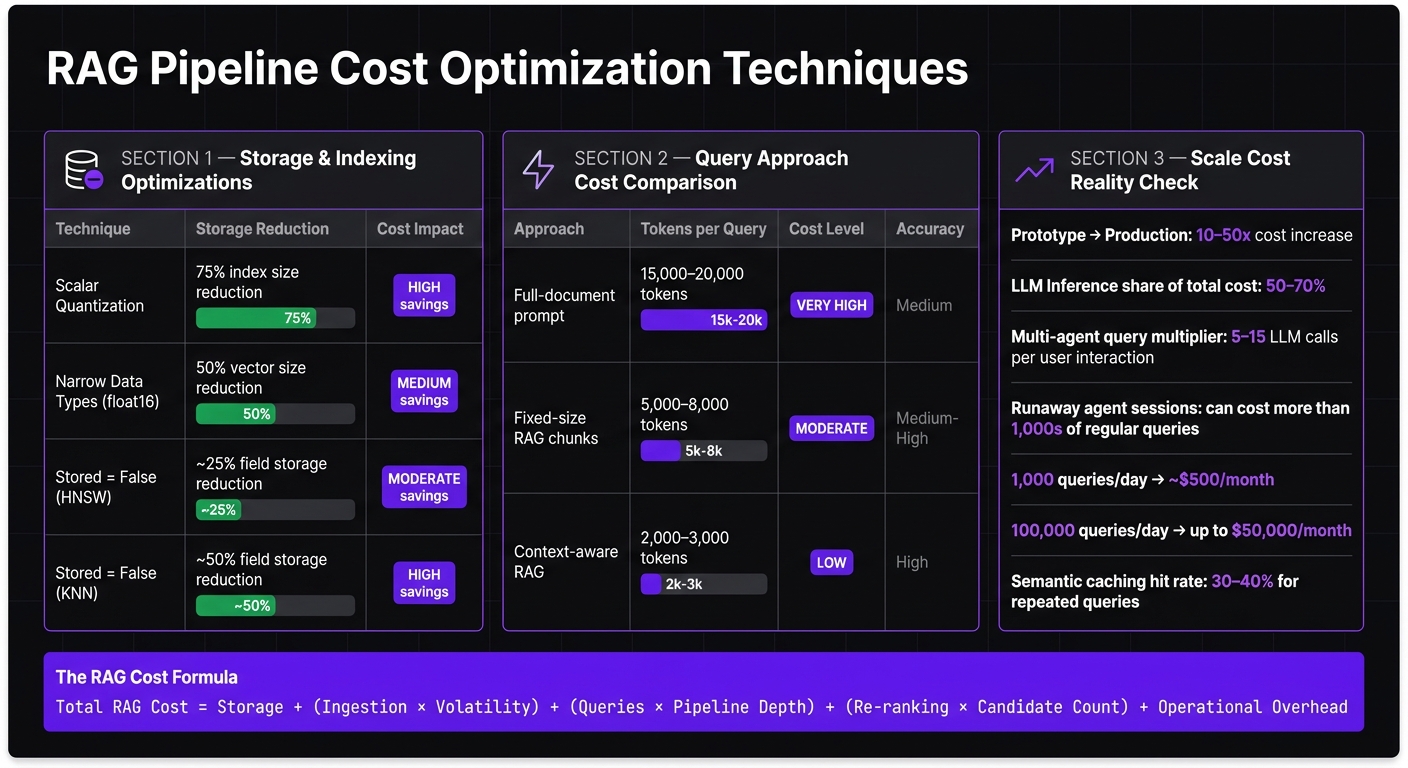
RAG Pipeline Cost Optimization: Key Techniques & Savings
Once you've pinpointed the main cost drivers, there are several practical ways to trim RAG pipeline expenses on Azure.
Optimizing Storage and Indexing
One of the quickest ways to save money is by reducing the amount of stored data. Azure AI Search has increased storage capacity per partition - S1 tiers, for instance, now offer 160 GB per partition instead of 25 GB. However, it's important to use this space wisely and avoid unnecessary storage.
Scalar quantization is a powerful tool here, as it can shrink vector index sizes by up to 75%, cutting both memory and storage costs. Similarly, switching from float32 to float16 for data types reduces vector sizes by half. Additionally, setting stored = false for fields that aren't used in queries can cut disk storage needs by 25–50%, depending on the index type.
| Optimization Technique | Storage Reduction | Cost Impact |
|---|---|---|
| Scalar Quantization | 75% (index size) | High - significant memory/storage savings |
Narrow Data Types (float16) |
50% (vector size) | Lower storage and compute consumption |
Stored = False (HNSW) |
~25% (field storage) | Moderate disk storage savings |
Stored = False (KNN) |
~50% (field storage) | Significant disk storage savings |
Another cost-saving strategy is separating content storage from vector indexes. By storing raw documents in tools like Azure Blob Storage or Azure SQL while keeping only vectors and metadata in the search index, you avoid paying premium prices for vector indexing on data that doesn’t need it.
Once you've optimized storage, refining how data is retrieved can further reduce costs.
Query Tuning and Compute Optimization
Context-aware retrieval is a game-changer for reducing token usage and costs. Instead of fetching entire documents, focus on retrieving only the most relevant passages. For example, using 2,000–3,000 tokens per query instead of 15,000–20,000 can significantly lower costs while improving accuracy.
Semantic caching is another underutilized method. By caching embeddings for frequently repeated queries, you can avoid making redundant LLM calls. Pair this with Azure's autoscaling features to adjust compute resources during off-peak hours, and you’ll see a noticeable drop in monthly expenses - all without altering your pipeline's core logic.
These query and compute optimizations set the stage for more efficient multi-tenant systems.
Data Consolidation for Multi-Tenant Systems
Running separate databases for each tenant can become prohibitively expensive at scale. Instead, use a shared schema with logical isolation. Tools like Azure Cosmos DB partition keys or row-level security in Azure SQL allow you to serve dozens - or even hundreds - of tenants from a single infrastructure.
For workloads with unpredictable traffic patterns, consider switching from continuous streaming to triggered sync patterns. This approach eliminates the need to maintain a 24/7 cluster when it's only occasionally required. Teams using Databricks for vector sync have reported substantial savings by adopting event-driven or scheduled sync jobs.
Unless compliance or performance requirements dictate otherwise, logical isolation is usually sufficient and much more cost-effective than physical isolation.
Fine-tuning storage, compute, and tenant management strategies is key to keeping costs under control. At AppStream Studio, these methods are integral to our approach, helping teams design, build, and maintain cost-efficient RAG pipelines on Microsoft's AI stack.
Governance and Long-Term Cost Control
Sustaining cost savings on Azure requires more than a one-time optimization of your RAG pipeline. Over time, factors like evolving features, growing data sets, and changing query patterns can steadily drive up expenses. To keep costs in check for the long haul, it's crucial to implement measures that accurately assign costs and establish performance limits.
"RAG is not expensive because retrieval is expensive. RAG is expensive because nobody models the full cost of keeping it running." - Framesta Fernando, Engineering Manager [8]
Cost Attribution and Telemetry
Understanding where your money is going is the first step toward effective cost management. While Azure's standard dashboards provide a general view of spending, they often fail to pinpoint which specific RAG feature or tenant is driving the costs. To address this, tag all cloud resources by feature or tenant - such as Azure AI Search indexes, container apps, and API gateways. This allows for precise cost allocation using Azure Cost Management.
Additionally, instrument your pipeline to monitor key metrics like average input and output tokens per query, API cost trends over time, and cache hit rates. It's especially important to track "retrieved input tokens" separately from "user-query tokens", as this helps identify bloated context windows and spot surges in LLM inference costs before they escalate. For instance, serving 60,000 queries on a premium model like Claude Sonnet 4.6 can cost over $1,500.00 [1].
Setting Cost and Performance Guardrails
Once you’ve identified cost drivers, the next step is to set clear, measurable targets. Establish cost-per-query SLOs and latency goals (e.g., under $0.004 per query at the 95th percentile) [5] to provide your team with actionable objectives instead of vague directives to "reduce costs."
Two practices can have a big impact here. First, treat token usage as a deployment metric for every major feature release. Even small prompt changes can significantly inflate costs if left unchecked. Second, simulate workloads to understand how costs scale as user volume grows. For example, conversational interfaces and agent loops can turn a single user action into 3–10 vector queries [8], causing costs to compound quickly if not stress-tested. Automating the cleanup of stale vectors is another essential step, as excessive chunking can unnecessarily drive up expenses.
Working with Specialists to Optimize RAG Pipelines
Designing your RAG pipeline with governance in mind from the outset simplifies long-term cost control. This is where working with specialists can make a big difference. For example, AppStream Studio collaborates with teams to create production-ready, cost-efficient RAG pipelines on the Microsoft stack - including Azure AI Search, Azure Cosmos DB, Semantic Kernel, and related services. Whether you're building a new pipeline or refining an existing one, partnering with experts who understand both the architecture and cost dynamics can save both time and money.
Conclusion: Keeping RAG Pipeline Costs Under Control
RAG costs can quietly pile up due to bloated indexes, inefficient queries, and agent orchestration that drives costs up by 3–8x [3]. The teams that excel in managing these expenses aren't necessarily spending more - they're spending smarter. This conclusion ties back to the detailed cost drivers covered earlier.
At its core, the formula for RAG costs is: Total RAG Cost = Storage + (Ingestion × Volatility) + (Queries × Pipeline Depth) + (Re-ranking × Candidate Count) + Operational Overhead [2][8]. The good news? Each of these factors can be optimized. Adjusting embedding dimensions, routing straightforward queries to more affordable models, and using semantic caching - which can deliver 30–40% hit rates for repeated queries [9] - are practical strategies that don’t require tearing everything down and starting over.
"The companies that win the AI race will not be the ones spending the most on infrastructure. They will be the ones spending the smartest." - LeanOps Team [3]
Early decisions around architecture - like chunk size, embedding models, and index structures - set the stage for long-term costs [2][10]. That's why focusing on cost-per-query as a critical metric is what separates pipelines that scale profitably from those that run into gross margin issues. The strategies outlined here provide a clear path for managing RAG pipelines efficiently on Azure.
FAQs
How can I estimate the true cost per query for my RAG pipeline?
To get a clear picture of the true cost per query, you need to account for three main components: embedding costs, retrieval costs, and answer generation costs. Here's how to approach it:
- Break down the costs per token for embedding, retrieval, and model inference. Add these together to calculate the base cost.
- Factor in operational overhead, such as maintenance and periodic re-embedding, which can influence long-term expenses.
- Prioritize optimizing retrieval processes and minimizing resource-heavy inference steps to keep costs manageable.
Keep a close eye on token usage and query volume over time. Regular monitoring allows you to adjust and fine-tune your cost estimates as conditions change.
What’s the best chunk size to balance accuracy and database cost?
The ideal chunk size is approximately 512 tokens with a 10–15% overlap. This balance helps maintain context effectively while minimizing the number of fragments. The result? Improved retrieval accuracy and reduced embedding costs.
By carefully adjusting chunk sizes, you can manage cloud database expenses without sacrificing performance. It’s a smart way to optimize both accuracy and cost-efficiency.
How can I reduce Azure egress fees in a RAG architecture?
To cut down on Azure egress fees within a Retrieval-Augmented Generation (RAG) architecture, focus on optimizing how data is stored and retrieved. Here are some practical steps:
- Use Scalar Quantization and Reduced Data Types: Convert data to more compact formats, like using
float16instead offloat32. This reduces the size of data being stored and transferred. - Avoid Optional Vector Storage: Stick to essential data storage to prevent unnecessary overhead.
- Keep Data Local: Store data in the same Azure region by leveraging local replicas or using incremental updates. This avoids cross-region transfer fees, which can quickly add up.
- Selective Data Storage: Focus on saving only the most relevant data to minimize the amount of information that needs to be transferred.
- Efficient Compression: Apply compression techniques to shrink the volume of data being transmitted, which directly lowers costs.
By implementing these strategies, you can effectively manage egress fees while maintaining efficient operations.


