
Integrating AI into older .NET apps like WPF, WinForms, and ASP.NET MVC is now possible without rebuilding entire systems. Azure OpenAI provides tools such as Semantic Kernel and NuGet packages (e.g., Azure.AI.OpenAI) to add AI-driven features like document summarization, sentiment analysis, and chat interfaces. This approach preserves existing business logic while introducing modern AI capabilities.
Key Steps:
- Set up an Azure OpenAI resource and deploy a model (e.g., GPT-4).
- Use secure authentication methods like Managed Identity or API keys stored in user secrets.
- Install necessary NuGet packages for .NET compatibility.
- Encapsulate AI logic in service classes to keep your core code unchanged.
- Focus on adding impactful features like chatbots or natural language search.
Best Practices:
- Secure sensitive data with Azure Key Vault and Managed Identity.
- Monitor costs with tools like Azure Monitor and optimize token usage.
- Use dependency injection for better resource management and clean architecture.
This method avoids full migrations while modernizing legacy apps with AI capabilities.
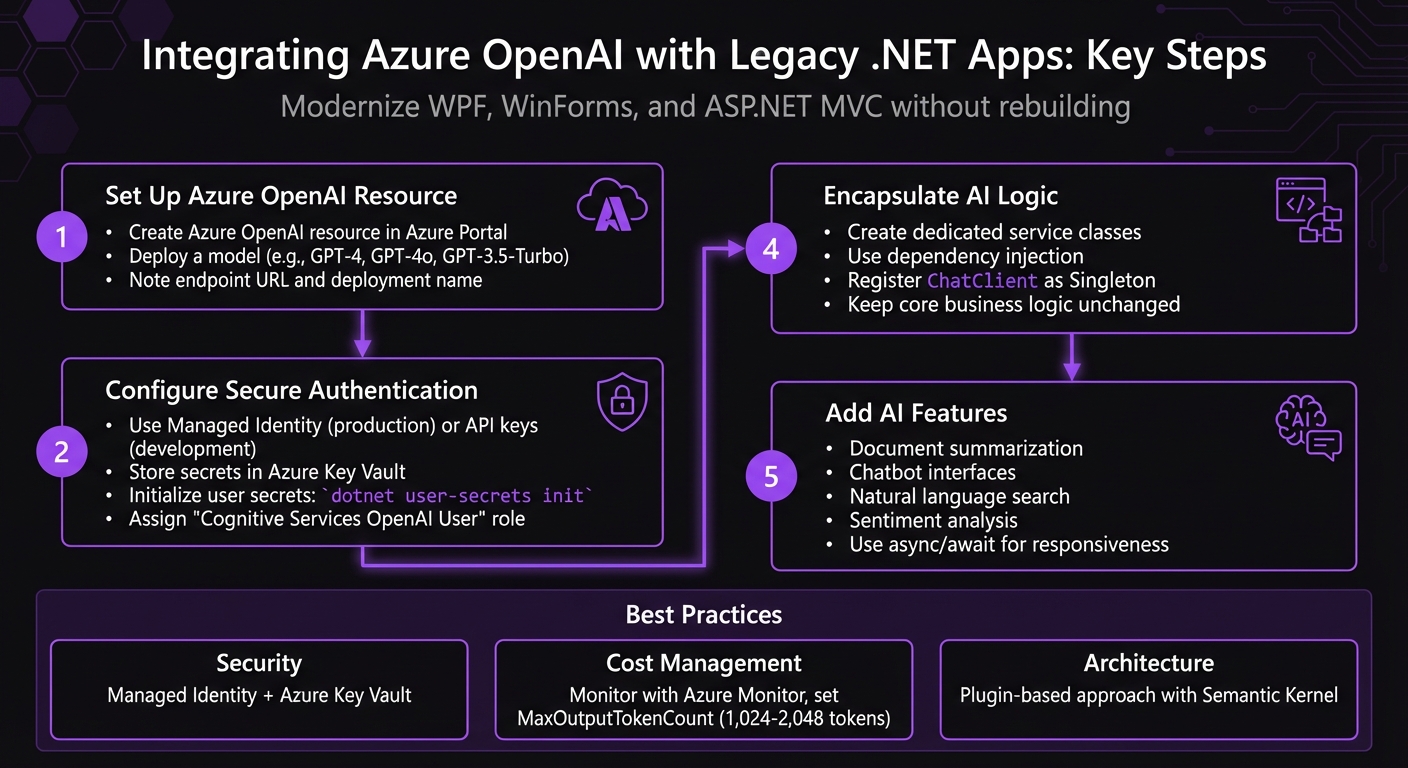
Azure OpenAI Integration Steps for Legacy .NET Applications
Integrating AI Chatbot in ASP.NET MVC using Azure AI Foundry
sbb-itb-79ce429
Preparing for Integration
To get started, make sure you have an active Azure subscription and have received approval from Microsoft to access the Azure OpenAI Service. This service requires an application process that depends on your intended use cases, so factor in some extra time for this step [5][1].
Once approved, you’ll need to provision an Azure OpenAI resource. Head to the Azure Portal, search for "Azure OpenAI", select your region, and pick a pricing tier [1]. After provisioning, use Azure OpenAI Studio to deploy a model, such as GPT-4o or GPT-3.5-Turbo [6][1]. Be sure to note the endpoint URL and deployment name. Azure provides two API keys, allowing for seamless key rotation, but for production environments, authentication through Managed Identity (Azure AD) is the preferred option [1]. With your resource ready, you can now configure your .NET project for secure API interactions.
"Never commit API keys to source control!" - DotNet Wisdom [1]
For your .NET project, start by installing the necessary NuGet packages using the .NET CLI: Azure.AI.OpenAI for API communication and Azure.Identity for authentication. Next, initialize user secrets to securely store sensitive data by running:
dotnet user-secrets init
Then, securely set your endpoint using:
dotnet user-secrets set AZURE_OPENAI_ENDPOINT <your-endpoint>
This method ensures sensitive information stays out of your codebase and configuration files, maintaining security best practices.
This setup works seamlessly for both WinForms and ASP.NET MVC applications. Since Azure.AI.OpenAI targets .NET Standard 2.0, it ensures compatibility across different .NET versions without requiring a full migration effort.
Step-by-Step Integration Guide
Connecting to Azure OpenAI
With the release of version 2, the Azure.AI.OpenAI SDK received a complete overhaul. If you're working with older code, you'll notice changes in type names and structure. The updated SDK now uses AzureOpenAIClient as the main entry point, followed by creating a ChatClient scoped to your specific model deployment, such as "gpt-4o" [7].
For authentication, DefaultAzureCredential is the go-to option for production environments. It seamlessly manages authentication, using Managed Identity in Azure setups and falling back to local credentials during development [1]. When working locally, AzureKeyCredential is a good alternative, using your API key. However, if you're leveraging Managed Identity in production, make sure to assign the "Cognitive Services OpenAI User" role [1].
"Design your service abstractions against ChatClient rather than AzureOpenAIClient so the auth layer stays swappable." - DotNet Studio AI [7]
In legacy ASP.NET or modern .NET applications, it's best to register the client as a Singleton in your dependency injection container. This approach reuses the HTTP connection pool efficiently. Once registered, you can inject IChatClient into your controllers or services, keeping your AI logic separate from the core business code [1].
Adding AI Features
To get started, focus on simple, impactful features that don't require overhauling your entire application. Examples include document summarization, chatbot responses, or natural language search. For chat interfaces, consider using CompleteChatStreamingAsync, which allows you to display responses token-by-token, creating a dynamic real-time "typing" effect [7].
When implementing AI calls, always use async/await. This ensures that your UI remains responsive in desktop apps like WinForms or WPF and helps prevent thread pool exhaustion in web apps [1]. In stateless web environments, manage conversation history effectively using IDistributedCache with Redis or a similar solution [3].
Minimizing Code Changes
To keep your integration clean, encapsulate AI logic within dedicated service classes or leverage Semantic Kernel plugins. This separation aligns with standard .NET practices, such as dependency injection and strong typing, and ensures your business logic remains unaffected [2].
"AI capabilities are treated as callable functions, just like any other part of your application." - Ashwinbalasubramaniam, .NET and Azure Engineer [2]
It's recommended to implement AI features in the backend, whether through ASP.NET Core Web API or MVC controllers. This backend-first approach safeguards your API keys, centralizes business logic, and allows for easier post-processing. You can add new endpoints or enhance existing ones with AI-powered responses, all while leaving your current UI and data access layers intact.
Security and Performance
Security Configuration
When integrating Azure OpenAI into your legacy .NET applications, ensuring a secure and monitored environment is critical for reliable and cost-efficient production. Once you've set up the integration, it's time to focus on implementing strong security practices.
One of the best ways to secure your AI-enhanced apps is by using Microsoft Entra ID and Managed Identity instead of relying on API keys. As Fullstack Developer Murat Aslan puts it:
"Managed Identity lets Azure resources authenticate to services without credentials, removing API keys from code" [8].
This method not only eliminates the need for hardcoded API keys but also brings automatic credential rotation, precise role-based access control (RBAC), and reduces the risk of exposing sensitive credentials in source control.
Assign the "Cognitive Services OpenAI User" role to your managed identity across all components of your stack, including Azure SQL databases. This creates a seamless, credential-free architecture [8]. To further enhance security, store legacy secrets in Azure Key Vault. This ensures automatic secret rotation and provides audit compliance [8][3].
For industries with strict regulations, data residency is a key consideration. Deploy Azure OpenAI in regions that comply with HIPAA and other local regulations. Additionally, always validate and sanitize user inputs before sending them to the AI model to guard against prompt injection attacks [3]. Enable continuous audit logging via Azure Monitor and Application Insights to track access patterns, detect unusual activity, and maintain a compliance trail for audits [8].
Monitoring and Cost Management
Security is just one side of the coin - effective monitoring and cost management are equally important for maintaining a sustainable production environment. Start by instrumenting your app to gather performance and cost data. Use .NET Meters (System.Diagnostics.Metrics) to monitor the estimated USD cost per request, model, and feature. This helps pinpoint the features that consume the most resources, often revealing that a small percentage of features drive the majority of costs [9].
To manage costs, set a MaxOutputTokenCount (between 1,024 and 2,048 tokens) in your ChatCompletionOptions. This prevents unexpectedly long and expensive responses [9]. You can also implement model routing, directing simpler queries to GPT-4o-mini ($0.15 per 1M input tokens) instead of GPT-4o ($5.00 per 1M input tokens). This simple adjustment can reduce costs by up to 33x for specific tasks [9].
For repeated queries, add semantic caching using Redis. This can cut API calls by 40–60% in scenarios like support chats [9]. When dealing with bulk tasks, such as document classification or nightly batch processing, leverage the Azure OpenAI Batch API to save up to 50% on costs [9]. During development, you might also consider using Ollama as a local IChatClient. This allows you to test features without incurring API costs before moving to production [9].
Production Examples and AppStream Studio
With integration and security in place, practical examples highlight how Azure OpenAI transforms legacy systems.
AI Use Cases in Legacy Systems
Azure OpenAI integration brings advanced AI capabilities to legacy .NET systems across various industries. For instance, in customer support, these systems now automate tasks like order tracking, determining refund eligibility, and offering product recommendations by combining existing APIs and databases with AI plugins [3]. In financial services, companies deploy multi-agent banking assistants that direct customer inquiries to specialized teams for sales, billing, or technical support [10]. IT operations teams leverage AI to analyze incidents, summarize root causes, and create automated change requests [2]. Similarly, in knowledge management, RAG-based assistants search internal documentation, policies, and compliance manuals without requiring businesses to replace their .NET infrastructure [2][4].
The transition from basic chatbots to autonomous agents has been a game-changer. These agents allow legacy systems to handle more complex tasks, such as triaging support tickets, managing multi-step approval processes, and performing real-time actions like checking order statuses or updating records [2][3]. By blending ML.NET for quick, localized tasks like sentiment analysis with Azure OpenAI for more advanced reasoning and natural language capabilities, companies achieve a powerful synergy [4].
These examples demonstrate how legacy systems can achieve AI production readiness, paving the way for specialized solution providers to deliver tailored implementations.
AppStream Studio's Approach
AppStream Studio focuses on building AI solutions for companies ready to use AI in real-world applications - not just in concept. Based in Nashville, the firm specializes in the Microsoft AI ecosystem, including .NET, C#, Azure, Semantic Kernel, and Azure AI Services, offering end-to-end services from strategy planning to deployment and handoff.
Their portfolio includes a scheduling platform managing over 250,000 appointments annually, AI engines that assess Medicare reimbursement eligibility before devices are shipped, NLP-powered buy-side marketplaces, and enterprise knowledge assistants for private equity firms. These projects meet strict compliance standards like HIPAA, SOC 2, and ISO 27001, serving industries such as healthcare, financial services, field services, edtech, and private equity.
AppStream Studio emphasizes a plugin-based architecture, allowing AI features to integrate seamlessly into existing business logic. They also utilize Semantic Kernel for orchestrating multi-agent workflows and focus on production readiness by embedding security, observability, and cost monitoring from the start.
Conclusion
Integrating Azure OpenAI into legacy .NET applications brings advanced features like natural language understanding, automated document summarization, and intelligent customer support - all while preserving your existing business logic [1][3]. By using a plugin-based approach, AI features can be added as callable functions, ensuring your system remains modular and easy to test [2].
Using tools like Semantic Kernel and plugin-based integration reduces disruption, enabling developers to expand functionality without rewriting the core code [2][3]. As Ashwinbalasubramaniam, Senior Software Engineer, explains:
"Semantic Kernel aligns naturally with [Dependency Injection and strong typing]. Instead of feeling like an external AI add-on, it fits into existing application structures" [2].
To ensure secure integration, Managed Identity and Azure Key Vault eliminate hardcoded API keys and centralize secret management [11][1].
For production scalability, techniques like reusing OpenAIClient instances, connection pooling, and streaming APIs are essential. Pairing these with monitoring tools like Azure Monitor and Application Insights helps track usage patterns and manage costs as AI features grow [11][1].
AppStream Studio specializes in creating production-ready AI solutions for the Microsoft ecosystem. Their expertise ensures compliance with standards like HIPAA, SOC 2, and ISO 27001, focusing on securely integrating AI into legacy systems without requiring complete rewrites. These strategies allow organizations to modernize their .NET applications, enhancing functionality while maintaining stability and security.
FAQs
Do I need to migrate my legacy .NET app to .NET Core first?
No, you don’t have to migrate your legacy .NET app to .NET Core to work with Azure OpenAI. Many older .NET applications, including those built on frameworks like .NET Framework, can incorporate AI features directly - as long as they’re compatible with the necessary libraries and SDKs. Before moving forward, it’s a good idea to double-check that your app aligns with the required dependencies.
How do I keep API keys and user data secure with Azure OpenAI?
To keep API keys and user data safe when using Azure OpenAI, it's crucial to avoid hardcoding credentials directly into your application. Instead, rely on methods like environment variables, Azure Key Vault, or Azure Identity libraries for securely storing and managing these keys. For an extra layer of security, consider using keyless authentication through Azure Active Directory (Azure AD). This approach leverages token-based authentication to safeguard access. By following these practices, you can reduce the risk of unauthorized access and protect sensitive data throughout your application's lifecycle.
How can I control Azure OpenAI costs in production?
To keep Azure OpenAI costs under control in production, there are several practical strategies you can adopt:
- Choose cost-effective models: For simpler tasks, opt for models that are less expensive but still meet your needs. This can make a noticeable difference in your overall spending.
- Optimize token usage: Use techniques like prompt compression to reduce the number of tokens sent and semantic caching to avoid redundant calls. Both approaches help minimize unnecessary costs.
- Leverage batch APIs: For workloads that don't require real-time processing, batch APIs can handle multiple requests at once, improving efficiency and saving money.
- Monitor spending: Set up Azure Cost Management alerts to track your expenses and get notified if you're approaching your budget limits.
- Enforce token budgets: In .NET, implement request filters to cap token usage per request and manage the flow of requests effectively.
By combining these methods, you can keep costs under control while maintaining performance.


