
Most Event Grid delivery failures come down to four things: the endpoint is down, it takes more than 30 seconds to answer, auth fails, or the payload is rejected. If I want fewer lost events, I focus on the response code first, then check retries, dead-letter storage, and whether my handler can safely process the same event more than once.
Here’s the short version:
- Event Grid marks delivery as successful only when the endpoint returns HTTP 200–204
- It retries many transient failures for up to 24 hours
- It does not retry terminal failures like 400, 403, and 413
- A slow endpoint that misses the 30-second response window will trigger retries
- Without dead-lettering, failed events can be lost
- Because Event Grid uses at-least-once delivery, duplicate events can happen
If I had to reduce delivery failures fast, I would do these five things first:
- Make sure the endpoint returns a 2xx status within 30 seconds
- Use 202 Accepted when work needs more time, then process it in the background
- Check whether 401, 403, 400, or 413 point to auth or payload issues
- Turn on dead-letter storage before production
- Make every consumer idempotent so retries and replay do not cause duplicate side effects
A few numbers matter here. Event Grid retries some failures on a schedule that starts at 10 seconds and can continue for 24 hours. It also treats HTTP 200–204 as success, while many 4xx responses stop delivery handling right away.
| Failure type | What it usually means | What I do first |
|---|---|---|
| Timeout / 5xx / 429 | Endpoint is slow, busy, or temporarily down | Check latency, load, and async handling |
| 401 | Bad auth header or identity delay | Check auth config and identity permissions |
| 403 | Access blocked | Check RBAC, firewall, WAF, or private access rules |
| 400 | Payload or schema problem | Validate the event contract |
| 413 | Event too large | Reduce payload size or change design |
If you want the direct path: separate transient failures from terminal ones, enable dead-lettering, and make replay safe. That covers most of what causes missed events in production.
Explore Azure Event Grid Module | AZ-204 | Episode 24
sbb-itb-79ce429
Endpoint Availability and Performance Problems
Once you've checked the failure signals, look at the endpoint first. Most delivery failures happen because the endpoint can't be reached or it takes too long to answer.
Unreachable or Misconfigured Endpoints
When Event Grid can't connect to an endpoint, it returns an outcome that points to the problem. A ResolutionError usually means DNS couldn't resolve the hostname. A SocketError points to a network or TLS failure. Forbidden usually means a firewall, IP filter, or Private Link rejection is blocking delivery. NotFound means the URL resolves, but the target resource no longer exists or isn't running.
Event Grid then waits before trying again:
| Last Delivery Outcome | Root Cause | Backoff Window |
|---|---|---|
| Busy or TimedOut | Overloaded server or no response within 30 seconds | 10 seconds |
| ResolutionError | DNS resolution failure | 5 minutes |
| SocketError | Network or TLS failure | 30 seconds |
| Forbidden | Firewall, IP filter, or Private Link rejection | 5 minutes |
| NotFound | URL is wrong or target no longer exists | 5 minutes |
| InvalidAzureFunctionDestination | Azure Function lacks EventGridTrigger | 10 minutes |
Test the endpoint directly with curl or Postman. Use the same network path if you can. The endpoint should return a 200 OK within 30 seconds. If it doesn't respond, or it comes back with a 403 or 404, that's probably the problem.
Timeouts, Throttling, and Slow Consumers
Event Grid expects a 2xx response within 30 seconds. If the handler doesn't answer in time, Event Grid records a TimedOut outcome and retries. If the destination is overloaded and returns 503 or 429, it records Busy. Event Grid retries timed-out or throttled deliveries with exponential backoff for up to 24 hours.
A simple fix is to acknowledge fast with 202 Accepted, then process the work asynchronously.
If the endpoint is reachable and fast enough, move next to authentication and payload validation.
Authentication, Validation, and Schema Failures
Once the endpoint is reachable, the next set of failures usually comes from auth, validation, or the payload itself. Most 400-level errors are terminal. So if the endpoint is up and latency isn't the problem, this is the next place to look.
Auth and Webhook Validation Errors
The most common auth issue is simple: a missing or invalid auth header. If a webhook endpoint expects a header like Authorization, but the Event Grid subscription isn't set up to send it, delivery attempts return 401 and stop there.
A 401 from an Azure resource destination usually means something different. In most cases, it points to a managed identity issue or a token propagation delay. Event Grid usually retries after about 5 minutes. A 403 is a different story. That usually means a missing RBAC role assignment, an IP firewall rule, or a WAF block. The status code helps you split short-lived identity delays from hard access blocks.
For webhook subscriptions, Event Grid sends a POST request with a validationCode. Your endpoint has to echo that code in a 200 OK response before the subscription becomes active.
Schema Mismatches and Oversized Events
A 400 usually means the payload doesn't match what the consumer expects. Event Grid treats 400 as a permanent failure, so it doesn't retry the event.
A 413 means the payload is too large for the destination's size limit. Event Grid doesn't retry that either.
These errors are often simpler to sort than endpoint failures. The catch is that they're also easier to miss if you don't have the status code in front of you.
| Error Code | Retry Behavior | Cause |
|---|---|---|
| 400 | No retry | Schema mismatch or consumer contract validation failure |
| 401 (Webhook) | No retry | Missing or invalid auth header or validation failure |
| 401 (Azure Resource) | Retry | Managed identity or token propagation delay |
| 403 | No retry | IP firewall, WAF block, or missing RBAC role |
| 413 | No retry | Payload exceeds destination size limit |
Retry, Dead-Lettering, and Event Recovery
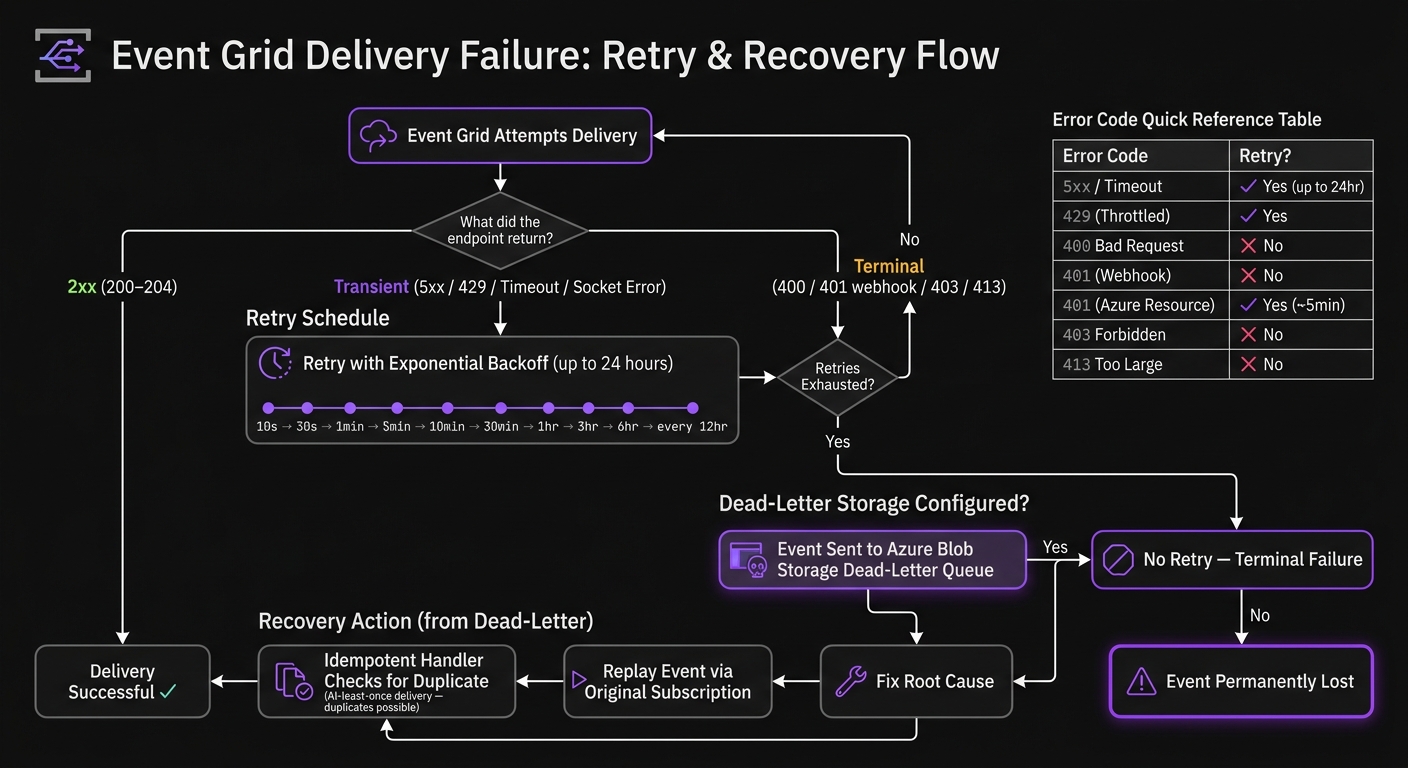
Event Grid Delivery Failure: Retry & Recovery Flow
How Retry and Dead-Lettering Work
Once you've separated transient failures from terminal ones, the next step is recovery.
If a delivery attempt fails, Event Grid keeps retrying transient failures like 5xx responses, timeouts, and socket errors for up to 24 hours. The retry schedule follows a set pattern: 10 seconds, 30 seconds, 1 minute, 5 minutes, 10 minutes, 30 minutes, 1 hour, 3 hours, 6 hours, and then every 12 hours after that.
Here’s the simple rule:
- Treat
5xx, timeouts, and socket errors as transient - Treat
400,401,403, and413as terminal
Event Grid also skips retries for some errors, based on the endpoint type:
| Endpoint Type | Error Codes (No Retry) |
|---|---|
| Azure Resources | 400 (Bad Request), 413 (Payload Too Large), 403 (Forbidden) |
| Webhooks | 400 (Bad Request), 413 (Payload Too Large), 401 (Unauthorized), 403 (Forbidden) |
Configuring Recovery Without Losing Events
Dead-lettering needs an Azure Blob Storage account set as the destination on the Event Grid subscription. Without it, events that use up all retries - or fail with a terminal error - are lost.
Set up dead-letter storage before production. Also, alert on every dead-lettered event. If an event lands there, something needs attention.
| Recovery Method | Reliability Impact |
|---|---|
| Built-in Retries | High - handles transient failures automatically |
| Dead-Lettering | Critical - prevents permanent data loss |
After dead-lettering is set, the next piece is replaying events safely.
Idempotency and Safe Replay
Retries and replay can send the same event more than once. That means your handler has to be safe to run again without causing extra changes.
Event Grid uses at-least-once delivery, so duplicate events are part of the deal. Make handlers idempotent by checking whether an event was already processed before applying changes.
Replay dead-lettered events only after you fix the root cause. Then send them back through the original subscription. Since duplicates can happen, replay logic needs to handle the same event more than once without side effects.
Architecture and Operations to Reduce Future Failures
Design Choices That Limit Failure Impact
Once recovery is in place, the next step is prevention. The goal is simple: shrink the blast radius before anything breaks. That means making design decisions that limit damage up front, instead of trying to patch things later in production.
One choice can make a big difference under load: give each downstream service its own Event Grid subscription. That way, if one consumer slows down or fails, it doesn't drag the others with it. That kind of subscriber isolation keeps a single weak link from backing up the whole event stream.
Consumers also need to be safe when the same event shows up more than once. In plain terms, duplicate delivery shouldn't cause duplicate side effects.
Monitoring, Testing, and Operational Readiness
Alerts should fire the instant an event lands in dead-letter storage, not hours later when someone spots a problem in the logs. If your team has to hunt through raw HTTP logs just to figure out what happened, you're already losing time.
Use delivery metadata to sort transient failures from permanent ones fast. At a minimum, monitor deadLetterReason and lastDeliveryOutcome on every subscription. Those fields help you see whether the issue was a timeout, a bad response code, or something else.
Before production, test both dead-letter alerts and replay. Don't assume they'll work when you need them most.
Conclusion: The Direct Path to Fewer Delivery Failures
Reliable delivery comes down to a handful of repeated habits. Separate failure types, set up dead-lettering before the first production deployment, and make every consumer idempotent so retries and replay stay safe. From there, the work is mostly discipline: isolate subscribers, watch failures closely, and make sure replay won't create a second problem.
FAQs
How do I tell transient from terminal failures?
In Azure Event Grid, the simplest way to separate transient failures from terminal ones is to look at the HTTP status code your endpoint sends back.
Here’s the basic idea: transient failures usually get retried automatically with exponential backoff. That includes status codes like 408 and 503. These codes tell Event Grid, in plain terms, “try again later.”
Terminal failures work differently. Status codes like 400 or 413 aren’t retried. Instead, Event Grid treats them as final failures and moves them straight to the dead-letter queue.
When should I use dead-lettering?
Use dead-lettering when an event can't be delivered or processed after all retry attempts are used up. If you don't set a dead-letter destination, the event is discarded by default.
Common cases include:
- Maximum delivery attempts or TTL reached
- Poison messages that keep failing
- Manual investigation, auditing, or possible rehydration
How do I make Event Grid consumers idempotent?
Design your Event Grid handler so it gives the same result even when the same event shows up more than once. Event Grid uses at-least-once delivery, so duplicate events can happen.
A common way to handle this is to use a unique ID - like a MessageId or a hash of the payload - and check it against a persistent store such as Redis or SQL before you process the event. If that ID is already there, skip the event.
Another good option is to use payloads that describe the final state instead of small step-by-step changes. That way, processing the same event twice won’t change the outcome.


