
If I want AKS setups that stay predictable, I don’t keep changing the same cluster. I rebuild it from Bicep, test it, switch traffic, and remove the old one.
That’s the whole model in one line. In this approach, I treat each AKS cluster as replaceable, not permanent. I keep the full setup in Git, pin the Kubernetes version, split the Bicep code into modules, deploy with .bicepparam files, validate the new cluster, cut over traffic, and then delete the old resource group only after traffic hits 0% on the old side.
Here’s the short version:
- Source of truth: Bicep files in Git
- Deployment flow: validate, deploy, save outputs, configure add-ons
- Cluster layout: separate system and user node pools
- Network rule: each cluster generation gets its own CIDR
- Cutover rule: move traffic only after identity, ingress, RBAC, and logs pass checks
- Rollback plan: keep the old cluster live until the new one is proven
- Use replace vs. upgrade: replace for network, OS, policy, or add-on changes; use in-place upgrades for small AKS or node image patches
A few details stand out. The article recommends pinning AKS to an exact version like 1.29.3, lowering DNS TTL to 300 seconds before cutover, and storing validation results for audit. That matters because cluster drift often starts with one-off portal edits and in-place changes that slowly make dev, QA, and prod stop matching.
If I were putting this into practice, I’d keep one main.bicep entry file, break the stamp into modules such as network.bicep, aks.bicep, acr.bicep, logs.bicep, and keyvault.bicep, and use tags like generation and lifecycleStatus to track which cluster is active, draining, or retired.
Bottom line: this article shows a clear AKS replacement pattern. I build the same cluster shape each time from code, validate it before production use, move traffic in a controlled way, and avoid cluster drift over time.
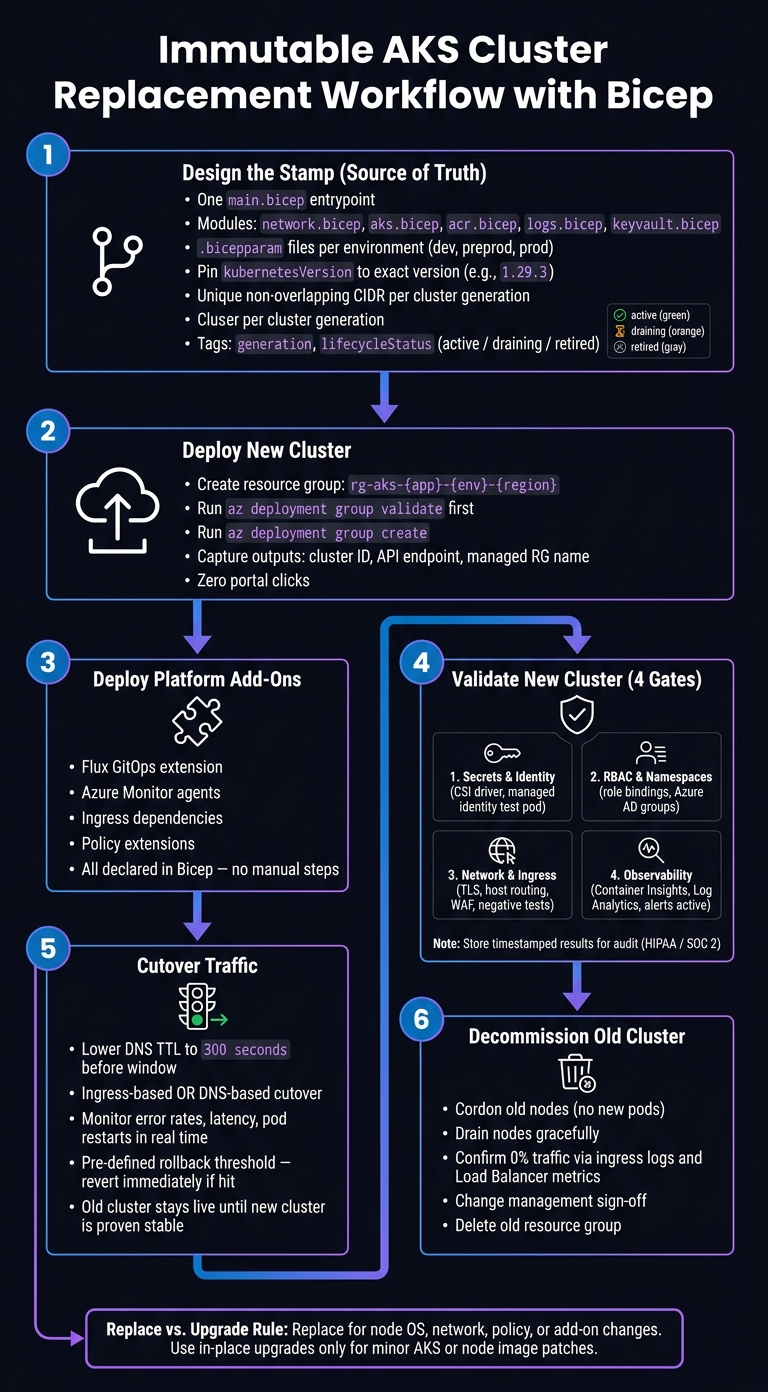
Immutable AKS Cluster Replacement Workflow with Bicep
Automating AKS cluster creation using Bicep and Azure DevOps | #Techespresso
sbb-itb-79ce429
Design the AKS Stamp in Bicep
A stamp is one Bicep template set that you deploy again and again. In this setup, you replace the stamp instead of changing it bit by bit. The point is simple: one Bicep template set should rebuild the same cluster layout every time, with only environment-specific values changing.
Structure Bicep Modules for Repeatable Cluster Builds
Use one main.bicep file as the entrypoint, then split the stamp into smaller modules with clear jobs:
network.bicepfor the VNet, subnets, and NSGsaks.bicepfor the cluster, node pools, and identityacr.bicepfor the registrylogs.bicepfor Log Analytics and diagnosticskeyvault.bicepfor secrets and permissions
That setup helps each environment rebuild the same topology from the same code, instead of drifting over time.
Each module should take parameters for values that change by environment, such as VM size, node count, and address space. But the structure and logic should stay the same across dev, preprod, and prod. Those environment-specific differences belong in .bicepparam files.
For example, aks-dev.bicepparam might set vmSize to Standard_B4ms with a small node count. aks-prod.bicepparam might use Standard_D8s_v5 with higher autoscale limits. At the same time, shared values like clusterBaselineVersion should stay the same across environments. Your CI/CD pipeline then just points to the right .bicepparam file for each environment. No template edits. No last-minute hand changes.
Set AKS Options That Support Immutable Operations
Pin kubernetesVersion to an exact version like 1.29.3. If you leave it unpinned, Azure can resolve a different version during a rebuild. That means the new cluster may not match the cluster it is replacing, which defeats the whole point.
Version pinning is only part of it. You should also define at least two node pools on purpose. A system pool with mode set to System runs cluster-critical components and should use the CriticalAddonsOnly taint so app workloads stay off it. Then use a separate user pool with mode set to User for your workloads, with its own VM size, autoscale range, and node labels. When versions are exact and pools are spelled out, rebuilt clusters act like the ones they replace. That's what you want.
For networking, set networkPlugin to azure so CNI behavior stays predictable. Give each cluster generation its own non-overlapping CIDR. That way, you can run the new cluster next to the old one during cutover without IP conflicts. Also define apiServerAccessProfile directly. That can mean enablePrivateCluster: true for a private API server, or authorizedIpRanges for a public control plane that's locked down. On top of that, set oidcIssuerProfile.enabled: true and turn on workload identity, so workloads can sign in to Azure services without secret management hanging around in the middle.
Define Naming, Tagging, and Environment Boundaries
Put the environment, region, and generation right into resource names. Use a format like aks-{appName}-{env}-{region}-{gen}. For example: aks-orders-prod-eastus-g2. Resource groups should follow the same pattern, like rg-aks-orders-prod-eastus.
Tags matter just as much as names. At a minimum, tag every resource with environment, businessOwner, costCenter, appName, generation, and lifecycleStatus. For lifecycleStatus, use values such as active, draining, or retired. The generation tag does a lot of heavy lifting here. It gives your automation a clean way to spot old clusters during a blue/green cutover and mark them for cleanup after traffic has fully moved.
For subscription layout, production should be in its own subscription. Dev and preprod can share a subscription, but they should use separate resource groups. Parameterize subscriptionId and location in your .bicepparam files so each environment lands in a clearly separated layout, with separate access control, billing, and plain environment isolation.
With the stamp in place, the next step is to deploy it by using parameter files and Azure CLI.
Deploy a New AKS Cluster from Bicep
Once the stamp is ready, the next move is simple: create the resource group, validate the template, run the parameterized deployment, and save the outputs. The whole flow should be repeatable from Git, with zero portal clicks.
Create the Resource Group and Parameter Files
Create a separate resource group for each environment before you deploy anything. For example, az group create --name rg-aks-prod-us --location eastus sets a clean boundary for the full stamp. After that, the parameter file defines the exact build.
Your .bicepparam files should stay short and easy to scan. A reviewer should be able to spot environment-specific changes without digging through a wall of config. Each file should point to the shared template with using '../main.bicep' and set only the values that differ, like:
clusterNamekubernetesVersionvmSizenodeCountlocation- standard tags
Everything else should remain in the template. That split keeps the deployment tracked in Git and repeatable across environments without changing the core logic.
Deploy the Template with Azure CLI
Before you create anything, run validation. az deployment group validate --resource-group rg-aks-prod-us --template-file main.bicep --parameters params/prod.bicepparam catches wiring issues early. That step matters a lot with AKS, because identity, networking, and node pool mistakes can lead to long failed deployments. If validation passes, run az deployment group create with the same arguments to start the deployment.
Use subscription-scope deployment only when the run also needs to create the resource group or assign roles and policy. For most day-to-day cluster replacements, where the resource group is already there, resource-group scope is simpler and easier to follow.
After deployment finishes, capture the outputs - the cluster resource ID, managed resource group name, and API server endpoint - and write them to pipeline variables or a file. Later steps, like GitOps setup and monitoring config, should read those declared outputs instead of values someone copied from the portal. Those outputs should also feed the next validation step and the traffic cutover.
Deploy Platform Add-Ons Through Code
A new cluster isn't ready just because AKS came up. Platform add-ons still need to be deployed. Flux GitOps extensions, Azure Monitor agents, ingress dependencies, and policy extensions should all be declared in Bicep, either in the main stamp or in nearby modules, so every replacement cluster gets the same setup automatically.
Order matters. Identity and networking prerequisites need to exist before any add-ons that depend on them. A practical pattern is to deploy the Flux extension and monitoring workspace alongside the cluster, then use a separate module or pipeline step for anything that needs the cluster API to be fully responsive first.
The Azure Architecture Center AKS baseline reference implementation uses CI/CD automation to provision the baseline and automate cluster provisioning, upgrades, and replacements.[1]
Code-driven add-ons help keep each replacement cluster aligned with the baseline until validation and traffic shift.
Replace Clusters Safely and Run the Pattern Day to Day
Once the replacement cluster and add-ons are live, the job isn’t done yet. First, prove the new setup works. Then shift traffic. Then retire the old environment without rushing it.
Validate the New Cluster Before Cutover
Check the new cluster across four areas before you send production traffic to it:
- Secrets and identity: Make sure the CSI driver or external-secrets controller has populated the expected namespaces from Key Vault. Then run a test pod that uses a managed identity to reach a downstream resource like Key Vault, Storage, or SQL.
- RBAC and namespaces: Verify that all required namespaces exist and that role bindings point to the right Azure AD groups.
- Network policies and ingress: Send synthetic HTTP requests through the ingress controller. Confirm TLS termination, host-based routing, and WAF rules work the way you expect. Then run negative tests to make sure blocked traffic is still blocked.
- Observability: Confirm Container Insights and Log Analytics are receiving logs and metrics. Also check that key alerts for error rate, pod restarts, and latency are active.
Run these checks in a dedicated cluster-validation stage and store timestamped results for audit. If your team works under HIPAA or SOC 2, that saved evidence is part of the compliance record.
After every gate passes, move to cutover.
Shift Traffic and Decommission the Old Cluster
When validation is complete, schedule a controlled cutover during a maintenance window and notify stakeholders ahead of time. Lower the DNS TTL to 300 seconds before the window starts so a rollback can propagate fast if you need it.
You can cut over through ingress or DNS.
With an ingress-based approach, update the ingress controller config or the Application Gateway backend pool so it points to services in the new cluster. Keep the old cluster reachable for a short period. With a DNS-based cutover, update the A or CNAME records and watch propagation closely.
In both cases, monitor error rates, latency, and pod restarts in real time. Set a single rollback threshold ahead of time. If that threshold is hit, revert ingress or DNS at once.
After the new cluster has been stable for several hours or days, start decommissioning the old one. Cordon the old nodes so no new pods land there. Drain them to evict remaining pods gracefully. Then confirm through ingress logs and Load Balancer metrics that zero traffic is still hitting the old environment. Once that’s confirmed and change management has signed off, delete the old resource group.
AKS guidance also notes that if an upgrade completes but breaks workloads, the safer remediation is to recreate the cluster at the previous version and restore workloads from backup [2].
When to Replace a Cluster vs. Upgrade It in Place
Use a simple rule here.
Replace the cluster when the baseline changes, such as the node OS, network layout, policy, or add-ons. Use in-place upgrades for minor AKS or node image patches.
Conclusion: A Repeatable Pattern for AKS
After deployment, validation, cutover, and decommissioning, the pattern stays the same each time. Treat every AKS cluster like a replaceable stamp, not a long-running pet: define it in Bicep, deploy it cleanly, validate it, cut over, and retire it.
When the full cluster definition lives in version-controlled Bicep templates and environment-specific parameter files, rollback becomes a redeploy instead of a repair. That shift matters. It turns cluster changes into a process you can run again and again, instead of a one-off fix under pressure. AKS upgrade guidance also notes that when AKS does not support an in-place upgrade path, the recommended action is to create a new cluster and migrate workloads [6].
Key Takeaways for Platform Teams
Carry these choices into your own setup:
- Version Bicep modules and tag each cluster with the code version that built it. That gives you a clear trail back to the exact source.
- Use .bicepparam files so one Bicep definition can cover dev, test, and production without copying the same setup over and over.
- Replace clusters for node OS, network, add-on, or policy changes; reserve in-place upgrades for minor patches.
- Automate validation in a separate pipeline stage and store the results for audit and compliance.
With GitOps tools like Flux or Argo CD, rebuilding a cluster stops feeling like a special event and starts feeling normal. Git is the source of truth; the cluster is only the current build [3][4][5].
If the stamp stays versioned and the deployment stays automated, cluster replacement becomes routine.
FAQs
Why is rebuilding AKS safer than changing the same cluster?
Rebuilding an Azure Kubernetes Service (AKS) cluster is often the safer path because it avoids the slow creep of manual configuration drift and keeps the setup consistent and auditable.
With Infrastructure as Code tools like Bicep, you can redeploy a validated, known-good version instead of tweaking live resources by hand. That lowers the chance of unintended side effects from piecemeal updates and helps keep the stack stable, repeatable, and in line with its documented baseline.
How do I know when to replace a cluster instead of upgrading it?
Replace the cluster when the issue's scope is unclear or when several changes landed at the same time. In that situation, rolling out a known-good, version-controlled state with Bicep is often the safer, more reliable way to get things stable again.
If you know the root cause and the fix is simple, an in-place upgrade is usually the better option because it keeps disruption to a minimum.
What should I validate before sending production traffic to a new AKS cluster?
Before sending production traffic to a new AKS cluster, make sure the cutover is protected by health checks. If those checks fail, the swap should stop instead of pushing bad traffic live. It also helps to use blue-green or canary routing so you can warm up the new cluster first and watch key metrics before moving all traffic over.
You should also confirm a few guardrails are in place:
- Explicit rollback thresholds are set in Azure Monitor, so there’s a clear point at which traffic shifts back.
- Diagnostic settings send logs to a central Log Analytics workspace, which keeps troubleshooting from turning into a scavenger hunt.
- Defender for Cloud and Azure Policy are active, so your cluster is covered by the right security and governance checks.
That way, the move isn’t just planned - it’s watched, tested, and ready to back out if something goes sideways.


