
If Azure Event Hubs handles PHI or PII, I’d check five things first: access, network lockout, encryption, logging, and change control. Miss one, and audit gaps can show up fast.
Here’s the short version:
- Use Microsoft Entra ID first, not shared keys
- Limit RBAC roles to senders, receivers, and approved admins
- Turn off public access and use private endpoints
- Confirm encryption for data at rest and in transit
- Send logs to one place for review and retention
- Use IaC and Azure Policy to stop drift
- Review access every 90 days and keep runbooks ready
For HIPAA and SOC 2, the goal is simple: prove who had access, how data was protected, what changed, and how you keep settings from drifting. Azure Event Hubs already gives you much of this, but I’d still verify each control and save the evidence.
A few facts worth noting:
- TLS 1.2+ should be enforced for traffic in transit
- Event Hubs uses AES-256 encryption at rest by default
- Quarterly access reviews help support audit review
- 0 public exposure should be the target for production namespaces
If I were summarizing the article in one line, it would be this: treat Event Hubs like a regulated data system, not just a message pipe.
The rest of the article walks through that checklist step by step, with a focus on what to turn on, what to block, and what evidence to keep.
Azure Event Hubs and Data Services Security Architecture | Uplatz
Checklist 1: Lock Down Identity, Access, and Secrets
Start with Microsoft Entra ID, least-privilege RBAC, managed identities, and Key Vault. That way, producers and consumers don't depend on shared secrets floating around in code or config files.
Use Entra ID and RBAC as the default access model
Microsoft Entra ID should be your default authentication model for Event Hubs producers and consumers. Shared access policies - and especially the RootManageSharedAccessKey - should be used as little as possible.
For access, keep it tight:
- Assign Azure Event Hubs Data Sender to producers
- Assign Azure Event Hubs Data Receiver to consumers
These roles follow least-privilege access and are scoped to the data plane.
It's also smarter to assign RBAC roles to Microsoft Entra ID Groups instead of individual users. That makes access easier to manage and much easier to audit later.
If a workload can't use Entra ID directly, don't hardcode secrets into the app. Put the secret in Key Vault instead.
Replace shared credentials with managed identities and Key Vault
Use managed identities for Azure services whenever possible. If you still need connection strings or SAS tokens, store them in Key Vault.
For every Key Vault that holds Event Hubs secrets, turn on purge protection and soft-delete. Without purge protection, a deleted vault can still be permanently removed during the retention window. You should also set a fixed rotation schedule and rotate secrets when staff or roles change.
| Feature | Shared Access Signatures (SAS) | Managed Identities (RBAC) |
|---|---|---|
| Credential Storage | Embedded in code/config | No secrets stored in code |
| Rotation | Manual or scripted | Automatic (handled by Azure) |
| Access Control | Broad (namespace/hub level) | Granular (Sender/Receiver/Data Owner) |
| Audit Trail | Limited visibility | Full Entra ID audit logs |
Once identity and secrets are under control, the next step is to tighten admin access.
Add stronger admin controls and run access reviews
Require MFA for admins and data-access users. Add Conditional Access and Privileged Identity Management (PIM) so admin elevation happens just in time, not all day, every day.
Run quarterly access reviews for all RBAC assignments and any shared access policies that still exist. These reviews can also serve as audit evidence for HIPAA and SOC 2.
Checklist 2: Isolate the Namespace and Encrypt Data
Once identity and access are locked down, the next step is network isolation and encryption. These controls cut exposure and help with audit prep. The simplest way to handle this is to shut the network door first, then check your encryption settings.
Use private endpoints, VNets, and deny-by-default network rules
For any production namespace, the baseline setup is straightforward: disable public network access. Start from a deny-by-default stance.
Use Private Endpoints so traffic doesn’t move across the public internet. Pair that with VNet segmentation and NSGs to limit inbound access to the namespace. If public access has to stay on, lock it down to approved IP ranges only.
Use Azure Policy in Deny mode to stop anyone from creating an Event Hubs namespace with public network access turned on or without a private endpoint.
Verify encryption in transit and at rest
Azure Event Hubs encrypts data at rest with AES-256 by default [1]. For data in transit, require TLS 1.2 or later [1].
Use CMK when policy calls for customer-controlled key rotation or key revocation. Customer-Managed Keys (CMK) in Azure Key Vault let you control the encryption lifecycle, including the option to revoke access.
Microsoft-managed keys vs. customer-managed keys: comparison table
Choose MMK for baseline compliance. Choose CMK only when key control is worth the extra work. Put simply: use the least complex option that still meets your compliance rule.
| Encryption Option | Control Level | Compliance Fit | Operational Considerations |
|---|---|---|---|
| Microsoft-managed Keys (MMK) | Microsoft handles all rotation and management | Standard/baseline security requirements | Zero overhead; no vault management needed |
| Customer-managed Keys (CMK) | You control the full key lifecycle in Key Vault | HIPAA, SOC 2 [1] | Requires Key Vault management, rotation policies, and HSM backing [1] |
If you use CMK, grant Key Vault access through a managed identity. Also turn on soft-delete and purge protection.
sbb-itb-79ce429
Checklist 3: Turn On Logging, Monitoring, and Compliance Evidence
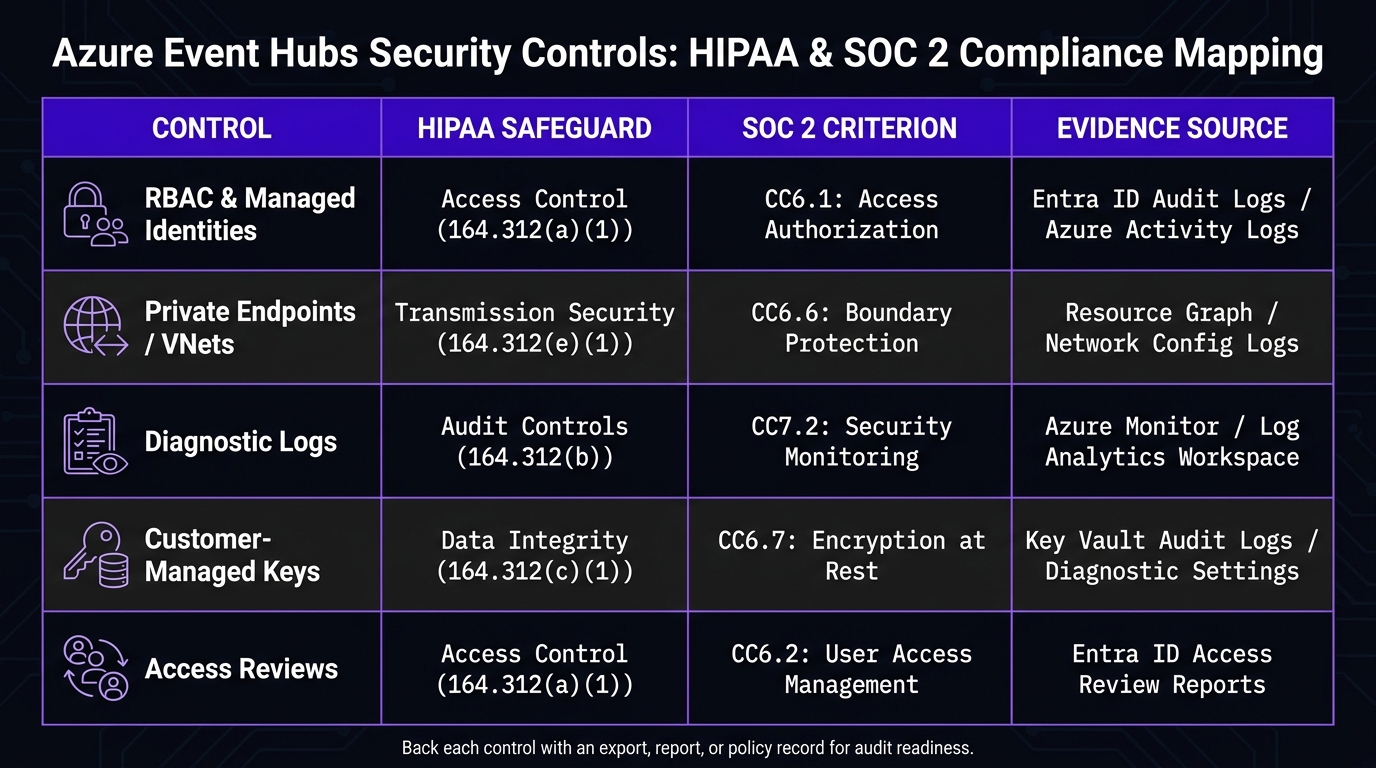
Azure Event Hubs Security Controls: HIPAA & SOC 2 Compliance Mapping
Encryption and network isolation protect data. Logs show what happened.
Enable diagnostic logs and centralize them for review
Turn on Azure Monitor diagnostic settings for every Event Hubs namespace in production. Capture authentication attempts, configuration changes, and odd send/receive activity. Then route those logs to a Log Analytics workspace, Azure Storage for long-term retention, or a SIEM for audit review.
You should log both management-plane changes and data-plane access. That way, auditors can trace who changed the namespace and who touched events.
Alert on failed access, privilege changes, and unusual traffic
Set up alerts for failed logins, unexpected RBAC changes, unusual ingress or egress, and network-rule drift.
Watch for "The operation is not allowed by RBAC" errors. They often point to a broken service identity or an access attempt that should not succeed.
Compliance mapping table: Event Hubs controls to HIPAA and SOC 2
Use this table to map controls to audit evidence.
| Control | HIPAA Safeguard | SOC 2 Criterion | Evidence Source |
|---|---|---|---|
| RBAC & Managed Identities | Access Control (164.312(a)(1)) | CC6.1: Access Authorization | Entra ID Audit Logs / Azure Activity Logs |
| Private Endpoints / VNets | Transmission Security (164.312(e)(1)) | CC6.6: Boundary Protection | Resource Graph / Network Config Logs |
| Diagnostic Logs | Audit Controls (164.312(b)) | CC7.2: Security Monitoring | Azure Monitor / Log Analytics Workspace |
| Customer-Managed Keys | Data Integrity (164.312(c)(1)) | CC6.7: Encryption at Rest | Key Vault Audit Logs / Diagnostic Settings |
| Access Reviews | Access Control (164.312(a)(1)) | CC6.2: User Access Management | Entra ID Access Review Reports |
Back each row with an export, report, or policy record.
Checklist 4: Govern Changes, Set Baselines, and Close Gaps
Logs and encryption help ONLY if the setup stays the same over time. This checklist is about keeping your Event Hubs configuration locked down after the first rollout.
Enforce secure baselines with IaC and Azure Policy
Once your controls are in place, use IaC and Azure Policy to stop drift before it turns into a problem.
Put the approved Event Hubs baseline into Bicep, ARM, or Terraform. Then use Azure Policy to deny unsafe settings and audit approved exceptions. For approved exceptions, run Azure Policy in audit mode so drift stays visible without slowing delivery.
Document runbooks for key rotation, access removal, and incidents
Governance also means having a clear plan when keys, access, or policies need to change. When something goes sideways, no one wants to figure it out on the fly.
Build runbooks for:
- emergency key rotation
- privileged access removal
- incident response
- exception handling
Document the steps for key rotation, access removal, incident response, and exceptions. Use the logs from earlier checklists to support rotation, removal, and incident work.
Management-plane access does not grant data-plane access. That’s a common place teams slip. Your access removal runbook needs to cover both planes on purpose.
Use PIM for temporary admin access.
Conclusion: The short list of controls leaders should verify first
If you need a fast review of your Event Hubs security posture, start with these checks:
- Entra ID and least-privilege RBAC
- Managed identities replace shared keys
- Private endpoints block public access
- Encryption at rest and in transit is confirmed
- Diagnostic logs are centralized
- IaC and Azure Policy enforce the baseline
FAQs
When should I use CMK instead of Microsoft-managed keys?
Use Customer-Managed Keys (CMK) when your organization needs tighter security or compliance controls and direct control over key management. With CMK, you handle key rotation and access through Azure Key Vault.
Microsoft-managed keys are automated and available across all tiers. CMK is only available in the Premium tier, requires managed identities, and adds Azure Key Vault operation costs.
What evidence should I save for HIPAA or SOC 2 audits?
Save proof that security is built into your architecture from day one. That means keeping records that show both how access is controlled and how your team checks, protects, and tracks the system over time.
Keep evidence for:
- Azure RBAC role assignments that follow least privilege, ideally scoped at the individual Event Hub level
- Audit trails from Defender for Cloud and Microsoft Sentinel
- Records showing encryption at rest (AES-256) and encryption in transit (TLS), along with Azure Key Vault rotation logs and HSM backing
- CI/CD pipeline logs that show SAST, DAST, and IaC security gates
This kind of documentation matters when someone asks a simple but loaded question: “Can you prove your controls are in place?” If you have the logs, assignments, and key-management records ready to go, you’re not scrambling for screenshots at the last minute.
How do I remove public access without breaking applications?
Use Private Link and Private Endpoints to keep Event Hubs traffic off the public internet. Start by creating a VNet and subnet. Then set up a Private Endpoint for your Event Hubs namespace so requests go through a private IP on the Microsoft backbone network.
Once the Private Endpoint is approved, update your app connection strings or DNS settings so they point to the private IP. After that, turn off public network access in the namespace settings.


