
If you use Azure Data Factory for PHI, PII, or financial data, focus on four things first: managed identities, Key Vault, private endpoints, and logging.
Here’s the short version: ADF is not just a data mover. It controls pipeline runs, secrets, and access to services like Storage, SQL, Synapse, and Key Vault. That means one weak setting can affect a lot of data at once. By default, ADF uses TLS for data in transit and AES-256 for data at rest, but that alone is not enough for HIPAA, SOC 2, or ISO 27001 reviews.
If I had to reduce the article to a simple checklist, it would be this:
- Use managed identities instead of stored usernames, passwords, or account keys
- Limit access with Entra ID and RBAC so each identity gets only the rights it needs
- Store secrets in Azure Key Vault instead of pipeline code or linked service configs
- Use customer-managed keys if your rules require direct key control
- Use private endpoints and block public access where possible
- Pick the right Integration Runtime model based on cloud-only vs. hybrid data flows
- Turn on diagnostic logs and send them to Log Analytics and Microsoft Sentinel
- Control pipeline changes with Git and approvals so one person cannot push changes alone
A few points matter most in regulated setups:
- Managed identities cut secret sprawl
- Private networking cuts public exposure
- Logging gives you audit evidence
- Change control helps prevent bad pipeline edits
Here’s a quick comparison of the main ADF security focus areas:
| Area | What to use first | Main goal |
|---|---|---|
| Identity | Managed identities + RBAC | Limit access and remove stored credentials |
| Secrets & keys | Key Vault | Keep secrets out of ADF configs |
| Encryption control | CMK if required | Put key control in customer hands |
| Network | Private endpoints + Managed VNet or self-hosted IR | Keep traffic off public paths |
| Monitoring | Log Analytics + Sentinel | Track access, changes, and pipeline activity |
In plain English: lock down who can act, where data can move, where secrets live, and how changes are tracked. That’s the core of Azure Data Factory security.
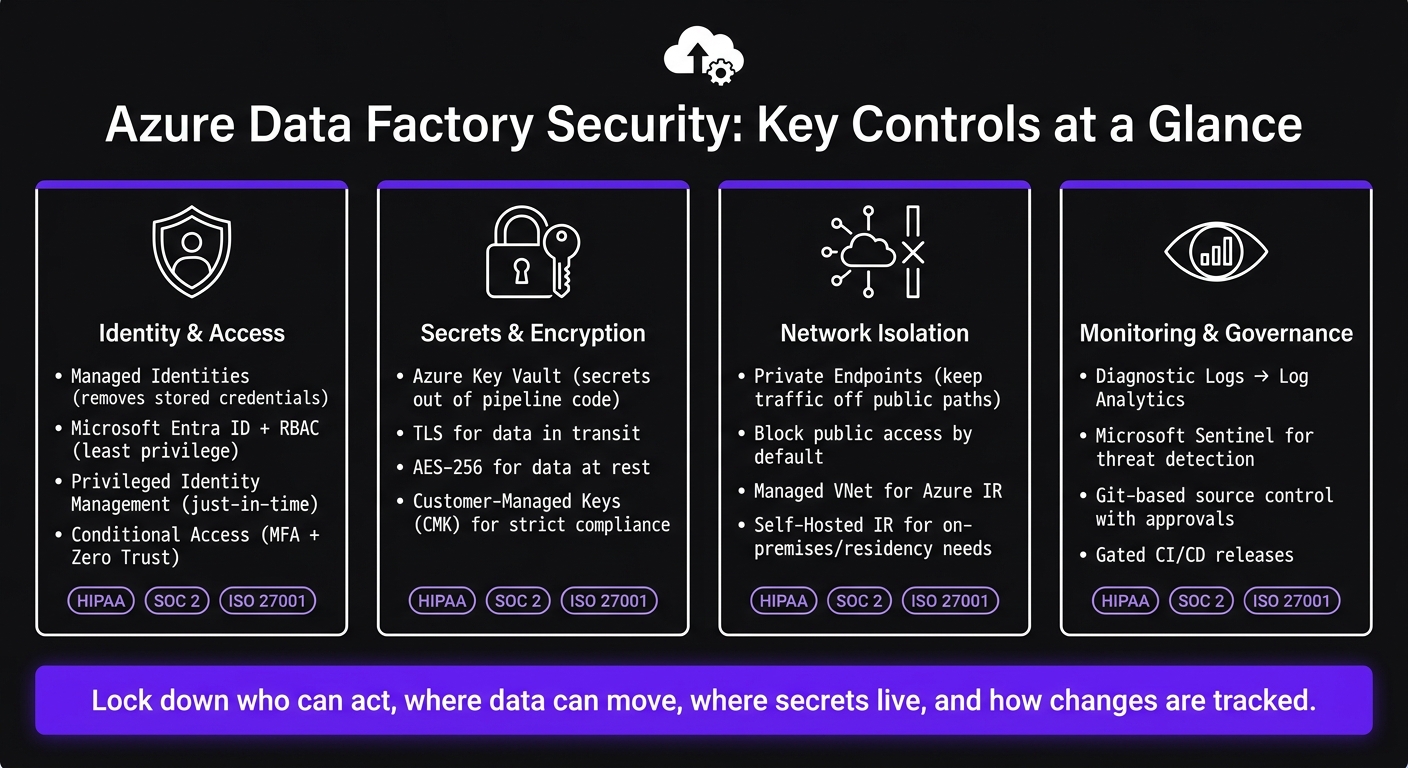
Azure Data Factory Security: Key Controls at a Glance
ADF Security – Managed Identity, Key Vault & RBAC
sbb-itb-79ce429
Identity and Access Control: Microsoft Entra ID, RBAC, and Managed Identities
Identity controls are the first security layer in ADF. They cut risk from over-privileged access and credential sprawl across pipeline orchestration.
Using Microsoft Entra ID and Azure RBAC to limit access
Microsoft Entra ID is the identity layer for ADF. When you pair it with Azure RBAC, you control what each identity can do in ADF. The goal is simple: use least privilege and keep role scope as narrow as you can.
Managed identities for Azure Key Vault, Storage, SQL, and Synapse
One of the biggest security wins here is replacing stored credentials in linked services wherever managed identity auth is supported. ADF can sign in to Azure Key Vault, Storage, SQL, and Synapse through its managed identity, so you don’t need to store passwords in ADF.
Access is then controlled through RBAC roles assigned to that identity. For example, instead of giving ADF an account key with broad storage access, you can assign the Storage Blob Data Reader role on a specific container. That’s a much tighter setup.
ADF supports both system-assigned and user-assigned managed identities.
These controls limit who can reach resources. The next layer is how ADF protects the data and secrets themselves.
Identity patterns for regulated environments
In regulated environments, access control usually needs two more layers: temporary elevation and conditional sign-in.
| Pattern | What It Does | Compliance Relevance |
|---|---|---|
| Managed Identities | Removes stored credentials from linked services | HIPAA, SOC 2, ISO 27001 |
| Least-Privilege RBAC | Scopes permissions by role | HIPAA, SOC 2, ISO 27001 |
| Privileged Identity Management (PIM) | Time-limited admin access, JIT elevation | HIPAA, SOC 2, ISO 27001 |
| Conditional Access | Supports MFA and Zero Trust access controls | HIPAA, SOC 2, ISO 27001 |
Use Privileged Identity Management for just-in-time elevation instead of permanent admin access. Then use Conditional Access to require MFA and other sign-in controls.
Data Protection: Encryption, Credentials, and Customer-Managed Keys
Identity controls decide who gets in. Data protection controls deal with what happens to data and secrets after a pipeline starts running. In Azure Data Factory, that means encryption, credential handling, and who controls the keys.
Encryption in transit and at rest in Azure Data Factory
Azure Data Factory uses TLS for data in transit and AES-256 for data at rest [1]. That default encryption matters. But it’s only one piece of the shared responsibility model.
Key Vault integration and customer-managed keys
A common setup is to store secrets in Azure Key Vault and let ADF reach them through managed identities [1]. This keeps credentials out of pipeline code and config files, which is a big step up from hardcoding secrets. Key Vault also supports rotation and HSM-backed keys for teams with stricter compliance needs [1].
If your organization needs tighter control, customer-managed keys (CMK) let you use keys stored in Azure Key Vault or Managed HSM [1]. That puts key lifecycle settings, access rules, and deletion under your control.
Key ownership and secret storage options
The right setup depends on your compliance needs and how much day-to-day admin work your team can take on.
| Feature | Microsoft-Managed Keys | Customer-Managed Keys (CMK) | Linked service secrets in ADF |
|---|---|---|---|
| Ownership | Microsoft | Customer (via Azure Key Vault) | Microsoft (service-level) |
| Key Rotation | Automatic | Managed by customer | Manual or service-linked |
| Governance control | Low | High | Medium |
| Compliance Fit | Standard cloud security | High for stricter regulatory requirements | Basic governance |
| Operational Effort | Minimal | Requires Key Vault management | Low |
| Where secrets live | Within the service | Not embedded in pipeline code | Within the service |
A good starting point is Key Vault-backed secrets plus managed identities. Use CMK when compliance rules call for customer control over encryption keys. After that, the next layer to look at is network isolation, which limits where encrypted traffic can go.
Network Isolation: Private Endpoints, VNets, and Integration Runtime Security
ADF security starts with one simple idea: control where orchestration traffic can go.
Private endpoints and virtual network design for Azure Data Factory
A private endpoint gives Azure services like Storage, SQL, or Synapse a private IP inside your VNet, which keeps ADF traffic on the Azure backbone [1]. That matters because it cuts public exposure and gives you a tighter network boundary.
A good default is to block public access [1]. From there, use private endpoints with Network Security Groups (NSGs) so you can allow only the internal paths you want and deny the rest. For regulated data pipelines, this is the usual setup. It also affects the next big decision: how you deploy the Integration Runtime.
Securing Azure Integration Runtime and self-hosted Integration Runtime
The Integration Runtime (IR) is the part of ADF that actually moves data. So the IR model you pick directly affects your network posture.
Azure Integration Runtime runs on Microsoft-managed infrastructure. It has low operational overhead, but by default it uses public IP space [1]. If that setup doesn't fit your security needs, turn on Managed Virtual Network so traffic can move through private endpoints and stay inside a private network boundary [1].
If public exposure isn't an option, self-hosted IR is usually the better fit.
Self-hosted Integration Runtime runs on a server you control, either on-premises or inside a private network zone. Use it when data has to remain on-premises or must follow strict residency rules [1]. The tradeoff is simple: you get more control, but you also take on more work. That means placing the host in a controlled network and enforcing firewall rules, patching, and hardening [1].
Public access vs. private endpoints vs. integration runtime models: a comparison
These tradeoffs shape how tightly you can isolate pipeline traffic [1]:
| Configuration | Network Exposure | Security Control | Operational Complexity | Best Fit |
|---|---|---|---|---|
| Azure IR (Public) | Public internet | Basic (IP allowlisting) | Low | Non-sensitive cloud-to-cloud workloads |
| Azure IR + Managed VNet | Private (via Private Endpoints) | High | Medium | Cloud-to-cloud with compliance requirements |
| Self-Hosted IR | Private (on-premises or private network) | Maximum | High | Hybrid, on-premises, or strict data residency needs |
Whichever IR model you use, pair it with private endpoints for downstream services [1]. Once the network path is locked down, the main concern shifts. At that point, the weak spots are usually change control, logging, and access reviews - not routing itself.
Governance, Monitoring, and Conclusion: How the Controls Work Together
Once identity, encryption, and network isolation are in place, the next step is simple: prove the controls are doing their job. That means logs, alerts, and change control.
Logging, alerts, and CI/CD controls for pipeline changes
Turn on diagnostic logs for every ADF instance and send them to a Log Analytics workspace. This creates one central place to review pipeline runs, trigger activity, and configuration changes. You don’t want to hunt through scattered records when something goes wrong.
From there, connect Log Analytics to Microsoft Sentinel. That setup helps security teams watch for:
- identity misuse
- unauthorized pipeline changes
- IR failures
- unexpected data movement
For deployments, treat pipeline definitions like code. Use Git-based source control with mandatory approvals, and keep authorship separate from approval. In plain English: the person who makes a change shouldn’t be the only one signing off on it.
Gated CI/CD releases, along with artifact signing, add another check before anything reaches production. That helps block unauthorized changes from slipping through. Use classification to track sensitive data as it moves through pipelines.
These controls also serve as audit evidence.
Mapping Azure Data Factory features to HIPAA, SOC 2, and ISO 27001 controls
Each ADF security feature lines up with specific compliance requirements. Here’s where those controls fit:
| ADF Security Feature | HIPAA | SOC 2 | ISO 27001 |
|---|---|---|---|
| Managed Identities / RBAC | Access Control & Identity Verification | Logical Access & Least Privilege | User Access Management (A.9.2) |
| Private Endpoints / VNets | Transmission Security | Network Security & Boundary Protection | Network Security Management (A.13.1) |
| Customer-Managed Keys | Encryption of PHI at Rest | Confidentiality & Data Protection | Cryptographic Controls (A.18.1) |
| Azure Monitor / Log Analytics | Audit Controls & Activity Logs | Monitoring & Evaluation of Controls | Logging and Monitoring (A.12.4) |
| Azure Key Vault | Key Management & Rotation | Protection of System Credentials | Management of Secret Auth Info (A.9.4) |
Conclusion: Azure Data Factory security features to prioritize first
Start with managed identities, Key Vault, private endpoints, and monitoring. These controls support each other in a practical way. Identity limits who can act. Encryption protects what they touch. Network isolation restricts where data can move. Monitoring makes sure the whole stack stays accountable over time.
FAQs
When should I use CMK in ADF?
Use Customer-Managed Keys (CMK) in Azure Data Factory when your organization needs full control over the encryption keys that protect its data. This usually comes up when strict regulatory rules or internal compliance policies are in play.
With CMK, you handle key rotation and revocation through Azure Key Vault instead of relying on Microsoft-managed keys. That extra control matters most in fields like financial services and healthcare, where security, data residency, and governance rules tend to be much tighter.
Which IR model is most secure?
No single Information Retrieval (IR) model is the “most secure.” In Azure, security depends far more on how you set things up than on the IR model itself.
The big levers are architecture and identity controls.
Use Managed Identities so you don’t have to rely on static credentials. Enforce encryption at rest and in transit. Use Private Endpoints to cut down network exposure. Then lock access down with least-privilege permissions through Role-Based Access Control and Microsoft Entra ID.
What logs should I enable first?
Start with logs that create a clear, auditable trail of system activity. Use Defender for Cloud and Microsoft Sentinel to track posture alerts and keep logs secure and easy to access during audits.
For data transfers and processing, use logs and monitoring to check data integrity and confirm that files and metadata arrive intact. These records also support security compliance and performance tracking.


