
Managing data across multiple platforms can be slow and disconnected. Azure Synapse Analytics solves this by combining data ingestion, transformation, and analytics into one workspace. With tools like Spark Structured Streaming and Delta Lake, you can handle both batch and real-time data efficiently, all in a single platform.
Key Takeaways:
- Real-time streaming: Process data with latencies as low as 1 millisecond.
- Unified tools: Synapse Studio integrates data engineering, analytics, and visualization.
- Flexible compute options: Choose between Dedicated SQL, Serverless SQL, or Spark Pools based on workload needs.
- Cost management: Serverless SQL Pools charge $5 per terabyte scanned, saving costs for ad-hoc queries.
- Governance: Microsoft Purview ensures secure and compliant workflows.
Learn how Synapse enables seamless workflows for real-time insights, efficient batch processing, and scalable analytics - all while simplifying operations and reducing costs.
Let's Build A...Streaming Data Solution using Azure Synapse Analytics Serverless SQL Pools
sbb-itb-79ce429
Core Components of Azure Synapse for Data Workflows
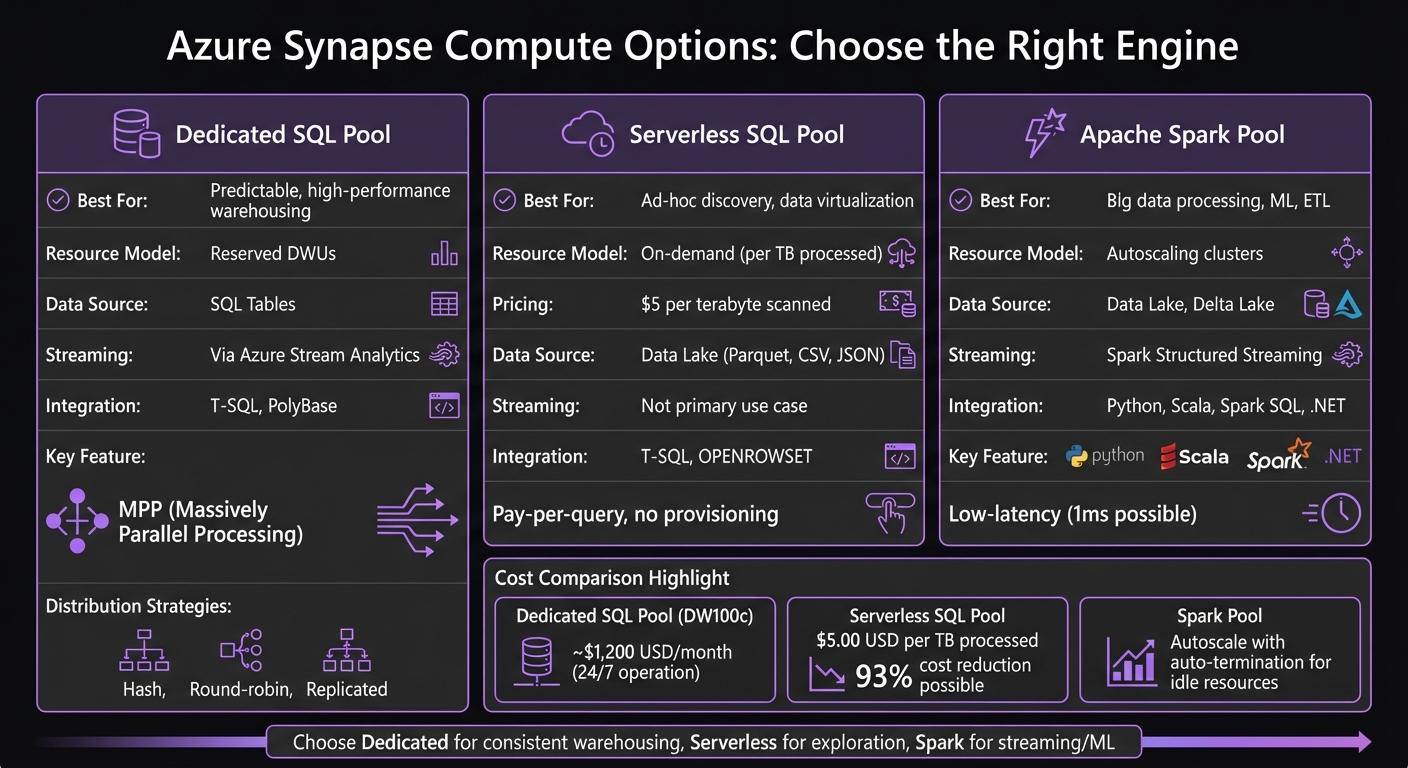
Azure Synapse Compute Options Comparison: SQL Pools vs Spark
Azure Synapse Analytics combines three key elements into a cohesive system: Synapse Studio for centralized management, Azure Data Lake Storage for scalable storage, and three compute options tailored for different workloads. Together, these components streamline workflows for both batch processing and real-time streaming without the need for multiple tools.
Synapse Studio: Your Central Hub
Synapse Studio acts as a unified, web-based workspace where data engineers, analysts, and business users collaborate. Engineers can work with Spark notebooks, analysts can query using SQL, and business users can create visualizations - all in one place. This eliminates the hassle of juggling different tools.
The platform connects to external data sources through Linked Services, reusable connection setups that work seamlessly across pipelines and notebooks [3]. It also features monitoring dashboards to oversee pipeline execution, query performance, and resource usage.
Azure Data Lake: The Storage Backbone
Azure Data Lake Storage Gen2 underpins Synapse workflows, accommodating everything from raw event data to polished analytics tables. Its decoupled design allows compute resources to scale independently, and you can pause compute operations to save costs while keeping your data intact [4].
Data is typically divided into three zones:
- Raw: Houses unprocessed source data.
- Curated: Stores cleaned and transformed data.
- SQL Pool: Optimized for analytics with star schemas [3].
For streaming workflows, the Delta Lake format adds features like ACID transactions and row versioning, ensuring reliability for both batch and real-time pipelines [2][3]. Additionally, Spark Structured Streaming uses a checkpoint location within the storage layer to track progress and maintain fault tolerance during job failures [2].
Compute Options: Tailored for Every Need
Synapse provides three compute engines, each suited to specific types of workloads:
-
Dedicated SQL Pools: These leverage Massively Parallel Processing (MPP) to break queries into smaller tasks for faster execution [4]. Ideal for high-performance data warehousing, they use distribution strategies like Hash (for large joins), Round-robin (for staging), or Replicated (for reference tables) [4]. Tools like the
COPY INTOstatement or PolyBase can handle large-scale data loading efficiently [3]. -
Serverless SQL Pools: These are cost-effective, charging only for the data scanned (per terabyte). They allow users to query data directly from the data lake using T-SQL and
OPENROWSET. This makes them perfect for quick data exploration and virtualization without needing to provision resources upfront. - Apache Spark Pools: Designed for big data processing and machine learning, Spark Pools provide autoscaling clusters that support Python, Scala, Spark SQL, and .NET. They excel in low-latency streaming scenarios and incremental ETL pipelines, with Spark Structured Streaming offering fault tolerance and change tracking via logs [2].
| Feature | Dedicated SQL Pool | Serverless SQL Pool | Apache Spark Pool |
|---|---|---|---|
| Best For | Predictable, high-performance warehousing | Ad-hoc discovery, data virtualization | Big data processing, ML, ETL |
| Resource Model | Reserved DWUs | On-demand (per TB processed) | Autoscaling clusters |
| Data Source | SQL Tables | Data Lake (Parquet, CSV, JSON) | Data Lake, Delta Lake |
| Streaming | Via Azure Stream Analytics [4] | Not primary use case | Spark Structured Streaming [2] |
| Integration | T-SQL, PolyBase | T-SQL, OPENROWSET | Python, Scala, Spark SQL, .NET |
Whether you need the consistent performance of Dedicated SQL Pools, the flexibility of Serverless SQL Pools, or the power of Spark Pools for complex processing, Azure Synapse has you covered. These components provide a solid framework for building ingestion and streaming pipelines effectively.
Building Data Ingestion and Streaming Pipelines
To handle batch ingestion effectively, Synapse Pipelines can be configured for tasks like incremental loading. By leveraging watermark columns such as LastModified, you can ensure only new or updated records are processed [3]. For high-performance data loading into dedicated SQL pools, tools like COPY INTO or PolyBase come in handy [3][1]. Automate these workflows using Schedule triggers for fixed intervals or Tumbling Window triggers for sequential, time-series-based processing [3]. While batch processes are ideal for periodic loads, they are not suited for real-time demands, which require a different approach.
"The key to a reliable ETL pipeline is incremental loading, proper error handling, and idempotent design so failures are recoverable without manual intervention." - Nawaz Dhandala, Author [3]
Real-time streaming, on the other hand, is all about continuous data processing for instant insights. Apache Spark Structured Streaming supports this with ultra-low latency, sometimes as low as 1 millisecond, using its continuous processing mode [2]. You can write streaming logic in PySpark, Scala, or SQL notebooks. Start by connecting to data sources like Event Hubs or IoT Hub using spark.readStream, then apply transformations via DataFrame APIs or SQL [2]. The writeStream API defines where the output should go, and specifying a checkpoint location ensures fault tolerance by tracking ingestion progress and enabling recovery from failures [2].
To ensure streaming jobs are running smoothly, monitor them using tools like the streaming handle (df.isActive) [2]. It’s also essential to design pipelines with idempotency in mind - using merge or upsert operations prevents duplicate data. Always maintain a raw copy of the data for auditing purposes [3]. Both batch and real-time methods can be integrated seamlessly within Synapse to create unified, end-to-end workflows for data ingestion and transformation.
Comparing Batch Ingestion and Real-Time Streaming
| Feature | Batch Ingestion (Synapse Pipelines) | Real-Time Streaming (Spark/ASA) |
|---|---|---|
| Latency | Minutes to hours | Seconds to milliseconds |
| Volume | Large, periodic loads | Continuous, high-frequency events |
| Engine | Data Factory Integration Engine | Apache Spark or Azure Stream Analytics |
| Source Examples | SQL DB, SAP, Parquet files, REST APIs | Event Hubs, IoT Hub, Kafka |
| Use Case | Daily reporting, historical analysis | Fraud detection, real-time dashboards, IoT |
To ensure reliability, configure Azure Monitor alerts to detect pipeline failures early. Use Managed Identities for secure authentication between Synapse and Azure Data Lake Storage, eliminating the need for hardcoded credentials [3]. These practices help maintain robust and efficient data workflows, from ingestion to transformation, ensuring seamless operations.
Transforming and Analyzing Streaming Data
Delta Lake for Batch and Streaming Data
Delta Lake serves as a unified storage solution for both batch and streaming workloads. With Spark Structured Streaming in Synapse, you can directly interact with Delta format, enabling ACID transactions and row versioning for real-time data ingestion [2]. This capability allows you to update, delete, or merge streaming records while maintaining data consistency - something traditional file formats often struggle to achieve. Combined with Delta Lake's time travel functionality, it becomes an ideal choice for applications requiring both high throughput and reliable data consistency. These transformation tools work seamlessly with on-demand querying and visualization, allowing for immediate insights into your data.
Serverless SQL Pools for On-Demand Analytics
After transforming your data, on-demand analytics provide a way to explore and validate it. Serverless SQL pools offer instant access to streaming data without the need for infrastructure setup or startup time. These pools are always ready and charge based on the volume of data processed, typically measured per terabyte scanned [2][5]. This makes them an excellent option for validating streaming sinks like Delta tables created by Spark jobs or ensuring data quality for downstream processes [2][5]. You can also use serverless SQL pools to run exploratory queries on streaming data stored in your Data Lake, querying formats like CSV, Parquet, or Delta files using familiar T-SQL syntax. The pay-per-query model helps control costs by avoiding expenses tied to idle compute resources.
Power BI Integration for Real-Time Dashboards
Power BI integration makes it possible to monitor streaming metrics in real time. For instance, in November 2022, Vinny Paluch implemented a solution using Delta Lake and Azure Synapse for a retail market application. This system handled between 300 million and 1 billion rows annually per client and dramatically reduced data delivery times for exploratory analytics - from weeks to the same day [6].
"Our architecture enables business consultants to query data and perform exploratory analytics within a few days instead of requiring weeks in the past." - Vinny Paluch, Solutions Architect [6]
To simplify the workflow, Synapse pipelines can orchestrate the entire process - from data extraction to loading curated streaming data into dedicated SQL pools using the COPY INTO statement. This method is faster and easier than PolyBase for bulk loading [3]. As a result, Power BI dashboards always reflect the most up-to-date, validated data, giving business users confidence in the metrics they rely on. This integration not only enhances real-time visibility but also optimizes and monitors Synapse streaming workflows effectively.
Optimization and Best Practices for Synapse Streaming
Optimizing Synapse streaming ensures seamless data workflows that balance performance, compliance, and cost efficiency.
Scaling Compute and Storage Independently
Azure Synapse takes a flexible approach by separating the query engine from persistent storage. This means you can scale compute and storage independently. Data is stored in Azure Data Lake Storage Gen2 (ADLS Gen2), while compute resources like Serverless SQL and Spark pools activate only when needed for processing tasks [7]. This design prevents you from paying for compute resources when they’re idle.
For example, you can define views directly over files in formats like Parquet, Delta Lake, or CSV, eliminating the need for duplicate data storage. If you’re dealing with unpredictable reporting workloads, switching from a dedicated DW100c SQL pool (which costs around $1,200 USD per month if operated 24/7) to a Serverless SQL pool can slash costs by up to 93% [7].
"The pricing model for Serverless SQL Pools is radically simple: $5.00 USD per Terabyte (TB) of data processed." – Jesse Ruiz, Data Engineer, The Atlantic [7]
Here’s a quick comparison between Serverless and Dedicated SQL Pools:
| Feature | Serverless SQL Pool | Dedicated SQL Pool |
|---|---|---|
| Cost Model | Pay-per-query ($5/TB scanned) | Provisioned hourly rate |
| Storage | External (ADLS, Cosmos DB) | Local columnar storage |
| Scaling | Automatic/On-demand | Manual or automated pause/resume |
| Best Use Case | Ad-hoc discovery, bursty reporting | Large-scale, consistent data warehousing |
This architecture not only optimizes costs but also ensures scalability for varying workloads.
Data Governance and Compliance with Microsoft Purview
To maintain data integrity and meet compliance standards, Microsoft Purview offers comprehensive governance tools for Synapse streaming workflows. When handling sensitive data through Change Data Capture (CDC), adopting robust governance measures is critical [1].
Purview works seamlessly with Azure role-based access control (RBAC), allowing you to set precise permissions for workspace resources [1]. To further secure your workflows, integrate Virtual Networks and use Managed Identities for authentication [1]. These measures create a layered security framework, ensuring sensitive data remains protected while still accessible to authorized users.
Monitoring and Cost Management in Synapse Studio
Synapse Studio provides tools to monitor and manage your streaming jobs effectively. Use metrics like isActive and status to keep track of job performance [2]. Setting a checkpoint location ensures fault tolerance, so your workflows can recover smoothly from interruptions [2].
For cost management, Serverless SQL pools charge $5.00 USD per terabyte of processed data, with no recurring monthly fees [7]. You can also enable autoscale and auto-termination for idle Spark pools to avoid unnecessary expenses. The Monitor hub in Synapse Studio gives you complete visibility into your active streams, helping you stay on top of performance and spending [2].
Use Cases for Unified Streaming Workflows
Batch vs. Streaming Workflows Comparison
When deciding between batch and streaming workflows, the key factor to consider is how quickly you need your data to be processed. Batch processing is ideal for scenarios where delays are acceptable, such as nightly ETL jobs that aggregate large datasets. On the other hand, streaming processing is the go-to choice for situations requiring instant insights, like identifying fraudulent transactions in real time.
The two approaches differ significantly in how they operate. Batch workflows run at scheduled intervals (e.g., hourly or daily), processing data in chunks that accumulate over time. Streaming workflows, however, operate on a continuous basis, ingesting and transforming data as soon as it arrives.
"Architecture is about constraints - not just capabilities" [8].
Ultimately, the decision should align with your business goals and operational needs, rather than simply focusing on what’s technically feasible. Recognizing these differences helps in tailoring workflows to meet specific industry demands, laying the groundwork for real-world applications.
Industry Applications and Implementation Examples
The choice between batch and streaming workflows has a direct impact on how industries implement unified streaming solutions. Let’s explore how this plays out in healthcare and financial services.
Healthcare organizations are leveraging unified streaming workflows to address operational challenges in real time. For instance, during flu season, hospitals monitor patient admissions and bed availability to handle sudden surges efficiently [8]. These workflows are designed to achieve data ingestion latencies of under 10 seconds, with data cleaning in the Silver layer completed in less than 45 seconds [8]. Instead of discarding problematic records, healthcare systems add a _dq_flags column to track data issues, creating a clear audit trail [8].
Financial services employ similar strategies to enhance fraud detection and anomaly monitoring. Real-time transaction tracking demands both speed and traceability, which is why regulated industries prioritize architectures that flag problematic data rather than discarding it. This ensures every data correction is fully traceable, meeting strict compliance requirements while maintaining efficiency [8].
"Break it. Inject bad data. Hit service limits. Design for failure. That's where real data engineering begins" [8].
Testing workflows under failure conditions is essential to ensure they can handle real-world challenges when it matters most.
Next Steps
To successfully transition to unified data workflows, it's essential to focus on key configurations and ensure secure operations. One critical step is specifying a checkpoint location in Spark Structured Streaming. This allows you to track progress and recover from interruptions, adhering to fault tolerance principles discussed earlier[2]. By doing so, you can safeguard against data loss and ensure your pipelines resume smoothly after any disruptions.
Equally important is implementing secure identity management. The following roles are vital for managing resource access and executing tasks within Synapse workflows:
| Role/Identity | Purpose in Synapse Workflow |
|---|---|
| Managed Identity | Serves as an administrator to securely access resources |
| Synapse Workspace SP | Handles script and pipeline execution once published |
| Data Factory SP | Executes triggers in response to storage events |
| User Identity | Used for manual script execution and unit testing |
Once secure identities are established, you can move from pilot testing to full-scale production. This transition is critical for operational success. AppStream Studio supports this process for mid-market organizations using the Microsoft stack. Their approach accelerates production-ready data unification and AI solutions, delivering results in weeks instead of months. Their senior engineering teams oversee the entire lifecycle - from strategic planning and architecture to security optimization and operational handoff - while ensuring compliance and traceability. This is especially important for industries like healthcare and finance, where regulatory requirements are stringent.
Begin with a pilot project that uses realistic business data. For example, test with datasets comparable to the 59 million-row Synapse benchmarks. Continuous processing can achieve latencies as low as 1 millisecond[2]. Evaluate your system's latency, throughput, and recovery times against your operational needs before scaling the solution across your organization.
FAQs
When should I use Dedicated SQL vs Serverless SQL vs Spark?
Choose Dedicated SQL pools when you need a high-performance, scalable data warehousing solution. These are best suited for handling predictable workloads and structured data.
Use Serverless SQL pools for ad-hoc queries on external data. This option works well for exploratory analysis and offers a cost-efficient pay-per-query model.
Opt for Spark pools if you're tackling advanced data engineering, real-time processing, or machine learning tasks that involve unstructured or semi-structured data.
Each of these options caters to specific needs, seamlessly fitting into unified data workflows.
How do I prevent duplicates in Synapse streaming pipelines?
To prevent duplicates in Synapse streaming pipelines, it's crucial to adopt strategies that handle common challenges like at-least-once delivery guarantees or pipeline restarts. Here are some effective practices:
- Track processed messages: Use stateful processing or external storage to keep a record of messages that have already been processed.
- Filter duplicates: Leverage unique identifiers or timestamps to identify and remove duplicate entries.
- Manage restarts: Configure start options thoughtfully to handle pipeline restarts without reprocessing data unnecessarily.
These approaches work together to maintain data accuracy and avoid duplicate record processing.
What’s the best way to query Delta Lake data with Serverless SQL?
The most effective method to query Delta Lake data using Serverless SQL in Azure Synapse is through T-SQL queries directly on Delta Lake files stored in Azure Data Lake. This takes advantage of the serverless SQL pool's ability to read Delta Lake files natively, eliminating the need for data movement and making the querying process both efficient and simple.


