
Microsoft Purview solves the chaos mid-sized organizations face when managing scattered data across cloud platforms, on-premises servers, and third-party tools. It automates data discovery, compliance, and governance, making it easier to locate sensitive information, track data flow, and ensure regulatory adherence.
Here’s what you need to know:
- Data Discovery: Automatically scans and catalogs assets across Azure, AWS, SQL Server, and more.
- Compliance Tools: Identifies sensitive data (e.g., PII, PHI) and enforces policies for GDPR, HIPAA, and similar regulations.
- Data Quality Monitoring: Evaluates data for accuracy, consistency, and completeness with AI-powered checks.
- Lineage Tracking: Visualizes data flow, transformations, and dependencies to simplify troubleshooting and impact analysis.
- Access Control: Uses role-based permissions to secure sensitive data and maintain clear audit trails.
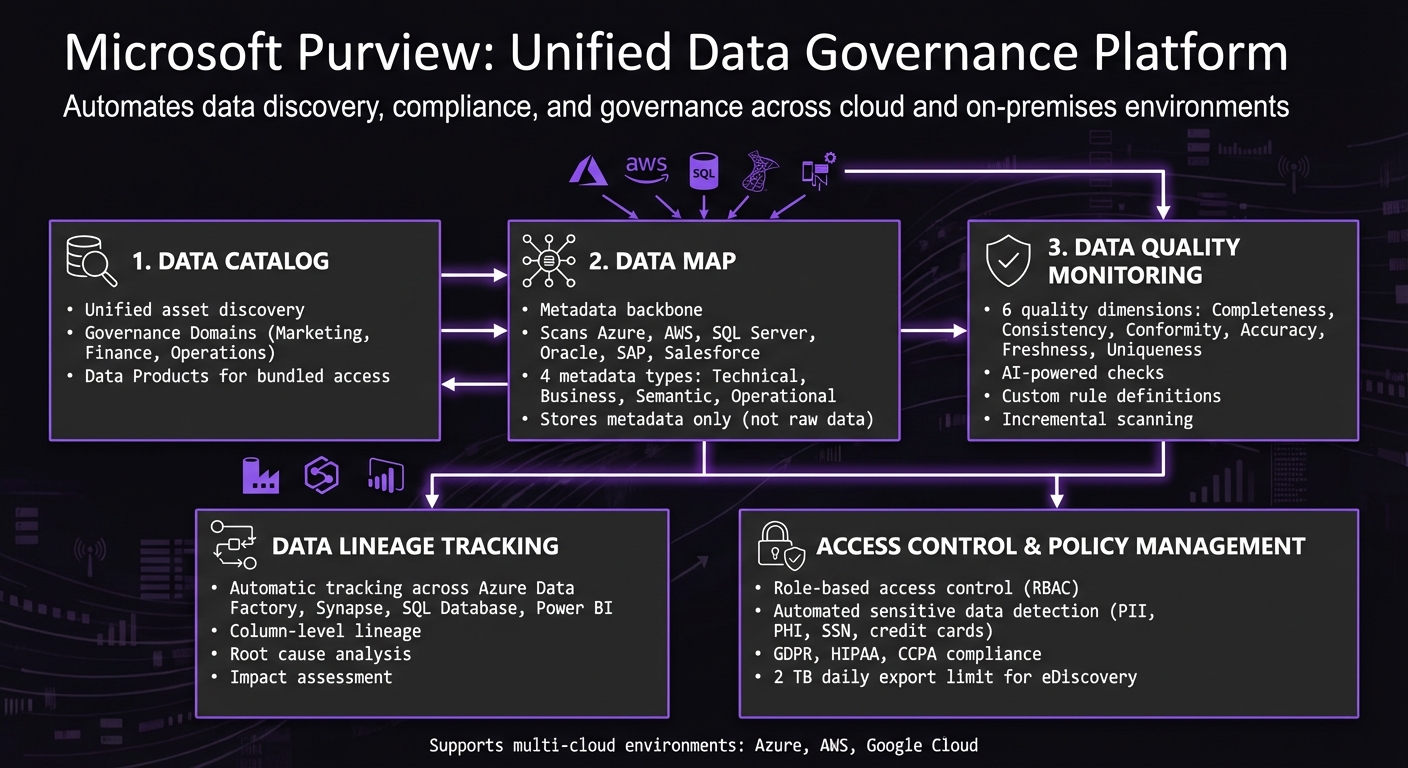
Microsoft Purview Core Components and Capabilities Overview
Data security and governance in the age of AI with Microsoft Purview | BRK251
sbb-itb-79ce429
Core Capabilities of Microsoft Purview
Microsoft Purview simplifies data management and governance using three main components: a Data Catalog for discovering assets, a Data Map for organizing metadata, and Data Quality Monitoring tools to ensure data reliability. Together, these tools help businesses maintain control over their data, even in complex and fragmented environments.
Data Catalog for Asset Discovery
The Unified Catalog consolidates access to an organization’s entire data estate. Instead of navigating multiple systems, Purview organizes data into Governance Domains - logical groupings like Marketing, Finance, or Operations. For example, a CFO searching for "revenue by region" can quickly find relevant data without needing to know the exact database or table where it resides.
Purview’s Data Products take this a step further by bundling related assets - such as tables, files, and Power BI reports - into a single package tailored to specific business needs. For instance, a data analyst can request access to the complete "Customer 360" data product in one go, eliminating the hassle of requesting permissions for individual resources and speeding up workflows.
Complementing this discovery process, the Data Map organizes metadata, making it easier to locate and understand data assets.
Data Map for Metadata Management
The Data Map acts as the foundation for managing metadata, scanning data from a wide range of sources. These include on-premises systems like SQL Server and Oracle, multicloud platforms such as AWS S3 and Google BigQuery, and SaaS applications like SAP and Salesforce. It handles various types of metadata, including:
- Technical metadata: Information like schemas and data types.
- Business metadata: Glossary terms and descriptions.
- Semantic metadata: Collection mappings.
- Operational metadata: Classifications and other governance details.
"The Data Map is the metadata backbone of Microsoft Purview. It discovers, catalogs, and classifies information... enabling consistent governance and search across the estate." - Azam Qureshi, CTO and Co-Founder, Intradyn [1]
Purview uses a federated model with Domains and Collections, allowing central IT teams to oversee governance while delegating day-to-day management to specific business units. This prevents configuration sprawl and maintains a clear audit trail. Notably, the Data Map stores only metadata and schema details - not raw data - helping to control storage costs and minimize security risks.
Data Quality Monitoring Tools
Purview also ensures data integrity through its quality monitoring capabilities.
It evaluates data across six key dimensions: completeness, consistency, conformity, accuracy, freshness, and uniqueness. Custom rules - like verifying phone numbers follow U.S. formats - can be defined, or users can rely on AI-generated recommendations for quality checks based on existing schemas. Incremental scans allow teams to focus on specific tables or columns, reducing both costs and processing time.
Dashboards provide Data Quality Stewards with insights into potential issues, such as incorrect addresses or IDs that could lead to non-compliance with regulations like GDPR or HIPAA. By offering a clear view of data health as it moves from source systems to reports, Purview helps teams catch and address problems before they impact critical dashboards or AI models.
Data Lineage and Governance Controls
Building on Purview's asset discovery and metadata management capabilities, these features are designed to maintain data accuracy and ensure compliance.
Data Lineage Tracking
Purview automatically tracks data movements and transformations across Microsoft services. When integrating tools like Azure Data Factory (ADF), Synapse Pipelines, Azure SQL Database, and Power BI, the platform captures every transformation, join, and filter - no custom coding required [2]. This automation eliminates the guesswork in tracing data origins and flow, making it easier to conduct root cause analysis when discrepancies arise and to assess potential impacts before making schema changes.
"When a business analyst asks 'where does this number come from?' and you cannot answer confidently, you have a lineage problem." - Nawaz Dhandala, Author [2]
For ADF Data Flows, Purview provides column-level lineage, clearly mapping inputs to outputs. If you're working with non-automated sources, such as custom Python scripts or third-party ETL tools, you can manually push lineage data using the Apache Atlas API [2].
This comprehensive visibility is a game-changer. For instance, if a dashboard displays incorrect revenue figures, you can trace the issue upstream through the lineage map to find the root cause. On the flip side, before altering a database schema, you can trace downstream to identify all reports, models, or processes that rely on that structure [2].
Such detailed insights into data flow lay the groundwork for implementing effective access controls and governance policies.
Access Control and Policy Management
Purview ensures security through role-based access control (RBAC) and data classification - a must for organizations in regulated industries. Built-in and custom classifiers automatically detect sensitive data, including Social Security numbers, credit card information, or health records. Once identified, this data can trigger retention policies, Data Loss Prevention (DLP) rules, and compliance measures required by frameworks like GDPR or HIPAA [1].
To maintain clarity and accountability, avoid assigning broad access to large groups. Instead, delegate permissions by collection, which keeps the audit trail clean and manageable [1]. Central IT teams can define overarching policies, while domain experts handle day-to-day governance tasks, balancing oversight with operational flexibility.
"Domains and collections aren't optional - they're the scaffolding that makes Purview manageable in enterprise environments." - Azam Qureshi, Chief Technology Officer and Co-Founder, Intradyn [1]
For teams managing large-scale eDiscovery, Microsoft Purview enforces a daily export limit of 2 TB per tenant. Compliance administrators handling investigations must split exports by date range or custodian to stay within this limit [1]. This level of precision ensures thorough compliance and governance across the organization.
How to Implement Microsoft Purview
Mid-sized organizations can roll out Microsoft Purview in just a few weeks by taking a step-by-step approach. The focus should be on setting up roles, scanning data, and ensuring seamless integration with existing Azure setups.
Setting Up Roles and Permissions
Start by assigning the Data Governance Administrator role to key team members. This role is responsible for creating collections, defining policies, and managing data classification. To keep things organized and auditable, delegate permissions at the collection level.
It's also important to distinguish between organization-wide policies and governance tailored to specific domains. Central teams should handle sensitive data policies that apply across the board, while individual business units take charge of cataloging and updating metadata for their own collections.
Scanning and Cataloging Data Sources
Once roles are in place, move on to registering data sources. You’ll need details like connection strings, resource names, and authentication credentials. Scanning is where Purview really shines - it extracts metadata, schemas, and classifications automatically [3].
During a scan, Purview uses machine learning to identify table names, data types, foreign key relationships, and even potential PII (personally identifiable information) [3]. The best part? It classifies data by sampling it, without making copies of the actual data [3].
For organizations that don’t have the internal resources to manage this process, there are streamlined deployment options available.
Working with AppStream Studio for Faster Deployment

Many mid-sized organizations using the Microsoft stack may find it challenging to configure Purview alongside Azure, .NET, and SQL workloads. That’s where AppStream Studio comes in. They handle the entire deployment process, including setting up collections, scans, lineage mapping, and RBAC (Role-Based Access Control) integration.
AppStream Studio has extensive experience in industries like financial services and healthcare, where strong data governance is non-negotiable. Their approach ensures quick cataloging, clear audit trails, and scalable governance. Instead of juggling multiple vendors or dealing with drawn-out consulting projects, you work with a single team that knows the Microsoft ecosystem inside out.
For organizations with scattered data across subsidiaries, AppStream Studio’s deployment brings everything under one Purview instance. At the same time, it allows domain-level autonomy, striking a balance between centralized control and operational flexibility. This setup ensures Purview works effectively in practical, complex environments.
Best Practices for Microsoft Purview
After setting up Microsoft Purview, you can follow these strategies to improve scanning efficiency and automate security measures.
Choosing Between Full and Incremental Scans
Full scans are ideal for specific situations like the initial setup, making significant rule changes, or conducting a comprehensive audit. These scans capture everything - metadata, schemas, and historical data - but they come with high costs and can take as long as seven days. Use them sparingly for when you need a complete picture.
For regular monitoring, incremental scans are a more practical option. These scans only target new or modified data, which helps keep costs manageable and speeds up processing. If your organization deals with large datasets that don’t frequently change, incremental scans are a solid choice for balancing accuracy and efficiency. Depending on how often your data changes, you can schedule these scans on a daily or weekly basis.
AI-Powered Features and Security Copilot
Purview's trainable classifiers simplify the process of identifying sensitive data like financial records or proprietary code. This reduces the risk of errors in manual tagging. Pair these classifiers with sensitivity labels - such as Public, Confidential, or Highly Confidential - to enable automated protections like encryption or access restrictions [4].
"Labeling acts as a defense-in-depth measure. It ensures that sensitive data is clearly marked and can trigger additional protections like encryption or access restrictions." - René Bremer, Data Solution Engineer, Microsoft [4]
Routine governance tasks can also be automated using the Az.Purview PowerShell module or REST APIs. These tools can handle processes like setting up mailboxes, updating catalog entries, or rotating retention policies. As Azam Qureshi, CTO at Intradyn, notes:
"Manual administration does not scale. By leveraging PowerShell or REST APIs, IT teams can automate recurring tasks... [to lower] the risk of configuration drift" [1]
For industries with strict regulatory requirements, like healthcare or finance, Private Endpoints provide an added layer of security. They restrict Purview traffic to a private Azure Virtual Network, reducing exposure to potential threats [1].
Conclusion
Microsoft Purview simplifies compliance and data governance for mid-market companies, eliminating the need for extensive custom development. Its AI-driven discovery tools automatically identify and label sensitive data across your Microsoft ecosystem, while the Data Map acts as a centralized hub for metadata management. For teams navigating regulations like GDPR, HIPAA, or CCPA, this approach cuts down on manual effort and helps address compliance challenges effectively. Beyond compliance, it also lays the groundwork for smoother operations.
The platform’s catalog and automated workflows empower business users to independently locate and request data through an intuitive portal. Additionally, data quality tools provide proactive alerts on potential issues, enabling teams to resolve them before they disrupt reporting or analytics.
To avoid unexpected costs, keep an eye on your CU consumption. For added security, deploying private endpoints ensures that data traffic stays within your Azure Virtual Network, reducing exposure to potential threats [1].
If you’re looking to accelerate your modernization efforts, working with experts can make all the difference. AppStream Studio specializes in helping mid-market organizations achieve faster results with Microsoft technologies. Their experienced engineering teams deliver measurable outcomes - like unified data systems and governed AI automation - within weeks, not months. They manage the entire implementation process across Azure, .NET, and SQL, bypassing common vendor delays to get your solutions up and running quickly.
As previously mentioned, automating repetitive tasks using PowerShell or REST APIs ensures consistency and reliable audit trails. Delegating permissions at the collection level further strengthens governance by maintaining clear accountability. When configured correctly, Microsoft Purview becomes a cornerstone for scalable and effective data governance strategies.
FAQs
What should we scan first in Purview?
To get started, scan your data sources using Microsoft Purview to bring in metadata. This process helps you create a comprehensive inventory of assets while improving performance, ensuring security compliance, and boosting operational efficiency.
How does Purview classify sensitive data without copying it?
Microsoft Purview identifies sensitive data by using automated classification rules during scans of data sources. It applies labels based on either predefined or custom rules and attaches sensitivity labels as metadata to the data assets. This approach ensures that sensitive data is categorized and safeguarded while leaving the original data intact and unchanged.
What are the biggest Purview cost drivers to watch?
The primary expenses associated with Microsoft Purview revolve around data governance processing units (DGPUs), asset scanning, and data map usage. Since costs are determined by actual usage and tiered pricing structures, keeping a close eye on these factors is key to controlling your spending efficiently.


