
Azure Event Grid simplifies event-driven communication in distributed systems, allowing services to publish and subscribe to events without direct dependencies. It uses five core components - events, event sources, topics, event subscriptions, and event handlers - and supports three main patterns to address various system needs:
- Fan-Out Pattern: Distributes a single event to multiple subscribers simultaneously, ideal for tasks like order processing or media uploads.
- Event Routing Pattern: Directs events from multiple sources to specific destinations based on predefined rules.
- Event Filtering Pattern: Ensures subscribers only receive relevant events, reducing unnecessary processing.
With subsecond latency, automatic scaling, and at-least-once delivery, Event Grid is designed to handle high event volumes effectively. Each pattern offers unique benefits and challenges, from scalability to implementation complexity. The right choice depends on your system's requirements, and combining patterns can further optimize performance.
Mastering Azure Event Grid | Topics, Subscriptions, Publishers & Handlers Explained (Live Demo)
sbb-itb-79ce429
1. Fan-Out Pattern
The Fan-Out pattern allows a single event to be sent to multiple subscribers at the same time. When an event source publishes to an Event Grid topic, each subscription processes that event independently. This eliminates the need for direct, one-to-one connections between services, making it a flexible and efficient way to handle event distribution. It also lays the groundwork for more advanced routing and filtering techniques.
Use Case
E-commerce platforms are a great example of how the Fan-Out pattern works. When a customer completes a purchase, an "Order Placed" event is triggered. From there, several services act independently: the inventory system reserves stock, the payment processor charges the customer's card, and the notification service sends a confirmation email [4]. Media platforms also rely on this pattern. For example, uploading an image might trigger simultaneous tasks like generating thumbnails, tagging with AI, and updating the search index [3].
Scalability Benefits
The Fan-Out pattern is designed to handle massive workloads. It can process millions of events per second with subsecond latency, automatically scaling from zero to thousands of concurrent executions as needed. This ensures that each subscription can process events in parallel without delay. Subscription-level filtering also improves performance by ensuring only relevant events are routed to each handler, reducing unnecessary processing [4][1].
Implementation Complexity
While publishers simply send events to topics without worrying about subscribers, managing multiple subscriptions comes with challenges. For instance, handlers may occasionally receive duplicate events, so idempotency becomes essential. To avoid processing the same event twice, you can track event IDs in a database or cache. Additionally, because Event Grid doesn’t guarantee the order of event delivery, handlers requiring sequential processing must implement custom ordering logic using sequence numbers included in the event data [3][4].
Best Practices
To ensure smooth operation, follow these tips:
- Design for idempotency: Store processed event IDs in a persistent database like Cosmos DB before executing any business logic [4].
- Filter events effectively: Use subscription filters to route events based on type, subject, or specific data. This reduces noise and cuts costs [3][4].
- Leverage CloudEvents v1.0: Using this standard format makes your event definitions portable and easier to work with across different systems [4].
2. Event Routing Pattern
Building on the fan-out approach, event routing takes event delivery a step further by directing events to specific endpoints based on predefined criteria. Unlike the fan-out pattern, which sends events to all subscribers, event routing ensures that only relevant endpoints receive the events. This selective delivery reduces unnecessary processing and keeps your system running efficiently. With Azure Event Grid, events are evaluated against filtering rules and routed only to the necessary destinations.
Use Case
Event routing works best when different services need only a portion of the event stream. For instance, in an IoT setup, sensor data might be published to a single topic. From there, only temperature readings above 100°F are sent to an alert service, while all readings are archived for analysis. You can filter events by type (e.g., Microsoft.Storage.BlobCreated), by subject (using "begins with" or "ends with" rules for file extensions like .jpg), or even by specific payload values using operators like NumberGreaterThan, StringContains, or IsNullOrUndefined. This flexibility allows you to fine-tune event distribution to endpoints such as Azure Functions, Logic Apps, Event Hubs, Service Bus queues, or external webhooks.
Scalability Benefits
Azure Event Grid can handle massive workloads, routing up to 10,000,000 events per second per region[5].
"Azure Event Grid serves as the nervous system for these event-driven applications, routing millions of events per second between publishers and subscribers",
This targeted approach not only scales effectively but also reduces the processing burden on downstream systems. However, the added efficiency comes with a need for careful configuration and planning.
Implementation Complexity
Setting up event routing involves defining filtering rules for each subscription. Since Event Grid guarantees at-least-once delivery, handlers must be idempotent to handle duplicate events or out-of-order delivery[3]. Additionally, configuring dead-lettering - using Azure Blob Storage or Service Bus to capture undelivered events - enhances the system's reliability. These steps require thoughtful planning to ensure a smooth and dependable event routing strategy.
Best Practices
- Use hierarchical subject paths: When publishing custom events, structure topics with paths like
/app/orders/region/priorityto allow subscribers to apply broad or specific filters[2]. - Monitor delivery success: Use Azure Monitor to track delivery rates and set alerts if dead-letter volumes exceed 1% of total traffic.
- Handle webhook validation: Ensure your webhook code responds with the
validationCodeduring the SubscriptionValidation handshake[2]. - Implement circuit breakers: Use tools like Polly to stop sending requests to failing endpoints after multiple consecutive failures.
3. Event Filtering Pattern
Event filtering builds on the targeted delivery of the event routing pattern by narrowing down events to match specific criteria that subscribers need. Unlike routing, which directs events to various endpoints, filtering ensures subscribers receive only the events they can act on. This shifts the responsibility of sifting through events from the subscriber's code to the Event Grid service itself, saving resources and avoiding unnecessary processing of irrelevant data [7][8].
Use Case
Imagine a retail system where different services need specific types of events. For example, an inventory service might filter all order events, while a premium support service may only care about orders where data.amount > 1000. Azure Event Grid provides three filtering layers to handle such scenarios:
- Event type filtering: The first layer, which sorts broad categories like
OrderPlacedorInventoryUpdated. - Subject filtering: Uses prefix or suffix matching for paths or file types.
- Advanced filtering: Applies operators like
NumberGreaterThanorStringContainsto target nested values.
This layered approach allows publishers to broadcast all events while giving subscribers the flexibility to define their own filtering rules [6][7].
Scalability Benefits
By delegating filtering logic to Event Grid, you can cut down on system noise, reduce latency, and save costs. Subscribers only receive actionable events, and you're billed only for events that match and are delivered.
"Filtering at the subscription level means subscribers only receive events they can act on. This reduces processing costs, lowers latency, and simplifies handler code."
- Nawaz Dhandala [7].
Implementation Complexity
Setting up filters effectively requires attention to detail. For instance, advanced filters are case-sensitive, so data.totalAmount won’t match data.TotalAmount. Additionally, multiple filters in a single subscription use AND logic. If you need OR logic across fields, you'll need to create multiple subscriptions targeting the same endpoint.
During development, consider using a temporary unfiltered subscription (e.g., one pointing to a storage queue) to inspect the actual JSON structure and verify field names. You can also use the "Matched Events" metric in the Azure Portal to troubleshoot filters [7]. These nuances underscore the need for clear filtering practices.
Best Practices
To simplify filtering and avoid common pitfalls, adopt standardized naming conventions. For example:
- Use hierarchical event types like
{Company}.{Product}.{Service}.{Action}. - Structure subject paths clearly, such as
/blobServices/default/containers/{name}.
"By determining a naming convention for both the subject and the eventType properties early... you can ensure that as your application grows so does the ability to control what messages are received."
- Korndoerfer, Developer Meanderings [6].
Additionally, adopting the CloudEvents 1.0 schema ensures consistency and compatibility across services and providers. Regularly monitor the "Matched Events" metric to catch any configuration issues early, preventing disruptions in production traffic [1]. This pattern, like others in event-driven systems, is key to efficient and scalable event handling.
Pros and Cons
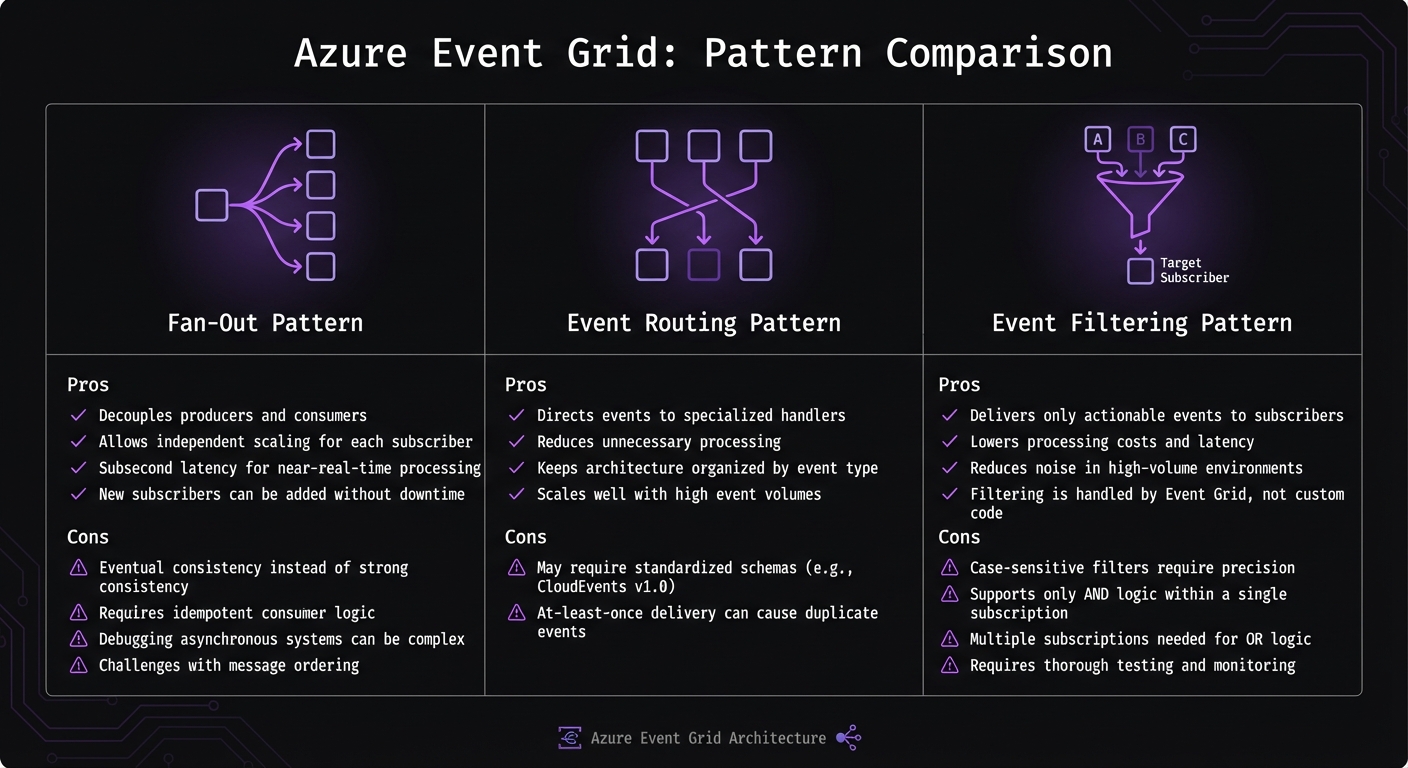
Azure Event Grid Architecture Patterns Comparison: Fan-Out vs Event Routing vs Event Filtering
Each event-handling pattern brings its own strengths and challenges, particularly in areas like scalability, consistency, and debugging. Let’s break down the key aspects of three popular patterns: Fan-Out, Event Routing, and Event Filtering.
The Fan-Out pattern shines when you need to decouple producers from consumers, enabling them to scale independently. For instance, combining Azure Functions with Event Grid can deliver subsecond latency, making it ideal for near-real-time processing[4]. However, it does come with trade-offs, such as eventual consistency, the need for idempotent handlers, and the difficulty of debugging asynchronous systems. Despite these challenges, the pattern’s ability to evolve and scale without downtime makes it a strong choice for many use cases. Building on this, the Event Routing pattern offers a more precise way to handle events.
The Event Routing pattern is perfect when different event types need to be directed to specialized handlers. For example, you might route order events to one endpoint and inventory updates to another. This approach reduces unnecessary processing and keeps your architecture tidy. As Nawaz Dhandala points out:
"Azure Event Grid and Functions together provide a powerful, cost-effective foundation for event-driven architectures"
[4]. However, this pattern may require standardized schemas like CloudEvents v1.0 and carries the risk of duplicate events due to at-least-once delivery. To further fine-tune event processing, the Event Filtering pattern can help.
The Event Filtering pattern minimizes noise by ensuring subscribers only receive relevant events. In scenarios where millions of events are processed per second[1], filtering at the subscription level can save significant computing resources. For instance, a system might focus solely on processing high-value orders above $1,000, avoiding unnecessary effort on smaller transactions. That said, the pattern’s complexity lies in its case-sensitive filters and the need for multiple subscriptions to handle OR logic effectively. Proper planning and rigorous testing are essential to make the most of this approach.
Here’s a quick comparison of the benefits and downsides of each pattern:
| Pattern Name | Pros | Cons |
|---|---|---|
| Fan-Out | • Decouples producers and consumers • Allows independent scaling for each subscriber • Subsecond latency for near-real-time processing • New subscribers can be added without downtime |
• Eventual consistency instead of strong consistency • Requires idempotent consumer logic • Debugging asynchronous systems can be complex • Challenges with message ordering |
| Event Routing | • Directs events to specialized handlers • Reduces unnecessary processing • Keeps architecture organized by event type • Scales well with high event volumes |
• May require standardized schemas (e.g., CloudEvents v1.0) • At-least-once delivery can cause duplicate events |
| Event Filtering | • Delivers only actionable events to subscribers • Lowers processing costs and latency • Reduces noise in high-volume environments • Filtering is handled by Event Grid, not custom code |
• Case-sensitive filters require precision • Supports only AND logic within a single subscription • Multiple subscriptions needed for OR logic • Requires thorough testing and monitoring |
Choosing the right pattern depends on your goals. Use Fan-Out for broad event distribution, Event Routing for more targeted delivery, and Event Filtering when you need to cut through the noise in high-volume scenarios.
Conclusion
Pick an Azure Event Grid pattern that aligns with your system's needs. Fan-Out works well when a single event must trigger multiple independent actions - like an order placement that notifies inventory, shipping, and customer service simultaneously. On the other hand, Event Routing is ideal for enterprise setups where you need centralized control to direct events from various sources to specific handlers. When dealing with high-volume scenarios, Event Filtering helps cut costs by ensuring subscribers only process events relevant to them.
You can also mix these patterns for greater efficiency. For example, combining Fan-Out with Filtering allows you to broadcast events widely while ensuring each subscriber only gets the data they care about. Similarly, Event Routing often pairs with filtering to send specific event types to the right endpoints, reducing unnecessary traffic and improving system performance.
To avoid duplicate processing, make sure handlers are idempotent by using unique event IDs[4]. Additionally, adopting CloudEvents v1.0 provides a standardized event schema for better interoperability[4].
Start with the simplest pattern that meets your needs. Fan-Out is easy to implement for basic event distribution, but as your system grows, Event Routing and Filtering offer the precision and scalability to handle more complex requirements.
FAQs
When should I use Fan-Out vs Routing vs Filtering?
In Azure Event Grid, use fan-out when you need to broadcast events to multiple subscribers simultaneously. This is ideal for scenarios like sending alerts to several systems for parallel processing. Choose routing if you want to direct events to specific endpoints based on defined criteria, such as the event type. If your goal is to ensure subscribers only receive events relevant to them, go with filtering to refine event delivery. Your choice depends on whether your priority is broad dissemination, targeted delivery, or selective processing.
How do I prevent duplicate event processing in handlers?
To handle duplicate event processing in Azure Event Grid, you need to implement idempotent logic in your event handlers. This means ensuring that processing the same event multiple times won't cause unintended side effects.
Here’s how you can manage this:
- Track Processed Events: Use unique event IDs or tokens to keep a record of events that have already been processed. This helps prevent reprocessing the same event.
- Understand Event Grid Behavior: Event Grid retries undelivered events, but it doesn’t guarantee the order of delivery. This retry mechanism can sometimes lead to duplicate events being sent.
- Set Up Dead-Letter Destinations: Configure dead-letter destinations to store events that couldn’t be delivered. This allows you to review and reprocess undelivered events as needed.
- Use Retry Policies: Apply retry policies to ensure events are delivered reliably. These policies can reduce the chances of duplicates while maintaining robust delivery.
By combining these strategies, you can minimize the impact of duplicate events and ensure smooth processing within your system.
How can I troubleshoot why my subscription filter isn’t matching?
To address subscription filter mismatches, start by double-checking that your filter criteria are properly set up and compatible with Azure Event Grid. Pay close attention to details like the includedEventTypes property - it must match the event payload exactly, including case sensitivity.
Here are some key steps to follow:
- Verify JSON Syntax: Ensure your filter's JSON syntax is correct and free of errors.
- Check Event Data: Confirm the event payload includes the properties you're filtering on. If you're working with custom properties, validate the paths thoroughly.
- Test with Sample Events: Use test events to confirm that your filters are routing events as expected.
- Review Endpoint Responses: Look at endpoint responses to identify any validation issues that might be affecting the subscription.
These steps will help you pinpoint and resolve mismatches effectively.


