
Standardizing event names in Azure-based systems is critical for reducing errors, improving system efficiency, and simplifying team workflows. Inconsistent naming - like mixing styles (userSignup, user_signup) or using unclear labels (click) - leads to broken dashboards, integration failures, and higher maintenance costs. Treat event names as public APIs: once they’re in use, changing them impacts multiple teams and systems.
Key takeaways:
- Consistency matters: Use a structured format like
domain.action(e.g.,auth.login.success) to make events predictable and easier to manage. - CloudEvents schema: Adopting this open standard ensures compatibility across systems and simplifies event organization.
- Automated validation: Tools like JSON schema validation and CI/CD pipeline checks prevent naming errors from reaching production.
- Domain organization: Group events by features or business areas (e.g.,
checkout.cart.viewed) for clarity and discoverability.
Results include faster troubleshooting, reduced onboarding time, and improved event delivery performance. By following these practices, teams can build scalable, reliable systems with minimal disruptions.
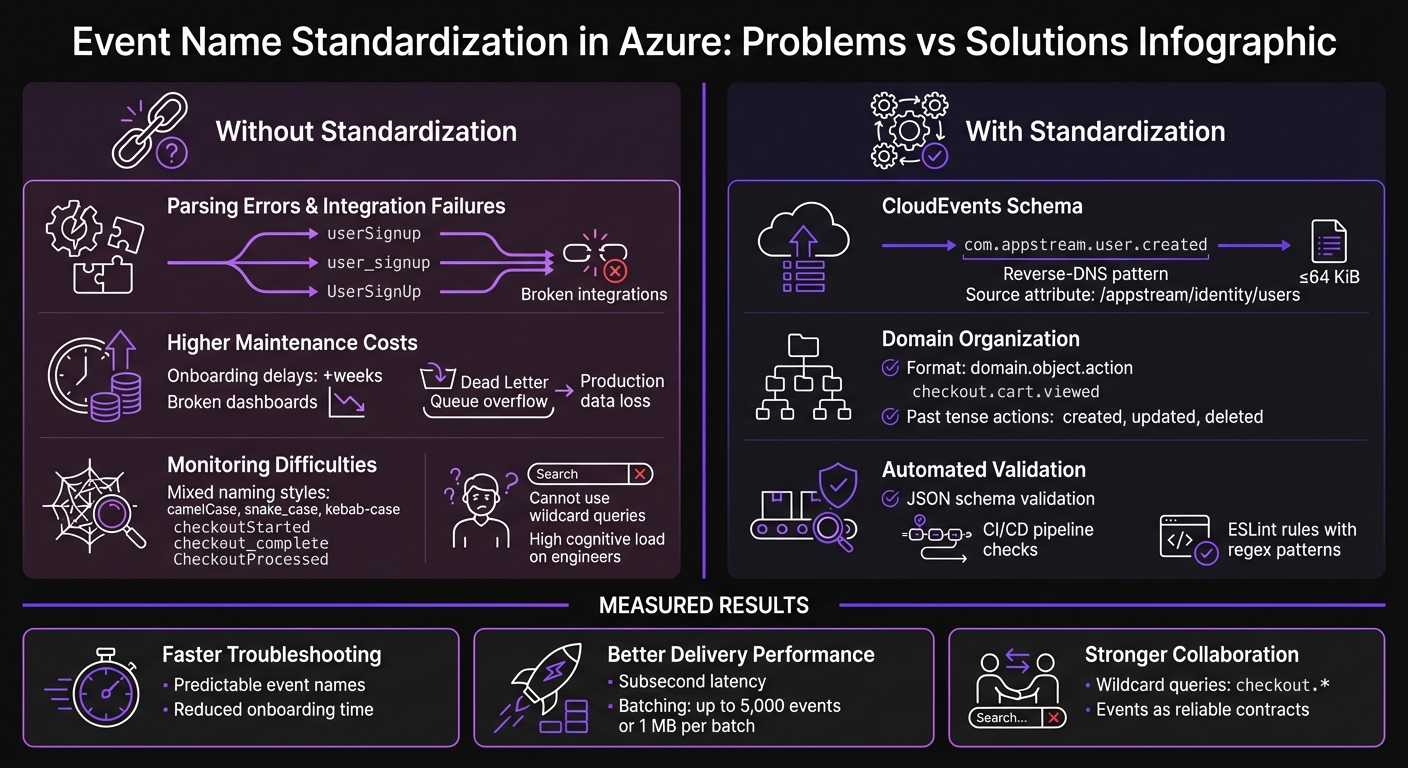
Problems vs Solutions: Event Naming Standardization in Azure
Event Design and Event Streams Best Practices | Events and Event Streaming
sbb-itb-79ce429
Problems With Inconsistent Event Naming in Azure
Getting event names right in Azure isn't just a nice-to-have - it’s a must for maintaining a scalable and efficient architecture. When naming conventions are inconsistent in tools like Azure Event Grid and Event Hubs, the effects spread across your entire system, causing headaches for everyone involved. Here's a closer look at the issues this creates.
Parsing Errors and Integration Failures
When event names aren’t standardized, the same action might be referenced by multiple identifiers. Even small variations, like different delimiters, can wreak havoc. Systems expecting a specific string will fail when they encounter an unexpected variation, causing broken integrations and parsing errors [1].
Without a structured format like domain.action, managing Azure Event Grid subscriptions becomes a manual - and error-prone - task [5]. Each subscription requires extra effort to configure correctly, increasing the risk of mistakes.
Think of events as a public API in distributed systems. Shivani, from Designing Event-Driven Systems on Azure, explains:
Events are a public API. Once consumers depend on the shape of your events, changing them becomes a coordination problem [3].
If your naming is inconsistent, updating or evolving your event schema turns into a logistical nightmare, requiring endless back-and-forth between teams.
Higher Maintenance Costs
The problems don’t stop at integration failures. Inconsistent event naming can quietly drain resources, leading to higher maintenance costs. For example, onboarding new engineers becomes a time sink. Instead of diving into meaningful work, they’re stuck sifting through analytics tools, trying to figure out what events even exist [1]. This can stretch onboarding timelines by weeks.
Monitoring tools like dashboards and alerts also take a hit. If events are renamed or if multiple variations of the same action exist, dashboards break, queries fail, and visualizations need to be rebuilt [1]. Documentation becomes unreliable, making it harder to maintain a single source of truth.
Validation issues add another layer of complexity. When event names don’t match expected schemas, messages often end up in Dead Letter Queues (DLQs). If no one is actively monitoring these queues, they can overflow, potentially leading to production data loss [3].
Monitoring and Troubleshooting Difficulties
Inconsistent naming doesn’t just make integration and maintenance harder - it also complicates monitoring and troubleshooting. Without predictable naming patterns, you can’t use wildcard queries to group related events [1]. For instance, tracking checkout-related events becomes a challenge when names like checkoutStarted, checkout_complete, and CheckoutProcessed are all in play.
Ambiguity in naming makes debugging even worse. Consider an event named ProcessPayment - does it indicate a completed transaction or just a pending request? Without clarity, reconstructing the system state during incidents becomes a guessing game [1].
The cognitive load on engineers also skyrockets. Mixing naming styles like camelCase, snake_case, and kebab-case forces engineers to constantly adjust, making it harder to predict event names. This slows down workflows and reduces discoverability in large-scale systems [1][5]. As Arrange Act Assert puts it:
Keeping naming patterns predictable and consistent is critical to reducing cognitive load and avoiding confusion [5].
AppStream Studio's Event Name Standardization Method
AppStream Studio has introduced a practical way to standardize event names, focusing on three key practices: using CloudEvents as the base, organizing events around domain boundaries, and ensuring compliance through automated validation.
Using CloudEvents Schema
AppStream Studio relies on the CloudEvents v1.0 specification for all Azure Event Grid and Event Hubs implementations. This approach creates a unified structure across cloud platforms.
Event types use a reverse-DNS prefix pattern, such as com.appstream.user.created, which identifies both the organization and the domain responsible for the event [6]. The source attribute specifies the originating microservice or component, like /appstream/identity/users [6][7].
To handle schema updates without disrupting downstream services, AppStream Studio includes a dataversion attribute. This is either added as a custom extension or appended to the event type [2][7]. The CloudEvents specification describes its purpose clearly:
The goal of the CloudEvents specification is to define the interoperability of event systems that allow services to produce or consume events [7].
One practical tip: keep events at or below 64 KiB to ensure compatibility with all intermediaries [6]. For better filtering, the optional subject field can add sub-structure, such as a blob name or user ID, enabling string-suffix filtering without needing to deserialize the entire payload [6]. Next, events are organized by domain for better clarity.
Organizing Events by Domain
Building on the CloudEvents structure, AppStream Studio organizes events using hierarchical namespacing. This approach groups events by feature areas or domains, such as checkout.cart.viewed or auth.login.started.
Within each domain, event names follow an Object.Action pattern, where the object refers to the entity (e.g., order), and the action describes what happened (e.g., created). Actions are always in past tense to indicate that the event reflects a completed change, not a command [1].
| Component | Purpose | Examples |
|---|---|---|
| Namespace | Groups events by domain | app, checkout, inventory, auth |
| Object | The entity being acted upon | user, order, cart, payment |
| Action | The operation performed (past tense) | created, updated, deleted, submitted |
| Qualifier | Optional extra context | succeeded, failed, started |
In Azure, schemas are grouped in the Event Hubs Schema Registry, organized by business needs or organizational units. This setup ensures separate authorization for each group, reducing the risk of metadata exposure between different applications sharing a namespace.
Automated Schema Validation With JSON
After events are named and categorized, automated validation ensures they follow the rules consistently. AppStream Studio uses a TypeScript-based event registry to define valid event names, their descriptions, and required JSON attributes like name, type, and mandatory fields [1].
A tracking library validates events in real time. During development, it flags errors if an event name is missing from the registry or the JSON payload doesn't match the schema [1]. ESLint rules enforce naming conventions during coding, using regex patterns like /^[a-z][a-z0-9]*(\.[a-z][a-z0-9]*){1,3}$/ to maintain consistent dot-separated naming [1].
These validation steps are fully integrated into CI/CD pipelines, blocking non-compliant code from reaching production [1]. As Nawaz Dhandala from OneUptime explains:
A well-named event like
checkout.payment_method.selectedtells you exactly what happened, where it happened, and how to query it [1].
The tracking library also includes a sanitization process to trim strings and remove undefined values before events are registered [1].
How to Implement Standardized Event Schemas in Azure
Once you've established your naming conventions and validation rules, it's time to put them into action in Azure. This involves configuring the Schema Registry, leveraging automation tools, and managing schema evolution without disrupting existing consumers. Here's how to get started.
Setting Up Schema Registry in Event Hubs
Azure Event Hubs' Schema Registry is designed to store and enforce event schemas across applications. It supports the CloudEvents standards and domain-based organization previously discussed. To use this feature, you'll need the Standard tier, which costs $0.028 per million events, along with Throughput Unit charges [4]. The Standard tier supports up to 25 schemas per schema group, while the Dedicated tier accommodates up to 10,000 schemas [8].
To create a schema group, use the Azure CLI command:
az eventhubs namespace schema-registry create.
This command sets up the group and defines its compatibility policy during deployment [4]. To manage access, apply RBAC roles:
- The Schema Registry Contributor role allows full access (read, write, delete).
- The Schema Registry Reader role provides read-only access [4].
For production environments, configure 8 to 32 partitions to handle parallel consumption and enable auto-inflate to automatically scale Throughput Units as needed [8]. Each Throughput Unit supports 1 MB/s ingress and 2 MB/s egress. Exceeding these limits results in HTTP 429 throttling errors [4].
Using Infrastructure as Code for Standardization
To ensure consistent deployments, automate your setup with Infrastructure as Code (IaC) tools like Bicep or Terraform. These tools can streamline the deployment of Event Hubs namespaces, schema groups, and schemas across different environments [8].
In February 2026, Nawaz Dhandala from OneUptime shared a Terraform configuration for Azure Event Hubs. His implementation used the azurerm_eventhub_namespace_schema_group resource to deploy an "avro-schemas" group with Forward compatibility. The setup included automated archival via Event Hub Capture to a StorageV2 account and restricted access to specific application VNets and CI/CD runner IPs. This approach ensured all order and telemetry events adhered to a unified contract, avoiding schema drift that could disrupt data pipelines [8].
"Terraform handles the dependency chain and gives you a repeatable deployment... preventing schema drift from breaking your pipeline." - Nawaz Dhandala, Author, OneUptime [8]
When configuring IaC templates, set the schema_compatibility property to Forward or Backward to handle schema evolution without downtime [8]. Avoid using the $Default consumer group in production; instead, create named consumer groups for each application to prevent checkpoint conflicts [8]. Additionally, secure the Schema Registry by restricting access to specific VNets or CI/CD runner IPs [8].
Managing Schema Versions and Compatibility
Effective schema versioning is crucial for avoiding integration issues. Azure Schema Registry supports three compatibility modes for Avro schemas:
| Compatibility Mode | Consumer Version | Producer Version | Allowed Changes |
|---|---|---|---|
| Backward | New | Old | Delete fields, Add optional fields |
| Forward | Old | New | Add fields, Delete optional fields |
| None | Any | Any | All changes allowed (No validation) |
For Backward compatibility, new consumers can read old messages by allowing deleted fields and adding optional ones. With Forward compatibility, old consumers can process new messages by accommodating new fields and removing optional ones [4].
To prevent breaking changes, integrate schema validation into your CI/CD pipeline. Use the Azure CLI to validate and register new schema versions before deployment [4]. For long-term event retention, the Event Hubs Premium tier offers storage for up to 90 days, or you can use the Capture feature for unlimited retention [4].
Lessons From Production: What Works in Practice
When systems move into production, real-world challenges often highlight the importance of standardizing event naming. Building on earlier discussions around standardization, production experiences reveal additional practices that can refine schema design for live environments.
Standardizing on CloudEvents Schema
CloudEvents offers a major advantage for integrating systems across public clouds, private setups, and hybrid environments. As an open standard backed by the Cloud Native Computing Foundation (CNCF), it provides a consistent structure with standard fields and flexible extensions that simplify interoperability [2].
"If you are building systems that need to interoperate with other cloud providers, on-premises systems, or any CNCF-aligned tooling, CloudEvents is the schema you should be using." - Nawaz Dhandala, Author, OneUptime [2]
In dynamic environments, where systems constantly evolve, this level of compatibility is crucial. CloudEvents ensures smooth communication and adaptability across varied platforms.
But while schema design is essential, managing how events flow through the system is just as important in production.
Using Filters and Routing for Scale
In large-scale systems, it’s easy for subscribers to get bogged down by irrelevant messages, leading to increased costs and higher latency [9]. Shifting filtering logic to Event Grid subscription filters can significantly improve efficiency by handling unnecessary data at the infrastructure level.
For example, advanced filters on data properties allow routing based on the actual content of the payload. This ensures that event handlers only process the events they truly need. Additionally, setting up a dead-letter destination - like Azure Blob Storage - captures undelivered messages, reducing the risk of data loss and maintaining system reliability [10].
Results: Measured Improvements From Standardization
When AppStream Studio introduced standardized event naming across Azure-based systems for mid-market organizations, the benefits became evident in three key areas: reduced maintenance overhead, improved event delivery performance, and enhanced team coordination. These outcomes were directly tied to adopting CloudEvents, domain-based organization, and automated validation practices discussed earlier.
Lower Maintenance and Faster Troubleshooting
Standardized naming conventions made finding events much quicker [1]. Engineers could now predict event names using consistent object.action patterns instead of relying on documentation or informal knowledge-sharing.
Onboarding new team members became faster and smoother [1]. Schema validation helped catch data mismatches during compile time rather than in production [11], saving months that would have otherwise been spent resolving breaking changes and creating custom migration scripts.
Better Event Delivery Rates
Streamlined diagnostics and naming conventions also led to better event delivery performance. Azure Event Grid began delivering events with subsecond latency after standardization [12]. By utilizing Event Grid subscription filters, unnecessary processing was reduced, ensuring handlers processed only the events they needed.
Batching events - up to 5,000 events or 1 MB per batch - further increased throughput [12]. This optimization improved the efficiency of Azure Event Hubs, allowing teams to detect bottlenecks before they affected delivery [4].
Stronger Team Collaboration
The impact extended beyond technical metrics, fostering better collaboration among teams. Standardization turned inter-service communications into reliable, well-defined contracts, enabling teams to update their systems independently without creating downstream issues [11].
Wildcard-based queries, such as checkout.*, simplified dashboard creation and monitoring [1], making it easier for engineers to group related events. Metadata fields like correlation_id and trace_id allowed teams to trace causality across distributed services in Azure Monitor [3], significantly improving the troubleshooting of complex event chains.
These results highlight how a systematic approach to standardization can drive meaningful operational improvements for engineering teams.
Conclusion
Inconsistent naming can create chaos, while automated validation lays the groundwork for smooth operations. When teams embrace strategic standardization, they unlock a new level of efficiency. Standardizing event names in Azure isn’t just about adhering to guidelines - it’s about building systems that are easier to maintain, scale, and troubleshoot. By adopting practices like the object.action naming convention, utilizing the CloudEvents schema, and automating validation, teams create predictable structures that keep dashboards stable during updates and make onboarding much faster.
As Nawaz Dhandala from OneUptime points out, a well-crafted event name such as checkout.payment_method.selected provides immediate clarity about the event’s purpose, origin, and query path [1]. This precision doesn’t just improve communication within distributed systems - it fosters collaboration. Events become like public APIs, where any changes are treated with the same care as external contracts.
For mid-market organizations modernizing on Microsoft’s platform, AppStream Studio offers practical implementations of these standardization techniques, especially in regulated industries. Their engineering teams specialize in deploying event-driven architectures using CloudEvents, schema validation, and Azure-native tools. These efforts are designed to support scalable and coordinated systems, proving that consistent event naming isn’t just a technical detail - it’s a strategic necessity.
The takeaway from Azure is straightforward: standardization boosts queryability, discoverability, and team productivity. The real question isn’t whether to standardize, but how quickly you can put it into practice before technical debt catches up.
FAQs
How do I pick the right event “domain” for a new feature?
Pick an event domain that prioritizes scalability, clarity, and makes querying efficient. Use names that clearly describe the event's purpose and context. For example, opt for something like checkout.payment_method.selected instead of vague terms like click. This approach not only improves understanding but also aligns the domain with your naming conventions, which is crucial for better observability and analytics.
Using a hierarchical structure, such as user.signup or order.shipped, further enhances clarity. It organizes telemetry data in a way that's easier to analyze and ensures your event schemas remain consistent and manageable over time.
When should I version an event name vs only the schema?
When an event undergoes major changes that affect its meaning or structure - and consequently how it’s processed or queried - it’s a good idea to version the event name. This helps distinguish it from its previous iteration and avoids confusion.
On the flip side, schema versioning is used when the data format within the same event name changes. This approach ensures the event remains backward-compatible, allowing older systems to continue processing it without issues.
What’s the fastest way to enforce naming rules in CI/CD?
The fastest way to enforce naming rules in CI/CD is by leveraging Azure Policy to automatically apply naming conventions at the platform level. This approach ensures that all resources comply with your standards by blocking the creation of anything that doesn’t align with the naming rules. With custom Azure Policy definitions, you can define specific naming patterns that are enforceable, simplifying resource provisioning and keeping workflows consistent without the need for manual checks or audits.


