
Looking to integrate third-party tools into Azure CI/CD pipelines? Here's what you need to know:
- Security is key: Use Azure Key Vault for credentials, enforce Role-Based Access Control (RBAC), and avoid embedding secrets in pipelines.
- Compliance matters: Ensure tools meet standards like HIPAA, SOC 2, and GDPR, especially for regulated industries.
- Start simple: Build basic pipelines first (checkout, build, test), then add complexity like security scans or multi-stage deployments.
- Tool compatibility: Pick tools that support YAML configurations, APIs, and CLI for seamless Azure Pipelines integration.
- AI-driven efficiency: Leverage AI agents for test impact analysis and failure detection to save time and reduce errors.
How to Select Third-Party Tools for Azure CI/CD
Picking the right third-party tools for your Azure CI/CD pipelines starts with identifying your specific needs. The goal is to address challenges without overcomplicating your setup. As Toxigon puts it:
"The pipelines that survive long term are the boring ones, the ones that do one thing, do it clearly, and don't try to be clever." [2]
This approach lays the groundwork for secure and efficient integrations, which are explored further in later sections.
Checking Compatibility with Azure Pipelines
When integrating tools, compatibility with Azure Pipelines is key. Look for tools that support YAML-based configuration. This ensures your pipeline configurations are stored in version control alongside your code, making it easier to track changes, roll back if needed, and review updates through pull requests [3][4].
API or CLI support is another must-have. For example, the Azure DevOps CLI allows you to test and validate configurations locally, catching errors before they reach production [2][4]. Start with a simple pipeline - covering tasks like checkout, restore, build, and running unit tests - then add complexity only when genuine bottlenecks arise [2].
Security and Compliance Requirements
Once you’ve identified tools that meet your functional needs, ensure they align with robust security and compliance standards, especially in regulated industries. Tools should support features like Role-Based Access Control (RBAC), detailed audit logs, and compliance with frameworks such as HIPAA, SOC 2, or ISO 27001 [4]. Every deployment should be traceable, and access should follow the principle of least privilege.
Avoid embedding credentials directly in your pipelines. Instead, use Azure Key Vault or the Azure DevOps secret store to inject sensitive data securely at runtime [3][4]. Treat pipelines as code by storing YAML files and scripts in Git, using feature branches for updates, and enforcing strict rules like:
"if the pipeline fails, you fix it before merging, no exceptions" [2]
Recommended Tool Examples
Different tools excel at different tasks. For instance, SonarQube is great for static code analysis, helping you catch quality issues early, while Snyk focuses on scanning dependencies and containers for vulnerabilities. For monitoring, Datadog provides visibility across multi-cloud setups, complementing Azure Monitor and Application Insights [3][5].
LaunchDarkly is a strong choice for feature flag management, enabling conditional rollouts without downtime [2][5]. Selenium is a go-to for UI testing, while pytest works well for Python-based unit tests [3][1]. Additionally, AI-driven test impact analysis can cut test suite execution time by about 30% by running only the tests affected by recent code changes [2].
High-performing teams aim to keep their Change Failure Rate below 15% and maintain build times under 10 minutes [5]. Using aggressive caching strategies for dependencies like NuGet or npm can slash build times by up to 70% [5].
Next, we’ll dive into how to securely integrate these tools into your pipelines to ensure smooth and safe operations.
sbb-itb-79ce429
Best Practices for Secure Integration
Building security into your integration strategy from the very beginning is critical. Some of the biggest risks stem from poor credential management and granting excessive permissions. As highlighted in the Engineering Fundamentals Playbook:
"YAML pipelines can be executed without the need for a Pull Request and Code Reviews. This allows the (malicious) user to make changes using the Service Connection which would normally require a reviewer." [7]
This underscores why managing credentials securely and enforcing strict access controls should never be overlooked. Below, you'll find key strategies for handling credentials and implementing least privilege access.
Managing Credentials and Secrets
When it comes to sensitive data like API keys, connection strings, and certificates, Azure Key Vault should be your go-to solution. Grizzly Peak Software offers a sharp reminder:
"Azure Key Vault is where your secrets belong - not in pipeline variables, not in config files, not in anyone's notepad." [8]
To ensure your secrets stay secure, keep these practices in mind:
-
Integrate Key Vault with Pipelines: Connect Variable Groups to Key Vault so your pipelines can fetch secrets dynamically at runtime. Use the
AzureKeyVault@2task with theSecretsFilterparameter to retrieve only the secrets you need. SetRunAsPreJob: trueto make these secrets available from the start of the job [6][8]. - Separate Key Vault Environments: Create distinct Key Vaults for development, staging, and production. This limits the potential impact of a breach by isolating secrets to specific environments [6][8].
- Rotate High-Sensitivity Secrets: Regularly rotate critical secrets - aim for every 30 to 90 days. This reduces the risk of exposure in case a secret is compromised [6].
- Firewall Configuration: If your Key Vault has a firewall enabled, make sure to activate the "Allow trusted Microsoft services to bypass this firewall" option. This ensures Microsoft-hosted agents can still access your secrets [8].
-
Naming Conventions: Remember that Key Vault secret names only support alphanumeric characters and hyphens. Azure Pipelines will convert hyphens to underscores, so a secret like
api-keybecomes$(api_key)during runtime [8].
Setting Up Least Privilege Access
Managing access effectively is just as important as securing your secrets. Adopting a least privilege approach ensures that tools only have the permissions they absolutely need. Here’s how to do it:
-
Use Azure RBAC: Azure Role-Based Access Control (RBAC) offers more granular control compared to legacy Vault Access Policies. Assign roles based on specific tasks:
- For standard operations, use the Key Vault Secrets User role, which provides read-only access to secrets.
- Reserve the Key Vault Secrets Officer role for administrative tasks like secret rotation or deletion [8].
-
Protect Service Connections with Branch Controls: Implement branch restrictions on service connections so they can only be used by pipelines running from protected branches like
main. This ensures that all changes go through proper review and approval processes before deployment [7].
Step-by-Step Tool Integration Process
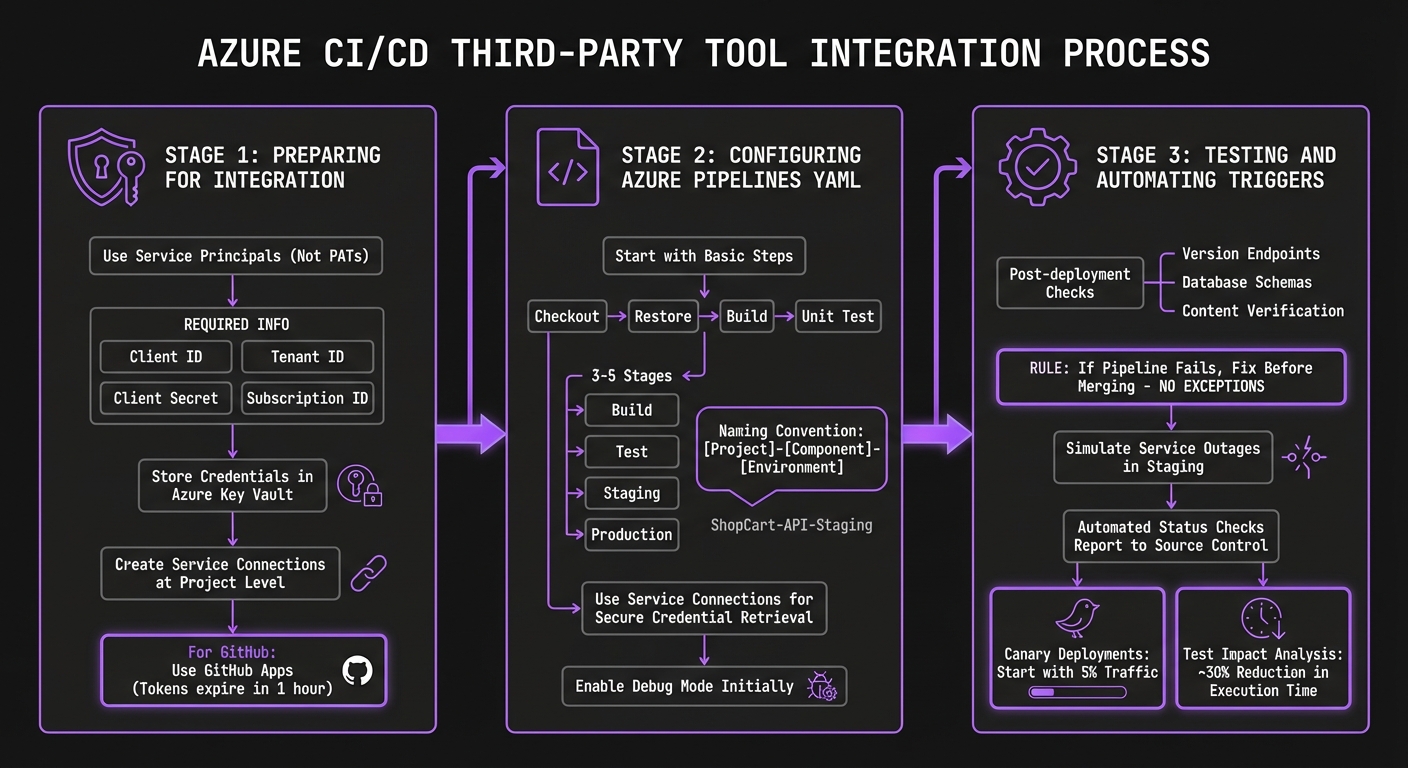
Step-by-Step Azure CI/CD Third-Party Tool Integration Process
Integrating third-party tools requires careful preparation, clear YAML configurations, and thorough functionality checks before introducing automation.
Preparing for Integration
Before diving into YAML, it's crucial to address authentication and credential management. Opt for Service Principals instead of Personal Access Tokens (PATs) whenever possible. Service Principals offer more precise permission controls, are easier to rotate, and avoid the need to store plaintext passwords [9]. To set up a Service Principal, you'll need four key pieces of information: Client ID, Tenant ID, Client Secret, and Subscription ID [9].
Sensitive credentials - such as API keys, client secrets, and connection strings - should always be stored securely in Azure Key Vault right from the start [3][9]. When working in Azure DevOps, create Service Connections at the project level. This setup securely stores authentication details for external services, ensuring that pipelines can access tools without exposing raw credentials to pipeline authors [10]. For GitHub, GitHub Apps are a better choice over PATs. They provide fine-grained permissions at the repository level and use short-lived tokens that expire after one hour, adding an extra layer of security [10].
With authentication secured, you can move on to writing precise YAML configurations for your pipeline.
Configuring Azure Pipelines YAML
Start with a basic pipeline setup that includes steps like checkout, restore, build, and unit test [2]. Avoid adding complex elements - like security scans or multi-stage deployments - until the core process is running smoothly. As Toxigon emphasizes, long-lasting pipelines prioritize clarity and simplicity over unnecessary complexity [2].
Structure your pipeline into 3–5 stages, such as Build, Test, Staging, and Production, to avoid silent failures [2]. Stick to a clear naming convention like [Project]-[Component]-[Environment] (e.g., ShopCart-API-Staging) to maintain organization [2]. Use your Service Connections in the YAML to securely retrieve credentials, and enable debug mode during the initial setup to capture detailed logs for troubleshooting [2].
Testing and Automating Triggers
After configuring your YAML, validate its functionality through thorough automated testing.
Use post-deployment checks to confirm that changes are live - such as hitting a version endpoint, verifying database schemas, or checking specific content [2]. Toxigon puts it plainly:
"If the pipeline fails, you fix it before merging, no exceptions" [2]
In staging environments, you can simulate service outages to test retry logic and failover mechanisms, ensuring your pipeline handles failures gracefully [2]. Automated status checks should report results back to source control, enabling rules that block non-compliant pull requests [10]. For canary deployments, start small - route just 5% of traffic to the new version to monitor for issues before a full rollout [2]. Additionally, modern test impact analysis tools can reduce test execution time by about 30% by running only the tests impacted by recent changes [2].
Using AppStream Studio AI Agents in Azure CI/CD
In this section, we take a closer look at how advanced AI agents can transform Azure CI/CD pipelines, making them smarter and more efficient. Built on the Microsoft stack, these AI agents seamlessly integrate into Azure CI/CD workflows, enabling autonomous decision-making at every stage of deployment. AppStream Studio specializes in crafting these production-ready agents using technologies like Azure, .NET, Semantic Kernel, and TypeScript. These tools are tailored for real-world challenges, particularly in regulated sectors like healthcare and finance.
AI Agents for Pipeline Optimization
AppStream Studio's AI agents are designed to plug directly into CI/CD workflows, bringing a new level of intelligence to the process. They can autonomously analyze test failures by reviewing DOM snapshots and logs, generate intent-based tests, and adapt to UI changes without compromising stability. When paired with Azure DevOps, these agents serve as quality gates, effectively blocking deployments with critical bugs while flagging minor visual regressions as low priority [12].
The results? Teams leveraging these AI agents have reported an 85% drop in test maintenance efforts and a 10x increase in test creation speed [12]. To further enhance automation, the Azure Skills Plugin - introduced in March 2026 - provides these agents with over 19 curated skills and access to 200+ tools for tasks such as azure-prepare and azure-cost-optimization [13]. Mitch Ashley, VP and Practice Lead at The Futurum Group, highlights this innovation:
"Microsoft is packaging institutional cloud knowledge as versioned, executable skills that agents consume automatically, collapsing the gap between writing code and deploying it to production" [13]
Such features align perfectly with the ongoing focus on efficiency and security.
For industries with strict regulations, AppStream Studio ensures compliance with HIPAA, SOC 2, and ISO 27001 standards from the outset [11]. This is crucial when deploying agents that handle sensitive data or make autonomous decisions about production releases.
Case Study: Healthcare Scheduling Platform
A real-world example brings these benefits to life. AppStream Studio implemented AI agents for a healthcare scheduling platform managing over 250,000 appointments annually. These agents autonomously handle tasks like prior authorizations, referral routing, and clinical document reconciliation - all while maintaining full HIPAA compliance [11]. This case demonstrates how integrating the right tools can significantly boost performance while adhering to strict regulations.
In another project, AppStream Studio collaborated with Unreal Estate in early 2026. Over a three-week engagement, they worked with CEO Kyle Stoner to identify and prioritize four high-impact AI agents. The process moved from workflow mapping to a detailed execution plan. Stoner reflected:
"AppStream didn't just tell us where AI agents could help - they showed us which ones to build first and why. Within weeks we had a clear roadmap that our engineering team could actually execute on" [11]
To ensure a smooth implementation, it's essential to map out existing workflows and identify areas where AI agents can genuinely add value, avoiding unnecessary complexity [11]. Running agents locally or during pull requests can help catch issues early, reducing the cost of fixes before they reach staging [12].
Maintaining and Optimizing Integrated Pipelines
Monitoring and Troubleshooting
Keeping an eye on your pipelines is crucial to catch and fix problems before they disrupt production. Tools like Azure Monitor and Application Insights offer real-time insights into pipeline performance, helping you pinpoint bottlenecks or failures quickly [3]. To stay ahead, set up automated alerts for key metrics like PipelineFailures, so your team gets notified immediately when something goes wrong.
For quicker problem-solving, leverage AI-driven failure analysis. This technology reviews pipeline telemetry and incident history to identify recurring issues and suggest fixes, saving time and effort on diagnosing the same problems repeatedly. Adding status badges to your repositories can also provide developers with instant feedback on build health, eliminating the need to sift through logs.
To improve efficiency, choose build agents tailored to your performance needs and position them close to source and target locations to minimize latency. Speed up feedback loops by enabling parallel jobs and running integration and UI test suites concurrently. Remember, maintaining high performance requires both smart optimization and regular upkeep.
Regular Updates and Maintenance
Updating and maintaining your pipelines is just as important as monitoring them. Use Infrastructure as Code (IaC) tools like Bicep or Terraform to manage environments through version-controlled definitions. This practice ensures deployments always start from a clean, predictable state, reducing the risk of configuration drift - a common cause of hard-to-resolve issues.
For sensitive information, rotate credentials frequently using Azure Key Vault [3]. Regularly audit your extensions and integrations to minimize potential vulnerabilities. When rolling out updates, always test them in isolated environments that closely mimic production. This "test-then-promote" strategy helps catch compatibility problems early, ensuring your pipelines remain stable, secure, and up-to-date.
Conclusion and Key Takeaways
Integrating third-party tools into Azure CI/CD pipelines requires careful selection and a strong focus on security. Opt for established tools from verified publishers instead of custom-built solutions to minimize maintenance challenges. When exploring marketplace extensions, assess their maturity and the number of active installations to better manage potential security risks.
Beyond tool selection, implementing robust security measures is critical. Security should never be an afterthought. Transition away from long-lived secrets and Personal Access Tokens by using Workload Identity Federation (OIDC) or Managed Identities to generate temporary tokens. GitHub's OIDC integration, for instance, eliminates the need to store static credentials. Additionally, automate credential rotation through Azure Key Vault, ideally on a daily schedule, to reduce the risk of exposure.
For organizations in regulated industries like healthcare or finance, compliance adds another layer of complexity. Companies such as AppStream Studio specialize in addressing these challenges by building AI agents that integrate seamlessly into Azure pipelines. These agents perform automated failure analysis and identify recurring patterns in telemetry data. AppStream Studio’s expertise spans HIPAA, SOC 2, and ISO 27001-compliant environments, supporting platforms that handle over 250,000 annual appointments and AI tools for Medicare reimbursement scoring. Based in Nashville and leveraging the Microsoft ecosystem, they manage every stage - from strategy to production - while adhering to the principles of secure third-party integration.
Looking ahead, AI-driven capabilities in DevOps are transforming how pipelines operate. Agentic AI now enables pipelines to autonomously resolve deployment issues by analyzing historical incident data. Combining AI-assisted failure analysis with custom agents can help address recurring challenges. With 76% of security professionals citing difficulties in security-developer collaboration [14], automated solutions are becoming increasingly essential.
Finally, prioritize continuous improvement. Regularly review pipeline configurations, test updates in isolated environments that mimic production, and standardize deployment templates. This ongoing refinement is key to achieving long-term success in your CI/CD processes.
FAQs
How do I choose which third-party tools are worth integrating?
When selecting third-party tools for your Azure CI/CD environment, focus on those that streamline your workflows without introducing unnecessary complications. Look for tools that integrate effortlessly with your existing systems, support automation, and comply with regulations like HIPAA or SOC 2. It's also wise to choose solutions with a solid reputation in the industry and dependable customer support. Tools that match your team's expertise and are consistently updated can help minimize risks and boost overall efficiency.
What’s the safest way to handle secrets in Azure CI/CD?
The best way to safeguard secrets in Azure CI/CD workflows is by storing them in Azure Key Vault. Implement strict Role-Based Access Control (RBAC) and well-defined policies to manage who can access these secrets. Never hardcode or expose sensitive information in your code or pipeline variables - this reduces the risk of accidental leaks. By doing this, secrets remain secure and accessible only to the right users or services.
How can I speed up builds without sacrificing security?
To keep your builds fast and secure, break your pipeline into smaller, manageable stages to prevent bottlenecks. Automate early testing to quickly identify issues, safeguard your environment with effective secret management and activity audits, and leverage caching or incremental builds to bypass unchanged components. These steps help you achieve faster build times without sacrificing security.


