
When encrypting Azure Service Bus data, you have two key management options:
- Azure-managed keys: Microsoft handles all encryption processes automatically, making it simple and cost-effective. Best for organizations with low regulatory demands or limited resources for key management.
- Customer-managed keys (CMK): Provides full control over encryption keys, including rotation, revocation, and storage. Required for meeting strict compliance standards in industries like finance and healthcare. Only available with the Premium tier.
Key Takeaways:
- Azure-managed keys are included in all Service Bus tiers and require no setup or maintenance.
- Customer-managed keys demand manual setup, ongoing management, and incur additional costs for Key Vault and Premium tier usage.
- Choose Azure-managed keys for simplicity and affordability. Opt for CMK if you need control, compliance, or enhanced auditing.
Quick Comparison:
| Feature | Azure-Managed Keys | Customer-Managed Keys (CMK) |
|---|---|---|
| Control | Managed by Microsoft | Full customer control |
| Service Tier | All tiers | Premium only |
| Setup | Automatic | Manual |
| Key Rotation | Automatic | Manual or configured automation |
| Cost | Included | Additional charges |
| Compliance | Basic encryption standards | Meets stricter regulations |
For most organizations, Azure-managed keys are sufficient. However, if compliance or key sovereignty is critical, CMK is the better choice.
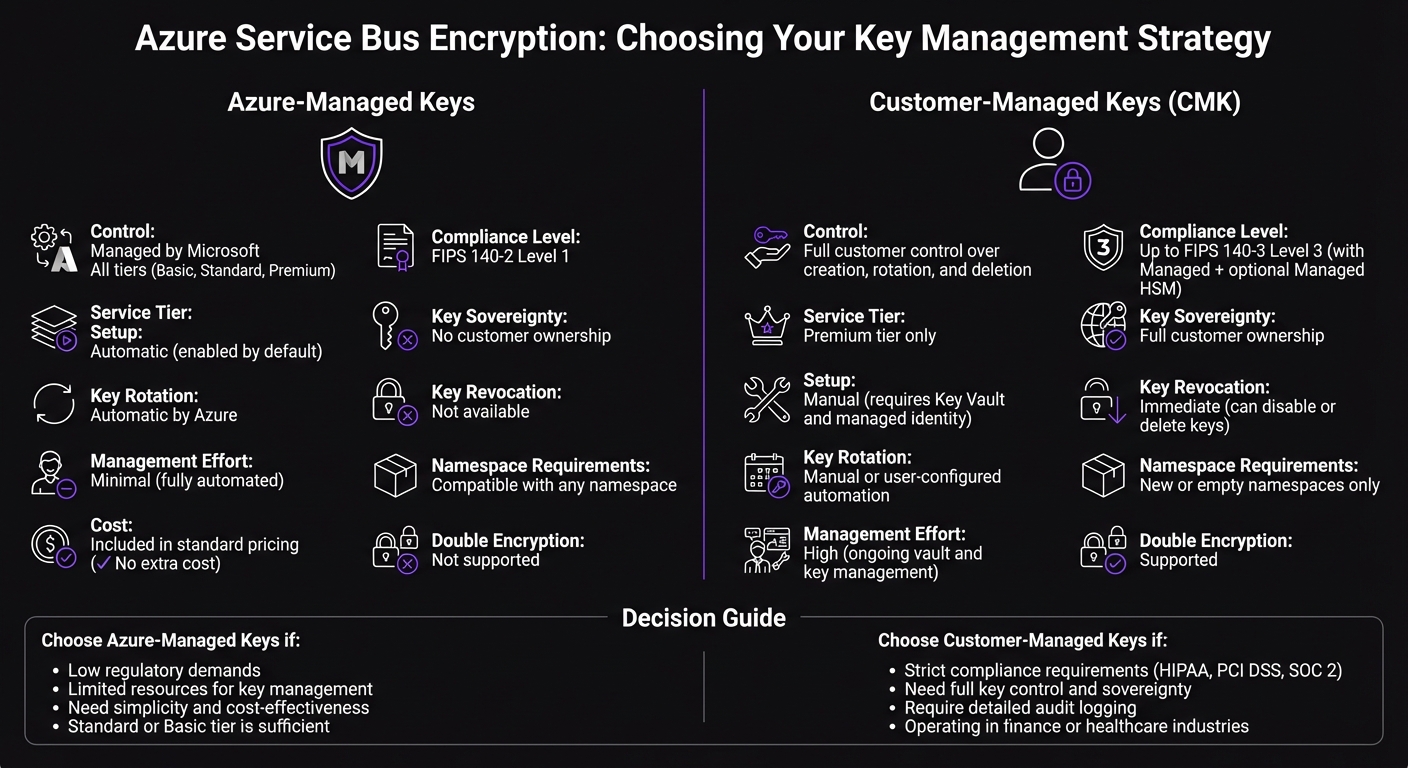
Azure Service Bus Encryption: Azure-Managed Keys vs Customer-Managed Keys Comparison
Azure Storage and Disk Encryption Deep Dive
sbb-itb-79ce429
Azure-Managed Keys Explained
Azure-managed keys offer a hands-off key management solution for Azure Service Bus, available across all service tiers. Microsoft takes care of everything - there’s no need for setup, configuration, or ongoing maintenance. When you create a Service Bus namespace, encryption at rest automatically kicks in, safeguarding your message data.
How Azure-Managed Keys Work
This system uses a two-layer key hierarchy to protect your data. First, a Data Encryption Key (DEK), based on the AES-256 symmetric algorithm, encrypts data blocks. Then, a Key Encryption Key (KEK) secures the DEKs. Microsoft handles everything from key issuance and rotation to backups and redundancy, ensuring your data stays safe even if hardware vulnerabilities arise [1].
Advantages of Azure-Managed Keys
The biggest perk? You don’t have to do a thing. There’s no need to set up a Key Vault, plan rotation schedules, or track key expiration dates. This is ideal for businesses that value operational simplicity and don’t need granular control over their encryption keys. For organizations without strict regulatory demands regarding key ownership, Azure-managed keys provide strong encryption without the hassle. Plus, it’s budget-friendly since there’s no extra cost for using these keys.
Drawbacks of Azure-Managed Keys
The downside is the lack of control. You can’t tweak key properties, decide when rotations happen, or revoke keys on your own. This setup doesn’t allow for separating key management responsibilities from service administration. For industries with tight regulations - like finance or healthcare - this could be a dealbreaker. If your organization needs full control over encryption keys to meet compliance standards, you’ll need to weigh these limitations carefully. Up next, we’ll look at customer-managed keys, which offer more control but come with added complexity.
Customer-Managed Keys (CMK) Explained
Customer-managed keys put encryption control directly in your hands. Instead of relying on Microsoft to handle encryption behind the scenes, you take charge of the keys. This setup is ideal for organizations that need to demonstrate control over their encryption keys, whether for compliance audits, meeting data residency requirements, or adhering to internal security policies. Unlike Azure-managed keys, which automate the entire process, CMK gives you the reins.
How Customer-Managed Keys Work
With CMK, your encryption keys are stored in Azure Key Vault or a Managed HSM (Hardware Security Module) under your control. Your Service Bus namespace accesses these keys using a managed identity, but you remain in charge of key rotation, versioning, and revocation. If you disable or delete a key, your Service Bus namespace immediately loses access - acting as a "kill switch" that isn't available with Azure-managed keys. Keep in mind, this feature requires a Premium tier Service Bus namespace, as Standard and Basic tiers don’t support CMK. This hands-on approach allows for more tailored compliance and auditing capabilities.
Advantages of Customer-Managed Keys
The biggest advantage? Control. With CMK, you can meet stringent compliance standards like HIPAA, PCI DSS, or FIPS 140-3 Level 3 by using HSM-backed keys. This is especially valuable for industries like finance and healthcare, where audits often demand proof of key ownership. CMK also enables detailed audit logs, showing exactly who accessed your keys and when - essential for forensic investigations and compliance reporting. For organizations operating in multiple regions, CMK lets you store keys in specific locations to meet local data residency rules.
Drawbacks of Customer-Managed Keys
The trade-off for control is responsibility. You’ll need to manage the entire key lifecycle - scheduling rotations, monitoring expiration dates, and ensuring your Key Vault remains operational. If your Key Vault becomes unavailable or a key is accidentally deleted, your Service Bus namespace will be inaccessible until the issue is resolved. Additionally, there are costs to consider: Premium tier Service Bus namespaces, Key Vault operations, and HSM usage (if hardware-backed protection is needed). Setting up CMK also requires configuring managed identities, access policies, and maintaining the necessary infrastructure.
Next, we’ll dive into the specifics of key rotation practices for each approach.
Key Rotation Practices
Key rotation helps reduce risks by frequently updating encryption keys. How you manage this process depends on whether you’re using Azure-managed keys or customer-managed keys - and the level of effort required varies significantly between the two.
Automatic Rotation with Azure-Managed Keys
With Azure-managed keys, Microsoft takes care of everything for you. Keys are rotated automatically, so there’s no need for your team to configure schedules, monitor policies, or worry about interruptions during the process. This hands-off approach removes operational risks and keeps your Service Bus namespace protected without adding extra management tasks. For organizations that don’t have strict compliance demands, this method is a game-changer. You get top-tier encryption without needing to allocate resources to oversee the key lifecycle. In contrast, customer-managed keys require you to take a more active role.
Manual Rotation with Customer-Managed Keys
When using customer-managed keys, the responsibility for rotation falls entirely on you. Here’s how it works: your Service Bus namespace checks Azure Key Vault every five minutes and automatically switches to a new key version once it’s available. You can either generate new versions manually on your own schedule or set up an automatic rotation policy within Key Vault to handle this for you.
However, this approach demands careful planning. You’ll need to create and monitor rotation policies to ensure smooth operations. If a key is disabled or deleted before rotation, your Service Bus namespace will stop working immediately. This gives you full control over when rotations happen and provides a clear audit trail, but it also requires constant attention to avoid disruptions in service.
Security and Compliance Requirements
In earlier sections, we explored different key management models. Now, let’s dive into how these models impact security and compliance. Choosing the right encryption key model is often dictated by regulatory standards. For industries like healthcare, finance, and government, encryption practices are tightly regulated. As Microsoft Azure Documentation highlights, "Encryption at rest is a mandatory measure required for compliance with some of those regulations [HIPAA, PCI, and FedRAMP]."[2] While both Azure-managed and customer-managed keys meet basic encryption requirements, customer-managed keys provide the control that auditors and regulators often expect.
Meeting Regulatory Standards
Azure-managed keys are sufficient for environments with less demanding regulatory requirements. However, stricter frameworks - like HIPAA, SOC 2, and ISO 27001 - often require organizations to demonstrate control over encryption keys. With Azure-managed keys, Microsoft oversees the entire key lifecycle, which may not satisfy these frameworks' requirements for key control.
Customer-managed keys address this need by giving you full authority over key creation, rotation, and revocation. This is especially critical for industries governed by FedRAMP or PCI standards, where maintaining a clear separation of duties is a central audit focus. These regulations also demand robust access control and detailed audit logging, which are better supported by customer-managed keys.
Access Control and Audit Logging
The difference in access control between the two approaches is stark. Azure-managed keys leave key lifecycle management entirely to Microsoft, offering no visibility into key usage or access events - an issue for organizations adhering to strict compliance rules.
On the other hand, customer-managed keys enable you to define precise access policies using Azure Key Vault. For example, you can grant your Service Bus managed identity only the permissions it needs - such as get, wrapKey, and unwrapKey. Additionally, every key access event is logged, creating a detailed audit trail. If necessary, you can immediately revoke access by disabling the key in Azure Key Vault, stopping data processing within five minutes. Microsoft explains that "Since the KEK is required to decrypt the DEKs, customers can cryptographically erase DEKs and data by disabling the KEK."[2] This level of control and visibility is invaluable for meeting stringent compliance requirements.
Operations and Cost Analysis
When deciding on an encryption approach, the management effort and cost involved often play a big role. Azure-managed keys are the simpler choice - Microsoft takes care of everything automatically, and there’s no extra charge. On the other hand, customer-managed keys (CMK) require significant setup, ongoing upkeep, and come with additional expenses.
Management Overhead
Azure-managed keys are popular for a reason - they’re completely hands-off. Encryption is handled automatically across all Service Bus tiers - both Standard and Premium - without any input from your team. It just works.
Things get more complicated with customer-managed keys. First off, they’re only available for the Premium tier, so if you’re currently using Standard, you’ll need to upgrade. Second, CMK can only be enabled on new or empty namespaces. If your namespace already contains queues or topics, the setup will fail, meaning you’ll either have to migrate resources or start from scratch. Beyond that, you’ll need to configure an Azure Key Vault or Managed HSM, ensuring that Soft Delete and Purge Protection are enabled. Additionally, you’ll need to set up either a system-assigned or user-assigned managed identity to allow your Service Bus namespace to authenticate with the vault.
If you’re using Geo-Disaster Recovery, the complexity increases even more. You’ll have to break any existing pairings, configure access policies for both the primary and secondary namespaces, and then re-pair them.
The effort doesn’t stop after setup. Key rotation adds ongoing maintenance requirements. You can rotate keys manually, which involves updating the key version URI in Service Bus each time, or set up automatic rotation using versionless key URIs. Even with automation, you’ll need to plan and configure it properly to avoid outages. These operational challenges should be weighed carefully alongside the cost considerations.
Cost Breakdown
Azure-managed keys don’t cost extra - they’re included in the standard Service Bus pricing. However, customer-managed keys come with several additional expenses. First, you’ll need the Premium tier, which is significantly more expensive than Standard. On top of that, you’ll incur charges for Azure Key Vault usage. Key Vault fees are transactional, meaning you’ll pay for each key wrap, unwrap, or retrieval. If you decide to use a Managed HSM for single-tenant, FIPS 140-3 Level 3 compliance, you’ll face a fixed hourly rate, which can add up quickly.
For organizations with relatively simple encryption needs, the added costs of CMK may outweigh the advantages of having more control over your keys.
Side-by-Side Comparison
This section simplifies the earlier discussions on operational, compliance, and cost factors into a clear, side-by-side comparison. Below is a table that outlines the main differences between Azure-managed keys and customer-managed keys (CMK).
Feature Comparison Table
The table below summarizes the critical factors to consider when deciding between these two encryption approaches:
| Feature | Azure-Managed Keys | Customer-Managed Keys (CMK) |
|---|---|---|
| Key Control | Managed entirely by Microsoft | Full control over creation, rotation, and deletion |
| Service Tier Availability | Available across all tiers (Basic, Standard, Premium) | Limited to Premium tier |
| Setup Effort | None (enabled by default) | Requires manual setup, including Key Vault and managed identity |
| Namespace Requirements | Compatible with any namespace | Restricted to new or empty namespaces |
| Key Rotation | Handled automatically by Azure | Manual or user-configured automation |
| Management Effort | Minimal (fully automated) | High (requires ongoing vault and key management) |
| Compliance Level | Meets FIPS 140-2 Level 1 | Can achieve up to FIPS 140-3 Level 3 (using Managed HSM) |
| Key Sovereignty | No customer ownership | Full ownership by the customer |
| Single Tenancy | No (multi-tenant setup) | Yes (with Managed HSM) |
| Key Revocation | Not available to customers | Immediate (keys can be disabled or deleted) |
| Cost | Included in standard pricing | Additional costs for Premium tier, Key Vault, and optional Managed HSM |
| Double Encryption | Not supported | Supported (adds an infrastructure encryption layer) |
Azure-managed keys are ready to use with no setup, making them a convenient choice for most scenarios. On the other hand, customer-managed keys provide full control and ownership, making them essential for highly regulated industries like banking, healthcare, and government, where key sovereignty is a top priority.
Choosing the Right Encryption Method
Decision Criteria
Selecting between Azure-managed keys and customer-managed keys boils down to four key factors: regulatory requirements, operational capacity, budget, and control needs.
Start with compliance. If your organization must meet strict data sovereignty rules or demonstrate full control over encryption keys, customer-managed keys are the way to go. Otherwise, Azure-managed keys meet most encryption needs effectively.
Next, assess your team's operational capacity. Azure-managed keys are hands-off - Microsoft takes care of everything, including key rotation, backups, and redundancy. On the other hand, customer-managed keys require active management. You'll need to handle key lifecycles, configure access policies, monitor the health of your Key Vault, and manage rotation schedules. This choice ties back to the earlier discussion on key management complexities.
Budget is another critical factor. Azure-managed keys come at no additional cost. However, customer-managed keys require a Premium Key Vault tier, along with extra charges for Key Vault usage and hardware security modules (HSMs).
Lastly, confirm namespace requirements. Customer-managed keys need new or empty namespaces, and revoking a key will immediately block access to the data encrypted with it.
Industry-Specific Recommendations
Different industries have distinct encryption needs, and these criteria can help refine your choice.
- Financial services: If you're managing sensitive payment data or customer financial records, customer-managed keys are ideal for providing the extra layer of control required in this sector.
- Healthcare: Organizations handling patient data often face strict regulations. Customer-managed keys help ensure compliance by giving you tighter control over encryption processes.
- Private equity: For portfolios managing multiple companies, Azure-managed keys work well for non-critical workloads. Save customer-managed keys for data or communications that demand higher protection during critical phases.
- General business applications: For tasks like internal messaging, notification queues, or development environments, Azure-managed keys deliver strong encryption without the hassle of additional management.
Conclusion
Deciding between Azure-managed keys and customer-managed keys is a matter of weighing ease of use against control. Azure-managed keys simplify encryption by offering automatic protection across all service tiers without additional costs. On the other hand, customer-managed keys provide full control over the encryption lifecycle but come with added responsibilities, such as requiring Premium tier namespaces, active key management, and extra expenses for Key Vault operations.
If your organization must adhere to strict regulations like HIPAA or PCI DSS, or if you need the ability to revoke access instantly, customer-managed keys are likely the better option. However, for most other use cases, Azure-managed keys deliver robust encryption without the burden of ongoing management.
Customer-managed keys involve significant upkeep - managing key rotations, monitoring Key Vault health, setting up access policies, and maintaining compliance documentation. For teams already operating at capacity, these tasks can become overwhelming and should be a key factor in your decision-making process.
Ultimately, your encryption approach should align with both your operational capabilities and compliance needs. For businesses working on secure Azure Service Bus solutions - whether modernizing legacy systems, building event-driven architectures, or integrating enterprise tools - AppStream Studio specializes in helping mid-market companies make informed encryption decisions. Their senior engineering teams deliver secure, audit-ready Azure implementations tailored for highly regulated industries like financial services and healthcare, ensuring your encryption strategy supports both compliance and operational efficiency.
Consider your compliance requirements, available resources, and budget carefully to choose the encryption strategy that best supports your business objectives.
FAQs
Does CMK encrypt message content in transit or only at rest?
Customer-managed keys (CMK) in Azure Service Bus are used specifically to encrypt data at rest, meaning the data stored within the service. However, this encryption does not cover messages in transit.
For data in transit, Azure provides protection through double encryption, ensuring secure transmission. But it's important to note that CMK focuses solely on safeguarding the stored data, not the data being transmitted.
What happens if my Key Vault or CMK key becomes unavailable?
If your Key Vault or Customer-Managed Key (CMK) becomes unavailable, any data encrypted with that key will be temporarily inaccessible. However, the data itself isn't deleted from Azure Service Bus. It remains securely stored and can be accessed again once the key is restored. This setup ensures the data is retained, even if it can't be used immediately.
Can I enable CMK on an existing Service Bus namespace without migrating?
Yes, you can enable customer-managed keys (CMK) on an Azure Service Bus namespace, but there are specific conditions. The namespace must either be empty or newly created. If the namespace already contains queues or topics, CMK cannot be enabled.
Additionally, this feature is only available for namespaces in the Premium tier.


