
Missed events, duplicates, and processing failures can derail your system. Azure Functions, while powerful for event-driven architectures, doesn’t guarantee reliability on its own. To build a dependable event processing system, you need to address challenges like:
- Message Loss: Unhandled exceptions can skip events entirely.
- Duplicate Processing: At-least-once delivery can reprocess events unnecessarily.
- Poison Messages: Repeated failures clog pipelines without proper handling.
- Pointer Issues: Event streams may skip or duplicate events due to poor checkpointing.
Key Solutions:
- Retry Policies: Use exponential backoff to handle transient errors.
- Dead-Letter Queues: Safeguard against poison messages disrupting workflows.
- Idempotency Keys: Prevent duplicates from causing errors downstream.
- Checkpointing: Ensure no events are skipped during processing.
- Monitoring: Tools like Application Insights provide visibility into failures and performance.
By combining these strategies, you can create resilient systems capable of handling failures, maintaining data consistency, and avoiding disruptions.
Event streaming app with Azure Functions, Event Hubs and Azure Cosmos DB - Episode 47
sbb-itb-79ce429
Common Challenges in Event Processing with Azure Functions
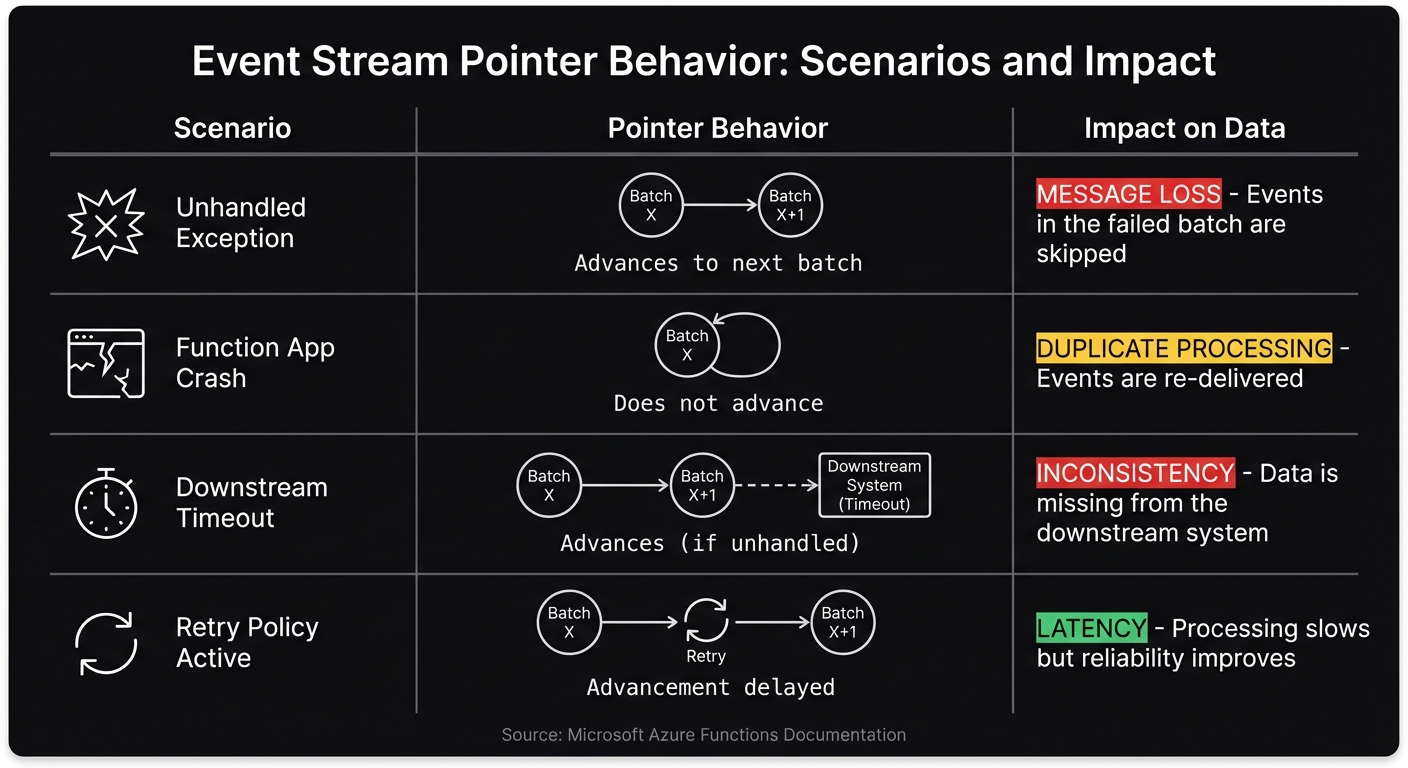
Event Stream Pointer Behavior and Impact on Data Processing
Azure Functions makes event processing easier, but it doesn’t guarantee reliability out of the box. Without careful handling, you might encounter issues like lost messages, duplicates, or processing gaps. Let’s break down some of the key challenges and how they can affect your system.
Message Loss and Unhandled Exceptions
One major issue is silent message loss caused by unhandled exceptions. If a function throws an unhandled exception, Azure Functions doesn’t retry the failed message. Instead, it moves on to the next batch. Microsoft’s documentation highlights this behavior: "Unhandled exceptions may cause you to lose messages. Executions that result in an exception will continue to progress the pointer" [1].
Jeff Hollan, a Senior Program Manager at Microsoft, demonstrated this in 2018. He processed 100,000 messages through an Event Hubs-triggered Azure Function and intentionally threw an exception every 100th message. Without a try/catch block, messages 100 through 112 were lost because the host checkpointed the batch, skipping over the failed messages. By adding a try/catch block and using the Polly library for retries, he ensured all 100,000 messages were processed successfully [3].
These processing gaps can lead to data inconsistencies downstream. Imagine an order confirmation email that never gets sent, an inventory update that’s skipped, or a payment notification that’s lost. Such errors can result in customer complaints and extra manual work to fix the issues.
Beyond message loss, duplicate processing is another challenge that requires attention.
At-Least-Once Delivery and Duplicate Messages
Azure Functions operates on an at-least-once delivery model, which means duplicate messages are a common occurrence. If a function execution fails - due to a timeout, host crash, or lost acknowledgment - the system reprocesses the same batch from the last successful checkpoint.
Jeff Hollan explained this behavior: "If a function doesn't complete execution, the offset pointer is never progressed, so the same messages will process again when a new instance begins to pull messages" [3]. This is a typical characteristic of distributed event processing.
Duplicate messages can cause real problems, such as double entries in a database, duplicate charges to a customer, or multiple email notifications. Event Grid adds to this complexity with its 30-second response timeout. If the endpoint doesn’t respond in time, the event gets queued for a retry, which can result in concurrent processing [4].
Azure Service Bus, on the other hand, uses a MaxDeliveryCount setting, defaulting to 10 retries. If a message fails 10 times in a row without being handled, it’s moved to a dead-letter queue [5]. While this avoids infinite retries, it also means messages can disappear from the main flow if transient errors aren’t resolved.
Pointer Advancement and Skipped Events
Managing processing pointers introduces its own set of difficulties. Unlike queues, event streams like Azure Event Hubs use an offset pointer to track the current position in the stream. Jeff Hollan described it as: "With event streams like Azure Event Hubs, there is no lock concept... services like Event Hubs read more like a tape drive when consuming events. There is a single 'offset' pointer in the stream per partition, and you can read forwards or backwards" [3].
Here’s where it gets tricky: if an exception occurs mid-batch, some events might never get processed. For example, if a batch of 50 events is received and the function fails on the 10th event, the remaining 40 events could be skipped entirely if the pointer checkpoints at the end of the batch. These data gaps are hard to detect and often require manual intervention to fix.
| Scenario | Pointer Behavior | Impact on Data |
|---|---|---|
| Unhandled Exception | Advances to next batch | Message Loss: Events in the failed batch are skipped |
| Function App Crash | Does not advance | Duplicate Processing: Events are re-delivered |
| Downstream Timeout | Advances (if unhandled) | Inconsistency: Data is missing from the downstream system |
| Retry Policy Active | Advancement delayed | Latency: Processing slows but reliability improves |
Poison Queues in Service Bus Triggers
Poison messages - events that repeatedly fail processing - are another challenge. Azure Service Bus handles these by moving them to a dead-letter queue after hitting the MaxDeliveryCount (default: 10 retries) [5]. While this prevents a single bad message from blocking the queue, it can lead to a backlog of unprocessed events. As Microsoft notes: "If the pointer is stopped to deal with problems processing a single event, the unprocessed events begin piling up" [1].
Solutions for Reliable Event Processing
Practical approaches tackle challenges like message loss, duplicates, and pointer issues.
Queue-Based Processing with Azure Service Bus and Storage Queues
Azure Service Bus and Storage Queues rely on a lock mechanism to ensure more dependable message processing. When a function triggers, it locks the message. If processing fails, the lock is released, allowing the message to be retried [1][6]. This mechanism avoids the pointer advancement problem seen with Event Hubs.
Both queue types handle poison messages automatically based on their retry settings. For instance, Storage Queues typically move messages to a poison queue after 5 failed attempts (though some configurations default to 4) [6]. Similarly, Service Bus transfers messages to a dead-letter queue once its MaxDeliveryCount is reached. This design prevents bad messages from clogging the pipeline and provides a separate queue for troubleshooting failures.
The choice between these services depends on your needs. Storage Queues are ideal for straightforward, high-volume queuing. On the other hand, Service Bus excels in more complex scenarios, offering features like message sessions to ensure ordered delivery [2].
For event-driven systems, checkpointing and idempotency strategies are essential to maintain reliability.
Checkpointing and Idempotency with Event Hubs
Event Hubs requires deliberate exception handling and idempotency measures to address issues like pointer advancement and duplicate messages.
Jeff Hollan, Principal Program Manager at Microsoft, emphasized this point: "All Event Hubs functions need to have a catch block" [6]. Without a try-catch wrapper, unhandled exceptions can advance the pointer, leading to message loss.
The checkpointing system stores an offset pointer in Azure Storage for each partition. This pointer only moves forward after function execution is complete - whether successful or not. Without proper exception handling, batch failures could still result in lost messages.
To manage duplicates, embed the final state in your event payloads instead of incremental changes. For example, include the updated account balance rather than just the withdrawal amount. This ensures that reprocessing the same event won't cause inconsistencies. Alternatively, you can use a "look-before-you-leap" pattern by checking a persistent store like Redis or SQL to confirm whether an event ID has already been processed.
It's also wise to use a dedicated Azure Storage account for your function app's internal operations (AzureWebJobsStorage) to minimize I/O contention during heavy checkpointing. For better resilience during datacenter outages, configure the storage account with Zone-Redundant Storage (ZRS).
Error Handling and Retry Strategies
Building on these processing techniques, robust retry strategies further improve reliability by addressing transient faults and other failure scenarios.
A good approach involves three retry layers: trigger-specific, function-level, and code-level retries using tools like Polly [2].
For example, Storage Queue triggers automatically retry messages up to 5 times before moving them to a poison queue [2]. At the function level, use ExponentialBackoffRetry instead of FixedDelayRetry for transient errors. Exponential backoff introduces randomized delays that grow with each attempt, giving downstream systems time to recover [2].
Limit retries to transient errors (e.g., HTTP 503 or 429) and avoid retrying permanent failures like 401 Unauthorized or 400 Bad Request [2]. This approach conserves resources and helps pinpoint configuration issues more efficiently.
High Availability and Disaster Recovery
Once error handling and retry mechanisms are in place, the next priority is ensuring high availability and disaster recovery. Implementing failover patterns and leveraging zone deployments can safeguard event processing against regional outages. These strategies work hand-in-hand with error handling to build a resilient system.
Active-Passive and Active-Active Failover Patterns
Choosing the right failover pattern depends on the type of trigger. Active-active setups are ideal for HTTP triggers, while active-passive is better suited for event-driven triggers.
- Active-Active Failover: Best for HTTP-triggered functions, this pattern uses Azure Front Door to balance traffic across multiple regions. Azure Front Door also monitors endpoints, rerouting traffic away from regions that become unresponsive to ensure uninterrupted service.
- Active-Passive Failover: For event-driven triggers like Service Bus or Event Hubs, active-passive maintains data consistency by keeping only one region active at a time. This avoids duplicate processing and preserves message order. With Event Hubs Geo-Disaster Recovery, publishers connect via a namespace alias, while the Function App trigger uses a direct connection string. The secondary function app remains idle until a manual failover of the Event Hubs alias occurs.
| Feature | Active-Active | Active-Passive |
|---|---|---|
| Primary Trigger | HTTP (via Azure Front Door) | Event Hubs, Service Bus, Non-HTTP |
| State | Both regions actively processing | Secondary idle until failover |
| Consistency | More challenging for non-HTTP | Easier for message streams |
Using Availability Zones for Function Apps
Availability Zones add another layer of protection by distributing function instances across separate datacenters within a region. This setup guards against failures at the datacenter level. However, it's important to note that this feature is available only on Flex Consumption, Premium, and Dedicated plans - not on the standard Consumption plan.
To enable zone redundancy on Premium plans, you’ll need at least two always-ready instances. Additionally, the function app's host storage account must use Zone-Redundant Storage (ZRS). With these configurations, the system can continue processing events even if an entire zone goes offline.
Monitoring and Best Practices for Reliability
Once you've tackled issues like message loss and duplicate processing, the next step is building strong monitoring and protection mechanisms. Failover patterns are great, but they only go so far without visibility into how your system is performing. That’s where tools like Application Insights come into play. However, setting it up correctly is key - otherwise, you could end up with incomplete data or inflated costs.
Using Application Insights for Observability
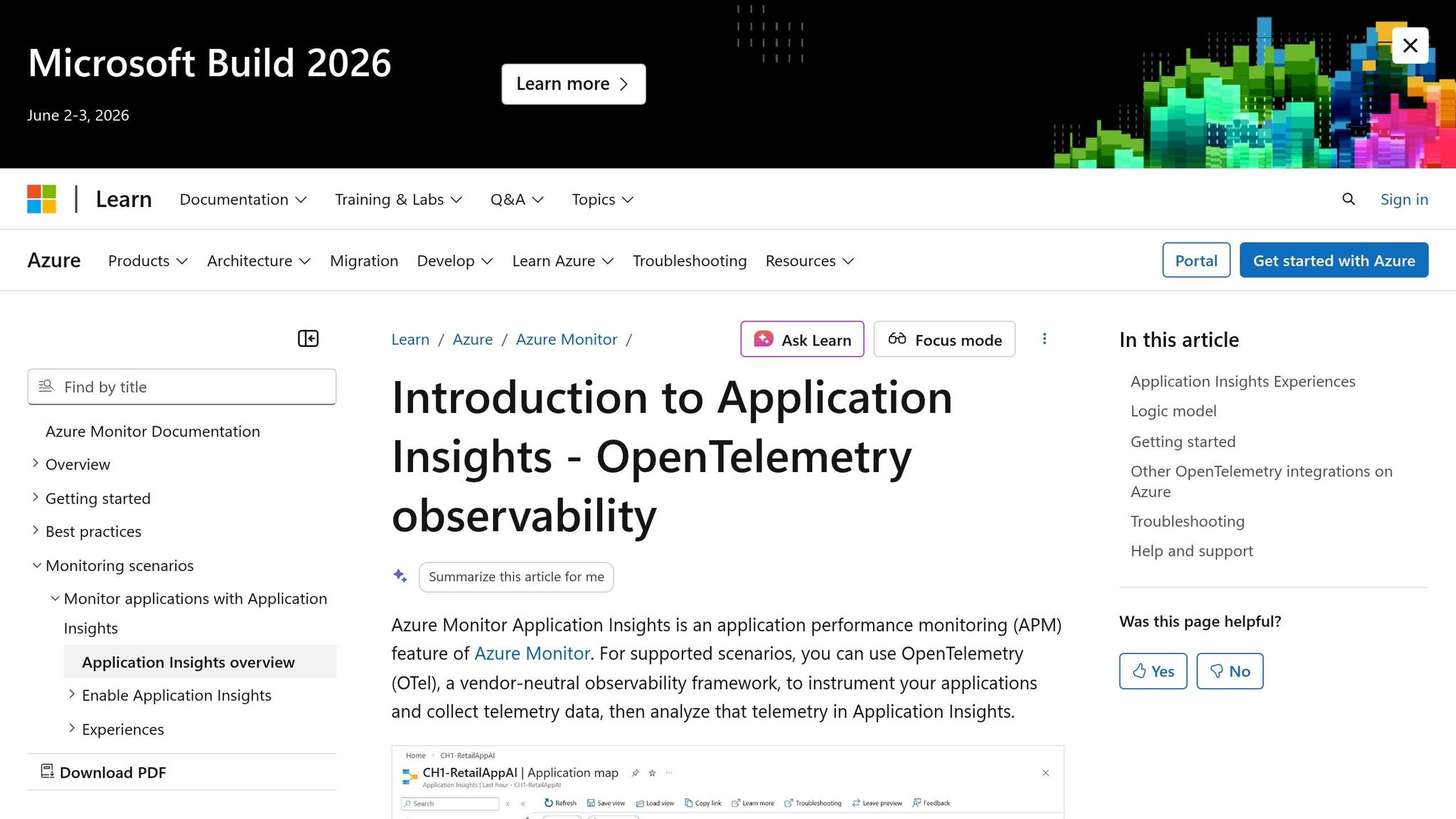
Application Insights offers three essential views to help identify and resolve event processing failures:
- Application Map: This shows how events flow between Azure Functions and dependencies like Event Hubs or Service Bus. Failed transactions are highlighted in red, making it easy to spot trouble areas.
- End-to-End Transaction Details: This provides a detailed, chronological breakdown of a single request’s journey. If something fails, this view pinpoints exactly where it happened.
- Live Metrics Stream: This gives real-time insights into incoming requests, failure rates, and dependency calls. It’s especially useful during active incidents when immediate action is needed.
If you're using the .NET isolated worker model, make sure to register Application Insights explicitly in your Program.cs file using AddApplicationInsightsTelemetryWorkerService() and ConfigureFunctionsApplicationInsights(). Also, modern setups should use the APPLICATIONINSIGHTS_CONNECTION_STRING instead of the older instrumentation key - especially if you're working in environments like Azure Government.
"You cannot improve what you cannot measure." - Nawaz Dhandala, OneUptime [7]
To ensure accurate data collection, configure host.json to avoid sampling Request and Exception types. This guarantees that all failures are captured, even under heavy load. Common monitoring alerts include:
- Triggering when the failure rate exceeds 5%.
- Notifying if the average response time exceeds 3,000ms (3 seconds) [7].
For Event Hubs, you can use KQL to calculate dispatchTimeMilliseconds (the difference between enqueueTimeUtc and the function's timestamp) to check if processing is lagging behind the stream. Always log the full exception object and include custom dimensions like OrderId or PartitionId. This makes querying and debugging much easier.
These observability tools provide the foundation for building a more resilient system.
Implementing Circuit Breaker Patterns
Monitoring is only part of the equation - you also need safeguards to prevent overload during failures. Circuit breaker patterns are a great way to protect your system from cascading failures when things go wrong. If a downstream service, like a database or API, starts failing repeatedly, the circuit breaker temporarily stops sending requests. This pause gives the failing service time to recover instead of being overwhelmed by retries.
Since Azure Functions are stateless, you'll need an external shared state (like Azure Storage or Redis) to track failure counts across parallel instances. The circuit breaker alternates between three states - closed, open, and half-open - to manage traffic effectively. This approach helps conserve compute resources and reduces latency during outages.
Using Dead-Letter Queues and Idempotency Keys
Dead-letter queues are essential for capturing events that fail processing after all retry attempts are exhausted. For example:
- Service Bus: Automatically moves messages to a dead-letter queue when the maximum delivery count is reached.
- Event Hubs: Requires you to manually implement this feature.
These queues ensure that "poison messages" don’t block the entire pipeline and provide a place for manual investigation.
Idempotency keys are another critical tool. They ensure that processing the same event multiple times produces the same result. By storing a unique identifier (like MessageId or a hash of the event payload) in a database or cache before processing, you can skip events with duplicate identifiers. This is especially important in at-least-once delivery scenarios where duplicate events are unavoidable.
When combined, dead-letter queues and idempotency keys create a safety net against both permanent failures and duplicate processing. Together, they help keep your system running smoothly even when things go wrong.
Conclusion
Building a reliable event processing system with Azure Functions requires thoughtful planning to address challenges like failures, duplicates, and outages. Without proper handling, unhandled exceptions can skip entire message batches, at-least-once delivery guarantees can lead to duplicates, and downstream failures may ripple through your pipeline. As discussed earlier, strong error management is key to mitigating these risks [6].
The strategies outlined here - such as queue-based processing, checkpointing, idempotency keys, dead-letter queues, and circuit breaker patterns - serve as essential safeguards. These methods help prevent data loss and ensure your system can recover smoothly from disruptions. Tools like Application Insights provide early detection of issues, while retry policies with exponential backoff help protect downstream services from overload during outages [8].
For industries like healthcare, financial services, or private equity, where compliance and reliability are non-negotiable, these practices are especially crucial. Systems managing hundreds of thousands of appointments annually or processing Medicare reimbursements before devices are shipped cannot tolerate message loss or duplicate processing. AppStream Studio specializes in creating production-ready AI agents and event-driven systems tailored for such scenarios, ensuring HIPAA, SOC 2, and ISO 27001 compliance from the start. To learn more, visit https://appstream.studio.
Additionally, selecting the right hosting plan is vital. Premium or Flex Consumption plans offer features like Availability Zones, VNet integration, and private endpoints - critical for maintaining high availability in regulated environments.
FAQs
How can I prevent message loss with Event Hubs-triggered Azure Functions?
Losing messages in your event-driven applications can lead to data inconsistencies and system issues. To avoid this, you can implement a few reliable practices that ensure smooth message handling and processing:
- Checkpointing: This technique ensures that a message is only marked as processed after it has been successfully handled. It prevents acknowledging messages prematurely, safeguarding against potential loss.
- Idempotency: By designing your system to handle duplicate messages without unintended side effects, you can safely retry operations without worrying about processing the same message multiple times.
- Error Handling: Use strategies like dead-letter queues or poison message detection to manage problematic messages. Dead-letter queues store messages that cannot be processed, allowing you to review and resolve issues without disrupting the system.
By combining these methods, you can create a resilient system that minimizes the risk of data loss and ensures reliable event processing in your applications.
What’s the best way to handle duplicate events in an at-least-once system?
To deal with duplicate events in an at-least-once system, use idempotency. Here's how it works: assign a unique identifier to every event. Then, before processing an event, check this identifier against a storage system to see if it has already been handled. If it has, skip processing; if not, proceed. This guarantees that each event is handled only once, even if it’s received multiple times.
When should I choose Service Bus/Storage Queues vs. Event Hubs for reliability?
When deciding between Service Bus and Storage Queues, go with these options if you need reliable and ordered delivery along with transactional support. These are ideal for scenarios like payment workflows or job queues. Features such as FIFO (First In, First Out), sessions, and message transactions make them a great fit for cases where maintaining order and consistency is crucial.
On the other hand, choose Event Hubs when your focus is on high-throughput, real-time event streaming. This is perfect for handling telemetry or managing big data scenarios where speed and scalability are more important than maintaining strict order or supporting transactions. The best choice will depend on the specific messaging needs of your application.


