
Retrieval-Augmented Generation (RAG) pipelines combine external knowledge sources with language models to generate accurate, up-to-date responses. However, these multi-step systems can face performance bottlenecks, especially in production. Here's what you need to know:
- How RAG Works: User queries trigger data retrieval, which is added as context before generating a response.
- Challenges: Delays in retrieval, augmentation, and generation stages can slow down responses.
- Solutions for Speed: Techniques like semantic caching (up to 17x faster), token compression (6.8x faster), and optimized hardware usage improve efficiency.
- Azure ML's Role: Azure simplifies RAG pipeline development and deployment with tools like Prompt Flow, managed endpoints, and AI Search for retrieval.
Optimizing retrieval quality, reducing latency, and ensuring scalability are key to deploying RAG pipelines effectively in production.
Building RAG Solutions with Azure AI Foundry
sbb-itb-79ce429
Building RAG Pipelines in Azure Machine Learning
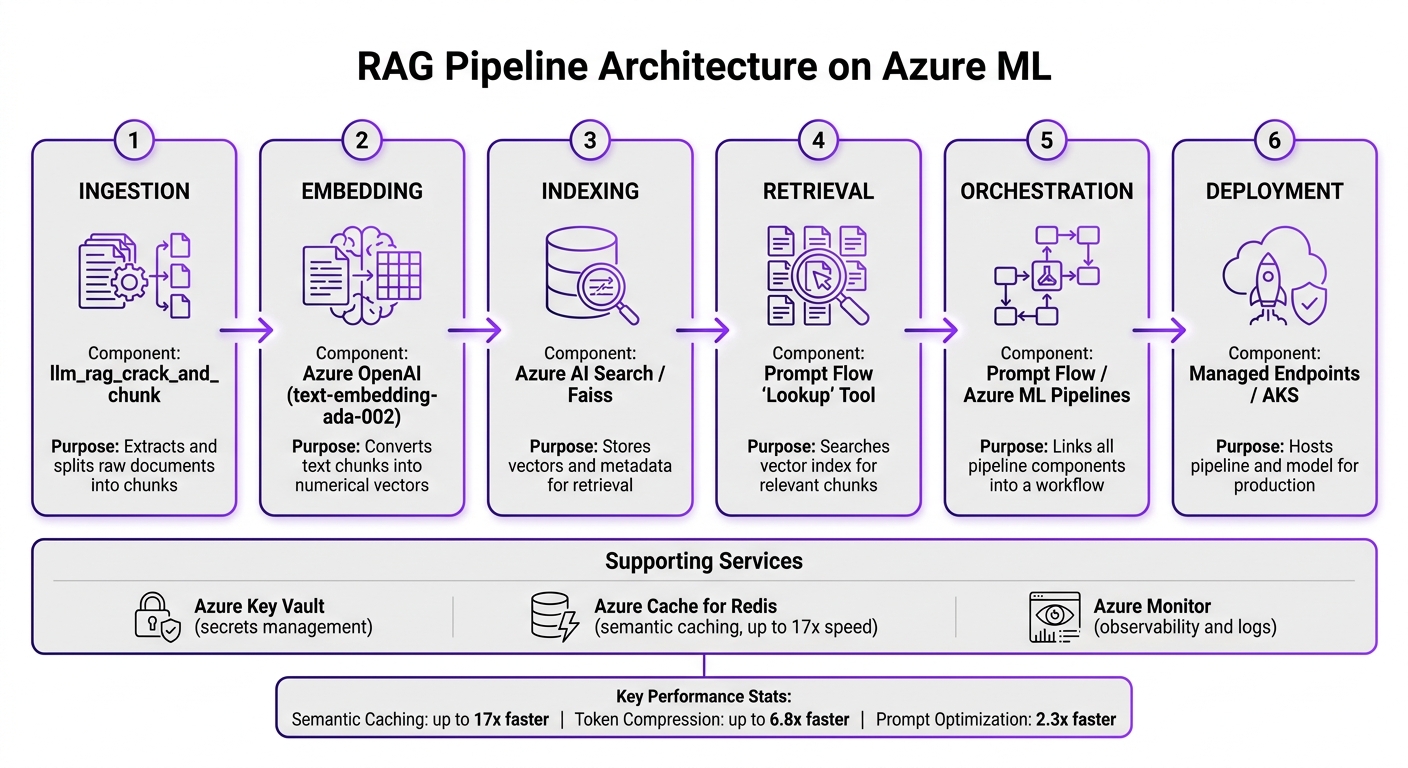
RAG Pipeline Architecture on Azure ML: End-to-End Workflow
Azure Machine Learning provides a streamlined platform to develop, manage, and deploy RAG (Retrieval-Augmented Generation) pipelines without needing to piece together separate services. Each stage of the pipeline is tied to a specific Azure service, creating a predictable and scalable workflow that’s easier to manage.
Key Stages of the RAG Pipeline Lifecycle
A RAG pipeline goes through several stages before delivering a response to the user. The table below outlines each stage and its corresponding Azure component:
| RAG Stage | Azure ML / Azure Service Component | Purpose |
|---|---|---|
| Ingestion | llm_rag_crack_and_chunk |
Extracts text and splits data into smaller, manageable pieces |
| Embedding | Azure OpenAI (text-embedding-ada-002) |
Converts text chunks into numerical vectors for efficient searching |
| Indexing | Azure AI Search / Faiss | Stores vectors and metadata for quick and accurate retrieval |
| Retrieval | Prompt Flow "Lookup" Tool | Searches the vector index for chunks relevant to the user’s query |
| Orchestration | Prompt Flow / Azure ML Pipelines | Links all pipeline components into a cohesive workflow |
| Deployment | Managed Endpoints / AKS | Hosts the pipeline and model for production use |
The ingestion phase is handled by the llm_rag_crack_and_chunk component, which automatically extracts, cleans, and splits raw documents into smaller segments.
Azure ML Components for RAG Pipelines
Azure ML Pipelines handle the orchestration of the remaining steps. For example, the llm_rag_update_acs_index component automates the process of vector indexing within Azure AI Search, ensuring the vectors are ready for retrieval [3].
Prompt Flow plays a critical role in connecting the retrieval and generation stages. It allows you to visually link the lookup tool, prompt assembly logic, and language model calls into a single workflow. This setup makes debugging straightforward, as individual steps can be examined without treating the pipeline as a single, opaque system. To manage sensitive information like credentials, Azure Key Vault securely stores and handles access to secrets, keeping them out of your codebase.
For deployment, you have two powerful options: Managed Endpoints and Azure Kubernetes Service (AKS). Managed Endpoints are easier to set up and work well for most production scenarios. On the other hand, AKS provides greater control and is ideal for high-throughput needs. To optimize costs during low-demand periods, AKS clusters can be configured with a minimum of 0 nodes, ensuring availability when traffic increases [2]. These integrations make it easier to deploy and maintain robust RAG pipelines in production environments.
Inference Acceleration Techniques in Azure ML
In production settings, speeding up RAG (Retrieval-Augmented Generation) pipelines is a priority. These techniques aim to reduce latency while maintaining model accuracy.
Model Optimization and Deployment
Refining prompt design is one way to enhance performance. For example, concise prompts can reduce response times from 23 seconds to 9.8 seconds - a 2.3x improvement[1]. Additionally, focusing on extracting and appending only the most relevant content can make responses up to 6.8x faster[1].
These improvements at the model level pave the way for broader infrastructure optimizations.
Batching, Autoscaling, and Caching
Semantic caching with Redis is a game-changer for handling repeated or similar queries. By serving semantically similar requests without invoking a new LLM call, it can improve speed by up to 17x for frequently asked questions[1].
On the infrastructure side, batching techniques can significantly impact GPU utilization. Static batching, which processes grouped requests all at once, often results in low GPU usage (around 30–40%). In contrast, continuous batching - where new requests are added to the queue during processing - can push GPU utilization above 80%, making it the go-to method for production RAG tasks.
While batching and caching optimize request handling, hardware selection also plays a pivotal role.
GPU and CPU Optimization
Choosing the right compute resources is essential for efficient deployment. For large generative models like Llama 2 70B, high-memory VMs such as Azure NC H100 v5 (94 GB HBM3) minimize inter-GPU communication by consolidating the model onto fewer GPUs. For embedding tasks, Intel-optimized instances like the D16s v6, powered by 5th Gen Intel Xeon (Emerald Rapids) and Advanced Matrix Extensions, can match Tesla T4 GPU performance while reducing costs by about 35%[5].
To maximize efficiency, direct tasks to GPUs only when compute density exceeds 10 FLOPs/Byte and parallelism is high. Offload CPU-intensive tasks like parsing and data cleaning to a dedicated microservice. This prevents resource bottlenecks and allows independent scaling. Additionally, optimizing CPU deployments with dedicated L3 cache grouping can boost cache hit rates by 41% and cut memory latency by 31%[4].
Improving Retrieval Quality with Azure AI Search
After addressing inference acceleration, the next step in building a high-performing RAG pipeline is to optimize retrieval quality. Even the fastest inference setup won't deliver accurate results if the retrieval layer fails to provide the right context. A weak retrieval layer leads to responses based on incorrect information. Azure AI Search tackles this challenge head-on with multiple retrieval strategies that can be customized and layered depending on your specific needs.
Hybrid and Semantic Search
Azure AI Search offers three retrieval modes: full-text search, vector search, and hybrid search. Each mode is tailored to different types of queries:
- Full-text search: Matches keywords directly within the index. It's fast and reliable for exact matches but struggles with queries that differ in phrasing from the source material.
- Vector search: Compares embeddings, making it effective for handling paraphrased or conceptually similar queries.
- Hybrid search: Combines the strengths of both full-text and vector search, often delivering better results than either method alone.
| Search Type | Mechanism | Best Use Case |
|---|---|---|
| Full-Text | Keyword matching against indexed text | Exact term lookups, structured queries |
| Vector | Embedding similarity comparison | Semantic/conceptual queries, paraphrasing |
| Hybrid | Combined text + vector scoring | General-purpose RAG pipelines |
These retrieval strategies work alongside inference acceleration techniques to ensure a robust, high-performance system.
Azure AI Search also includes semantic ranking, a feature that re-scores the top search results using a Microsoft-trained model. This re-ranking improves relevance, which is especially valuable for applications like conversational agents and knowledge assistants where precision matters most.
In addition to selecting the right search mode, fine-tuning how data is segmented can further improve retrieval performance.
Vector Search and Chunk Size Tuning
Choosing the right chunk size is a critical part of optimizing RAG pipelines. If chunks are too large, they may contain irrelevant content, increasing token costs and diluting the quality of the retrieved context. On the other hand, chunks that are too small can lose important context, making it harder to generate coherent responses.
A good starting point is 512 tokens per chunk with a 10–15% overlap between adjacent chunks. From there, you can adjust based on the type of content you're working with:
- For knowledge bases with long, dense paragraphs, smaller chunks (256–384 tokens) often work better.
- For technical documents with well-structured sections, larger chunks are usually fine.
Ultimately, the ideal chunk size depends on the specific domain and content type - there’s no one-size-fits-all solution.
When configuring vector search in Azure AI Search, it’s essential to align the document and query embedding models. Using mismatched embeddings can significantly reduce retrieval quality. A reliable default for English-language content is Azure OpenAI’s text-embedding-3-large, which balances high accuracy with manageable dimensions. Ensuring consistent embeddings across data ingestion and inference is a foundational step for optimizing the entire pipeline.
Evaluating and Tuning RAG Pipelines for Production
Once you've fine-tuned retrieval quality, the next big challenge is measuring performance and identifying areas that need improvement. Without clear metrics and a structured approach to tuning, it’s tough to isolate and resolve performance issues effectively.
Key Metrics for RAG Performance
RAG pipelines have two main stages - retrieval and generation - and each requires its own evaluation. Treating the pipeline as a single "black box" makes it nearly impossible to diagnose specific problems.
Component-level metrics focus on the retrieval stage alone. For example, Context Recall measures whether the retrieved chunks contain the necessary information to answer the query, while Context Precision assesses how relevant those chunks are. Together, these metrics help determine if the retrieval system is providing high-quality context for the language model to work with.
End-to-end metrics assess the entire pipeline’s output. Groundedness looks at whether the generated answer is supported by the retrieved context - low scores here often indicate hallucination issues. Answer Relevance evaluates how well the response addresses the query. Additionally, metrics like latency and throughput are critical, especially in production, where fast response times are key to a good user experience.
| Metric | Stage | Insight Provided |
|---|---|---|
| Context Recall | Retrieval | Are the right chunks being retrieved? |
| Context Precision | Retrieval | Is the retrieved content free of irrelevant data? |
| Groundedness | Generation | Is the answer supported by the provided context? |
| Answer Relevance | Generation | Does the response directly address the query? |
| Latency / Throughput | End-to-End | Is the pipeline fast enough for production use? |
Using these metrics, you can zero in on areas to improve and guide the tuning process systematically.
Tuning Strategies for RAG Pipelines
Once you’ve established performance metrics, the next step is fine-tuning the pipeline for better efficiency and reliability in production.
Azure ML's RAG Experiment Accelerator simplifies this process by automating hyperparameter and search strategy testing on your dataset [6]. This tool quickly identifies the best settings, eliminating the need for time-consuming manual experiments.
Two specific tuning strategies can make a big difference. First, token compression - encouraging the model to generate concise responses - has been shown to reduce response times, as noted in the inference acceleration section. Second, semantic caching using Azure Cache for Redis stores the results of frequently asked queries. This allows the system to reuse cached results instead of initiating a full language model call, significantly speeding up responses for repeated queries [1].
Production Hardening for RAG Pipelines on Azure ML
Demonstrating a RAG pipeline is one thing; making it production-ready is a whole different challenge. Production hardening ensures your pipeline is secure, reliable, and scalable, while also keeping costs under control. Building on earlier performance and retrieval improvements, this step focuses on making your RAG pipeline dependable for real-world use.
Security and Compliance
In industries like healthcare or finance, security isn't just important - it's mandatory. A crucial feature to implement is security trimming in Azure AI Search. By adding fields like group_ids to your document index, you can enforce document-level access controls. This ensures users only see content they’re authorized to access, which is critical for meeting strict regulations like HIPAA and SOC 2 [8].
Another must-have is audit trails. Every query session should log key details: the authenticated user, sanitized prompts, applied retrieval filters, document IDs returned, and the final generated response. These tamper-proof logs provide a clear record of why a specific response was generated, which is invaluable for compliance and troubleshooting [7].
To address permission drift - when user permissions change in the source system but aren’t updated in real-time - event-driven updates are a reliable solution [7]. For securing credentials, use Azure Key Vault with system-assigned managed identities [2].
Organizations working in regulated sectors, like AppStream Studio, prioritize these controls as essential. They’re not optional add-ons - they’re the foundation for building compliant and secure RAG systems on Azure.
Once security is locked down, the next step is ensuring your pipeline remains stable and cost-efficient.
Observability and Cost Management
After deployment, visibility into your pipeline’s operations becomes critical. Azure ML’s activity logs track every subquery, knowledge source query, and parameter used, making it easier to debug retrieval failures [2]. The "Outputs + logs" tab in the Azure ML workspace provides detailed insights into individual compute nodes, helping you trace issues in steps like indexing [2].
To manage costs effectively, consider these strategies:
- Set compute clusters to scale down to zero nodes during idle periods [2]. This prevents unnecessary expenses when the pipeline isn’t in use.
- Use public tokenizers to estimate token usage and compare it with API-reported usage in your activity logs. This helps you spot unexpected cost spikes early.
You can also reduce costs by lowering the "reasoning effort" parameter, which cuts down on LLM processing during query planning. This reduces both latency and token consumption.
Here’s a quick breakdown of observability components and their roles in your pipeline:
| Observability Component | Purpose in RAG Pipeline |
|---|---|
| Detailed Logs | Helps investigate and resolve incorrect AI responses |
| Activity Plan | Shows the breakdown of query execution steps |
| Reference Data | Tracks source documents and citations for verification |
| Toxicity Classifiers | Filters harmful or sensitive content during data ingestion or response generation |
These tools provide the granular insights needed to fine-tune your pipeline while complementing earlier performance metrics.
Finally, don’t overlook red-teaming. Regularly test your pipeline by trying to exploit vulnerabilities, such as injecting harmful prompts or bypassing safeguards. This proactive approach helps you identify and address weaknesses before users encounter them. It’s not a one-and-done task - it should be part of your ongoing operations.
Conclusion: RAG Pipelines and Azure ML in Production
Key Benefits of RAG Pipelines in Azure ML
RAG pipelines in Azure ML offer a powerful alternative to traditional fine-tuning by delivering accurate and grounded AI results using live data - without the significant computational burden of retraining. With semantic caching, response speeds for repeated queries can improve by up to 17x [1], while combining token compression with optimized prompt design can enhance overall pipeline performance by as much as 6.8x [1]. These performance gains set the stage for deploying RAG pipelines effectively.
The architecture is designed with scalability in mind. Features like continuous batching, prefix caching, quantization, and MIG partitioning tackle specific challenges such as latency, throughput, memory, or resource isolation. This flexibility allows teams to tailor the system to their unique workloads rather than relying on generic configurations. Additionally, since RAG pipelines leverage in-context learning instead of retraining, they typically maintain lower costs compared to fine-tuning, making them a cost-effective choice for most production scenarios.
Next Steps for Implementing RAG Pipelines
Start by focusing on your retrieval layer. Prioritize configuring hybrid and semantic search in Azure AI Search, as high-quality retrieval is essential - weak retrieval can undermine the effectiveness of any downstream optimizations.
Once the retrieval layer is solid, enhance inference performance step by step. Begin with semantic caching, then introduce token compression, and finally implement hardware-level optimizations like quantization. After stabilizing performance, incorporate production hardening measures, including security trimming, audit logging, integration with Key Vault, and red-teaming to ensure reliability.
For industries with strict regulatory requirements, such as healthcare and finance, tools like AppStream Studio provide production-ready RAG systems. These systems are crafted to meet compliance needs, deliver dependable performance, and handle complex enterprise workloads seamlessly on the Microsoft platform.
FAQs
What’s the fastest way to reduce RAG latency in Azure ML?
To cut down RAG latency in Azure ML, inference acceleration techniques are your best bet. Here's how you can achieve faster response times:
- Optimize retrieval processes: Fine-tune your data retrieval methods to ensure they're as efficient as possible.
- Use scalable infrastructure: Deploy solutions like Azure Kubernetes Service (AKS) with autoscaling to handle varying workloads seamlessly.
- Leverage high-performance inference engines: Tools like vLLM can significantly speed up inference tasks.
- Implement multi-query pipelines: These pipelines are great for managing complex questions, enabling quicker and more efficient responses.
By combining these techniques, you can streamline your operations and improve performance in Azure ML.
How do I choose chunk size and overlap for Azure AI Search?
When setting up chunk size and overlap for Azure AI Search in a RAG pipeline, the goal is to balance context relevance while staying within token limits and avoiding unnecessary data.
- Chunk size: Keep it large enough to include meaningful content but ensure it stays within token constraints - typically a few hundred tokens.
- Overlap: Aim for 10–20% of the chunk size. This helps maintain context across chunks without introducing too much repetition.
Make sure to test and adjust these settings based on your specific data and query requirements to achieve the best results.
When should I use Managed Endpoints vs AKS for a RAG pipeline?
Use Managed Endpoints in Azure ML when you need a fast deployment process with minimal configuration and upkeep. These endpoints work well for applications that handle predictable, moderate traffic while maintaining low latency.
For more complex or large-scale RAG pipelines that require custom orchestration, specialized hardware, or integration with Kubernetes, AKS is the better choice. It provides the flexibility and control needed for enterprise-level scenarios that demand high levels of customization and scalability.


