
Azure Service Bus is a messaging platform often used in industries like healthcare and finance to handle sensitive data. If you’re using it for tasks involving Protected Health Information (PHI) or financial transactions, compliance with SOC 2 and HIPAA is critical. Here's what you need to know:
- SOC 2 Compliance: Focuses on security, availability, processing integrity, confidentiality, and privacy. It’s your job to configure Azure Service Bus to meet these standards, while Microsoft secures the infrastructure.
- HIPAA Compliance: Governs how PHI is managed. Azure Service Bus is HIPAA-eligible, but you must configure encryption, access controls, and logging for compliance.
Key Steps for Compliance:
- Access Management: Use Azure AD, RBAC, and managed identities to secure access.
- Encryption: Enforce TLS 1.2+ for data in transit and use Customer-Managed Keys (CMK) for data at rest.
- Network Security: Enable Private Link, disable public network access, and use firewalls.
- Audit Logging: Track all activity using diagnostic logs.
- Policy Enforcement: Use Azure Policy to ensure configurations meet compliance standards.
Premium Tier is essential for regulated workloads, as it supports features like CMK and Private Link. Remember, compliance is a shared responsibility: Microsoft secures the infrastructure, but you must configure and manage the service to meet SOC 2 and HIPAA requirements.
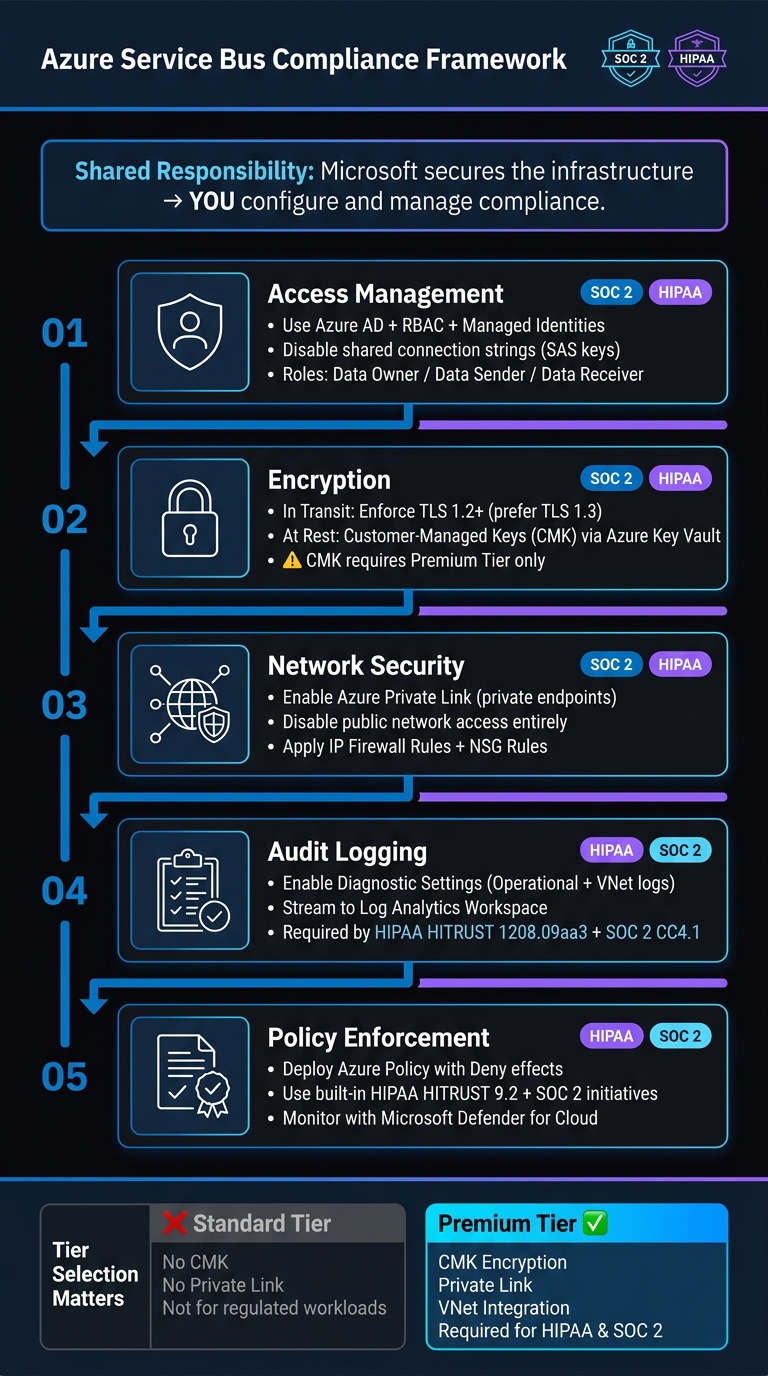
Azure Service Bus SOC 2 & HIPAA Compliance: 5 Key Configuration Steps
SOC 2 and HIPAA Compliance: Core Concepts
SOC 2 Compliance Explained
"SOC 2 (Service Organization Control 2) is an auditing framework developed by the AICPA that evaluates an organisation's controls related to security, availability, processing integrity, confidentiality, and privacy." - Drop Table Team [1]
SOC 2 focuses on evaluating an organization's ability to meet five Trust Services Criteria (TSC): Security, Availability, Processing Integrity, Confidentiality, and Privacy. These criteria are assessed through two types of reports:
- Type 1: Examines whether controls are properly designed at a specific point in time.
- Type 2: Evaluates how effectively those controls operate over a period - usually 6 to 12 months.
For enterprise customers and partners, a Type 2 report holds more weight because it demonstrates consistent operational performance over time.
Microsoft provides SOC 2 reports for the Azure infrastructure layer, which can support your audit. However, these reports do not cover how you configure your Azure Service Bus. Ensuring it meets compliance standards is entirely your responsibility.
Next, let’s look at HIPAA compliance and how it applies to messaging systems.
HIPAA Compliance Explained
HIPAA governs organizations that handle Protected Health Information (PHI), including covered entities like hospitals and health plans, as well as their business associates - vendors or service providers managing PHI on their behalf. If your organization uses Azure Service Bus to route PHI, you take on the role of a business associate under HIPAA.
Azure Service Bus is classified as a HIPAA-eligible service, meaning Microsoft can sign a Business Associate Agreement (BAA) with your organization. However, a signed BAA alone doesn’t guarantee compliance. You must configure the service appropriately to protect electronic PHI (ePHI). This includes implementing encryption, access controls, and logging to safeguard data both during transmission and while stored.
Both SOC 2 and HIPAA share a focus on confidentiality, integrity, and availability - principles that are critical for secure messaging systems.
Applying Compliance Principles to Messaging Systems
To align your messaging systems with SOC 2 and HIPAA requirements, apply these key principles:
| Compliance Principle | What It Means for Service Bus |
|---|---|
| Confidentiality | Use TLS 1.2 or higher for message encryption in transit, encrypt data at rest with Customer-Managed Keys (CMK) on the Premium tier, and limit access with Private Link. |
| Integrity | Enable resource logging and diagnostic settings to create an audit trail for message activity. |
| Availability | Use Azure Monitor and redundancy features to maintain uptime and ensure the system stays operational. |
For regulated workloads, the Standard tier does not provide adequate safeguards. Only the Premium tier supports critical features like CMK encryption and VNet integration, which are necessary to meet SOC 2 confidentiality standards and HIPAA requirements. Always choose the Premium tier when dealing with PHI or other sensitive data.
sbb-itb-79ce429
Azure HSM for Compliance: Map to GDPR, HIPAA, PCI & ISO 27001 | Module 6.2
Configuring Azure Service Bus for SOC 2 and HIPAA
To secure Azure Service Bus for regulated environments, you need to focus on three core areas: access management, encryption, and network isolation. These configurations ensure compliance with SOC 2 and HIPAA standards, safeguarding sensitive data and maintaining a strong security posture.
Identity and Access Management
Shared connection strings are a major risk in regulated environments. They can't be scoped properly, rotated easily, or tied to specific users. Instead, rely on Azure Active Directory (Azure AD), role-based access control (RBAC), and managed identities.
Azure Service Bus offers three pre-defined roles to enforce least privilege:
| Role | Permissions | Purpose |
|---|---|---|
| Azure Service Bus Data Owner | Full access to all entities and data | For administrators who need complete control |
| Azure Service Bus Data Sender | Send-only access to specific queues or topics | Restricts producer apps to their required privileges |
| Azure Service Bus Data Receiver | Receive-only access to specific queues or subscriptions | Limits consumer apps to their required privileges |
For added security, use managed identities, which eliminate the need for storing credentials in code. Azure automatically handles identity creation, rotation, and lifecycle management. Whether you're running an Azure Function, App Service, or container, managed identities are the best option for secure authentication.
Once access is locked down, the next step is to address encryption requirements.
Encryption and Key Management
Azure Service Bus encrypts data both at rest and in transit by default, but regulated environments demand stricter controls.
- In transit: Enforce a minimum of TLS 1.2 and opt for TLS 1.3 whenever possible. This satisfies HIPAA and SOC 2 confidentiality requirements. Set the minimum TLS version at the namespace level to ensure compliance.
- At rest: While platform-managed keys (PMK) are the default, regulated workloads should use customer-managed keys (CMK) stored in Azure Key Vault. CMK gives your organization full control over key rotation, immediate revocation, and auditability - critical for meeting HIPAA and SOC 2 standards.
| Feature | Platform-Managed Keys | Customer-Managed Keys |
|---|---|---|
| Key Control | Managed by Microsoft | Managed by your organization |
| Key Rotation | Automatic | Defined and controlled by you |
| Availability | All tiers | Premium tier only |
| Best Fit | General use | Required for HIPAA, SOC 2, FedRAMP |
Since CMK is only available in the Premium tier, organizations handling sensitive data should avoid the Standard tier altogether.
With encryption measures in place, it's time to secure network boundaries.
Network Security and Isolation
Network isolation is a critical layer of protection that often faces scrutiny during audits. The goal is straightforward: ensure your Service Bus namespace is completely inaccessible from the public internet.
- Private Endpoints: Use Azure Private Link to assign a private IP address to your namespace within your VNet. This keeps all message traffic confined to the Azure backbone.
- Disable Public Access: Once a private endpoint is in place, turn off public network access entirely. Leaving it enabled alongside private endpoints is a common and avoidable misstep.
- IP Firewall Rules: Restrict access to authorized IP ranges using firewall rules.
- Network Security Groups (NSGs): Control traffic by defining rules for port, protocol, and source.
- Azure Policy: Create policies with a
Denyeffect to enforce minimum TLS requirements and prevent non-compliant configurations. - Microsoft Defender for Cloud: Enable monitoring to detect and alert on configuration drift.
| Security Measure | Configuration | Compliance Standard |
|---|---|---|
| Network Isolation | Private Endpoints via Azure Private Link | SOC 2 CC6.1, FedRAMP, NIST SP 800-53 |
| Public Access | Disable public network access | Microsoft Cloud Security Benchmark NS-2 |
| Encryption in Transit | TLS 1.2 or 1.3 | HIPAA, SOC 2, NIST SP 800-171 |
| Segmentation | VNet Integration & NSG Rules | Microsoft Cloud Security Benchmark NS-1 |
| Audit Logging | Enable diagnostic logs | HIPAA HITRUST 1208.09aa3, SOC 2 CC4.1 |
Finally, enable diagnostic logging to track and investigate security incidents. HIPAA HITRUST Control 1208.09aa3 explicitly requires an audit trail, so configure resource logs from the beginning to avoid compliance headaches later.
Maintaining Ongoing Compliance for Azure Service Bus
Setting up Azure Service Bus is just the beginning. Ensuring compliance over time requires continuous monitoring, keeping thorough records, and having a clear plan for handling incidents.
Continuous Monitoring and Policy Enforcement
Preventing non-compliance starts with stopping issues before they ever reach production. With Azure Policy, you can define rules that enforce compliance by blocking non-compliant resources. For example, you can require that all new Service Bus namespaces have Private Link enabled or use TLS 1.3 or higher.
But prevention alone isn’t enough - you need visibility too. Stream diagnostic logs, such as Operational and VNet Connection logs, to a Log Analytics workspace. From there, tools like Microsoft Sentinel can provide real-time insights, such as detecting authentication failures or unauthorized access attempts. To catch potential issues early, set up Azure Monitor alerts for dead-letter queue (DLQ) growth, which could indicate delivery problems or even security concerns.
Another critical step is to disable local authentication (SAS keys) at the namespace level and enforce Microsoft Entra ID for all actions. This ensures every action is tied to a unique, auditable identity, a key requirement for meeting standards like SOC 2 and HIPAA.
| Compliance Control | Monitoring Action | Relevant Standard |
|---|---|---|
| Audit Generation | Enable Resource Logs (Operational + VNet) | HIPAA, SOC 2, NIST 800-53 |
| Information Flow | Verify Private Link is active | HIPAA, FedRAMP |
| Cryptographic Protection | Audit minimum TLS 1.3 via Azure Policy | SOC 2, HIPAA |
| Access Control | Disable SAS / Require Entra ID | SOC 2, HIPAA |
| Data at Rest Encryption | Monitor CMK status on Premium namespaces | HIPAA, NIST 800-53 |
Pair this ongoing monitoring with well-organized documentation to make audits easier and faster.
Audit Readiness and Documentation
While monitoring helps prevent problems, proper documentation ensures you’re ready when auditors come knocking. When asked for evidence, having organized records can save you from last-minute scrambling.
Your ARM templates or Bicep files can act as living records of your namespace’s configuration. These files not only capture your setup but also serve as proof for change management requirements like SOC 2 CC5.2. Combine these with Azure Policy compliance reports to show a history of policy adherence. For access-related evidence, regularly export Microsoft Entra ID and RBAC logs - these align with SOC 2 CC6.3 and HIPAA control 1149.01c2.
| Audit Evidence Category | Azure Tool/Feature | Compliance Mapping |
|---|---|---|
| Access Logs | Diagnostic Settings (Resource Logs) | SOC 2 CC6.1 / HIPAA 1208.09aa3 |
| Configuration History | ARM Templates / Azure Policy | SOC 2 CC5.2 / HIPAA 0103.00a3 |
| Encryption Status | Azure Policy (TLS/CMK Audit) | SOC 2 CC6.1 / HIPAA SC-12 |
| Network Isolation | Private Link / IP Firewall Rules | SOC 2 CC6.1 / HIPAA AC-4 |
| Identity Audit | Microsoft Entra ID / RBAC Logs | SOC 2 CC6.3 / HIPAA 1149.01c2 |
Keeping this documentation up to date simplifies audit processes and helps demonstrate compliance with confidence.
Incident Response and Breach Management
Even with the best monitoring and documentation, incidents can still occur. What sets compliant organizations apart is how quickly and effectively they respond.
Integrate Microsoft Sentinel with your Log Analytics workspace to detect high-priority issues. Examples include repeated authorization failures, unexpected access from unknown IPs, or sudden spikes in message reads by unfamiliar identities. When an alert is triggered, determine whether sensitive data, such as PHI, has been exposed and follow HIPAA’s breach notification guidelines if necessary.
For containment, Azure Key Vault can offer a quick solution. If you’re using customer-managed keys, you can revoke access to the encryption key immediately. This action cuts off access to data at rest without taking the entire namespace offline, ensuring you can respond swiftly while maintaining compliance.
How AppStream Studio Supports Compliant AI Solutions
AI Solutions Built for Regulated Industries
AppStream Studio specializes in creating AI agents tailored for industries where strict compliance is non-negotiable - sectors like healthcare, financial services, and private equity. The team operates under rigorous standards, including HIPAA, SOC 2, and ISO 27001, ensuring robust regulatory controls are in place. For example, the studio has developed an AI engine for Medicare reimbursement scoring and scheduling platforms that manage over 250,000 appointments annually. These systems must adhere to strict requirements for handling PHI, maintaining audit trails, and implementing access controls - similar to the compliance demands Azure Service Bus faces in regulated workloads. This commitment to regulatory precision shapes the design of their AI agents, ensuring they align with even the most demanding compliance standards.
Integrating AI Agents with Azure Service Bus
When integrating AI agents with Azure Service Bus, compliance becomes even more critical. Every message exchanged and every identity used must be traceable and secure, as each interaction could be subject to an audit.
AppStream Studio tackles this challenge by leveraging Managed Identities for service-to-service authentication. This eliminates the need for static credentials or connection strings, reducing security risks. As Microsoft emphasizes:
"Azure AD provides superior security and ease of use over shared access signatures (SAS). With Azure AD, there's no need to store the tokens in your code and risk potential security vulnerabilities." - Microsoft Learn [2]
In addition to identity management, the team ensures all Service Bus communication is secured through Private Link, disables public network access, and applies Customer-Managed Keys (CMK) for encrypting data at rest. These advanced measures, available exclusively in the Premium tier, further enhance security [2].
Production Hardening and Compliance Expertise
AppStream Studio doesn’t stop at secure integrations; they take compliance to the next level with production hardening. By embedding security and compliance into every phase - strategy, design, build, production, and handoff - they create systems that are always ready for an audit. This includes centralizing diagnostic logs with HIPAA-compliant retention policies, setting up immutable storage to prevent tampering, and automating compliance checks using HIPAA HITRUST 9.2 policies. These practices ensure a continuously audit-ready environment, not just during scheduled assessments. This robust approach reinforces the compliance framework essential for Azure Service Bus in highly regulated industries.
Conclusion
Achieving SOC 2 and HIPAA compliance with Azure Service Bus requires continuous effort and attention to detail. Start by using the Premium tier, as it supports features like Private Link, Customer-Managed Keys (CMK), and Availability Zones - capabilities that aren't available in the Standard tier and are essential for regulated workloads.
From there, focus on the key steps to secure your environment. Strengthen identity management with Azure AD and Managed Identities, isolate your network using private endpoints, enforce TLS 1.2+ for data in transit, and safeguard data at rest with CMK. Use Azure Policy to maintain governance and detect configuration drift before it becomes an issue.
Below is a helpful summary of the five compliance control areas auditors prioritize, along with the corresponding Azure Service Bus implementation steps:
| Compliance Control Area | Azure Service Bus Implementation Step |
|---|---|
| Access Control | Use Azure AD Authentication and RBAC; disable local authentication (SAS) |
| Network Security | Configure Private Endpoints (Private Link) and manage traffic with Network Security Groups (NSGs) |
| Data Encryption | Enforce TLS for data in transit; apply Customer-Managed Keys (CMK) for encryption at rest |
| Audit & Logging | Enable Diagnostic Settings to send logs to Log Analytics or a Storage Account |
| Governance | Use Azure Policy "HIPAA HITRUST" and "SOC 2" built-in initiatives for ongoing monitoring |
As Gil Vidals, CEO of HIPAA Vault, aptly states:
"Azure provides the tools - you must implement the safeguards." [3]
While Microsoft secures the foundational infrastructure, the responsibility to configure and maintain compliance lies with you. This shared responsibility model emphasizes the importance of thoughtful planning and execution to ensure your Service Bus environment remains audit-ready.
Sustained compliance hinges on being prepared for audits at all times. Centralized logging, immutable storage, and automated enforcement of policies are what separate teams that consistently pass audits from those that struggle to meet requirements.
FAQs
Do I need a BAA with Microsoft to use Azure Service Bus for PHI?
Yes, if you're planning to use Azure Service Bus to handle Protected Health Information (PHI), you need a signed Business Associate Agreement (BAA) with Microsoft. Under HIPAA, Microsoft takes on the role of a business associate when delivering services that involve PHI. Make sure your organization has this agreement in place before deploying Azure Service Bus in any HIPAA-regulated environment.
How do I prove SOC 2 controls for Azure Service Bus during an audit?
To show SOC 2 compliance for Azure Service Bus during an audit, rely on Microsoft's third-party SOC 2 Type 2 audit reports. These reports confirm that controls related to security, availability, processing integrity, confidentiality, and privacy are in place.
You can also use Azure Policy to map and track SOC 2 controls effectively. Make it a habit to review compliance assessments regularly and keep detailed documentation of your configurations and implemented controls. This will make the audit process smoother and more transparent.
What breaks compliance if I use the Standard tier instead of Premium?
Using the Standard tier might lead to compliance issues since it doesn't include critical features needed for regulatory standards such as SOC 2 and HIPAA. The Premium tier, on the other hand, offers customer-managed keys for encryption, resource isolation, and predictable performance - all crucial for meeting these compliance requirements. These advanced security and compliance features are not available in the Standard tier.


