
Azure Event Hubs is a service for real-time data streaming, now offering OAuth 2.0 for authentication. This eliminates the need for static connection strings by leveraging Microsoft Entra ID for secure, token-based access. Key benefits include centralized authentication, Azure RBAC for permissions, and automated token management. Here's what you need to know:
- Why OAuth 2.0? It's more secure than Shared Access Signatures (SAS) and integrates with enterprise compliance needs.
- Setup Essentials:
- Register an app in Microsoft Entra ID.
- Assign Azure RBAC roles (e.g., Data Sender, Data Receiver) at the narrowest scope.
- Use Managed Identities for Azure-hosted resources or Service Principals for external apps.
- Client Integration: Use Azure Identity libraries for token management or configure Kafka-compatible clients with OAuth.
This guide covers setup, role assignment, and implementation for secure, scalable Event Hubs usage.
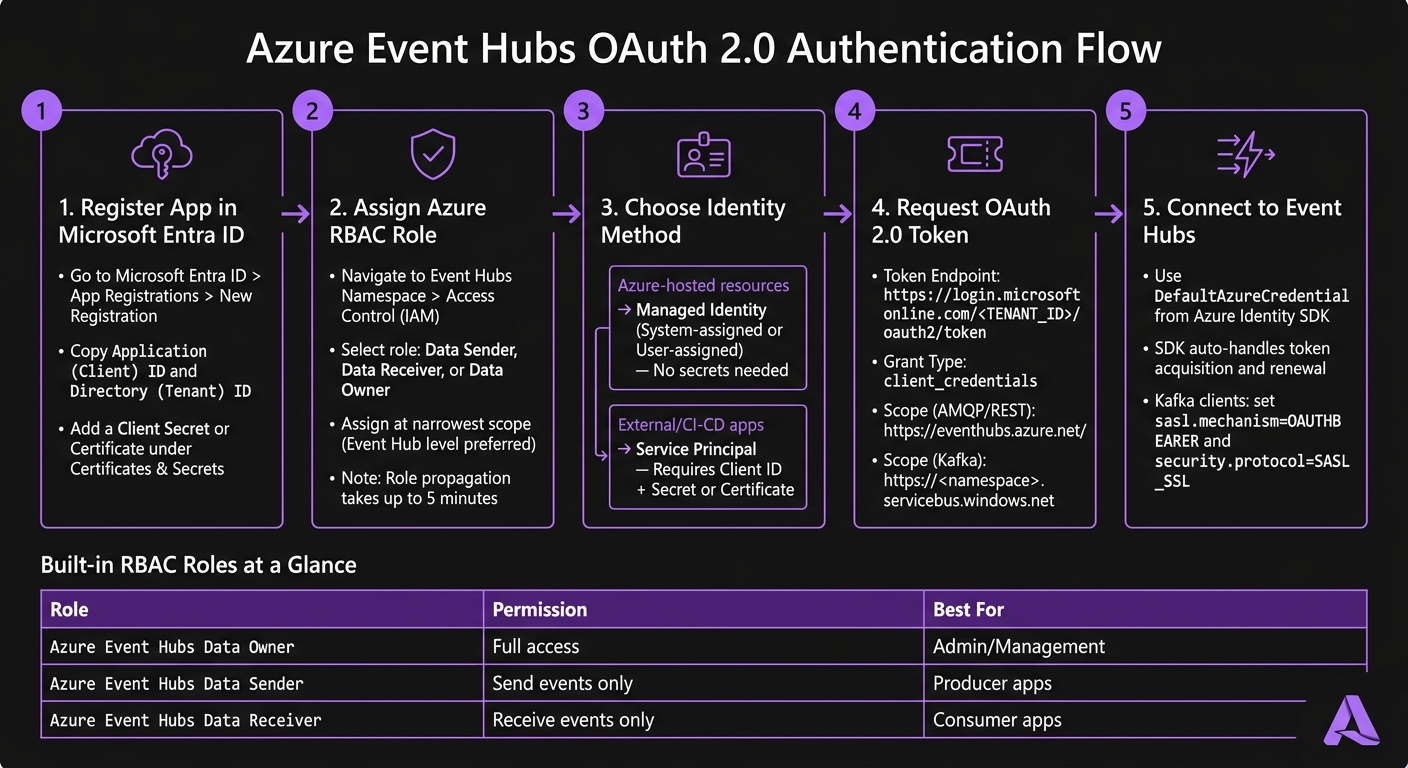
Azure Event Hubs OAuth 2.0 Setup: Step-by-Step Flow
How OAuth 2.0 Works with Azure Event Hubs
OAuth 2.0 Core Concepts for Event Hubs
OAuth 2.0 is a framework that uses tokens for authorization. Instead of relying on static credentials or connection strings, your application requests a short-lived access token from Microsoft Entra ID. This token is then presented to Event Hubs to confirm the application has the necessary permissions to send or receive data.
Here’s how it works: your application authenticates with Microsoft Entra ID to obtain the token. Then, it includes this token in every request to Event Hubs. The resource audience in the token specifies the intended service. For standard clients, this is https://eventhubs.azure.net/. If you're using Kafka-compatible clients, the audience changes to https://<namespace>.servicebus.windows.net.
The most common grant type used is the client credentials flow. This method allows an application to authenticate as itself rather than on behalf of a user. It’s ideal for backend services, microservices, and automated workflows. Once the token is issued, Azure RBAC enforces the embedded permissions.
Azure RBAC Roles for Event Hubs
Azure Role-Based Access Control (RBAC) ensures that permissions are enforced properly. Event Hubs supports three built-in roles:
| Role | Permissions | Best For |
|---|---|---|
| Azure Event Hubs Data Owner | Full access - manage, send, and receive | Administrative or management tasks |
| Azure Event Hubs Data Sender | Send events only | Producer applications |
| Azure Event Hubs Data Receiver | Receive events only | Consumer applications |
The principle of least privilege is key here. For example, a microservice that only sends telemetry data should only have the Data Sender role. Granting unnecessary permissions, such as the Data Owner role, increases the risk of security vulnerabilities.
Role assignments can be scoped at different levels, such as Subscription, Resource Group, Namespace, Event Hub, or even Consumer Group. It’s best to assign roles at the narrowest scope possible - preferably at the Event Hub level rather than the Namespace. Keep in mind that role assignments might take up to five minutes to propagate across Azure [1].
After defining role-based permissions, the next step is choosing the right identity for authentication.
Identity Options for OAuth 2.0
Once you have a valid token, selecting the right identity method simplifies secure access. The choice depends on your deployment environment:
| Identity Option | Best Use Case | Credential Management |
|---|---|---|
| System-assigned Managed Identity | Single Azure resource (e.g., one Azure Function or VM) | Automatic - no secrets needed |
| User-assigned Managed Identity | Multiple Azure resources sharing the same permissions | Automatic - no secrets needed |
| Service Principal | Apps running outside Azure, CI/CD pipelines, local dev | Manual - requires client secret or certificate |
For resources running within Azure, Managed Identities are highly recommended. They are automatically handled by Azure, so there are no secrets to manage, rotate, or accidentally expose. A system-assigned identity works well when a single service requires its own identity. If multiple services need shared permissions, a user-assigned managed identity is a better choice since it can be reused across resources.
On the other hand, Service Principals are ideal for workloads running outside of Azure, such as CI/CD pipelines in GitHub Actions or on-premises services. However, they require a client ID along with a client secret or certificate, which must be carefully managed and rotated regularly to maintain security.
sbb-itb-79ce429
Configuring Microsoft Entra ID for Event Hubs
Registering an Application in Microsoft Entra ID
To get started, open the Azure portal and go to Microsoft Entra ID > App registrations > New registration. Enter a clear, descriptive name for your application (e.g., eventhubs-producer-service), register it, and make sure to copy the Application (client) ID and Directory (tenant) ID. You'll need these later to request tokens.
Next, head to Certificates & secrets to set up authentication. You can either add a client secret or configure a certificate. Certificates provide stronger security and are better suited for production environments. If you choose a client secret, make a note of its expiration date and set a reminder to rotate it before it expires.
Assigning RBAC Roles to Applications
After registering your application, you’ll need to grant it access to Event Hubs. Navigate to your Event Hubs namespace in the Azure portal (or to a specific event hub for more restricted access). Go to Access Control (IAM), click '+ Add', and select 'Add role assignment'. Choose the appropriate role, then use the Members tab to find your application by name or client ID.
If you prefer using the Azure CLI, you can assign roles with the following command:
az role assignment create \
  --assignee <APPLICATION_CLIENT_ID> \
  --role "Azure Event Hubs Data Sender" \
  --scope /subscriptions/<SUBSCRIPTION_ID>/resourceGroups/<RG_NAME>/providers/Microsoft.EventHub/namespaces/<NAMESPACE_NAME>/eventhubs/<EVENTHUB_NAME>
Note: The Owner or Contributor roles don't provide data-plane access. If you need to assign roles at the consumer group level, you'll need to use the CLI or API.
| Scope Level | Coverage Description |
|---|---|
| Namespace | Includes all event hubs and consumer groups in the namespace. |
| Event Hub | Limited to a specific event hub and its consumer groups. |
| Consumer Group | Applies to a single consumer group (CLI or API required). |
Once the role assignments are in place, you can move on to configuring the token endpoint and scope for authentication.
Token Endpoint and Scope Setup
Your application requires a token endpoint and scope to authenticate. The token endpoint follows this format:
https://login.microsoftonline.com/<TENANT_ID>/oauth2/token
The scope (resource) value depends on the type of client you're using:
- For native Event Hubs clients (e.g., Azure SDKs using AMQP or REST), use:
https://eventhubs.azure.net/ - For Kafka-compatible clients, use a namespace-specific URL:
https://<namespace>.servicebus.windows.net
To request a token, send a POST request with the following parameters: grant_type=client_credentials, client_id, client_secret, and the correct resource URL. Be sure to handle token expiration by implementing proactive caching or using the Azure Identity SDK for automated token management.
Authentication and authorization options for Azure Event Hubs
Implementing OAuth 2.0 in Event Hubs Clients
Once your Microsoft Entra ID app is registered and RBAC roles are assigned, the next step is integrating OAuth 2.0 into your client code. The process varies depending on whether you're using a native Event Hubs SDK or a Kafka-compatible client.
Using Azure Identity Libraries
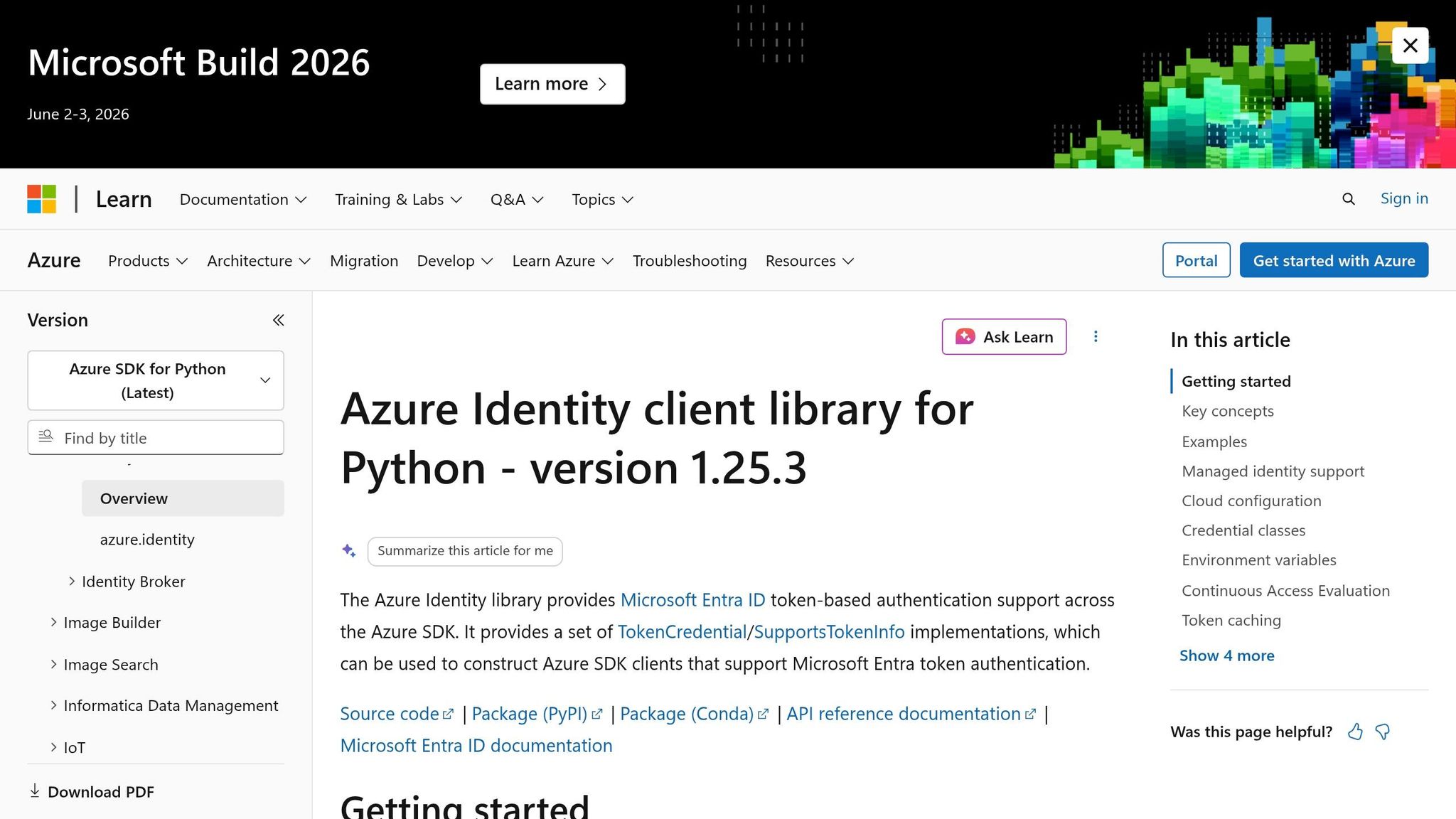
The Azure Identity library - Azure.Identity for .NET, azure-identity for Python, and azure-identity for Java - is your go-to tool for acquiring OAuth 2.0 tokens from the Microsoft identity platform. A standout feature is the DefaultAzureCredential class, which attempts various credential sources like Managed Identity, environment variables, Visual Studio credentials, and Azure CLI. This makes it easy to switch between local development and production without changing your code.
For native Event Hubs clients, you pass the credential object directly into the client constructor. Here's an example in .NET using the Azure.Messaging.EventHubs package (not the older Microsoft.Azure.EventHubs):
var credential = new DefaultAzureCredential();
var producer = new EventHubProducerClient("<namespace>.servicebus.windows.net", "<eventhub-name>", credential);
The SDK handles token acquisition and renewal for you. Internally, it uses the token scope https://eventhubs.azure.net/.default.
If your app is running on Azure, Managed Identities offer a seamless way to handle authentication.
Configuring Managed Identities
Managed Identities simplify authentication for Azure-hosted applications like VMs, App Service, and Azure Functions. With this approach, there’s no need to manage secrets or worry about accidental exposure. You just enable the identity on your Azure resource, assign it the necessary Event Hubs RBAC role (e.g., Azure Event Hubs Data Sender), and use DefaultAzureCredential in your code as shown earlier. The credential class automatically detects and uses the Managed Identity at runtime.
For added security, assign roles at the Event Hub level instead of the namespace level when your app only needs access to a single stream. This limits potential risks if something goes wrong [1].
Kafka-Compatible Authentication Setup
If you’re working in an environment where native SDKs can’t directly use TokenCredential, you’ll need to take a different approach for Kafka-compatible clients. These clients require additional configuration since they can’t directly interact with TokenCredential objects. Here’s what you need to do:
- Set
security.protocoltoSASL_SSLandsasl.mechanismtoOAUTHBEARER. - Implement a callback that fetches a token from Azure Identity and supplies it to the Kafka client.
In Java, this involves creating a custom AuthenticateCallbackHandler class that uses the Azure Identity library to fetch and return a token. For Python clients using confluent_kafka, you’ll pass an oauth_cb function that calls DefaultAzureCredential().get_token() with the scope https://<namespace>.servicebus.windows.net/.default and returns the token along with its expiration.
Keep in mind that Azure Event Hubs closes idle connections after 240 seconds. To prevent issues, adjust your Kafka client's configuration as outlined below:
| Property | Recommended Value | Why It Matters |
|---|---|---|
bootstrap.servers |
<namespace>.servicebus.windows.net:9093 |
Required FQDN for public cloud |
sasl.mechanism |
OAUTHBEARER |
Needed for OAuth 2.0 authentication |
security.protocol |
SASL_SSL |
Ensures secure, authenticated communication |
metadata.max.age.ms |
180000 |
Refreshes metadata before idle timeout |
connections.max.idle.ms |
180000 |
Prevents silent connection drops |
request.timeout.ms |
60000 |
Avoids premature timeouts during token refresh |
For clients built on librdkafka (e.g., Python, .NET, Go), also set socket.keepalive.enable=true to maintain stable, long-lived connections under normal load.
Best Practices for Security and Compliance
Managing Token Lifecycles
Access tokens stay valid until they expire, even if access is revoked. To immediately cut off compromised tokens, restart the affected service. This is especially critical for quick incident response in regulated environments.
Instead of embedding client credentials in code or configuration files, store them securely in Azure Key Vault. Key Vault works seamlessly with Managed Identities, allowing your application to retrieve secrets at runtime. This approach eliminates a common risk of credential exposure.
Beyond token management, tightening network controls is another key step to safeguarding your deployment.
Security Hardening Strategies
Use least-privilege RBAC (Role-Based Access Control) by assigning only the roles necessary at the Event Hub level [1]. This minimizes the impact of potential breaches, ensuring a compromised sender doesn’t gain access to other Event Hubs in the same namespace.
For added protection, combine identity-based access with strong network controls. For example:
- Private Endpoints: Remove your Event Hubs namespace from the public internet.
- IP Firewall Rules and Virtual Network Service Endpoints: Add extra layers of network security.
Relying solely on OAuth 2.0 for security isn’t enough. Combining it with network isolation closes off attack vectors that token security alone can’t address.
| Security Layer | Method | What It Protects Against |
|---|---|---|
| Identity | Managed Identities + RBAC | Credential leaks and excessive permissions |
| Network | Private Endpoints, IP Firewall | Exposure to the public internet |
| Transport | TLS 1.2+ (SASL_SSL) | Data interception during transit |
| Scope | Event Hub-level role assignments [1] | Lateral movement within namespaces |
It’s worth noting that Azure role assignments can take up to five minutes to propagate [1]. Keep this delay in mind during deployment and testing to avoid unnecessary troubleshooting for permissions that haven’t yet taken effect.
Monitoring and Troubleshooting
A strong security posture isn’t complete without active monitoring to catch and resolve issues early.
Enable Azure Monitor diagnostic logs for your Event Hubs namespace and route them to a Log Analytics workspace. The AzureDiagnostics table logs authentication events, including failed token validations. This makes it easier to spot patterns, such as repeated 401 errors from a specific client ID.
Pay special attention to orphaned consumers in multi-environment setups. These are applications still running in development or staging environments that share the same consumer group ID as production. Orphaned consumers can silently consume messages or cause partition rebalancing, which might look like authentication failures or data inconsistencies. If you notice consumer lag, verify that production uses a unique consumer group name to prevent conflicts.
Conclusion
To wrap things up, here’s what you need to focus on: register your application (or enable a Managed Identity), assign the most specific RBAC role necessary, and rely on Azure Identity libraries like DefaultAzureCredential to handle tokens efficiently.
By assigning roles directly at the Event Hub level - rather than at larger scopes like Subscription or Resource Group - you limit the potential impact of security incidents to just one resource [1].
For teams operating in industries with strict regulations - such as healthcare, financial services, or environments governed by SOC 2 or HIPAA standards - this approach can make compliance much easier. Identity-based access not only enhances security but also provides a clear, auditable record of access events, which is far simpler to manage compared to static shared keys.
If your organization is working on production-grade, event-driven systems using Microsoft’s platform, AppStream Studio offers a comprehensive solution - from strategy to implementation - designed to deliver secure and scalable Azure systems.
The key principles are straightforward: establish strong identity controls, use narrowly scoped permissions, implement network isolation, and maintain active monitoring. By following these guidelines, you can achieve a secure and scalable Event Hubs deployment. Be sure to revisit earlier configuration and security best practices to ensure smooth integration and robust protection.
FAQs
When should I use a Managed Identity vs a Service Principal?
Using a Managed Identity is a smart way to enable secure, passwordless authentication for Azure services like Virtual Machines or Function Apps. By eliminating the need to store credentials in your code, it streamlines credential management and reduces security risks.
On the other hand, a Service Principal is ideal when external applications or services require explicit control over credentials. It allows for managing granular permissions or integrating with external systems but involves creating and maintaining credentials in Azure AD.
Why does the OAuth audience differ for Event Hubs vs Kafka clients?
The OAuth audience is different depending on the client type. For Event Hubs, the resource name for access tokens is https://eventhubs.azure.net/. On the other hand, Kafka clients use https://<your-namespace>.servicebus.windows.net/. This distinction highlights the specific resource scope each client type requires.
What should I check first when I get 401 errors with OAuth?
When dealing with 401 errors while using OAuth, start by checking if the OAuth 2.0 token is correctly obtained and included in the Authorization header. Make sure the token is still valid and hasn’t expired. These simple steps often help resolve the problem.


