
Managing Azure AI costs is critical to avoid budget overruns. Without proper monitoring, idle resources, over-provisioning, and misconfigurations can quietly inflate expenses. Here's what you need to know to keep costs under control:
- Key Azure Tools: Use Microsoft Cost Management + Billing for expense tracking, Azure Advisor for cost-saving recommendations, and Azure Monitor for real-time usage insights.
- Third-Party Solutions: Tools like Finout, azurecost, and Sedai offer advanced features like multi-cloud support, real-time updates, and automated optimizations.
- Best Practices: Implement resource tagging, optimize usage (e.g., rightsizing and spot instances), and set budgets with alerts to catch anomalies early.
- Cost Metrics: Track real-time expenses alongside performance metrics using tools like Azure Monitor and Application Insights.
Takeaway: Start tracking costs early, automate optimizations, and integrate cost metrics into your AI workflow to maintain financial control and scalability.
Manage & optimize the cost of your AI workloads | BRK1737
sbb-itb-79ce429
Azure Built-In Tools for AI Cost Monitoring
Azure provides three integrated tools to help manage and monitor the costs of AI workloads: Microsoft Cost Management + Billing, Azure Advisor, and Azure Monitor. Each tool plays a specific role, and together they offer a detailed view of expenses, real-time tracking, actionable insights, and cost projections.
Microsoft Cost Management + Billing
This tool serves as the go-to dashboard for keeping tabs on Azure spending. It categorizes costs by resource, service, and time period, making it easy to see where the budget is going. For AI workloads, it monitors metrics like token usage for language models and resource consumption for fine-tuned models. You can also set budgets and alerts to stay informed when spending approaches predefined limits. Plus, historical data analysis helps predict future expenses. The Cost Analysis feature allows filtering by tags, resource groups, or billing meters for more granular insights.
Azure Advisor for Cost Recommendations
Azure Advisor focuses on improving cost efficiency by analyzing your deployed resources and flagging areas where you can save money. For AI workloads, it highlights inefficiencies in resource usage or configuration. Recommendations are ranked based on potential savings, making it easier to prioritize changes that will have the biggest impact on reducing costs.
Azure Monitor for Usage Tracking
Azure Monitor provides real-time metrics for AI resources, tracking details such as input and output token counts for language models, training metrics for fine-tuned models, and throughput utilization. Custom dashboards can be created for a tailored view. For example, the Monitor tab in the Foundry Portal gives insights into token costs and usage patterns, helping teams better understand their spending.
| AI Resource Component | Billing Metric Tracked | Tool for Visibility |
|---|---|---|
| Language Models | Input Tokens, Output Tokens | Azure Monitor / Cost Management |
| Fine-tuned Models | Training (tokens/hr), Hosting (hr), Inference (tokens) | Azure Monitor / Cost Management |
| AI Agents | Token costs, Usage metrics | Foundry Portal (Monitor tab) |
| Provisioned Throughput | PTU utilization, Reservation status | Reservations + Hybrid benefit blade |
| Global Models | model-name-GUID meters | Cost Analysis (Group by Meter) |
Third-Party Tools for AI Cost Tracking
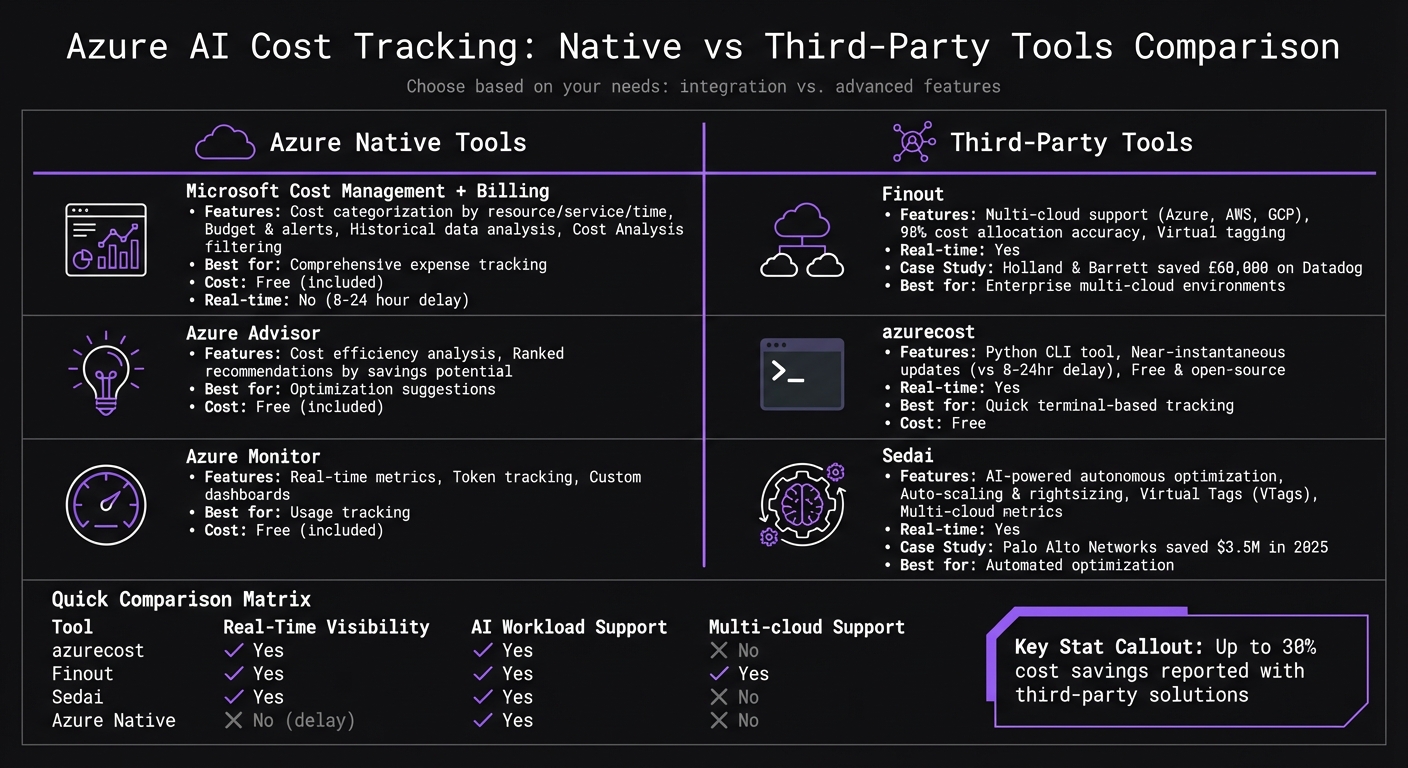
Azure AI Cost Tracking Tools Comparison: Native vs Third-Party Solutions
Key Tools and Their Features
Third-party platforms can expand on the capabilities of Azure's native tools, offering additional ways to monitor and manage costs. Combining these tools with Azure's built-in features can lead to more efficient AI deployments and better cost control.
Finout is a powerful FinOps platform designed for enterprises. It consolidates Azure costs alongside other cloud providers like AWS and GCP, as well as SaaS tools like Snowflake and Datadog. According to reports, Finout users have achieved up to 98% accuracy in cost allocation [4]. For example, Holland & Barrett saved over £60,000 on their Datadog expenses by using Finout to gain clearer visibility into their spending [7].
azurecost is a free, open-source Python CLI tool that tracks Azure OpenAI costs directly from the terminal in just a couple of seconds [5]. Unlike the Azure portal, which can have an 8–24-hour delay in cost updates, azurecost provides near-instantaneous insights, making it easier to spot sudden cost increases [7].
Sedai takes automation to the next level by using AI to optimize resources. It automatically adjusts scaling rules and right-sizes resources in real time. For instance, Palo Alto Networks reportedly saved $3.5 million in 2025 by using Sedai to manage thousands of changes across its infrastructure autonomously [6]. Sedai also supports advanced cost allocation using Virtual Tags (VTags), which help distribute shared costs like ExpressRoute or storage that native Azure tags might struggle to handle [4]. Additionally, it enables organizations to calculate metrics like "Cost per Customer" or "Cost per AI Model" across multiple cloud environments [4].
These tools bring unique capabilities to the table, such as real-time tracking, multi-cloud support, and automated optimizations, offering a compelling alternative to Azure's native tools.
Comparison: Native vs. Third-Party Tools
The table below highlights some of the key differences between Azure's native tools and third-party platforms:
| Tool | Real-Time Visibility | AI Workload Support | Multi-cloud Support |
|---|---|---|---|
| azurecost | Yes | Yes | No |
| Finout | Yes | Yes | Yes |
| Sedai | Yes | Yes | No |
While Azure's native tools are free and seamlessly integrated, third-party platforms often provide advanced features that go beyond basic monitoring. These include real-time updates, detailed cost breakdowns, and autonomous optimizations. Some enterprises have reported up to 30% cost savings by leveraging these third-party solutions [4]. The right choice depends on your organization's needs, such as whether you require multi-cloud visibility, faster cost updates, or automated tools to address inefficiencies.
Best Practices for Cost Efficiency in AI Deployments
Following established strategies can significantly cut down on unnecessary expenses tied to AI deployments.
Implement Resource Tagging
Tags act as your map for understanding where your AI budget is going. Without them, you're essentially navigating blind. A solid tagging strategy should include formatting rules and essential keys like ProjectID, Environment, and Owner. It should also clarify who is responsible for creating and maintaining these tags [3]. For containerized AI workloads on platforms like Azure Kubernetes Service (AKS), labels serve a similar purpose at the workload, namespace, and cluster levels [1][2].
"Tags are the sole mechanism for understanding the cost of your cloud environment." - Cast AI [3]
By implementing proper tagging, you can identify inefficiencies and turn ambiguous spending into actionable insights [2]. If adjusting tags directly seems too complex, tools like Finout offer "virtual tagging", which allocates costs without requiring changes to your infrastructure [2].
Once you have a clear view of your resource origins, the next step is to align capacity with actual demand.
Optimize Resource Usage
Rightsizing is one of the fastest ways to cut costs. Choose virtual machines (VMs) that align with your actual needs for CPU, GPU, memory, and storage - no more, no less. Many resources often sit underutilized, making this an essential step. For instance, Akamai achieved 40-70% cost reductions on Kubernetes workloads by using automated rightsizing, all without causing downtime [3]. Similarly, Jisr cut costs by 65% while improving CPU and memory efficiency by managing spiky demand in their production clusters [3].
Spot instances are another powerful tool, offering up to 90% savings for training jobs that can tolerate interruptions [3]. These are ideal for non-urgent experiments and model training tasks. To further reduce waste, autoscaling ensures you only allocate resources during peak demand, avoiding unnecessary costs during idle times [3][1]. Storage costs also deserve attention - premium SSDs can quickly inflate your bill unless high IOPS are absolutely required [3][1].
"Azure cost optimization is a continuous process, not a one-time task." - Laurent Gil, Cast AI [3]
Initial optimization efforts can reduce waste by 6-14%, while more advanced techniques can push total savings to 8-20% [2]. For example, Palo Alto Networks saved $3.5 million in 2025 by using autonomous optimization to handle thousands of production changes [2].
After fine-tuning resource usage, the focus should shift to staying proactive with budgets, alerts, and forecasts.
Set Budgets, Alerts, and Forecasting
Use the Cost Management + Billing feature in the Azure portal to set budgets for specific subscriptions or resource groups. Configure budget alerts at thresholds like 50%, 80%, and 100% to catch potential overruns early. Enable anomaly alerts to flag unexpected daily usage spikes, which can help identify technical issues or unauthorized access. Additionally, scheduled alerts can provide stakeholders with regular updates - whether daily, weekly, or monthly.
These alerts serve different purposes: budget alerts maintain governance, anomaly alerts catch technical problems, and commitment alerts keep track of Enterprise Agreement credit usage at key thresholds like 90% or 100%. Combining these alerts ensures comprehensive oversight across your AI projects.
Integrating Cost Monitoring into Production AI Deployments
Start tracking costs from the very beginning. For production AI deployments, observability, compliance, and smooth operational transitions are essential. Cost metrics should be treated with the same level of importance as performance and reliability.
Observability and Cost Metrics
Keep an eye on costs in real time, alongside other key metrics like latency and error rates. Real-time cost monitoring provides immediate insights into spending, while tracking daily expenses helps catch anomalies early - before they escalate into major budget issues. Metrics like cost per operation, derived from integrated telemetry, can also shed light on overall efficiency.
| Metric | Tool | Benefit |
|---|---|---|
| Real-Time Costs | Azure Monitor | Immediate visibility into spend |
| Daily Spend | Microsoft Cost Management | Early detection of anomalies |
To securely collect token-level cost data without altering your AI agent code, use Azure API Management (APIM) as a gateway. APIM manages authentication, rate limiting, and tracing while sending structured telemetry to Application Insights. This setup ensures a detailed audit trail for every request.
Once observability is in place, the next step is implementing strong security and compliance measures.
Security and Compliance in Cost Tracking
Adhering to regulatory standards like HIPAA, SOC 2, and ISO 27001 means you need strict controls over access to cost data. Use Role-Based Access Control (RBAC) to assign permissions. For example:
- Cost Management Reader: Allows viewing costs only.
- Azure AI User: Provides resource usage context.
- Custom roles: For specific needs, such as granting
Microsoft.Consumption/*/readpermissions.
Automate compliance reporting with Azure Policy by assigning rules at the management group level. Always test custom role definitions in a sandbox environment before rolling them out to production. Store telemetry in Application Insights to maintain a complete audit trail, ensuring transparency for regulatory audits.
With secure and compliant cost tracking in place, it’s time to focus on operational handoff strategies.
Operational Handoff and Production Strategies
A smooth operational handoff for cost monitoring involves clear documentation and well-tested processes. Ensure that resource scopes in cost estimates align with production views to avoid discrepancies. Set up budget alerts to trigger automated responses whenever spending thresholds are breached.
For AI agents built using Microsoft tools like Semantic Kernel, integrate cost tracking into your observability pipeline from the outset. Use managed virtual networks to isolate traffic securely. While virtual networks themselves are free, note that private endpoints and firewall rules might generate additional costs. Also, keep in mind that cost and usage records may have a delay due to service ingestion timing. To ensure accurate financial reconciliation, focus on trend windows rather than minute-by-minute comparisons.
AppStream Studio offers a strong example of best practices by embedding cost monitoring and operational handoff into its production deployments, ensuring both efficiency and compliance from start to finish.
Conclusion
Keeping a close eye on AI deployment costs in Azure is crucial as your projects grow. Thankfully, Azure offers a range of tools to help manage expenses effectively. Microsoft Cost Management + Billing provides detailed breakdowns of your spending, Azure Advisor highlights areas for cost optimization, and Azure Monitor helps you track usage patterns in real time. By combining these tools with resource tagging, budget alerts, and forecasting, you can stay ahead of potential cost issues.
To take it a step further, focus on key metrics like real-time monitoring to spot spending spikes before they become a problem. This level of visibility allows you to fine-tune your operations without compromising on performance.
Cost monitoring should be baked into your overall observability strategy from the start. Align cost estimates with production views, automate actions for hitting budget thresholds, and look at spending trends over time rather than focusing solely on minute-by-minute changes. It's also smart to plan for reconciliation processes to address any data delays. When cost oversight is fully integrated with your production strategy, it becomes a cornerstone of your deployment's success.
FAQs
Why don’t Azure AI costs show up in real time?
Azure AI costs aren’t shown in real time because usage and cost data can take some time to process and reflect due to service ingestion delays. For a more accurate understanding of your expenses, it’s best to focus on analyzing trends over longer time periods rather than expecting up-to-the-minute updates.
What tags should I require for AI cost allocation?
To effectively manage and allocate AI-related costs in Azure, leverage tools like resource tags, resource groups, and management groups. These features make it easier to classify and organize your assets, enabling streamlined expense tracking and improved cost oversight across all your Azure resources.
How can I track token costs per app or customer?
You can keep track of token costs for each app or customer by leveraging telemetry from Azure tools such as Microsoft Foundry, Azure API Management, and Application Insights. These tools allow you to monitor token usage by incorporating custom metadata (like caller information or request details), giving you the ability to perform a detailed cost breakdown for every agent, model, or individual request.


