
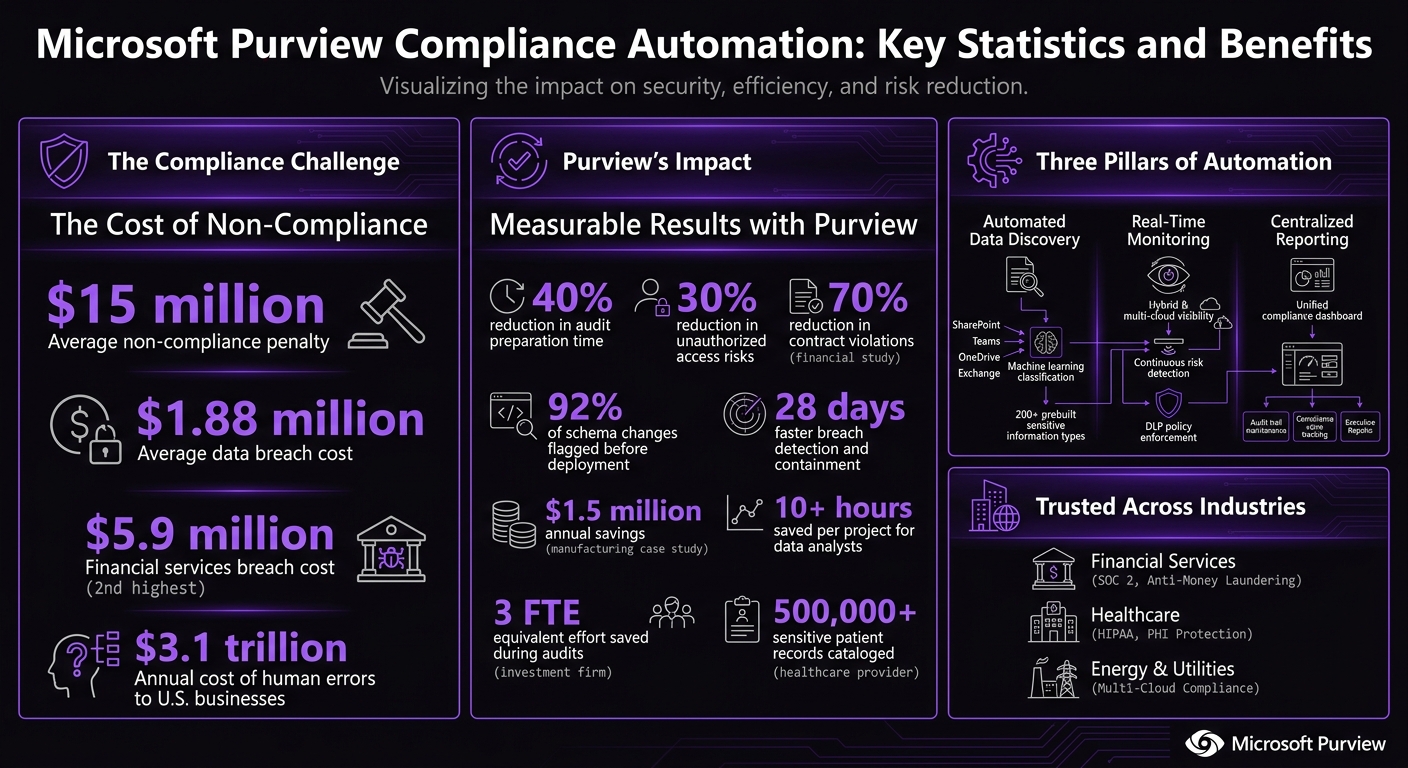
Microsoft Purview simplifies compliance by automating tasks like data discovery, classification, and monitoring. This reduces manual efforts, cuts compliance risks, and saves costs. With rising data volumes and stricter regulations, organizations face penalties averaging $15 million for non-compliance and $1.88 million in breach costs. Purview addresses these challenges by:
- Automating Data Discovery: Scans platforms like SharePoint, Teams, and OneDrive to classify sensitive data using machine learning and predefined patterns.
- Real-Time Monitoring: Tracks risks across cloud and on-premises systems, enabling quick adjustments without business disruption.
- Centralized Reporting: Offers dashboards for tracking compliance goals, audit readiness, and policy enforcement.
Industries like finance, healthcare, and energy benefit from Purview by streamlining regulatory processes, reducing audit prep time by 40%, and improving data governance. Organizations can start with small, high-priority tasks, test policies in simulation mode, and customize data classifications for better accuracy.
For faster implementation, experts like AppStream Studio can manage deployment, ensuring Purview integrates seamlessly into existing systems while meeting regulatory standards like HIPAA and SOC 2. Automating compliance not only mitigates risks but also delivers measurable operational savings.
Microsoft Purview Compliance Automation: Key Statistics and Benefits
Enhancing Data Protection and Compliance with Microsoft Purview
sbb-itb-79ce429
How Microsoft Purview Automates Compliance
Microsoft Purview tackles compliance challenges head-on by automating key processes, replacing manual tasks with ongoing, policy-driven actions throughout your data environment.
Automated Data Discovery and Classification
Purview's Data Map automatically scans data sources like Exchange Online, SharePoint, OneDrive, and Teams to capture technical metadata - no human involvement required [10]. It uses a combination of a client-side engine for real-time suggestions and a server-side engine to scan content at rest or in transit. This allows Purview to classify information using regular expressions, dictionaries, and machine learning [6].
Sensitive Information Types (SITs) play a crucial role in this process. By employing pattern matching, dictionaries, and regular expressions, SITs can identify specific data types like credit card numbers or national IDs [6][8]. For more complex cases, Purview uses machine learning-powered trainable classifiers to detect document types such as contracts, source code, or even specialized industry records like those related to money laundering investigations [2][10]. For instance, in one financial study, automated enforcement flagged 92% of schema changes before deployment, reducing contract violations by 70% [7].
"Data classification is not a user problem - it is an architecture problem."
- Kerem Ozturk, Former CISO at ING Bank Türkiye [6]
Before scaling automated classification across your organization, it's a good idea to run server-side auto-labeling in simulation mode. This allows you to preview results and minimize false positives [6][9]. Since default SITs can sometimes generate higher false-positive rates, fine-tuning these patterns to align with your organization’s data formats is essential [6]. A practical starting point? Use a simple label set like Public, Internal, and Confidential, and then expand once your results are consistent [2].
Once data is accurately classified, Purview shifts its focus to real-time monitoring, ensuring risks are addressed as they arise.
Real-Time Monitoring and Risk Detection
Purview provides continuous visibility across hybrid and multi-cloud environments, including on-premises systems, SaaS apps, and cloud storage [11]. This real-time monitoring ensures anomalies are detected as they happen, rather than being uncovered weeks later during audits. Such oversight enables organizations to fine-tune Data Loss Prevention (DLP) policies without disrupting essential operations.
When deploying DLP or discovery policies, consider running them in audit mode first. This allows you to gauge false positives and refine thresholds before enforcing blocks [2]. This measured approach ensures legitimate business activities aren’t unnecessarily interrupted while still capturing potential risks.
"Good DLP is not about stopping everything. It is about stopping the wrong thing at the right time with enough context for the user to make a better decision."
Additionally, Purview's automated discovery tools can save data analysts over 10 hours per project compared to manual searches [11].
Centralized Compliance Reporting and Audit Readiness
Building on its proactive detection capabilities, Purview centralizes compliance reporting into a single, actionable dashboard. Using the Compliance Manager and Unified Data Map, organizations can track compliance goals, maintain audit trails, and integrate seamlessly with tools like Microsoft Defender XDR and Sentinel [2][3][9][10]. The Data Map offers a searchable inventory with end-to-end lineage, while the Compliance Manager monitors compliance scores and assigns actions for improvement.
"The Data Map is the metadata backbone of Microsoft Purview... ensuring that compliance rules are applied at the metadata level, giving organizations both flexibility and defensibility during audits."
However, there are a few practical considerations. Microsoft enforces a 2 TB/day export limit per tenant for eDiscovery, so large cases need to be staged in batches [10]. To avoid unexpected costs during heavy scanning periods, set up alerts for Capacity Unit (CU) consumption in the Data Map. Additionally, assigning permissions at the collection level rather than broadly across user groups ensures clear accountability during audits [10].
Industry Use Cases and Results
Financial Services: Anti-Money Laundering and SOC 2 Compliance
Financial institutions face a dual challenge: safeguarding sensitive data and adhering to strict regulations. With an average data breach cost of $5.9 million - the second-highest across industries - and 74% of institutions prioritizing regulatory compliance, the stakes are high for effective data governance [12].
Purview steps in by classifying financial data using 200 prebuilt sensitive information types, covering everything from account balances to investment strategies [12]. Advanced data governance doesn't just reduce risk; it also speeds up breach detection and containment by 28 days [12].
"Good data governance isn't just about avoiding fines - it's about creating a foundation of trust, transparency, and strategic advantage."
To strengthen governance, financial organizations can establish a governance council to ensure accountability, apply role-based access control (RBAC) to limit data exposure, and leverage automated discovery tools to track both structured and unstructured data during compliance reviews [12].
This approach mirrors healthcare providers' reliance on precise data classification and real-time monitoring to meet regulatory demands.
Healthcare: HIPAA Compliance and PHI Protection
In healthcare, safeguarding Protected Health Information (PHI) is non-negotiable. Purview supports this by enabling automated data discovery and real-time monitoring across an organization's data estate. For instance, one global healthcare provider cataloged over 500,000 sensitive patient records with Purview, while another cut audit preparation time by 40% through automated governance [5].
Purview also offers sensitivity labels that enforce encryption and access restrictions on documents containing patient data. Meanwhile, its Data Loss Prevention (DLP) tools scan platforms like Exchange, SharePoint, and OneDrive in real time to prevent unauthorized sharing. The built-in Compliance Manager uses a premium HIPAA/HITECH assessment template to track compliance posture and generate measurable audit scores [13].
Before rolling out auto-labeling, organizations should customize Sensitive Information Types to minimize false positives and test the system in simulation mode to understand its effects. Additionally, HIPAA requires that audit logs be retained securely for at least six years [13].
Energy and Utilities: Multi-Cloud Compliance Management
Energy companies, much like those in financial and healthcare sectors, face complex compliance challenges, especially when dealing with distributed, multi-cloud environments. Purview simplifies this by offering unified data visibility through its Data Map, which spans on-premises systems, Azure, AWS, and other cloud platforms. This ensures that compliance policies are applied consistently, no matter where the data resides [11].
Implementing Microsoft Purview for Compliance Automation
Integrating Purview into Existing Governance Frameworks
Before diving into automation, it's essential to start with a thorough data inventory. Identifying where sensitive information resides - whether in Exchange, SharePoint, OneDrive, or Teams - is a critical first step. This allows Microsoft Purview to classify data effectively [2]. The Data Map acts as a centralized metadata foundation, cataloging information across platforms without duplicating full content. This approach minimizes storage demands while providing a clear, unified view of your data landscape [10].
To ensure alignment with your organization's governance structure, organize Purview into Domains (e.g., Finance, HR) and Collections (e.g., Payroll). This setup avoids policy sprawl, enabling business units to manage their own governance while maintaining oversight at a global level [10]. In environments with stringent firewall requirements, configuring Private Endpoints ensures that traffic remains confined to a private Azure Virtual Network [10].
"Data classification is not a user problem - it is an architecture problem."
- Kerem Ozturk, Principal Security Consultant [6]
For effective scaling, deploy both client-side and server-side auto-labeling engines. The client-side engine provides users with suggestions as they create documents, while the server-side engine works in the background to scan data at rest [6]. Always test policies in simulation mode first to fine-tune their effectiveness before enforcing them [6][2].
Customizing Sensitive Information Types (SITs) is another key step. Microsoft's default SITs may not fit your organization's specific needs and can result in false positives. Tailor them to match internal data patterns, such as employee IDs or account numbers [6][2]. For organizations with E5, A5, or G5 subscriptions, Microsoft offers three premium regulation templates at no additional cost, along with a 90-day trial for Compliance Manager Premium Assessments [4].
Overcoming Adoption Challenges
Standardization is crucial before automation. If your compliance processes are inconsistent or lack clear steps, they won't translate well into automated policies [14]. Start by defining what "sensitive" means for your organization, documenting classification criteria, and setting up approval workflows. This groundwork ensures smoother automation.
Unstructured data poses a major challenge. Around 90% of this data resides in email, yet only 9% of environments effectively classify it due to limitations with emails at rest and unsupported file types [15]. To tackle this, begin with server-side auto-labeling for SharePoint and OneDrive before expanding to Exchange data in transit.
"Good DLP is not about stopping everything. It is about stopping the wrong thing at the right time with enough context for the user to make a better decision."
- ITU Online [2]
Keep an eye on Capacity Units (CUs) to avoid unexpected costs during large-scale data scans [10]. Microsoft limits eDiscovery exports to 2 TB per day per tenant, so plan extraction schedules carefully [10]. A phased rollout is often the best approach - start with simple, high-priority tasks like protecting Social Security numbers or credit card data before moving on to more complex scenarios [14][2].
Expert guidance can make addressing these challenges far easier, as outlined below.
Working with AppStream Studio for Faster Implementation

Bridging the gaps in integration and operations often requires specialized expertise. AppStream Studio simplifies and accelerates Purview deployment by managing the entire process - from strategic planning and design to production hardening and operational handoff. Their senior engineering teams, deeply experienced in Microsoft technologies like Azure, .NET, and SQL, deliver results in weeks rather than months.
For industries with strict regulatory standards, such as healthcare and financial services, AppStream brings compliance expertise backed by certifications like HIPAA, SOC 2, and ISO 27001. They’ve developed AI systems grounded in real business data, ensuring consistent application of governance policies across hybrid environments. By consolidating fragmented vendor models into a single accountable team, AppStream integrates Purview seamlessly into existing Azure infrastructures.
Their deployment approach includes security hardening, observability, and cost monitoring to close any operational gaps. Whether it's scheduling platforms that manage over 250,000 appointments annually or AI engines that assess Medicare reimbursements before devices are shipped, AppStream consistently delivers production-ready solutions that meet regulatory demands.
Conclusion
Automating compliance with Microsoft Purview shifts regulatory management from reactive responses to proactive, policy-driven strategies. By automating data discovery, classification, and monitoring, organizations can cut unauthorized access risks by 30% and reduce audit preparation time by 40% [5]. Moving away from manual spreadsheets to automated, policy-based systems eliminates the costly human errors that drain U.S. businesses of an estimated $3.1 trillion annually [1].
Consider this: a manufacturing company saved $1.5 million each year by using Purview's automated lineage tracking to streamline processes [5]. Meanwhile, a global investment firm reduced contract violations by 70% and saved the equivalent of three full-time employees' worth of effort during audits by automating data contracts across more than 200 financial pipelines [7]. These examples highlight how compliance automation goes beyond regulatory requirements - it delivers operational improvements and cost savings.
"Compliance Automation is the difference between privacy controls that look good on a policy document and controls that actually work every day."
- ITU Online [2]
These measurable outcomes emphasize the urgency of implementing compliance automation effectively and quickly. For industries like healthcare and financial services, the question isn’t whether to automate - it’s how fast you can deploy it. AppStream Studio helps accelerate this process, delivering production-ready Microsoft Purview deployments in weeks, not months. Their experienced engineers manage every step, from strategic planning to operational handoff, ensuring governance policies are secure, auditable, and seamlessly integrated into your Azure environment. With expertise in HIPAA, SOC 2, and ISO 27001 compliance, AppStream simplifies the process by consolidating fragmented vendor efforts into one accountable team that delivers results.
On average, organizations leveraging AI and automation save $1.88 million in data breach costs, while non-compliance penalties can reach up to $15 million [1]. Automated compliance isn’t just a safeguard - it’s a strategic advantage that enhances efficiency while protecting your organization. Microsoft Purview’s automation tools not only reduce compliance risks but also unlock operational efficiencies across your entire data ecosystem.
FAQs
Which data sources should I scan first in Purview?
To get started, scan the data sources already linked to your Purview account. Pay special attention to relational databases, file storage systems, and SaaS applications. By doing this, you can collect essential metadata, schema details, and data lineage. This step lays a solid groundwork for better data management and analysis.
How do I reduce false positives from auto-labeling and DLP?
Fine-tuning your sensitivity labels and policies is key to cutting down on false positives in auto-labeling and DLP. Start by adjusting how pattern matching works for Sensitive Info Types or Trainable Classifiers. This helps ensure they’re better at identifying genuine sensitive data.
Another helpful approach is using client-side auto-labeling. This method lets the system recommend labels, but gives users the chance to review them before they’re applied. It adds a layer of human oversight, which can make a big difference in accuracy.
Finally, don’t forget to regularly review your policies. Pay attention to reports of false positives and use them to refine your settings. Over time, this process will help improve accuracy and cut down on unnecessary alerts.
What should I monitor to control Purview scanning and eDiscovery costs?
To keep Purview scanning and eDiscovery costs under control, it's important to pay attention to a few key areas: automated scanning usage, metadata change triggers, and alerting features. These factors play a big role in how resources are used and, ultimately, the costs incurred. By monitoring them closely, you can strike a balance between staying compliant and managing expenses efficiently.


