
If your RAG API only does chat, it will hit limits fast. In production, I need more than answer generation: I need retrieval with access checks, multi-step tool use, chat history control, separate ingestion, and auditable function calls.
Here’s the short version:
- I use Semantic Kernel as the layer that coordinates model calls, retrieval, plugins, memory, and filters.
- I keep query and ingestion apart so live traffic stays stable while documents are chunked, embedded, and indexed in the background.
- I use Azure AI Search hybrid retrieval so the system can handle both semantic matches and exact terms like policy IDs or form numbers.
- I apply metadata filters and user-scoped identity before the model sees any content.
- I track token usage, latency, retrieval quality, and function execution from day one.
A few practical details stand out:
- For chunking, the article points to 500 to 1,000 words with 50 to 100 words of overlap.
- For enterprise auth, it recommends Microsoft Entra ID, Managed Identity, and DefaultAzureCredential instead of hardcoded secrets.
- For production retrieval, it leans on newer vector abstractions like
IVectorStoreandMicrosoft.Extensions.VectorData.Abstractionsrather than older memory APIs. - For multi-turn chat, it uses sliding windows, summarization, and truncation to stay inside token limits.
What I take from the piece is simple: Semantic Kernel gives a RAG API a control layer. That control layer is where I route requests, limit retrieval, run plugins, inspect function calls, and keep logs that matter when teams ask, “Why did the system answer this way?”
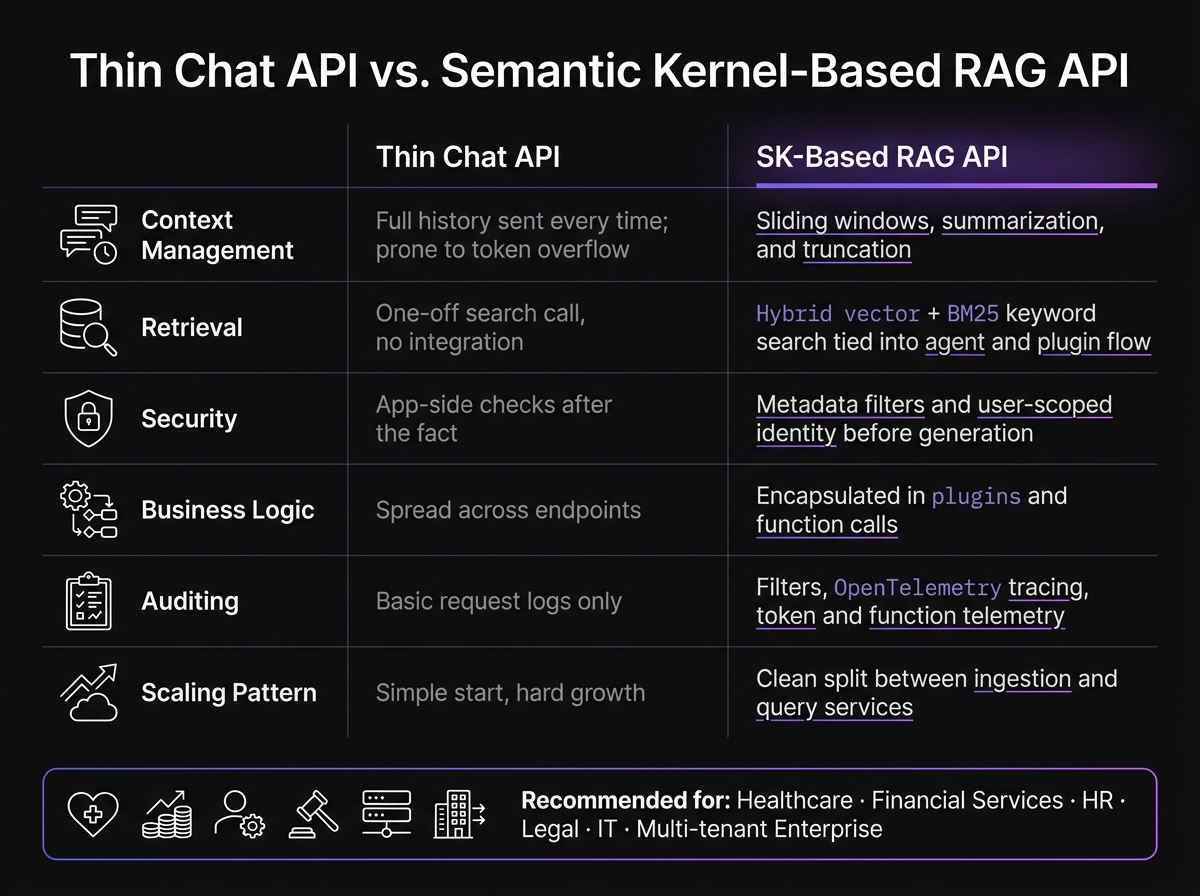
Thin Chat API vs Semantic Kernel RAG API: Key Differences
Semantic Kernel Fundamentals - AI Search RAG - Part 16
sbb-itb-79ce429
Quick comparison
| Area | Thin chat API | SK-based RAG API |
|---|---|---|
| Context | Full history or manual prompt handling | Sliding window, summaries, truncation |
| Retrieval | One-off search call | Search tied into agent and plugin flow |
| Security | App-side checks after the fact | Retrieval filters and scoped access before generation |
| Business logic | Spread across endpoints | Kept in plugins and function calls |
| Auditing | Basic request logs | Filters, tracing, token and function telemetry |
| Scaling pattern | Simple start, hard growth | Clear split between query and ingestion |
So if I’m building for HR, IT, legal, healthcare, finance, or any setup with audit and access rules, I would not stop at a plain chat endpoint. I’d use Semantic Kernel to turn RAG into a controlled API workflow.
Core Semantic Kernel Components for RAG
Kernel, Agents, and Planners
Once orchestration is in place, the next piece is the set of primitives that drive execution and retrieval.
The kernel is the request-time orchestration layer. It coordinates AI services, plugins, and configuration across each step of a RAG call.
Agents sit above the kernel and manage task-specific behavior. A ChatCompletionAgent, for example, can be scoped to a domain like HR policy questions or IT troubleshooting so it stays on topic. Function choice behavior in Semantic Kernel picks the next function or step instead of forcing a hardcoded flow.
Memory and Search Connectors
RAG systems also need retrieval that can change under the API without forcing changes to the API itself.
In production, retrieval needs to stay storage-agnostic. Semantic Kernel handles this with the ITextSearch abstraction and TextSearchProvider, which offer a consistent interface no matter what sits underneath.
Vector Store Connectors expose a unified IVectorStore interface [7]. That keeps retrieval logic in place even if the database changes. For new projects, Microsoft recommends Microsoft.Extensions.VectorData.Abstractions instead of the older MemoryBuilder and ISemanticTextMemory interfaces, which are legacy APIs [1]. The newer abstractions support custom schemas and metadata pre-filtering. That matters when you need document-level access controls or tenant-based filtering.
Hybrid search blends vector search with BM25 keyword search. That's useful for exact identifiers like "SOP-IT-0041" or "Form HR-12" in regulated or technical settings [4].
Where Kernel Memory Fits
Retrieval handles request-time grounding. Kernel Memory covers the ingestion side.
Kernel Memory works as a high-level service for the ingestion pipeline, handling document ingestion, chunking, embedding generation, and indexing. It handles ingestion, chunking, embeddings, and indexing end to end [4].
These primitives line up directly with core RAG jobs:
| Primitive | RAG Responsibility | What It Does |
|---|---|---|
| Kernel | Orchestration | Coordinates AI services, plugins, and filters across the execution lifecycle |
| Agents | Task-specific reasoning and state | Handles task-specific reasoning and state, such as HR or IT workflows |
| Function Choice Behavior | Multi-step flow | Sequences retrieval, tool calls, and reasoning steps |
| ITextSearch | Retrieval | Abstracts search across vector stores or search engines for relevant context |
| Kernel Memory | Ingestion & storage | Handles the data side of RAG: chunking, embedding, and indexing documents |
| Plugins | Tool integration | Exposes external APIs or native code to the model |
| Filters | Governance & security | Provides hooks to intercept prompts or results for PII stripping or logging |
Designing a Production RAG API with Semantic Kernel
With the orchestration pieces in place, the next step is the runtime path from request to grounded answer.
Request Flow from Client to Grounded Answer
A production RAG API on Azure should follow a fixed request path.
The client authenticates with Microsoft Entra ID. The API gateway forwards the request, and Semantic Kernel sends it through retrieval and generation. Azure AI Search supplies grounded context through hybrid retrieval - vector search plus BM25 keyword search - and uses ISO 8601 timestamps so time context stays intact. Azure OpenAI generates the answer. The API should return the answer, citations, and token usage metrics.
Use DefaultAzureCredential and Managed Identity to avoid hardcoded keys in regulated environments [1][3].
Ingestion Pipeline for Enterprise Content
Keep document processing out of the query path. If you mix ingestion with live requests, latency goes up and scaling gets messy.
Instead, run ingestion in a separate background service, such as an Azure Function or .NET Worker Service. That service can scan source systems, extract text, chunk content, generate embeddings, and upsert records into Azure AI Search. A solid chunking approach is 500- to 1,000-word chunks with 50- to 100-word overlap, using text-embedding-3-small for a strong quality-to-cost balance [2][8].
Store ACLs as metadata and apply filtering at retrieval time [1][4].
API Patterns and Service Boundaries
That request flow shapes the service boundaries.
Choose the pattern that matches your scale, team setup, and compliance needs:
| Architecture Pattern | Scalability | Complexity | Observability | Fit for Regulated Environments |
|---|---|---|---|---|
| Single RAG API | Moderate | Low | Simple | Good for small-scale internal tools |
| Split Ingestion/Query | High | Moderate | Detailed | Excellent; isolates data processing from query traffic |
| Microservices Orchestrator | Very High | High | Distributed | Best for multi-tenant or siloed departments (HR, IT, Legal) |
A split ingestion/query setup is often the practical middle ground. It lets you scale ingestion and query services on their own, and it gives you cleaner audit boundaries. The microservices route fits cases where you need per-department security boundaries or strict data isolation across multiple tenants.
Instrument the orchestration layer with Azure Application Insights from day one. Track retrieval precision, confidence scores, and per-request token usage. That data gives you the observability you need before production issues show up [1].
Once the flow is stable, the next challenge is keeping multi-turn context compact and controlled.
How Semantic Kernel Solves Context and Orchestration Problems
Managing Multi-Turn Context Without Bloated Prompts
Once retrieval is working, the next choke point is conversation state. Semantic Kernel handles ChatHistory with sliding windows, summarization, and token-based truncation [5]. That means older turns can be summarized or removed, so prompts stay inside the model’s context window without dropping business context.
With context under control, the next job is sending each request to the right knowledge and tools.
A router agent helps cut wasted retrieval. Before anything is retrieved, it routes the request to the right domain plugins and memory stores [4]. So if someone asks an HR question, unrelated knowledge bases don’t get pulled in. The result is a tighter prompt and more steady retrieval costs.
Coordinating Retrieval, Tools, and Business Logic
The tougher part is tying retrieval, tool calls, and business rules together. Semantic Kernel’s planners and agents do this with a clear execution loop: Observe → Classify → Plan → Execute → Respond [4]. Each step is explicit and auditable.
In practice, an agent can retrieve policy details, call an availability API, check the result against a business rule plugin, and then write a grounded response. The key point is that business logic lives inside plugins instead of being scattered across endpoints.
That orchestration layer also becomes the place where policy and access control are enforced.
Security, Tenant Isolation, and Governance Controls
Governance is where flimsy RAG setups tend to break down in enterprise use. A system prompt is not a security boundary. Semantic Kernel applies policy through retrieval filters, scoped identities, and function filters.
Metadata filtering during retrieval makes sure the agent only sees documents the requesting user is allowed to access. For example, it can filter by TenantId or group claims such as groups eq 'HR' before the LLM ever touches the data [1][4]. When you pair that with On-Behalf-Of (OBO) tokens, the agent uses the caller’s actual permissions instead of broad service-level access [1].
For high-stakes actions, IFunctionInvocationFilter lets you intercept any function call before it runs [5][6]. A planner validator can block destructive operations or send them into a human-in-the-loop approval flow. The same layer also supports observability through middleware-style filters and OpenTelemetry-friendly tracing [5][6].
| Feature | Naive RAG (Thin API) | SK-Based Orchestrated RAG |
|---|---|---|
| Context Control | Full history sent every time; prone to token overflow | Managed via AgentThread, sliding windows, and summarization [5] |
| Tool Sequencing | Hard-coded logic or single-step retrieval | Dynamic planning via planners and agent orchestration [4] |
| Observability | Basic logging of inputs/outputs | Middleware-style filters for OpenTelemetry and audit trails [5][6] |
| Policy Enforcement | Manual checks or unreliable system prompts | Pre-execution filters and tenant-aware metadata filtering [1][5] |
| Tenant Isolation | Often requires separate database instances | Metadata-level filtering and scoped tool access [1][4] |
For teams building against HIPAA, SOC 2, or ISO 27001 requirements, these controls are much easier to document and audit. They also become much easier to apply once the stack and deployment pattern are set.
Implementing Semantic Kernel RAG on the Microsoft Stack
Recommended Stack and Delivery Workflow
With orchestration and governance in place, the next step is locking down the runtime stack. The goal is simple: keep clean separation between the API layer, orchestration, retrieval, and ingestion.
| Layer | Technology | Role |
|---|---|---|
| API / Gateway | .NET Minimal API | Auth, request routing, chat history |
| Orchestration | Semantic Kernel SDK (.NET/C#) | Plugin execution, function calling, filters |
| Reasoning | Azure OpenAI (GPT-4o / o1) | Intent classification, answer synthesis |
| Knowledge | Azure AI Search | Hybrid retrieval - vector + BM25 keyword |
| Ingestion | .NET Worker Service | Chunking, embedding generation, index updates |
| Storage | SharePoint / SQL / File Shares | Source of truth for enterprise content |
Use GPT-4o for routing and synthesis, o1 for harder policy reasoning, and text-embedding-3-large for embeddings [4]. For local work, start with InMemoryVectorStore. Then switch to Azure AI Search in production. The nice part is that the IVectorStore abstraction lets you swap providers through configuration instead of rewriting code [2].
For enterprise content, use the Azure AI Search SharePoint Connector for Microsoft 365 sources. For older file shares or on-premises SMB drives, pair it with a custom .NET Worker Service [4].
Production Patterns for Regulated and Enterprise Use Cases
Once the stack is set, the hard part shifts to access control, audit trails, and staying stable under load.
Healthcare, financial services, and private equity teams run into the same issue. The RAG system needs to connect to enterprise content while still enforcing strict permissions for each user and role.
Use a reference layer that maps internal document IDs to permission-aware URLs before citations reach the client [4]. That extra step matters a lot in regulated settings, where a citation can't point someone to content they aren't allowed to open.
Wire OpenTelemetry into IFunctionInvocationFilter and IPromptRenderFilter to record latency, token usage, and function execution [5][3]. Also track FunctionResult metadata so you can log model names and finish reasons next to token counts [3].
Add retries and circuit breakers for Azure OpenAI 429s. In production, throttling shows up all the time. Without retries, users see raw errors instead of the system recovering on its own [5].
Conclusion: What Semantic Kernel Changes in a RAG API
Those implementation choices are what make the system safe to run at scale.
Semantic Kernel turns a RAG API into a structured, auditable system. Context is handled on purpose. Retrieval is limited to what the user is allowed to see. Business logic lives in plugins instead of being scattered across endpoints. And every function call can be intercepted, logged, or blocked before it runs.
That structure matters most in regulated environments - healthcare, financial services, and private equity portfolios - where "it works in the demo" is not enough.
FAQs
When should I use Semantic Kernel instead of a basic chat API?
Use Semantic Kernel when your app needs more than a simple prompt-response loop. Basic chat APIs are fine for demos, but they get messy fast once you add conversation history, pull from more than one data source, or stitch together multi-step flows.
That’s where Semantic Kernel comes in. It works well as an orchestration layer for service abstraction, plugin-based function calling, memory management, observability, and enterprise RAG workflows.
How do access controls work in a Semantic Kernel RAG API?
In a Semantic Kernel RAG API, access controls work through a mix of plugin orchestration and metadata-based filtering. Since agents treat queries as goals, domain routing helps restrict which plugins and indexes a request can touch.
For tighter control, metadata tags like DepartmentId or SecurityLevel can filter vector store results so users only see content they're allowed to access. Developers can also use IFunctionInvocationFilters to check permissions or usage limits before retrieval or other actions run.
Why should ingestion be separated from the query path?
Separating ingestion from the query path makes the system more efficient and easier on your budget. Ingestion - loading, chunking, and embedding documents - takes a lot of compute, so it should sit outside runtime retrieval instead of running again and again when users send requests.
That split helps you avoid unnecessary re-embedding on restarts or new queries, which cuts API costs and trims latency. It also keeps the query path centered on what it should do best: fast similarity searches against data that has already been preprocessed.


