
If tenant filtering fails at retrieval, your RAG system fails. In a multi-tenant SaaS setup, I’d make one rule non-negotiable: apply the tenant boundary before anything reaches the model.
Here’s the short version:
- I tag every document, chunk, embedding, log, and cache entry with
tenant_id. - I enforce tenant scope in storage, search, memory, and deletion paths.
- I choose partitioning based on risk, scale, and cost:
- Shared filter model for lower-risk, high-volume tenants
- Namespace or schema split for the middle ground
- Dedicated database or index for regulated or large tenants
- I keep the same boundary across Azure AI Search, Cosmos DB, Semantic Kernel, and Azure OpenAI.
- I never treat the LLM prompt as access control. That is too late.
A few points stand out fast:
- 4 pipeline stages need the same tenant rule: ingestion, indexing, retrieval, and generation.
- 3 common vector layouts show up most often: shared index with metadata filter, namespace-per-tenant, and dedicated index per tenant.
- 2 failure points cause many leaks: dropped query filters and shared caches or memory.
- 1 design choice drives the rest: physical separation vs. logical separation.
AWS re:Invent 2024 - Generative AI meets multi-tenancy: Inside a working solution (SAS407)
sbb-itb-79ce429
Quick comparison
| Model | Isolation | Cost | Setup load | Best fit |
|---|---|---|---|---|
Shared table/index + tenant_id filter |
Lowest | Lowest | Low | SMB and mid-market SaaS |
| Schema/container/namespace per tenant | Medium | Medium | Medium | Growing B2B SaaS |
| Dedicated database/index per tenant | Highest | Highest | High | Regulated or very large tenants |
What I take from the article is simple: partitioning is not just a storage choice. It controls retrieval safety, deletion, audit trails, rate limits, cache scope, and who can see what. If I make that call early, the rest of the RAG pipeline gets much easier to reason about.
Partitioning Models for Multi-Tenant RAG Data
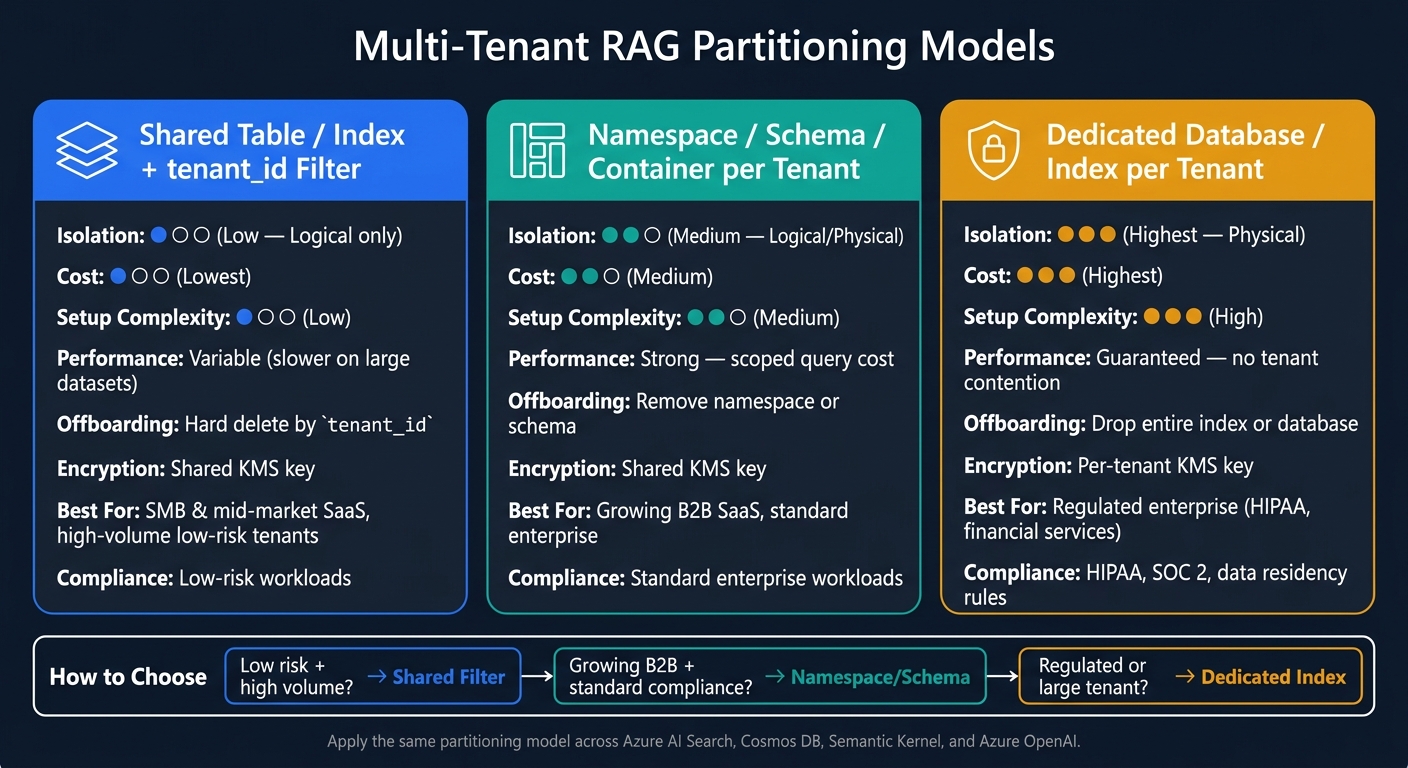
Multi-Tenant RAG Partitioning Models: Isolation vs. Cost vs. Complexity
Retrieval is only as safe as the way you split tenant data. If the storage layout doesn't enforce the same tenant boundary, your RAG system can drift into trouble fast. That applies across relational databases, NoSQL stores, and vector indexes. The model you pick sets the limit for both security and speed.
Shared vs. Dedicated Data Layouts
There are three main models, plus a hybrid option that often works well for bigger tenants.
Database-per-tenant gives each customer a separate database or container. This gives you the strongest physical separation. It also makes per-tenant encryption keys easier to handle. The tradeoff is cost and ops load. Every new tenant adds provisioning work, and unused capacity can get expensive fast. This setup fits regulated enterprise customers, especially in healthcare and financial services, where physical isolation or data residency rules may apply [2][4].
Schema-per-tenant in relational stores, container-per-tenant in NoSQL stores, is the middle path. Tenants still share the base infrastructure, but each one lives in its own logical container. That gives you solid isolation without the sprawl of fully dedicated infrastructure. Even so, object limits and admin overhead can still pile up as you grow.
Shared tables with row-level security (RLS) or tenant_id filters are the lowest-cost option and usually the right default for SMB and mid-market tenants. You keep one shared schema, table, or index, and enforce tenant_id at query time. It's efficient, but the isolation is logical, not physical. So the app layer has to be strict. No shortcuts.
A hybrid model is common in enterprise SaaS. Shared infrastructure works for the long tail, while dedicated layouts make sense for high-compliance or high-volume tenants.
That same isolation decision has to carry over to vector retrieval too.
Vector Index Partitioning Patterns
If the vector layer isn't partitioned the right way, retrieval can cross tenant lines even when the app code looks fine. The safe move is simple: use the same tenant model in both the document store and the vector index. When those boundaries don't match, leakage risk goes up.
The main patterns are:
- Namespace-per-tenant creates a logical partition inside a shared index. Queries stay locked to a tenant-specific namespace. That usually helps performance, and it also makes offboarding easier than metadata filtering because you can remove tenant data at the namespace level [2][5].
- Shared index with metadata filtering adds a
tenant_idfield to each chunk during ingestion and applies a hard filter at query time. This is flexible, but it can slow down as the dataset grows [2]. - Dedicated index per tenant gives the strongest physical separation and removes tenant contention. It also costs the most to run. This is usually best for large tenants or edge cases, like custom embedding models or different vector dimensions.
There's one more point that matters in enterprise RAG. Hybrid retrieval - dense vector search plus sparse keyword search such as BM25 - can help when rare but important terms need to show up in results [1]. Keeping namespace boundaries aligned across both retrieval paths makes that much easier to run.
Comparison Tables: Isolation, Performance, and Operational Overhead
Use these tables to match each tenant class to one layout. In other words, don't mix models casually.
Relational and NoSQL partitioning:
| Model | Isolation | Operational Complexity | Scaling Path | Best Fit |
|---|---|---|---|---|
| Database-per-tenant | Highest (Physical) | High - infrastructure sprawl | Vertical (scale up instance) | Regulated enterprise |
| Collection/Schema-per-tenant | Medium (Logical/Physical) | Medium - object limits apply | Horizontal (sharding) | Mid-market B2B SaaS |
| Shared Table (RLS/Filter) | Lowest (Logical) | Low - single schema | Horizontal (partition keys) | SMB, high-volume low-risk tenants |
Vector index partitioning:
| Pattern | Isolation | Performance | Operational Complexity | Typical Use Case |
|---|---|---|---|---|
| Namespace-per-tenant | Medium (Logical) | Strong - scoped query cost | Low - single index to manage | Standard multi-tenant RAG pipelines |
| Shared index + metadata filter | Low (Logical) | Variable - slower on large datasets | Low | Early-stage or low-volume deployments |
| Dedicated index per tenant | Highest (Physical) | Guaranteed - no tenant contention | High - provisioning per tenant | Large enterprise, custom embedding models |
These storage decisions shape how the pipeline tags data, filters retrieval, and deletes tenant content.
Building a Tenant-Aware RAG Pipeline on the Microsoft Stack
After you pick a partitioning model, you need to enforce it at every stage of the pipeline. If you don’t, gaps tend to show up in the boring places: ingestion, caching, orchestration state, or query filters.
Ingestion, Embeddings, and Storage Boundaries
As soon as documents enter the pipeline, tag each one with a tenant_id. That tag should stay attached to every chunk, every embedding, and every record written to storage.
For raw files, use tenant-specific Blob Storage containers or prefixes. Containers give you stronger encryption and policy isolation. Prefixes are easier to manage when you have a lot of tenants. If you’re pooling tenants, a shared container with tenant-specific prefixes usually works well. If you need tighter isolation, use a dedicated container.
Before chunking, normalize the content. Strip HTML, remove Markdown noise, and map proprietary JSON keys to a unified schema. That way, tenant-scoped metadata and ACLs survive indexing no matter where the content came from.
If you use shared embedding models, store tenant metadata with each embedding. If you use dedicated indexes, tune chunk size and overlap per tenant so they fit the tenant’s document types.
In Azure Cosmos DB, use tenant_id as the partition key. That helps with isolation and sharding for high-volume tenants.
You also want to mirror upstream ACLs during ingestion. Capture source ACLs as allowed_principals metadata so query-time RBAC lines up with the source system.
Once the data is tagged and stored the right way, retrieval has to enforce that same tenant boundary.
Retrieval and Orchestration Without Cross-Tenant Leakage
Cross-tenant leakage usually happens because a filter gets dropped, context gets reused, or orchestration state isn’t scoped. The fix is simple in principle: enforce the boundary in the vector database, not in the LLM.
In Azure AI Search, every query needs a hard tenant_id filter before results are returned. That check has to happen at the database layer, before any content reaches the context window. Relying on the LLM to police access on its own is an architectural anti-pattern.
Apply that same tenant filter to both dense and sparse retrieval paths.
That tenant scope also needs to follow the query through Semantic Kernel and cached memory. Scope memory, tools, planners, and chat history by tenant, using the same tenant key you use in storage and search.
Partition semantic caches by tenant so cached answers never spill across boundaries.
Comparison Table: How Partitioning Changes Pipeline Implementation
| Stage | Shared Index + Tenant Filter | Dedicated Index per Tenant |
|---|---|---|
| Ingestion setup | Single pipeline; tag every chunk with tenant_id |
Separate pipeline or routing logic per tenant |
| Indexing jobs | One job writes to a shared index with metadata | Separate index targets; per-tenant provisioning required |
| Retrieval logic | Hard filter on tenant_id at query time |
No filter needed; index boundary enforces isolation |
| Deployment complexity | Lower - one index to manage and monitor | Higher - more indexes to provision and manage |
| Tenant offboarding | Hard delete all records matching tenant_id |
Drop the tenant's index or namespace |
Shared layouts cut operational overhead. Dedicated layouts make isolation easier to defend and audit.
Security, Compliance, and Operations in Production
Partitioning shapes security, compliance, and day-to-day operations because it decides how you prove isolation, handle growth, and assign cost.
Isolation Controls Across Identity, Data, and Logging
Pass tenant context from signed JWTs into vector-store access control so the database enforces the boundary.
Encryption should follow that same partitioning model. Shared pools usually use shared KMS keys. Dedicated tenant environments can use per-tenant KMS keys and tenant-specific deletion policies [3]. For HIPAA-sensitive workflows, the dedicated model gives the strongest isolation because it separates data sources, knowledge bases, and vector store collections for each tenant [3].
Tag logs, traces, retrieval scores, and cache keys with tenant_id so audits and cached responses stay tenant-scoped [1]. That partitioned audit trail makes SOC 2 evidence collection much easier because it shows that access boundaries held [1][2].
These controls can break down under pressure if rate limits, deletion, and cache scope aren't tenant-aware.
Scaling, Migration, and Failure Isolation
Most teams start with a shared pool because it's easy to onboard new tenants and keeps costs low. Add per-tenant rate limits and backoff so one tenant's traffic doesn't spill over and hit everyone else.
When a tenant outgrows the shared pool, promote it to a dedicated index or namespace. Use webhook-driven purges so deleted source records are removed from the vector store [2].
Keep critical tenants on dedicated query resources so one tenant's load can't affect others [4].
Those choices shape whether you run a shared, tiered, or dedicated model.
Comparison Table: Shared vs. Tiered vs. Dedicated Operations
The table below sums up the main operating tradeoffs.
| Factor | Shared (Pool) | Tiered (Hybrid) | Dedicated (Silo) |
|---|---|---|---|
| Isolation guarantee | Logical (namespace or metadata) | Logical + physical mix | Physical separation |
| Failure blast radius | Entire pool | Single index or tier | Single tenant |
| Compliance profile | Low-risk workloads | Standard enterprise | HIPAA, regulated |
| Encryption | Shared KMS key | Shared KMS key | Per-tenant KMS key |
| Chargeback reporting | Complex | Tier-based | Simple |
| Observability | Requires tenant tagging | Tier-level + tagging | Tenant-scoped logs |
| Cost efficiency | Highest | Medium | Lowest |
| Best for | SMB, mid-market | Growth-stage SaaS | Regulated enterprise |
Conclusion: Choosing the Right Partitioning Strategy
RAG quality often falls apart at the retrieval boundary, not in the model itself. As Sidharth Verma of Truto points out, multi-tenant RAG is a data security problem first. Partitioning turns retrieval boundaries into something concrete, and the model you pick affects isolation, compliance, cost, and day-to-day work. In practice, that means every Azure AI Search query, Cosmos DB partition, and Semantic Kernel memory scope needs to follow the same tenant boundary. That one decision shapes how tenant_id moves through ingestion, retrieval, logging, and deletion.
What to Decide Before You Build
Use four checks to match tenant needs to the right partitioning model.
Start with isolation requirements. Regulated industries like healthcare and finance usually lean toward physical separation with dedicated indexes, per-tenant KMS keys, and strict data residency rules. Standard B2B SaaS setups can often start with logical isolation through namespaces and JWT-driven access control.
Then look at tenant-specific needs. If tenants need different chunking strategies, embedding models, or ingestion schedules, a tiered or dedicated model gives you more room to change settings without affecting other tenants [3].
Next, compare compliance requirements with your encryption setup. Dedicated silos support per-tenant KMS keys out of the box [2][3]. Shared pools can get there too, but they need extra plumbing.
Last, take a hard look at operational capacity. A shared pool can onboard a new tenant with a single API call. A dedicated silo means provisioning a separate index and related infrastructure for each tenant.
Make this partitioning call before you build, not after your first customer asks about isolation. Partitioning shapes ingestion, retrieval, and operations from the first request forward. Pick the partitioning model first, and the rest of the pipeline follows from it.
FAQs
Which partitioning model should I choose first?
For most enterprise applications, start with a Pool model and separate tenants with namespaces or metadata filters in one shared index.
Why start there? It usually keeps costs lower, scales well, and makes tenant onboarding simpler.
If some tenants have their own compliance rules, encryption demands, or custom chunking needs, use a hybrid setup:
- Pool for small to mid-market tenants
- Silo for high-value or highly regulated tenants
How do I prevent cross-tenant leaks in retrieval?
Prevent cross-tenant leaks by enforcing isolation at the infrastructure or database level, not by relying on app-layer filtering.
- Silo pattern: give each tenant a dedicated data store or index.
- Pool pattern: share one store, but enforce isolation with FGAC or metadata filtering. Pass tenant identity to the database layer with JWTs.
- In PostgreSQL, use row-level security with pgvector.
When should a tenant move to a dedicated index?
A tenant should move to a dedicated index when shared pool patterns can no longer provide the needed isolation, performance, or management flexibility.
Common triggers include:
- regulated requirements for physical separation or per-tenant encryption keys
- custom chunking or embedding needs
- noisy-neighbor risks from large enterprise usage
- data residency or fast offboarding requirements


