
If I want a Synapse ETL pipeline to hold up in production, I focus on six things first: reliability, performance, security, monitoring, cost, and long-term upkeep.
Here’s the short version: I set up clear data zones, use incremental loads instead of full reloads for large tables, keep reruns safe with idempotent patterns, log every run, and lock down access with managed identities, Key Vault, and private endpoints.
At a glance, that means:
- Split data by zone: Raw, Curated, and serving tables in a Dedicated SQL Pool
- Use metadata-driven setup: add tables with config changes instead of pipeline rewrites
- Pick the right engine: Copy Activity, Data Flows, Spark, or stored procedures based on the job
- Cut waste: use watermark-based incremental loads and partitioned folders
- Plan for failure: retries, failure paths, and restart-safe loads
- Track each run: rows read, rows copied, duration, throughput, and error details
- Set quality checks: stop bad data before it moves downstream
- Keep secrets out of code: use managed identities and Key Vault
A few numbers matter here. If I reload a large table in full every day, I move 100% of the data each run. With watermark-based loading, I may move only the new or changed slice, which often means far less data, lower compute use, and shorter run times. I also treat a null-rate limit like 0.1% on key fields as a hard stop before data moves forward.
What I take from this article is simple: a good Synapse ETL pipeline is not just about moving data. It has to be safe to rerun, easy to monitor, low-friction to change, and built to recover when something breaks.
Designing ETL Pipelines with Medallion Architecture in Azure Synapse
sbb-itb-79ce429
Design the Architecture and Workspace for Maintainability
Once your operating requirements are set, the next step is to turn them into workspace standards that make pipelines reusable, predictable, and easy to run.
Separate Environments and Standardize Naming
Keep dev, test, and prod in separate workspaces. Then use the same naming pattern across pipelines, datasets, linked services, and tables. That sounds simple, but it saves a lot of friction later. When names follow the same pattern, people can scan the workspace and know what they’re looking at.
It also helps to use a centralized configuration table to control pipeline behavior. Standardize the required fields so the setup stays predictable as it grows. Common fields include TableName, LoadType, LastLoadedValue, DeltaColumnName, and FolderName[2].
Choose the Right Engine for Each Transformation
Synapse gives you a few different transformation engines. Picking the right one keeps cost and complexity in check.
| Engine | Best For |
|---|---|
| Copy Activity | Simple data movement and ingestion from external sources into the Raw zone[3] |
| Mapping Data Flows | Visual, code-free transformations compiled into Spark jobs[3] |
| Spark Notebooks | Complex transformations, data quality checks, and data science integration with PySpark or Scala[3] |
| Stored Procedures | Updates, watermark management, and T-SQL transformations[4][2] |
Use the simplest engine that fits the job. Copy Activity works well for straight ingestion. Mapping Data Flows fit visual logic. Spark Notebooks make sense for PySpark or Scala work. And stored procedures are a good fit for SQL updates and watermark handling.
Once you make those engine choices, stick with them. Consistency matters here because it makes the workspace easier to support through source control and automated release.
Automate Deployment and Configuration
Use Azure DevOps or GitHub Actions with Synapse workspace Git integration for version control and fast iteration[5]. Then pair that with a metadata-driven configuration table, so things like load type, target table, and watermark column can be changed with a SQL insert instead of a pipeline edit[2].
That setup keeps deployment aligned with the same naming and configuration rules used across the workspace.
Improve Pipeline Performance and Control Costs
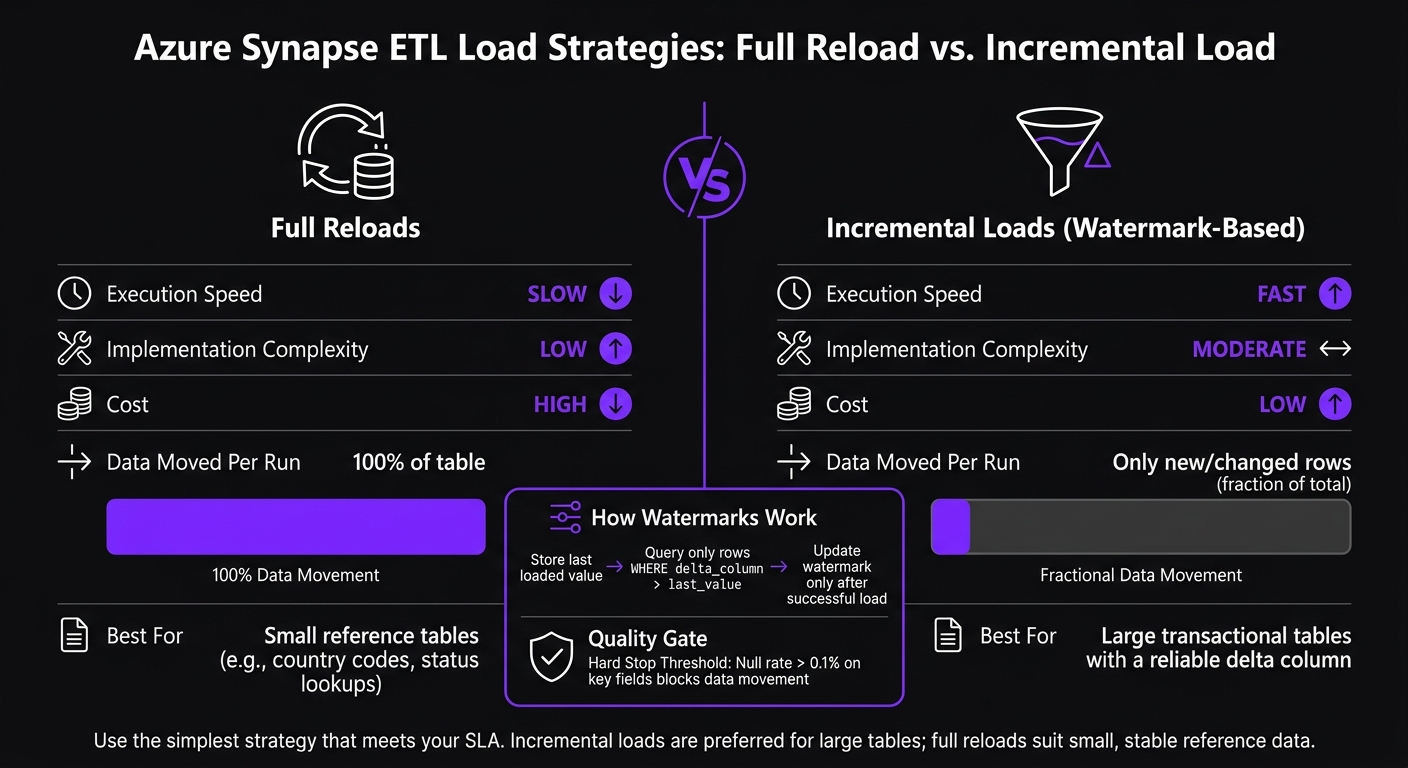
Azure Synapse ETL Load Strategies: Full Reload vs. Incremental Load
Once deployment is standardized, the next step is runtime efficiency and cost control.
Use Incremental Loads Instead of Full Reloads
Incremental loads help you hit freshness targets without driving up compute use or putting extra pressure on source systems. On large tables, they cut runtime and data movement by a lot compared with full reloads.
A common setup is simple: store each table’s last loaded value in a configuration table, then pull only the rows where the watermark column is greater than that value and up to the current maximum[6].
You’ll also want to index delta columns so the filter can use a seek instead of a full table scan. And land files in date-based folders so reruns don’t overwrite earlier data and Spark can prune partitions[6][3].
Once you cut data movement, you can tune parallelism and partitioning so you’re not paying for compute you don’t need.
Tune Parallelism, Partitioning, and Compute
With date-partitioned landing folders, downstream jobs can read only the data they need. That helps keep compute use under control[6][3].
Speed, Simplicity, and Cost: A Tradeoff Table
The tradeoff usually looks like this[6]:
| Strategy | Execution Speed | Implementation Complexity | Cost | Best For |
|---|---|---|---|---|
| Full Reloads | Slow | Low | High | Small reference tables such as country codes and status lookups[6] |
| Incremental Loads | Fast | Moderate | Low | Large transactional tables with a reliable delta column[6] |
Build for Reliability, Governance, and Production Operations
After you tune performance, production ETL still needs three things: recovery, monitoring, and security. Fast pipelines are nice. Pipelines that can fail, recover, and keep data clean are what matter in production.
Add Fault Handling, Retries, and Restart-Safe Patterns
Start with failure paths and retries. In Synapse Pipelines, On Failure paths let you run recovery steps when an activity fails. That can mean logging the error to a database, sending an alert with a Web activity, or calling a stored procedure that stores the failure message from @activity('Copy_TableData').output.errors.Message [1].
Inside ForEach loops, use Continue on error so one bad table doesn't stop the whole batch [1]. That small setting can save a lot of pain when you're moving many tables at once.
Reruns also need to be safe. If a job fails halfway through, you should be able to run it again without creating duplicate data. Use MERGE for upserts or overwrite partitions instead of using plain INSERT statements [4]. Read the watermark at the start of the run, then update it only after the load finishes successfully [4]. That's the difference between a clean retry and a mess you have to fix by hand.
Monitor Pipelines, Data Quality, and Lineage
Once failures are recoverable, the next job is making sure each load is correct and fast. Log every run to a dedicated audit table with rowsRead, rowsCopied, copyDuration, pipelineRunId, and any error messages [1]. That gives you run-level visibility into whether the pipeline is hitting its SLA and data-quality goals [1].
| Metric Category | Specific Check | Implementation Method |
|---|---|---|
| Completeness | Row count anomalies | Compare output.rowsRead vs. output.rowsCopied [1] |
| Performance | Latency / throughput | output.copyDuration and output.throughput [1] |
| Consistency | Source vs. sink match | Lookup and Compare activities |
Set clear quality gates at the bronze-to-silver transition. For example, fail the load if null rates on primary keys go above a set threshold, such as 0.1%, or if row counts drift outside the expected range [4]. If bad data slips through this layer, it tends to spread fast.
Secure Data Movement and Prepare for Handoff
Production handoff depends on securing the data path, not just the pipeline logic. Use managed identities, Key Vault, and private endpoints for every source, sink, and orchestration connection.
This keeps credentials out of pipeline code and helps make sure data movement stays inside the network boundary. For teams dealing with HIPAA, SOC 2, and similar compliance frameworks, that isn't optional. It's part of the baseline for running ETL in production.
Conclusion: The Core Best Practices to Prioritize First
Start with clear architecture boundaries. Keep raw data for replay, curated data for transformation, and the dedicated SQL pool for serving. That setup makes the whole system easier to reason about, and it also makes load strategy simpler to tune.
Next, move from full reloads to incremental loads with watermarks. This cuts runtime, reduces pressure on source systems, and lowers cost. When data volume is under control, the next piece gets much easier: keeping the design maintainable over time.
That’s where metadata-driven pipelines come in. New tables should be a configuration change, not a code change. If every new source needs custom pipeline logic, things get messy fast.
Some parts are non-negotiable. Idempotency, audit logging, data quality gates, and managed identities aren’t nice-to-haves. They’re what separate a quick test setup from a production-ready pipeline. Build every pipeline with failure in mind so it can stop, restart, and recover cleanly without manual work.
From day one, aim for three things: restartability, auditability, and a clean handoff.
FAQs
How do I choose between Copy Activity, Data Flows, Spark, and stored procedures?
Choose the option that fits the job you need done: moving data, changing it, or coordinating the work.
- Copy Activity: best for moving large volumes of data and loading them into dedicated SQL pools
- Data Flows: a visual, no-code way to handle transformations, with the work compiled into Spark jobs
- Spark notebooks: better for code-heavy and more advanced transformation work
- Stored procedures: useful for operational work such as audit logging, metadata management, and logic handled in SQL
The right pick usually comes down to three things: complexity, performance, and the skills your team already has.
What makes a Synapse ETL pipeline safe to rerun?
A Synapse ETL pipeline is safe to rerun when it is idempotent. That means you can run it again and still end up with the same final state - without duplicate rows, damaged data, or other side effects.
To get there, keep your transformations deterministic. In plain English, the same input should always produce the same output. Avoid changing values on each run, like random GUIDs or DateTime.UtcNow, because those can make reruns drift from the original result.
It also helps to use checkpointing so the pipeline can track progress between runs. That way, if something fails halfway through, you don’t have to guess where to restart.
Finally, design writes and retries so they can survive partial runs. If a step completes once and gets hit again, it should land cleanly instead of inserting the same data twice or leaving the target in a messy state.
When should I use full reloads instead of incremental loads?
Use full reloads for small tables or lookup data that changes on a schedule when the logic for incremental loading is more trouble than it’s worth. Sometimes a clean refresh is just the simpler move.
For bigger datasets, incremental loads with the watermark pattern are usually the better fit. You move only the rows that changed instead of reloading the whole table, which helps cut processing time and compute use.
If you need to update a large chunk of history, use CTAS to rewrite the table instead of relying on incremental INSERT, UPDATE, and DELETE statements. That approach is often cleaner and easier to manage at scale.
No matter which method you choose, make the load process idempotent so retries don’t create duplicate rows.


