
Challenge: Many businesses rely on decades-old systems that are hard to scale, expensive to maintain, and risky to migrate entirely to the cloud. These legacy systems often use outdated protocols and architectures that complicate integration with modern tools.
Solution: Azure hybrid cloud strategies offer a phased approach to modernization, allowing organizations to combine on-premises systems with cloud resources. This reduces costs, minimizes disruptions, and improves scalability without requiring a full system overhaul.
Key Takeaways:
- Hybrid Benefits: Gradual modernization, reduced downtime, and compliance with strict data regulations.
- Core Patterns:
- API Gateway Pattern: Wraps legacy systems with modern APIs for better integration.
- Strangler Fig Pattern: Incrementally replaces legacy components with modern microservices.
- Event-Driven Architecture: Decouples systems using asynchronous messaging for real-time updates.
- Azure Tools: Azure Arc, Azure API Management, and Azure Kubernetes Service enable seamless management of hybrid environments.
By leveraging these patterns and tools, businesses can modernize legacy systems step-by-step while maintaining reliability and reducing costs.
Azure Arc: Extending Azure for hybrid and multi-cloud management | BRK183
sbb-itb-79ce429
Core Hybrid Architecture Patterns for Legacy Systems
Modernizing legacy systems on Azure can feel like walking a tightrope - you want to upgrade without causing disruptions to essential operations. To strike this balance, three hybrid patterns are commonly used: the API Gateway Pattern, the Strangler Fig Pattern, and the Event-Driven Architecture Pattern. These approaches can be combined or tailored to address specific challenges and goals.
API Gateway Pattern
Think of the API Gateway Pattern as a bridge between the old and the new. It simplifies interactions by wrapping legacy systems with modern REST or GraphQL interfaces, masking the complexity of older protocols. For example, it can transform XML into JSON automatically, making data easier to work with. Beyond that, it centralizes security by integrating tools like Microsoft Entra ID and OAuth 2.0, taking the burden of authentication and governance off outdated code.
For secure and efficient deployment, Azure API Management can be set up privately using private endpoints or ExpressRoute. This setup also supports features like rate limiting and circuit breaker policies, which help prevent system overloads.
A notable example of this pattern in action comes from April 2025, when Microsoft’s Commercial Software Engineering team worked with a global financial institution, Contoso Bank, to modernize their Electronic Funds Transfer system. They built a "Channel Holder" service as a REST API gateway using Azure Red Hat OpenShift and Azure Kubernetes Service. The result? The system handled 2,000 transactions per second.
From here, the next step often involves a gradual migration strategy with the Strangler Fig Pattern.
Strangler Fig Pattern
The Strangler Fig Pattern is all about gradual transformation. Just like its namesake tree slowly replaces its host, this pattern enables you to modernize a legacy monolith piece by piece, all while keeping the system running. It starts with deploying an API facade - commonly through Azure API Management - as a single entry point for all requests. Secure connectivity is then established using Azure ExpressRoute or a Site-to-Site VPN.
The process begins by selecting a specific function, such as customer search or payment processing, to migrate. This functionality is rebuilt as a microservice using platforms like Azure Kubernetes Service or Azure Functions. Once the new service is ready, the API facade routes requests for that function to the updated endpoint, while other requests continue to flow through the legacy system. This approach focuses on reducing downtime and prioritizes "Mean Time to Repair" (MTTR) over "Mean Time Between Failures" (MTBF).
For instance, one project involved migrating legacy EFT logic to Azure Kubernetes Service. This included integrating Azure Event Hubs with Kafka-based messaging and using event-driven autoscaling through KEDA. The result was a seamless transition for critical transaction processing.
Event-Driven Architecture Pattern
The Event-Driven Architecture Pattern takes a different approach by introducing asynchronous messaging to decouple legacy systems from modern components. Here, systems communicate by publishing and subscribing to events. For example, when a legacy system announces a status update or a completed transaction, modern Azure services can respond instantly without being tied to the slower performance of the older system.
This setup allows modern services to scale independently, maintaining high throughput even during peak demand. It’s particularly effective for real-time updates and scenarios where responsiveness is key.
Often, these patterns work best when combined. For example, legacy functionality can be exposed through an API gateway, event-driven messaging can handle real-time updates, and the Strangler Fig approach can guide the gradual migration of components. Together, these strategies create a flexible and reliable path to modernization.
Azure-Specific Implementation Strategies
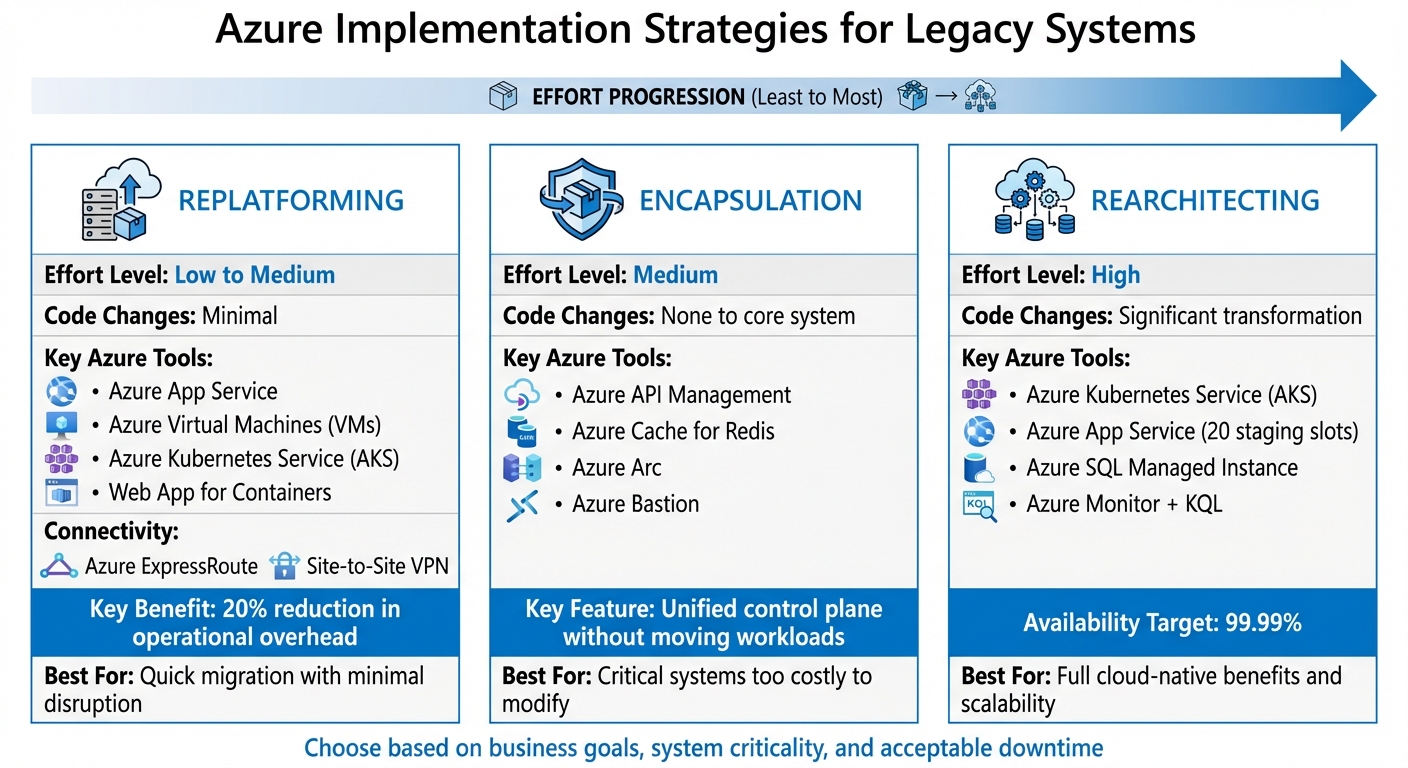
Azure Hybrid Modernization Strategies: Replatforming vs Encapsulation vs Rearchitecting
Azure offers tailored strategies to modernize legacy systems effectively. Once you've chosen a hybrid pattern, the next step is implementing it with Azure tools. The approach you select - replatforming, encapsulation, or rearchitecting - depends on how much change your legacy system can handle and the business goals you're aiming to achieve. Each approach comes with its own level of effort and rewards.
Replatforming Legacy Systems
Replatforming involves migrating legacy workloads to Azure with minimal changes to the existing code. It's a quick way to lower infrastructure costs while keeping your business logic intact. For instance, .NET applications can use Azure App Service, which handles managed OS patching. For mainframe applications, workloads can be recompiled or containerized on Azure Virtual Machines (VMs) or Azure Kubernetes Service (AKS). If minimal refactoring is needed, Web App for Containers is another option for containerizing applications.
If your organization has concerns about data sovereignty or latency, seamless on-premises integration is essential. Many businesses using this approach have reported a 20% reduction in operational overhead by consolidating IT processes under a single control plane. Secure connectivity is critical for linking on-premises environments with Azure's management layer, which can be achieved through Azure ExpressRoute or a Site-to-Site VPN.
For systems where maintaining core legacy functionality is a priority, encapsulation offers the next logical step.
Encapsulation for Critical Legacy Systems
When legacy systems are too critical or costly to modify, encapsulation provides a modernization solution without altering the core system. This approach involves wrapping the legacy system with modern APIs and middleware. For instance, Azure API Management can expose legacy functions as secure, versioned APIs, protecting the backend. A real-world example is Contoso Bank, which developed a "Channel Holder" wrapper service using Azure Cache for Redis. This allowed synchronous requests to be handled efficiently while the legacy mainframe processed transactions asynchronously, ensuring high transaction rates.
To further streamline operations, Azure Arc projects on-premises servers and databases into Azure Resource Manager, offering a unified control plane for consistent policy enforcement, security, and monitoring - all without moving the workloads themselves. Additionally, Azure Bastion provides secure, browser-based RDP or SSH access to legacy virtual machines, eliminating the need for open ports.
Rearchitecting for Cloud-Native Benefits
Rearchitecting takes modernization to the next level by transforming monolithic applications into microservices, adopting serverless designs, and modernizing databases with cloud-native solutions. Azure Kubernetes Service (AKS) is a powerful tool for orchestrating microservices, offering automated management, self-healing, and autoscaling. For smaller applications, Azure App Service provides features like up to 20 staging slots, enabling advanced deployment strategies such as blue-green or canary releases. Meanwhile, Azure SQL Managed Instance allows you to modernize databases while maintaining compatibility with on-premises SQL Server, adding benefits like automated patching and high availability.
Choosing between App Service and AKS depends on the scale and complexity of your application. App Service is ideal for smaller systems with straightforward requirements and lower management overhead. On the other hand, AKS is better suited for large-scale systems with complex orchestration needs. Both options support VNet integration, and organizations aiming for high resiliency often target 99.99% availability by leveraging multicloud or hybrid environments. Centralized monitoring is also key - Azure Monitor combined with Kusto Query Language (KQL) in Log Analytics allows for near real-time troubleshooting across both on-premises and cloud systems.
Security, Resilience, and Cost Efficiency in Hybrid Environments
Once your hybrid architecture is up and running, keeping it secure, efficient, and cost-effective becomes essential. Azure offers tools to enforce policies, monitor performance, and manage costs - all from a unified control plane. Let’s dive into how Zero Trust principles and unified monitoring can strengthen your hybrid setup.
Zero Trust Security for Hybrid Systems
Zero Trust is all about verifying every access request, no matter where it originates. Microsoft Entra ID provides Single Sign-On (SSO) and Conditional Access across both Azure and on-premises systems, ensuring robust authentication for every user.
With Azure Arc, you can extend Azure’s control plane to manage legacy on-premises servers, Kubernetes clusters, and SQL databases. This approach enables you to secure older assets using the same tools as your cloud-native resources. Microsoft Defender for Cloud helps maintain a strong security posture across the hybrid environment, while Azure Policy enforces baseline security configurations for both cloud and Arc-enabled resources. For example, organizations can set a goal of achieving 100% compliance with baseline security policies, as measured through Azure Policy and Defender for Cloud.
On the networking side, implementing a Hub-and-Spoke or Azure Virtual WAN (vWAN) architecture centralizes traffic inspection via Azure Firewall, while Network Security Groups (NSGs) help regulate east-west traffic. For secure remote access, Azure Bastion eliminates the need for public IP exposure. Microsoft Sentinel acts as a centralized SIEM/SOAR hub, aggregating logs from Azure Monitor and on-premises agents to detect threats across the hybrid environment. Data security is a priority, with Log Analytics data encrypted at rest using 256-bit AES and all transit data secured via TLS 1.2.
Monitoring and Observability Tools
Unified monitoring is key to identifying and addressing potential issues before they escalate. Azure Monitor consolidates logs, metrics, and traces from all environments into Log Analytics workspaces, allowing teams to focus on the resources they manage by configuring "Resource Context" access modes. Additionally, Azure Policy can automate the deployment of monitoring and security agents across hybrid virtual machines at scale.
For proactive issue detection, Application Insights uses machine learning to identify security anomalies and performance problems. If your legacy systems lack direct internet access, a Log Analytics gateway can securely collect and send log data to Azure over TCP port 443. To ensure connectivity, configure VPN gateways as a failover for ExpressRoute connections. Tools like the Azure Connectivity Toolkit (AzureCT) can help monitor and troubleshoot ExpressRoute performance issues.
Cost Management and Optimization
Managing costs in hybrid environments requires careful planning and resource allocation. During the design phase, use the Azure Local sizer to avoid over-provisioning while maintaining resilience for critical workloads (e.g., "N+1" or "N+2" configurations). Additionally, take advantage of Azure Hybrid Benefit (AHB) to reuse existing Windows Server and SQL Server licenses for cost savings.
To further reduce costs, implement Data Collection Rules (DCRs) in Azure Monitor to capture only essential logs and metrics. Azure Update Manager, included at no extra cost, simplifies patch management for Azure Local instances and virtual machines. For testing-intensive modernization projects, set up an automatic disposal strategy for test environments to eliminate idle resource charges. Tools like Kubernetes Event-driven Autoscaling (KEDA) can dynamically adjust microservice capacity to match demand, reducing waste.
Conclusion: Building a Modernization Roadmap
Start by evaluating your workloads with Azure Migrate to assess dependencies and compatibility. This step is essential for shaping your modernization roadmap. Hosting Event Storming sessions can also help map out commands and events, providing clarity on how modern and legacy systems will interact in the future.
Once the assessment is complete, choose a migration strategy that aligns with your business needs - whether it’s Rehost, Replatform, Refactor, or Retain. To minimize risks and deliver immediate value, consider using the Strangler Fig Pattern, which allows you to incrementally replace legacy functionality. As Alex Dorand, Solutions Architect, wisely points out:
The individuals who manage the legacy systems can either become your greatest allies or lead to your downfall.
Adopt Azure hybrid patterns to bridge the gap between modern and legacy systems. For instance, use Azure API Management and Azure Functions to create an abstraction layer, store connectivity parameters securely in Azure Key Vault, and ensure network security with VPN or ExpressRoute. Additionally, Azure Arc can help you manage on-premises, edge, and multicloud resources from a single control plane, streamlining your operations.
Begin with a pilot project targeting a low-risk workload. This approach can validate your strategy and even lead to benefits like a 20% reduction in operational overhead by unifying IT processes. To budget effectively, use the Azure Pricing Calculator to estimate costs for different migration paths, and take advantage of Azure Hybrid Benefit to reuse your existing Windows Server and SQL Server licenses.
For mid-market organizations looking to speed up results, partnering with AppStream can be a game-changer. They specialize in quick integrations, data unification, and production-ready AI solutions tailored for regulated Microsoft environments - all while maintaining security and auditability.
FAQs
What is the Strangler Fig Pattern, and how does it help modernize legacy systems?
The Strangler Fig Pattern offers a step-by-step method for updating legacy systems by replacing them incrementally instead of overhauling everything at once. The process begins by setting up an API façade or routing layer in front of the existing system. This façade acts as a traffic controller, directing specific requests to newly built cloud-native services or microservices, while the remaining traffic continues to be handled by the old system.
This approach allows the old and new components to operate simultaneously, making it easier to test, validate, and even roll back changes if needed - all without disrupting daily operations. Over time, more functionality is transitioned to the modern services, eventually making it possible to retire the legacy system entirely. This gradual transition minimizes risks, spreads out costs, and gives teams the flexibility to adopt tools like Azure services or .NET at a pace that works for them, all while ensuring the business keeps running smoothly.
What security advantages does Azure's hybrid cloud offer for legacy systems?
Azure's hybrid cloud approach bridges the gap between on-premises and cloud environments, offering a seamless and secure protection strategy. By integrating on-premises Active Directory with Microsoft Entra ID, you can enforce consistent identity and access policies - like single sign-on and conditional access - across both legacy systems and cloud-based services. To bolster security further, Azure Firewall and dedicated network segmentation ensure all traffic undergoes centralized, stateful inspection.
For organizations with strict regulatory or sovereignty requirements, Azure Stack and Azure Arc provide the flexibility to keep sensitive data on-premises while still benefiting from Azure's encryption and continuous threat detection. This means you can secure older systems using modern, cloud-scale tools without needing a complete system overhaul.
AppStream Studio takes full advantage of these capabilities, offering secure modernization solutions that allow legacy workloads to be extended or migrated to Azure with ease and compliance.
How can Azure tools like API Management and Kubernetes Service help integrate legacy systems with the cloud?
Azure API Management (APIM) offers a way to bring legacy systems into the modern era by exposing their functionality as APIs, such as REST or SOAP, without the need for time-consuming code rewrites. Acting as a secure gateway, APIM facilitates smooth communication between on-premises systems and cloud-based applications. It connects to on-premises networks through VPN or Azure ExpressRoute, allowing legacy systems to remain operational while providing a unified API interface. Additionally, APIM includes features like authentication, throttling, and data transformation to enhance control and security.
Azure Kubernetes Service (AKS) complements APIM by providing a flexible, scalable platform for hosting containerized workloads. With AKS, you can run adapters, sidecar services, or even re-host legacy applications. This setup makes it easier to break down monolithic systems into microservices, integrate them with new cloud-native components, and leverage capabilities like auto-scaling and load balancing.
When used together, APIM and AKS enable a step-by-step modernization approach. Legacy systems can be exposed via APIs, while containerized adapters or re-hosted services in AKS manage the backend processes. Over time, these legacy components can be replaced or expanded with cloud-native solutions. AppStream Studio specializes in applying these techniques to help organizations modernize their systems efficiently and securely, often achieving tangible results in weeks rather than months.


