
Azure autoscaling helps you manage cloud costs by automatically adjusting resources based on demand. This ensures you’re not overpaying for idle resources during low-traffic periods or underprepared during traffic spikes. Here’s a quick breakdown of five key autoscaling strategies:
- Metric-Based Autoscaling: Adjusts resources dynamically using performance metrics (e.g., CPU, memory). Ideal for workloads with unpredictable traffic.
- Schedule-Based Autoscaling: Scales resources based on predefined schedules. Best for predictable traffic patterns like business hours.
- Predictive Autoscaling: Uses machine learning to forecast demand and provision resources ahead of spikes. Suitable for cyclical workloads.
- Serverless Autoscaling: Automatically scales resources at the code level, charging only for execution time. Great for event-driven tasks.
- Queue-Based Load Leveling Autoscaling: Uses message queues to buffer requests and scale backend workers. Works well for bursty or asynchronous tasks.
Each method targets specific workload types and cost-saving opportunities. For example, serverless autoscaling minimizes costs for sporadic demand, while queue-based scaling prevents backend overload during spikes. Combining these strategies can optimize performance and control expenses effectively.
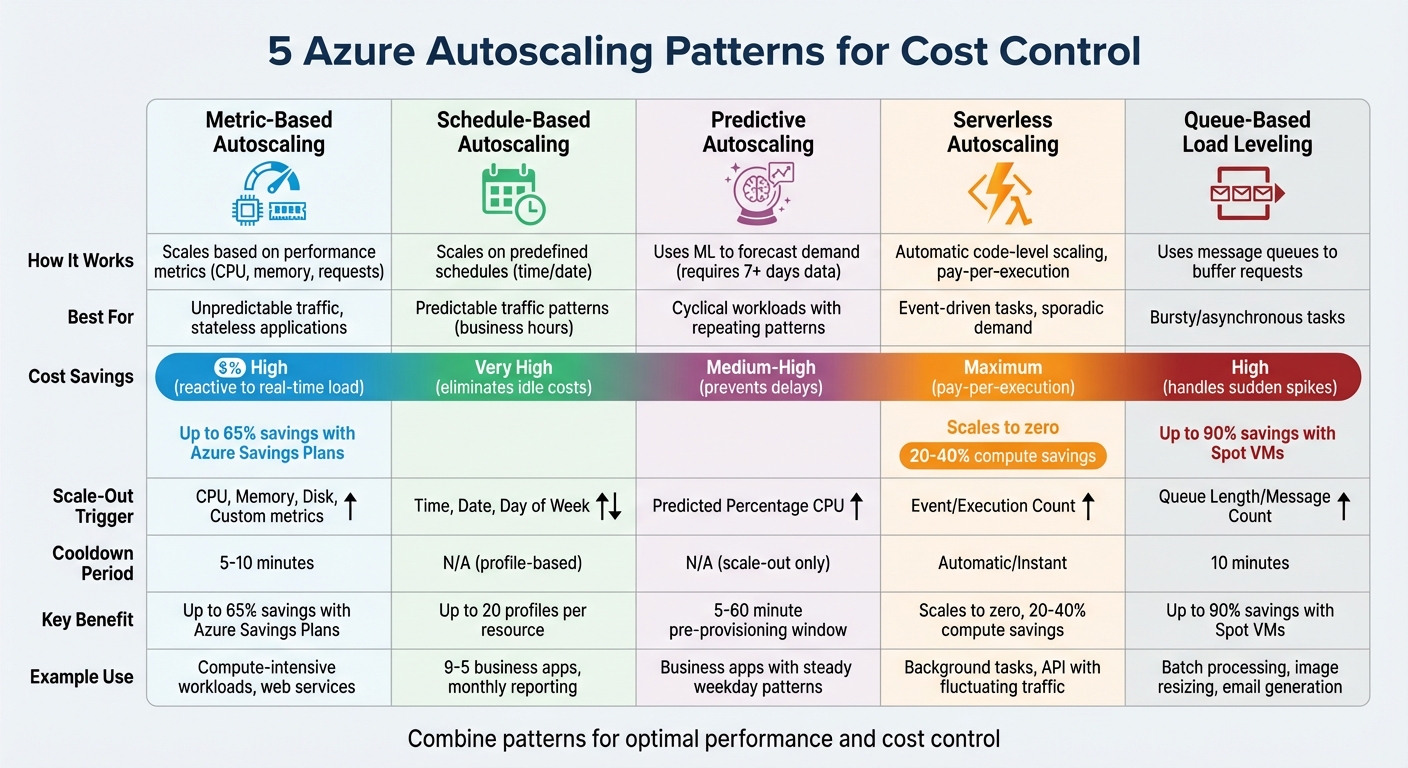
Azure Autoscaling Patterns: Cost Savings and Use Cases Comparison
Cut Your AVD Costs in Half - Step-by-Step Guide
1. Metric-Based Autoscaling
Metric-based autoscaling dynamically adjusts Azure resources by tracking performance metrics like CPU usage, memory consumption, request counts, and queue lengths. For instance, if CPU usage exceeds 80%, additional instances are deployed to handle the load. Conversely, when usage dips below 60%, instances are removed. This approach ensures resources align with actual demand in real time.
Cost Savings Potential
A major advantage of metric-based autoscaling is the reduction of unnecessary resource allocation. By matching resource usage to actual demand, it prevents overprovisioning. In cloud environments, horizontal scaling is particularly efficient because resources can be added or removed seamlessly without causing downtime. However, achieving real cost efficiency requires pairing every scale-out rule with a corresponding scale-in rule. Without this balance, resources might remain over-allocated even after demand subsides. Additionally, Azure Savings Plans for compute offer discounts of up to 65% on pay-as-you-go pricing, making this method even more cost-effective for workloads with fluctuating demands.
Scalability for Variable Workloads
Beyond cost savings, metric-based autoscaling thrives in environments with unpredictable traffic patterns. Unlike fixed schedules, it adjusts dynamically to changes in demand. For example, Azure averages metrics like CPU usage over a 10-minute period to filter out short-lived spikes. The scaling logic is designed to prioritize stability: scaling out occurs when any condition is met, while scaling in happens only when all conditions are satisfied. This ensures applications remain available even during sudden traffic surges.
Ease of Configuration
Azure simplifies the setup process for autoscaling across services like Virtual Machine Scale Sets, App Service, and API Management. You can configure settings - such as minimum, maximum, and default instance counts - through the Azure portal, PowerShell, CLI, or REST APIs. For example, new instances for Azure App Service Web Apps typically become operational within five minutes of a metric change. In contrast, Virtual Machines and Cloud Services have a default aggregation period of about 45 minutes before scaling adjustments take effect.
Applicability to Workload Types
This pattern works particularly well for stateless applications, where any instance can handle incoming requests without requiring session affinity. It’s ideal for compute-intensive workloads that scale based on CPU usage and for systems like message processors that scale with queue depth. Common triggers include CPU for compute-heavy tasks, memory for database operations, queue length for background jobs, and request count for web services. To avoid frequent scaling adjustments, it’s important to set clear margins between scale-out and scale-in thresholds.
2. Schedule-Based Autoscaling
Schedule-based autoscaling lets you adjust Azure resources based on predefined time periods instead of relying solely on performance metrics. By planning resource changes ahead of time, you can maintain system performance while keeping costs aligned with actual demand. For example, you might scale up resources at 9:00 AM when employees log in and scale down at 6:00 PM when the workday ends. This approach ensures resources are ready before demand increases, avoiding the delays that can occur when scaling reacts to performance thresholds. Virtual Machines and Cloud Services, for instance, can take up to 45 minutes to scale, but scheduled adjustments eliminate this lag. This proactive method complements metric-based autoscaling by preparing for known demand spikes in advance.
Cost Savings Potential
One of the biggest advantages of schedule-based autoscaling is the ability to eliminate idle resources during predictable low-traffic periods. For instance, non-production environments that aren't used overnight or on weekends can be scaled down - or even shut off entirely - to avoid unnecessary costs. Azure allows up to 20 profiles per resource, giving you flexibility to create detailed schedules for various scenarios, such as standard weekday business hours or special events like Black Friday sales. By setting a lower instance count during off-peak hours and scaling up only during high-demand periods, you ensure you're not paying for unused capacity. This approach is especially effective for non-production workloads, where aggressive scaling can significantly reduce expenses during downtime.
Scalability for Variable Workloads
This method shines for workloads with predictable, cyclical traffic patterns. Applications that experience regular peaks - like morning logins, month-end processing, or planned marketing events - can benefit greatly. The key advantage is proactive provisioning: resources are ready to handle users as soon as they arrive, rather than scrambling to add capacity after performance issues arise. For optimal results, combine schedule-based scaling with metric-based rules. Use scheduling to set a baseline capacity for expected demand, and layer reactive rules on top to manage unexpected traffic surges during those times.
Ease of Configuration
Configuring schedule-based autoscaling in Azure is simple. Navigate to your resource, such as an App Service Plan or Virtual Machine Scale Set, and select "Scaling." From there, choose "Custom autoscale". Define start and end times, specify the timezone, and set instance limits. Double-check the timezone setting to ensure scaling actions occur at the correct local time. After setup, monitor the "Run history" to verify that scaling actions are executed as planned. It's also important to define a safe default instance count to maintain availability in case scheduled profiles fail or metrics become temporarily unavailable. These clear schedules align with predictable usage patterns, ensuring resources are deployed efficiently.
Applicability to Workload Types
Schedule-based autoscaling is ideal for applications with well-defined usage cycles. Examples include business-hours applications (9:00 AM to 5:00 PM), monthly reporting systems, fiscal year-end processing, and planned marketing campaigns. To determine which workloads are suitable, analyze historical usage data and tag resources based on their uptime requirements. However, workloads with unpredictable traffic or those requiring constant availability are better suited to metric-based or hybrid scaling approaches that combine both scheduling and reactive adjustments.
3. Predictive Autoscaling
Predictive autoscaling leverages machine learning to analyze past CPU usage and predict future demand, enabling resources to be provisioned ahead of traffic spikes. To start generating predictions, the system requires at least seven days of historical data, with its accuracy improving over a rolling 15-day period. You can set a "pre-provisioning window" between 5 and 60 minutes, ensuring that instances are operational and ready when users arrive. This method takes a proactive approach by anticipating demand rather than simply reacting to it.
Cost Savings Potential
Predictive scaling eliminates the lag often associated with reactive rules by provisioning resources in advance, ensuring smooth performance during peak loads. It also minimizes over-provisioning compared to schedule-based scaling. Instead of keeping a large number of instances running during broad time windows "just in case", the machine learning model identifies specific patterns and adjusts resources more precisely. Predictive autoscaling works alongside reactive rules as a backup, so unexpected surges in demand are still covered without the need to maintain expensive idle capacity.
Scalability for Variable Workloads
This approach shines when dealing with cyclical workloads - for example, applications that experience regular usage patterns, such as high traffic during business hours and lower traffic overnight or on weekends. It's especially useful for applications with long initialization times, as resources are prepped and ready before demand peaks. While predictive autoscaling is excellent for workloads with consistent patterns, unpredictable spikes still rely on reactive rules. Currently, Azure offers predictive autoscaling for the Percentage CPU metric with Average aggregation on Virtual Machine Scale Sets in the Commercial cloud.
Ease of Configuration
To get started, use "Forecast only" mode to compare predicted CPU usage with actual usage without triggering any scaling actions. This allows you to evaluate the model's accuracy before enabling automatic scaling. Once confident in the predictions, you can switch to active scaling and configure your pre-provisioning window (between 5 and 60 minutes). Predictive autoscaling handles only scale-out actions, leaving scale-in actions to standard rules. Be mindful of "flapping", where instances are repeatedly added and removed, by setting an adequate margin between your scale-out and scale-in thresholds.
Applicability to Workload Types
Predictive autoscaling is most effective for applications with repeating usage cycles that the machine learning model can identify and adapt to. Ideal candidates include business applications with steady weekday patterns, services with predictable peaks in the morning or evening, and workloads that follow weekly rhythms. However, for one-time events like Black Friday, where there's insufficient historical data (less than 15 days), schedule-based scaling remains the better option. Combining predictive and reactive scaling ensures you're prepared for both predictable and unexpected traffic. Always keep reactive autoscale rules in place as a safety net for scenarios that fall outside historical patterns.
4. Serverless Autoscaling
Serverless autoscaling takes resource management to the next level by automating allocation at the code level. With this approach, infrastructure management becomes a thing of the past as compute power is dynamically allocated based on demand. For example, Azure Functions, Microsoft Azure's serverless platform, handles scaling entirely on its own. There’s no need to set up autoscale rules, define thresholds, or constantly monitor metrics. A built-in scale controller monitors incoming events and adjusts the number of instances accordingly - scaling up when demand spikes and scaling down when it drops. This not only simplifies operations but also helps reduce costs significantly.
Cost Savings Potential
One of the biggest advantages of serverless autoscaling is its pay-as-you-go model. You’re charged only for the actual execution time and resources used - nothing more. When there’s no demand, the system scales down to zero, completely eliminating compute costs during idle periods. This is a game-changer for businesses that often overprovision resources. Research shows that up to 35% of cloud spending is wasted on idle or underutilized resources. By switching from oversized virtual machines to serverless solutions for workloads with sporadic demand, organizations can save anywhere from 20% to 40% on compute expenses.
Azure’s serverless options, such as the Consumption and Flex plans, add further value by offering free executions and charging only for active usage. This ensures that costs align directly with actual application activity.
Scalability for Variable Workloads
Serverless excels in handling event-driven tasks with unpredictable traffic patterns - situations where traditional scaling methods often fall short. Its stateless design means that any instance can process a request without needing to maintain session data, making it highly efficient. Applications can also be broken into smaller, independent components, further improving performance and scalability.
For workloads that are IO-bound, the Flex Consumption plan allows multiple operations to run on a single instance by increasing per-instance concurrency. This can help reduce costs compared to scaling out to multiple instances. Events like HTTP requests or queue triggers scale dynamically based on factors like concurrency or queue length, ensuring responsiveness even during demand surges.
Ease of Configuration
Setting up serverless autoscaling is straightforward. The Flex Consumption plan is the go-to choice for most new serverless applications, offering flexible compute options and virtual network integration. Legacy Consumption plans are typically reserved for specific use cases, such as Windows features or PowerShell workloads. Configuration mainly involves selecting the right plan and adjusting per-instance concurrency, rather than defining complex scaling rules manually.
To ensure smooth scaling, avoid long-running functions and implement checkpoints so tasks can shut down gracefully during scale-in events. If using the Premium plan, consider adding a warmup trigger to reduce cold start latency when new instances are created.
Applicability to Workload Types
Serverless autoscaling is perfect for background tasks, event-driven triggers, and APIs that experience fluctuating traffic. Workloads triggered by message queues, streaming updates, or Kafka topics are particularly well-suited for this model. When traffic patterns are unpredictable, serverless provides the flexibility needed, making scheduled scaling unnecessary.
For better performance, consider breaking long-running processes into smaller, manageable tasks that can shut down cleanly during scaling events. Using event-based triggers, like those supported by KEDA (Kubernetes Event-Driven Autoscaling), allows you to scale based on specific event sources such as queue length, rather than relying solely on CPU or memory metrics. While compute costs drop to zero during idle periods, keep in mind that other charges, such as storage for maintaining function states, may still apply.
sbb-itb-79ce429
5. Queue-Based Load Leveling Autoscaling
Queue-based load leveling autoscaling uses a message queue - like Azure Service Bus or Azure Storage Queue - to act as a buffer between incoming requests and the services that handle them. Instead of overwhelming your backend directly, requests are placed in a queue, allowing worker instances (such as Azure Functions or Container Apps) to process them at a manageable pace. Think of it as a "shock absorber" that smooths out traffic spikes, helping to avoid service failures or timeouts during sudden surges in demand. This method works well alongside other scaling strategies by separating real-time processing from peak traffic loads.
Cost Savings Potential
One of the biggest advantages of this approach is that you can size your infrastructure for average traffic rather than peak demand. Without a queue, you'd need to provision resources to handle the highest traffic levels, which often means paying for unused capacity during quieter periods. By decoupling the front end from the backend, you can operate with fewer instances during normal conditions and only scale out when the queue grows beyond a specific threshold.
For steady workloads, using Reserved Instances or Savings Plans can save up to 72%. Meanwhile, non-critical tasks like batch jobs can take advantage of Spot VMs, which offer discounts of up to 90%.
Scalability for Variable Workloads
This autoscaling approach is perfect for workloads that are bursty or asynchronous, such as background jobs, batch processing, image resizing, email generation, or data indexing. Azure determines scaling thresholds based on the average number of messages per active instance. For example, if your scale-out threshold is 50 messages per instance and you have two instances running, a third instance will be added once the queue hits 100 messages. The flexibility to scale both the queue and the consumer tier independently allows you to handle unpredictable demand without overprovisioning.
You can also scale based on "critical time" - the delay between when a message is added to the queue and when it's processed. For instance, if your SLA allows for a 500ms delay, scaling might not trigger immediately, ensuring resources are aligned with actual performance needs.
Ease of Configuration
Setting up queue-based autoscaling is straightforward:
- Start by choosing either Azure Storage Queue or Service Bus as your trigger.
- Define a scaling profile with minimum, maximum, and default instance counts to control costs. Add email or webhook alerts for better monitoring.
- Create scale-out rules (e.g., add instances when messages exceed 50 per instance) and corresponding scale-in rules (e.g., remove instances when messages drop below 10 per instance). This ensures resources are released as demand decreases, keeping costs in check.
To avoid rapid scaling cycles caused by fluctuating queue depths, set thresholds carefully and include cooldown periods of 5–10 minutes. This stabilizes metrics after scaling events. Additionally, setting a maximum instance limit can help prevent unexpected budget overruns. With proper configuration, queue-based scaling ensures efficient resource allocation while keeping costs under control.
Applicability to Workload Types
Queue-based autoscaling is particularly well-suited for asynchronous and non-critical tasks where slight delays are acceptable. It’s especially useful for protecting backend services with throttling limits - like Azure Cosmos DB - by ensuring demand stays within manageable levels. However, this pattern requires stateless processing logic, so any worker instance can handle any queued message without relying on session data.
While this method shines for background tasks with occasional spikes, it’s not ideal for scenarios requiring immediate responses. For synchronous, low-latency needs, direct service invocation paired with metric-based scaling is often a better option.
How to Implement Autoscaling Patterns
Setting up autoscaling in Azure involves defining thresholds, instance limits, and rules to ensure smooth operation without unnecessary resource fluctuations. Each autoscale configuration must include a minimum, maximum, and default instance count. The default count acts as a fallback in case metrics temporarily become unavailable.
To avoid locking resources at extreme levels, always pair scale-out and scale-in rules. For example, if you scale out when CPU usage hits 70% but don’t scale back in, instances will keep piling up until the maximum limit is reached - potentially blowing up your budget. Use the same metric for both scaling directions (e.g., Percentage CPU) and maintain a safe margin between thresholds. If you scale out at 70%, scaling back in at 65% would cause the remaining instances to quickly exceed 70% again, triggering what Azure refers to as "flapping". A better strategy is to set the scale-in threshold at 30% or lower, allowing the system to stabilize before scaling down.
Before diving into autoscaling rules, consult Azure Advisor. It analyzes utilization data over configurable periods (7, 14, 21, 30, 60, or 90 days) and offers recommendations for optimizing resources. For example, if a virtual machine's CPU usage is below 3% (P95) and network usage is under 2% over seven days, Advisor might suggest shutting it down. For user-facing workloads, it recommends a SKU where CPU and network utilization are at 40% or lower (P95) and memory usage doesn't exceed 60% (P100). Addressing these recommendations ensures you're not scaling inefficient infrastructure.
To implement autoscaling effectively, consider the following patterns and their configurations:
| Pattern | Scale-Out Metric | Scale-In Cooldown | Cost Savings Potential |
|---|---|---|---|
| Metric-Based | CPU, Memory, Disk, Custom | 5–10 minutes | High (reactive to real-time load) |
| Schedule-Based | Time, Date, Day of Week | N/A (profile-based) | Very High (reduces idle costs) |
| Predictive | Predicted Percentage CPU | N/A (scale-out only) | Medium-High (prevents delays) |
| Serverless | Event/Execution Count | Automatic/Instant | Maximum (pay-per-execution) |
| Queue-Based | Queue Length/Message Count | 10 minutes | High (handles sudden spikes) |
Implementation Tips for Specific Patterns
- Metric-Based Scaling: For Virtual Machine Scale Sets or App Services, select "Custom autoscale" and set instance limits. Define rules using metrics like CPU usage. For example, configure a scale-out rule to add an instance when CPU exceeds 70% and a scale-in rule to remove one when it drops below 30%.
- Schedule-Based Scaling: Create a new profile, select "Schedule and repeat on specific days", and define start/end times. For instance, set a minimum of one instance during weekends to save costs.
- Predictive Autoscaling: Enable predictive autoscaling in your Virtual Machine Scale Set. Set a prelaunch window (e.g., 5–60 minutes) to provision resources ahead of anticipated demand.
- Serverless Patterns: Azure Functions on the Consumption Plan automatically scale based on trigger volume, so no manual configuration is needed.
- Queue-Based Scaling: Use resources like Service Bus or Storage Queue. Configure triggers based on "Message Count" or "Queue Length" in the consumer resource's scaling settings.
Monitoring and Adjustments
Set up activity log alerts to track scaling actions and identify issues like "flapping." If problems arise, tweak thresholds to ensure smoother operations. Azure prioritizes scale-out actions over scale-in, and if multiple scale-out rules activate simultaneously, the one adding the most instances takes precedence. This mechanism prevents under-provisioning but can lead to higher costs if maximum instance limits aren’t set carefully.
AppStream Studio Integration
When it comes to production deployment, especially in mid-market organizations, turning autoscaling patterns into a fully operational infrastructure on Azure can be a real challenge. Many businesses find it difficult to implement Azure autoscaling effectively in live environments. That’s where AppStream Studio steps in, offering tailored solutions that bring Azure cloud modernization, event-driven architecture, and AI-powered cost management together - delivering results in just weeks. This approach transforms theoretical strategies into production-ready systems.
Our experienced engineering teams specialize in working with regulated industries like financial services and healthcare. These sectors require a careful balance between cost efficiency and strict compliance standards. By leveraging Kubernetes Event-driven Autoscaling (KEDA), we enable scaling based on specific business triggers - such as message queue depth, Kafka topic length, or custom application events - rather than relying on general infrastructure metrics. This targeted method reduces the inefficiencies often caused by generic scaling metrics, leading to smarter cost management.
To push resource efficiency even further, we use Azure Machine Learning for predictive scaling. By building time-series forecasting models, we can anticipate demand patterns and adjust resources ahead of time. Paired with anomaly detection, this proactive strategy has helped businesses cut compute costs by 40% to 65% in real-world enterprise applications. Additionally, we configure tools like the Horizontal Pod Autoscaler (HPA) for scaling replica pods and the Cluster Autoscaler for managing node-level resources. Together, these ensure your Kubernetes workloads align perfectly with actual demand.
Conclusion
Autoscaling in Azure is all about striking the right balance between handling predictable demand and responding to unexpected spikes. By combining schedule-based, metric-based, and predictive scaling, you can manage both steady traffic patterns - like business hours or seasonal peaks - and sudden surges. Schedule-based scaling tackles recurring demand cycles, metric-based scaling adjusts to real-time fluctuations, and predictive scaling ensures resources are ready before demand hits. For event-driven workloads, serverless autoscaling with pay-per-execution pricing is a game-changer, while queue-based load leveling helps smooth out traffic spikes by buffering messages. Together, these strategies create a well-rounded approach to resource management.
Cost control is just as important as performance. Pairing scale-out rules with scale-in rules is key to avoiding unnecessary expenses. Without this balance, resources can stay maxed out longer than needed, driving up costs. As highlighted in Microsoft's Well-Architected Framework, scaling up at the last responsible moment and scaling down as soon as possible is critical. Setting hard limits on maximum instances can protect against runaway costs during unexpected events like DDoS attacks, and leaving enough margin between thresholds prevents "flapping" - the inefficient cycle of repeatedly adding and removing instances.
Azure offers a robust toolkit to make this possible: Azure Monitor for tracking metrics, Azure Advisor for optimization tips, and tools like KEDA for event-driven scaling. However, turning these tools into a seamless, production-ready system takes expertise, especially in industries where compliance is non-negotiable. Inefficient scaling can lead to unnecessary overspending, so getting it right not only boosts performance but also delivers immediate cost savings.
FAQs
What’s the difference between predictive autoscaling and schedule-based autoscaling in Azure?
Predictive autoscaling leverages machine learning to analyze historical data, such as CPU usage and other performance metrics, to anticipate future demand. By forecasting workload spikes, it adjusts resources ahead of time, making it especially useful for systems with consistent traffic patterns or when provisioning new resources takes longer.
On the other hand, schedule-based autoscaling operates on a predefined timetable. It scales resources up or down at specific intervals you set. While this method is straightforward and dependable, it doesn't adapt to unexpected changes in demand.
To put it simply, predictive autoscaling takes a proactive and dynamic approach, while schedule-based autoscaling sticks to a fixed, time-based strategy.
How does serverless autoscaling help reduce costs?
Serverless autoscaling is a smart way to manage costs because you’re only charged for the resources you actually use. It dynamically adjusts the capacity based on demand, so you’re not paying for idle or underused resources.
This method is particularly useful for workloads with fluctuating or unpredictable traffic. It ramps up capacity during high-demand periods and scales down when things quiet down, striking a balance between cost efficiency and performance.
What is queue-based load-leveling autoscaling, and when should I use it?
Queue-based load-leveling autoscaling is a smart solution for handling sudden traffic surges or unpredictable workloads. Instead of overwhelming your compute resources, it places incoming tasks into a queue, ensuring they’re processed steadily and efficiently as demand fluctuates.
This method helps balance traffic spikes, avoids overloading backend systems, and keeps costs under control by scaling resources only when the queue grows. It’s particularly handy for situations like processing large batches of requests or dealing with workloads that don’t follow a consistent traffic pattern.


