
Azure Event Grid is a cloud-based eventing service that simplifies event-driven architectures by decoupling producers and consumers. It supports regulated industries like healthcare and finance by offering tools to meet strict compliance standards, including HIPAA, PCI DSS, and FedRAMP. However, ensuring compliance requires proper configuration, as Microsoft provides the infrastructure, but users are responsible for setup and management.
Key takeaways:
- Authentication and Access Control: Use Microsoft Entra ID, Role-Based Access Control (RBAC), and managed identities. Avoid local authentication and hard-coded credentials.
- Data Protection: Encrypt data at rest and in transit with TLS 1.2+ and configure private endpoints with Azure Private Link.
- Monitoring and Governance: Enable Azure Monitor for real-time alerts and Azure Policy for automated compliance enforcement. Maintain audit trails with diagnostic logs.
- Event Delivery: Configure dead-letter queues to handle failed events and ensure retry policies align with compliance needs.
- Cost Management: Optimize delivery settings, remove unused resources, and monitor storage costs without compromising security.
Monitoring Azure Policy compliance states using Azure Monitor
Compliance Frameworks Supported by Azure Event Grid
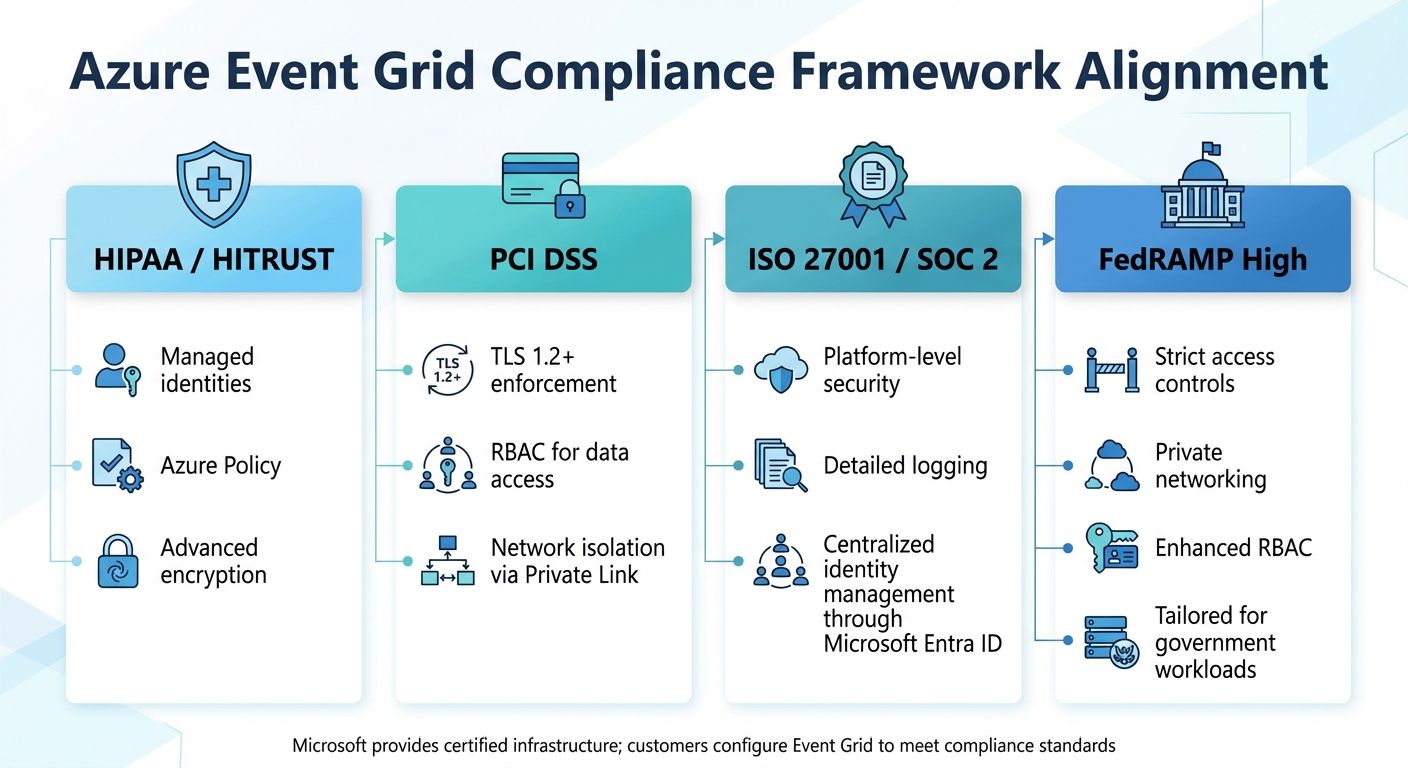
Azure Event Grid Compliance Framework Alignment and Security Mechanisms
Azure Event Grid builds on Microsoft Azure's extensive certifications, which include SOC 1, SOC 2, SOC 3, ISO 27001, ISO 27017, ISO 27018, PCI DSS, HIPAA, HITRUST, and FedRAMP High. These certifications form the foundation for the security of its infrastructure, platform encryption, and physical controls. However, it's crucial to understand that maintaining compliance is a shared responsibility. While Microsoft provides the certified infrastructure, it’s up to you to configure Event Grid properly to align with these standards. This division of responsibilities is key to managing compliance effectively.
Azure's Shared Responsibility Model
Microsoft's shared responsibility model outlines the division of security tasks. Microsoft takes care of securing the core cloud infrastructure, including physical data centers, host operating systems, and platform-level encryption. On the other hand, you are responsible for configuring Event Grid to meet your specific needs. This includes setting up access controls, defining network rules, and handling data appropriately. Features like Role-Based Access Control (RBAC) and Private Link are available to help, but you must activate and configure them to meet your compliance goals.
Major Regulatory Standards and Certifications
Azure Event Grid incorporates controls that align with key regulatory frameworks. Here's how it supports compliance with some of the most prominent standards:
- HIPAA and HITRUST: Event Grid uses managed identities to enable secure event delivery, Azure Policy for compliance monitoring, and encryption to protect data both at rest and in transit.
- PCI DSS: Compliance is achieved through measures like enforcing TLS 1.2+ for all communications, applying RBAC for data access, and ensuring network isolation with Azure Private Link.
- ISO 27001 and SOC 2: These certifications are supported by platform-level security features, detailed logging for audit trails, and centralized identity management through Microsoft Entra ID.
- FedRAMP High: For government workloads, Event Grid offers capabilities like strict access controls, private networking, and robust RBAC.
Azure Policy also plays a significant role by providing predefined regulatory compliance initiatives for Event Grid. These initiatives include policies for HIPAA/HITRUST, ISO 27001, and PCI DSS. They help automate compliance checks, such as verifying that topics use private endpoints or ensuring diagnostic logging is enabled.
| Compliance Framework | Event Grid Alignment Mechanism |
|---|---|
| HIPAA / HITRUST | Managed identities, Azure Policy, and advanced encryption. |
| PCI DSS | TLS 1.2+ enforcement, RBAC for data access, and network isolation via Private Link. |
| ISO 27001 / SOC 2 | Platform-level security, detailed logging, and centralized identity management through Microsoft Entra ID. |
| FedRAMP High | Tailored for government workloads with strict access controls, private networking, and enhanced RBAC. |
These frameworks highlight the importance of correctly implementing and managing the tools and features provided by Azure Event Grid, which is further detailed in the following sections.
Authentication and Access Control Best Practices
To secure Event Grid, disable local authentication by setting disableLocalAuth=true on topics and domains. This blocks access keys and SAS tokens, requiring all clients to use Microsoft Entra ID for authentication. This step is crucial for meeting identity management compliance requirements. These practices work alongside Azure's compliance configurations to strengthen security. Below are best practices for using Azure AD, RBAC, and managed identities to establish reliable and compliant access control.
Using Azure AD and Role-Based Access Control (RBAC)
Azure RBAC helps define who can manage Event Grid resources and publish events. Assign roles based on the specific tasks:
- EventGrid Data Sender: For publishing events.
- EventGrid Contributor: For administrative tasks.
- EventGrid EventSubscription Reader: For monitoring.
Limit access to sensitive operations like listKeys and getFullUrl to authorized administrators only. Regularly audit RBAC assignments across all scopes to maintain proper access control and security.
Using Managed Identities
Managed identities remove the need to store credentials in your code or configuration files. Event Grid supports both system-assigned and user-assigned managed identities for event delivery to destinations such as Service Bus, Event Hubs, and Azure Storage. Here's how they differ:
- System-assigned identities: Tied to the lifecycle of a specific Event Grid resource.
- User-assigned identities: Can be shared across multiple resources, with up to two identities supported per topic or domain.
"Managed identity credentials are fully managed, rotated, and protected by the platform, avoiding hard-coded credentials in source code or configuration files." – Microsoft Learn
For secure event delivery, use a system-assigned managed identity with the "Allow trusted Microsoft services to bypass this firewall" setting enabled. Assign roles like Service Bus Data Sender or Storage Blob Data Contributor to ensure the identity has only the permissions it needs.
Eliminating Hard-Coded Credentials
Avoid embedding credentials directly in your applications. Instead, use the DefaultAzureCredential class from the Azure Identity SDK. This class automatically detects and uses the managed identity in production environments while supporting local development credentials. This approach prevents exposing secrets and ensures secure operations.
When delivering events to webhooks, secure the endpoint with Microsoft Entra ID. Configure a service principal to authorize Event Grid, enabling the receiver to verify the sender's identity.
| Authentication Method | Credential Storage | Rotation Requirement | Auditability |
|---|---|---|---|
| Local Authentication (Keys/SAS) | Stored in code, configuration, or Key Vault | Manual or scripted rotation required | Difficult to track individual callers |
| Managed Identity (Entra ID) | No credentials stored in application | Handled automatically by Azure | Fully auditable via Entra ID logs |
Data Protection and Network Security
Azure Event Grid ensures robust data security by encrypting data at rest using Microsoft-managed platform keys as the default setting. Additionally, it minimizes data exposure by automatically deleting all events after either their time-to-live (TTL) expires or a maximum of 24 hours, whichever comes first.
To secure event transmission, Event Grid enforces data-plane encryption, requiring HTTPS endpoints and TLS 1.2 or higher. These encryption measures align seamlessly with the network isolation strategies outlined below.
Encryption at Rest and In Transit
Microsoft handles encryption at rest, while customers are responsible for configuring secure endpoints and enforcing TLS settings.
| Security Feature | Implementation Method | Responsibility |
|---|---|---|
| Encryption at Rest | Microsoft-managed keys (Platform keys) | Microsoft |
| Encryption in Transit | TLS / HTTPS (Mandatory for webhooks) | Microsoft / Customer |
| Private Ingress | Azure Private Link / Private Endpoints | Customer |
| Network Filtering | IP Firewall (CIDR ranges) | Customer |
| Egress Security | Service Tags (AzureEventGrid) | Customer |
Virtual Network Integration
Beyond encryption, Event Grid enhances security with virtual network integration. Private endpoints assign a private IP from your virtual network to Event Grid resources, ensuring traffic flows through the Microsoft backbone network rather than the public internet. Once private endpoints are configured, you can disable public network access entirely by setting the "Public network access" property to "Disabled" or "Private endpoints only".
To enforce private link usage across your environment, you can use Azure Policy. For example, the built-in policy definition "Azure Event Grid topics should use private link" audits or denies resources that don't meet network isolation standards. If public access is necessary, you can limit ingress to specific CIDR ranges using IP firewall controls. Unauthorized requests are blocked with a 403 response. For egress traffic, service tags like AzureEventGrid simplify Network Security Group rules, eliminating the need to manage individual IP addresses.
When private endpoints are in use, Event Grid updates the DNS CNAME record to a privatelink subdomain. Within the virtual network, this resolves to a private IP address, while outside the network, it resolves to the public endpoint unless restricted by firewall settings. For event consumption, pull delivery in Event Grid namespaces natively supports private links, whereas push delivery requires managed identities and public endpoints as a secure alternative.
Monitoring, Auditing, and Governance
Once you've set up secure configurations, the next step is to focus on monitoring and auditing to round out your compliance strategy. These processes are essential for ensuring Event Grid's reliability, security, and proper configuration. By combining real-time alerting from Azure Monitor with Azure Policy's enforcement capabilities, you can create a solid compliance framework.
Using Azure Monitor and Alerts
Azure Monitor provides a way to keep tabs on your Event Grid infrastructure by using diagnostic settings and metric-based alerts. Enabling diagnostic settings allows you to capture critical security events - like access attempts, configuration changes, and identity usage - and route these logs to tools like Log Analytics or Microsoft Sentinel for advanced threat detection.
Set up alerts for key metrics such as delivery success rates, failures, and dead-letter volumes. For example, you might configure an alert to trigger when dead-letter volumes exceed 1% of total events. Additionally, create alert rules for issues like failed authentication, unauthorized access attempts, or suspicious configuration changes. As Microsoft's Well-Architected Framework emphasizes:
Implement failure detection alerts with defined thresholds for delivery failures, consumer unavailability, and dependency health.
To improve troubleshooting and auditability, align your alert thresholds with your Service Level Objectives (SLOs). Embedding a standardized format like CloudEvents into all events, complete with a correlation ID or trace identifier, can further streamline incident analysis. These measures, combined with diagnostic logs, lay the groundwork for automated compliance enforcement.
Using Azure Policy for Compliance Enforcement
Azure Policy provides a way to enforce governance rules automatically, helping you avoid non-compliant configurations before they turn into audit findings. For instance, built-in policies like "Azure Event Grid topics should use private link" can audit or even block resources that fail to meet network isolation requirements. The Deny effect is particularly useful for stopping event subscriptions that target unauthorized endpoint URLs, reducing the risk of data leaks.
To maintain a consistent security baseline, group Event Grid-specific policies into a custom initiative. For policies with DeployIfNotExists effects, you can configure managed identities to automatically correct non-compliant resources. Additionally, subscribe to Microsoft.PolicyInsights.PolicyStateChanged events to trigger alerts or automated remediation whenever a resource's compliance state changes. Keep in mind that compliance notifications via Event Grid may have a delay of up to 20 minutes.
Maintaining Audit Trails
Audit trails are a critical component of your compliance strategy, offering visibility into system changes and activities. A robust audit trail should include Activity Logs (to track who created or modified topics), Resource Logs (to capture data plane operations), and Policy Insights (to record the compliance status of resources). Use Azure Policy with DeployIfNotExists to ensure diagnostic settings are automatically configured, so all Event Grid topics send logs to Log Analytics, Event Hubs, or Storage Accounts.
Adjust Log Analytics workspace retention periods to meet specific regulatory requirements - such as HIPAA or PCI-DSS - instead of relying on default settings. For long-term storage, route logs to Azure Storage accounts or Data Lake. Additionally, monitor Azure AD audit logs for changes in permissions related to Event Grid management. To enhance security, use Role-Based Access Control (RBAC) to limit access to sensitive operations like listKeys and getFullUrl.
sbb-itb-79ce429
Event Delivery Reliability and Failure Handling
Ensuring reliable event delivery is critical for maintaining compliance. Lost events can disrupt audit trails, making it essential to manage delivery failures effectively. Azure Event Grid guarantees at-least-once delivery, retrying failed attempts until the event is delivered or moved to a dead-letter queue. These retries span 24 hours or up to 30 attempts. However, default settings alone might not satisfy compliance needs - you’ll need to configure features like dead-lettering, tweak retry policies, and actively monitor failures. This section focuses on safeguarding your compliance audit trail by addressing potential delivery issues.
Dead-Lettering and Retry Policies
Dead-lettering isn't enabled by default, so it's crucial to set it up while creating event subscriptions. This involves configuring a storage account and a blob container to avoid silent data loss. Assign Event Grid the Storage Blob Data Contributor role using managed identities, ensuring secure and auditable access. Dead-lettered events retain their original schema but include metadata like deadletterreason, deliveryattempts, deliveryresult, and publishutc, which are key for auditing failed deliveries.
You can customize retry settings, such as the maximum number of attempts (1 to 30) and the event time-to-live (1 to 1,440 minutes), to align with your compliance goals. For added resilience, use geo-redundant storage for dead-lettered events. Azure Policy can help you audit or enforce dead-letter configurations across all Event Grid subscriptions, ensuring no non-compliant setups are overlooked. Additionally, set up Azure Monitor alerts to flag when dead-letter volumes exceed 1% of total event traffic, helping you catch systemic issues early.
Handling Timeouts and Failures
After configuring dead-lettering, addressing timeouts becomes critical for system reliability. If an endpoint repeatedly times out, Event Grid temporarily suspends it for 10 seconds, during which delivery attempts may be skipped. For certain errors, such as 400 Bad Request or 413 Request Entity Too Large, retries are skipped entirely, and the event is directly moved to the dead-letter queue.
Enable diagnostic settings to capture "DeliveryFailureLogs", which can help pinpoint root causes like timeouts. Use Azure Monitor to track metrics like "Dead Letter Events" and "Delivery Attempt Failures", enabling early detection of issues that could breach service-level agreements. Automate the recovery process by setting up an Azure Function or similar "concierge service" to process dead-lettered events and reinject them into the system once the issue is resolved. Note that there's a five-minute delay before a failed event is written to the dead-letter location. If the storage location is unavailable for more than four hours, the event is permanently lost.
| Error Type | Retry Behavior | Probation Duration |
|---|---|---|
| TimedOut | Exponential backoff | 10 seconds |
| Busy | Exponential backoff | 10 seconds |
| Unauthorized | Exponential backoff | 5 minutes |
| NotFound | Exponential backoff | 5 minutes |
| 400 Bad Request | Not retried | N/A |
| 413 Entity Too Large | Not retried | N/A |
Cost Optimization Without Compromising Compliance
When managing Azure Event Grid, cutting costs doesn't mean you have to compromise on meeting regulatory requirements. Inefficiencies in cloud usage lead to 28% of total cloud spending being wasted, with 32% lost to idle or misconfigured resources. Tackling these inefficiencies while maintaining audit trails and security controls ensures compliance and system integrity. Focus on the main cost drivers: unused resources, over-provisioned capacity, and inefficient delivery settings.
Removing Unused Resources
Start by auditing Event Grid topics and subscriptions that are no longer needed. Tools like Azure Advisor can pinpoint idle topics and abandoned endpoints that are incurring unnecessary costs. Implement a consistent tagging system using key–value pairs (e.g., department, project, cost center) to clearly distinguish between essential, compliant resources and those ready for removal.
Don’t overlook dead-letter destinations. These storage accounts and queues can continue to generate charges even after the associated Event Grid subscriptions are deleted. Shift dead-letter data to Cool or Archive storage tiers to save on storage costs while staying compliant. Use Azure RBAC to restrict cleanup permissions to authorized "Event Grid Contributors" and document all deletions with Azure Monitor Activity Logs for auditing purposes.
Optimizing Event Delivery Settings
Event Grid charges are based on 64-KB increments, so keeping event payloads under 64 KB can reduce billable operations. Use event batching to minimize the number of operations billed. Subscription-level filtering is another effective way to block unnecessary events, which not only cuts costs but also supports data minimization.
Set appropriate Time-to-Live (TTL) values, typically between one and seven days, to avoid extended retention that could lead to rising storage costs. Keep an eye on Standard tier Throughput Unit (TU) usage to avoid over-provisioning ($0.04 per hour per unit) or throttling. Azure Monitor alerts can help track dead-letter volumes and ensure delivery issues don’t inflate costs.
Choose the right pricing tier for your needs: the Basic tier ($0.60 per million operations) works for low-volume scenarios, while the Standard tier is better for high-volume MQTT or pull delivery workloads.
Common Compliance Pitfalls and How to Avoid Them
Even seasoned teams encounter challenges when setting up Azure Event Grid in regulated environments. Three recurring issues stand out: poor event filtering, missing dead-letter queues, and incorrect assumptions about event ordering. These mistakes can lead to compliance violations, higher costs, or data integrity issues.
Overlooking Event Filtering
If you set event filtering to "All", you're inviting unnecessary problems. This configuration floods your endpoint with every event from the source, whether you need it or not. The result? Your compliance team ends up auditing irrelevant data, and you're stuck paying for events that serve no business purpose. Event Grid charges based on 64-KB increments, so unfiltered, large payloads can quickly inflate costs.
To avoid this, take advantage of filtering options:
- Use
includedEventTypesto specify the exact notifications you need, likeMicrosoft.Resources.ResourceWriteFailure, instead of accepting everything. - Narrow events further with subject filters like
subjectBeginsWithorsubjectEndsWithto target specific resource paths or file extensions. - Advanced filters such as
NumberInRangeorStringInallow you to filter based on values within the event data object.
Keep in mind that Event Grid subscriptions are capped at 25 advanced filters and 25 values across all filters. Plan your filtering logic thoughtfully to stay within these limits.
To enforce compliance, you can assign Azure Policies with a "Deny" effect at the subscription level. This blocks event subscriptions that point to unauthorized endpoints.
Now, let’s address another common issue: the lack of dead-letter queues.
Failing to Implement Dead-Lettering
When you don’t configure a dead-letter queue, failed events simply disappear. This can violate audit and data retention standards. Always set up a dead-letter destination, such as Azure Storage or Service Bus, and secure it using managed identities to avoid exposing credentials. These dead-lettered events serve as a critical audit trail.
To stay ahead of potential issues, enable Azure Monitor alerts for the "Dead Letter Events" metric. A sudden spike in dead-lettered events often points to systemic failures or security misconfigurations at the consumer endpoint. Be aware that if the dead-letter destination remains unavailable for more than four hours, the event will be permanently dropped. Monitoring that storage account is essential.
Lastly, let’s tackle the misconception about event ordering.
Assuming Guaranteed Event Ordering
Event Grid doesn’t guarantee events will arrive in sequence. If your system depends on strict ordering, this can cause data inconsistency. Instead, ensure your handlers are idempotent and use sequence IDs or timestamps to manage event order. If your compliance framework demands strict ordering, you’ll need to handle it in your application layer - Event Grid won’t do it for you.
| Pitfall | Compliance Risk | Corrective Action |
|---|---|---|
| Defaulting to "All" Event Types | Increased audit scope and unnecessary costs | Use includedEventTypes and subject filters |
| No Dead-Lettering | Permanent data loss after 24-hour retry window | Configure Azure Storage/Service Bus as DLQ |
| Assuming Event Ordering | Data inconsistency in state-dependent systems | Design idempotent handlers and use sequence IDs |
Conclusion
To ensure a compliant Event Grid setup, focus on security, monitoring, and governance. Start by securing configurations with tools like Microsoft Entra ID and Managed Identities to eliminate hard-coded credentials. Protect network access using Private Link and IP filtering. Maintain resilience by configuring dead-lettering and setting up alerts in Azure Monitor to flag when dead-letter volumes exceed 1% of total traffic.
Use Azure Policy to block unauthorized endpoints and automate Private Link deployments. Assign granular RBAC roles like "EventGrid Data Sender" and "EventGrid EventSubscription Contributor" to enforce the principle of least privilege. Additionally, keep recovery strategies in place to complement Event Grid's high availability.
AppStream Studio simplifies modernization by delivering secure, compliant, and production-ready event-driven architectures on Azure in a matter of weeks. Their experienced engineering teams manage API integration, automate governance, and ensure compliance for Microsoft-specific environments.
Compliance isn't just about ticking a box - it's an ongoing commitment. It requires the right tools, well-defined policies, and a capable team from the start. By following these best practices, you can build and maintain a secure, compliant, and adaptable event-driven architecture.
FAQs
How does Azure Event Grid help meet regulatory standards like HIPAA and PCI DSS?
Azure Event Grid helps businesses meet regulatory standards like HIPAA and PCI DSS by implementing strong security features and offering tools such as Azure Policy built-ins. These built-ins enable organizations to enforce security policies, monitor for compliance, and address specific regulatory needs.
While Azure Event Grid provides the necessary tools and controls, achieving full compliance depends on proper setup and continuous management tailored to your organization’s requirements. With these tools in place, businesses can build secure, event-driven systems that align with regulatory expectations.
What are the best practices for securing access in Azure Event Grid?
To ensure secure access in Azure Event Grid, start by leveraging authentication mechanisms such as Azure Active Directory (Azure AD) or Microsoft Entra ID. These tools help ensure that only authorized event publishers and subscribers can interact with your system. For added convenience and security, consider using managed identities, which eliminate the need to handle credentials manually while supporting secure event delivery.
Another key step is implementing role-based access control (RBAC). This allows you to clearly define who has permission to create, modify, or manage Event Grid resources. To strengthen security further, you can establish custom Azure policies. These policies help enforce compliance and provide tighter control over access.
Finally, make use of private endpoints to limit network access to your Event Grid namespace. By doing this, you can isolate your namespace within your virtual network and shield it from exposure to the public internet.
These measures collectively create a secure and well-regulated environment for managing event-driven systems on Azure.
What are the best ways to reduce costs in Azure Event Grid while staying compliant?
To keep costs down in Azure Event Grid while staying compliant, start by leveraging Azure Cost Management. This tool lets you track and control your spending, ensuring you stay within budget while meeting necessary regulatory standards. Setting quotas and limits can help you avoid unexpected charges.
Another smart move is to implement custom Azure policies. These policies can automatically enforce compliance requirements, reducing the risk of expensive misconfigurations. They also help maintain a secure and auditable event-driven setup. By actively managing your resources and aligning them with compliance goals, you can strike the right balance between cost savings and governance.


